How to Connect Kit Email Platform to Squarespace in 2026
A note on pricing: all prices mentioned in this post are accurate as of the date this article was written, but can change at any time. This includes Squarespace plans, third-party tools, plugins, templates, and any other services referenced. Always check directly with the provider for the most current pricing before committing.
This post contains affiliate links. If you purchase through them, I may receive a small commission at no extra cost to you.
This article was researched and fact-checked for all information provided from primary sources (Squarespace and Kit) and is up to date as of June 2026
Table of Contents Show
How do you connect Kit (formerly ConvertKit) to Squarespace?
Quick Answer: There are two main ways to connect Kit (formerly ConvertKit) to Squarespace. The easiest and most common method is embedding a Kit form directly into your Squarespace site using a Code Block. (This is the way I recommend.) The second is using Squarespace's native forms and connecting them to Kit through Zapier. Both methods require at least the Squarespace Core plan; the Squarespace Basic plan doesn't support JavaScript in Code Blocks or Zapier form connections. And if you're running a Squarespace shop, there's also a direct Commerce integration for syncing orders and customer data.
KEY KIT FACTS:
Embedding a Kit form works with Kit's free Newsletter plan (up to 10,000 subscribers) and is the quickest & easiest method
The Zapier method requires a paid Kit plan: Creator or Pro
Both methods require Squarespace Core or higher; the Squarespace Basic plan won't work
Kit rebranded from ConvertKit in 2024; the platform is the same, just a new name (you might see old articles floating around with ConvertKit)
Squarespace Promotional Pop-Up forms cannot connect directly to Zapier (workaround below)
There's also a Kit Commerce integration for Squarespace ecommerce sites
Quick naming note before we dive in
ConvertKit rebranded to Kit in 2024. Same platform, same features, new name. Most people still search "ConvertKit," so I'm using both names throughout this post. If you see "Kit" and think "wait, what?" - it's the same thing.
Which Method Should You Use?
Before jumping into the steps, it helps to figure out which way makes sense for your specific situation. Because the answer depends on what Squarespace plan you're on, what Kit plan you're on, and what you're actually trying to do.
Here's the breakdown:Embed a Kit form (Method A) if:
You want full control over form design, tagging, and automation triggers inside Kit
You're on Kit's free Newsletter plan and want to keep it that way
You want to tag subscribers, deliver lead magnets, or trigger automations the moment someone subscribes
Use Squarespace forms + Zapier (Method B) if:
You want your forms to match your Squarespace site's design exactly (native look and feel)
You're already on a paid Kit plan (Creator or Pro)
You want to keep all your forms inside Squarespace's editor
Use the Commerce integration (Method C) if:
You're selling products on Squarespace and want to sync customer/order data to Kit for post-purchase email sequences
One thing that's true across the board: you'll need at least the Squarespace Core plan. The Basic plan doesn't support JavaScript in Code Blocks and doesn't connect to Zapier.







Method A: Embed a Kit Form in Squarespace (Most Common)
This is the method I set up on probably 90% of the client sites I work on, and it works with Kit's free plan. You build your form in Kit, grab the embed code, and paste it into a Squarespace Code Block.
Step 1: Build your form in Kit
Log into your Kit account and go to Grow → Landing Pages & Forms → Create New. Design your form however you'd like; inline, modal, slide-in, sticky bar. Kit gives you a visual builder to customize colors, fields, button text, and the success message.
Step 2: Grab the embed code
Once your form looks good, click Embed at the top right of the form builder. You'll see a short JavaScript snippet (usually just one line). Copy it.
Step 3: Add a Code Block in Squarespace
In the Squarespace editor, navigate to the page where you want the form to appear. Add a Code Block where you want the signup form. Paste the JavaScript embed code into the Code Block. Hit Save.
Step 4: Preview and test
Open a preview of your page and make sure the form renders correctly. Submit a test email to confirm it's arriving in your Kit account and triggering the right tags or automations.
That's it. The form will pull in Kit's styling, and depending on how you designed it, it can look pretty seamless on your site. (Kit forms tend to inherit some of your site's default fonts, which is a nice touch.)
Not a ConvertKit customer? Sign up for a free trial today.Quick update as of June 15 2026: Kit just released a completely rebuilt landing page and form editor at their Craft & Commerce conference. It has 20+ new templates and a lot more creative control than the old builder. So if the form editor looks different from screenshots you've seen in older tutorials, that's why. Check them out here.
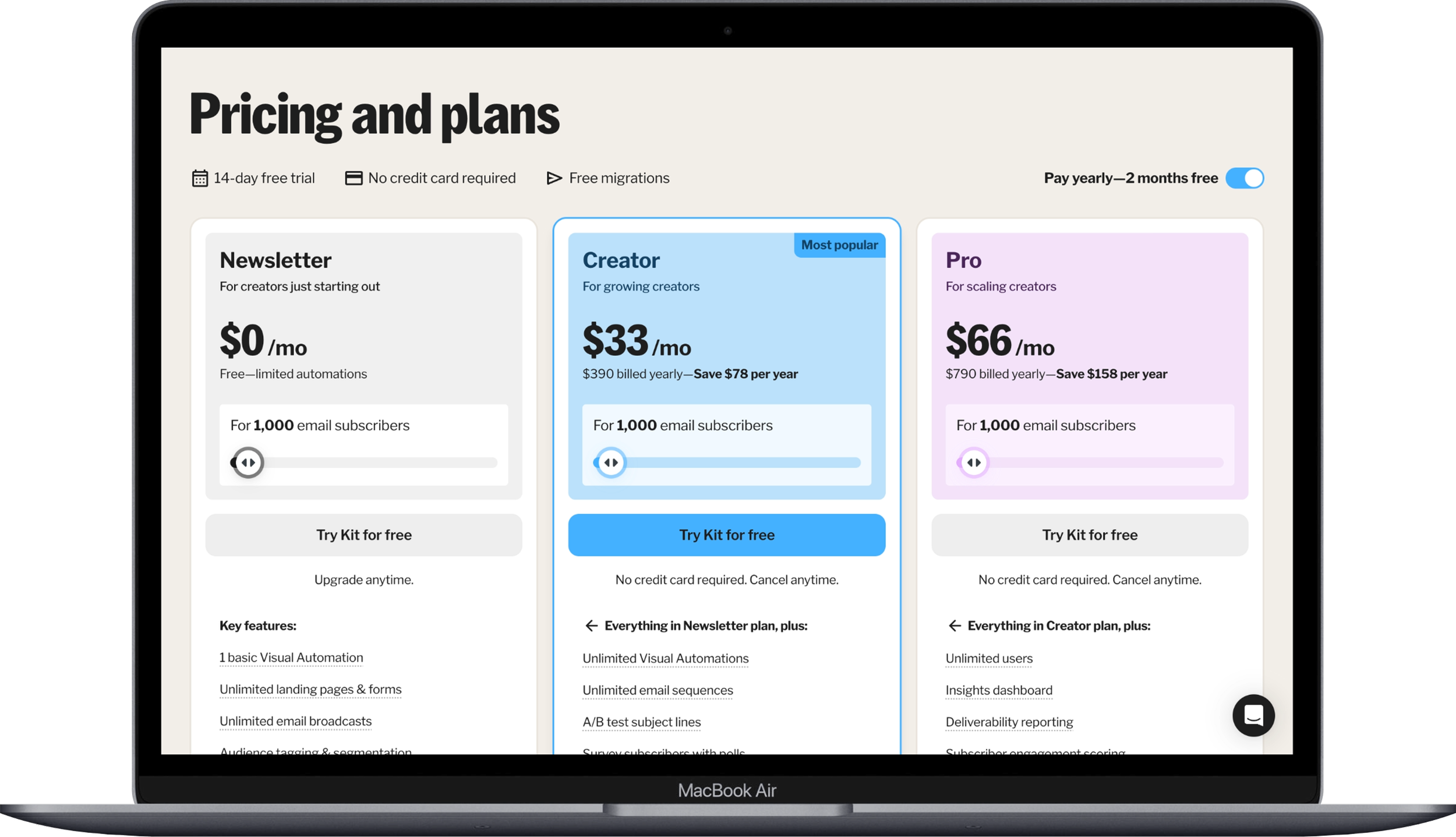
Current Kit pricing
Method B: Squarespace Native Forms & Zapier
If you'd rather use Squarespace's built-in form blocks so they match your site design exactly, you can route submissions to Kit through Zapier. This method has more moving parts and costs more, but it keeps everything looking native.
What you'll need:
Squarespace Core plan or higher
A paid Kit plan (Creator at $33/month or Pro at $66/month, both paid annually; the free Newsletter plan doesn't support Zapier)
A Zapier account (free plan works for basic zaps)
Step 1: Set up your Squarespace form
Add a Form Block or Newsletter Block to your page in the Squarespace editor. Click the form → edit → Storage tab → Additional Storage. Click Connect for Zapier. It'll show "Awaiting Connection" until Zapier picks it up.
Step 2: Generate a Squarespace API key
In your Squarespace dashboard, go to Settings → Developer Tools → Developer API Keys. Click Generate Key, give it a name (something like "Kit Zapier"), check the Forms box, generate the key, and copy it. You'll need this in the next step.
Step 3: Build your Zap in Zapier
Head to Zapier and create a new Zap:
Trigger: Squarespace Forms → New Form Submission
Paste your API key when Zapier asks you to connect your Squarespace account
Action: Kit → choose your action (Add Subscriber to Form, Add Tag to Subscriber, or Add Subscriber to Sequence)
Map the subscriber fields (email, first name, etc.)
Test the zap, then publish it
Step 4: Test the full flow
Go to your live site, submit a test through the form, and confirm the subscriber shows up in Kit with the correct tags or sequence.
Important limitation: Pop-up forms
Squarespace's Promotional Pop-Up forms do NOT connect to Zapier. I've had more than a few clients hit this wall after building out their whole pop-up, so flagging it here. If you want a pop-up that sends subscribers to Kit, your best options are:
Embed a Kit form as a modal/pop-up (Kit has a pop-up form type built into their form builder)
Workaround: Connect your Squarespace pop-up form to Google Drive, then set up a Zapier trigger of Google Sheets → New Row → Kit
Option 1 is easier and doesn't require the workaround. Just build a pop-up form in Kit and embed it on your Squarespace site via a Code Block on your site-wide footer or header code injection area.
Method C: Kit Commerce Integration
If you're selling products on your Squarespace site and want to trigger post-purchase email sequences (thank you emails, upsells, review requests, onboarding sequences), Kit has a direct Commerce integration.
This connects your Squarespace orders and customer data to Kit so you can automate emails based on what people buy.
The general setup: generate a Squarespace API key (same process as Method B, Step 2), then in your Kit dashboard, go to your integrations and connect Squarespace using that API key. From there you can map products to tags and sequences.
Kit made some improvements to this integration recently; they fixed a bug where purchase data was syncing with delays, and they added auto-detection of expired Squarespace sites so you're not sending sequences into the void.
My personal recommondation: If you're not sure, go with Method A. It's the fastest to set up, it works with Kit's free plan, and it gives you the most control over what happens when someone subscribes. The Zapier method has its place, but it adds complexity and cost that most solopreneurs and business owners really don't need.






Quick Troubleshooting
Kit Form not showing up on Squarespace? The most likely culprit: you're on the Squarespace Basic plan, which doesn't support JavaScript in Code Blocks. Upgrade to Core or higher.
Zapier not connecting Kit → Squarespace? Double-check that you generated the API key with the Forms permission checked. Also make sure you're on a paid Kit plan; the free Newsletter plan doesn't support Zapier.
Kit Form looks weird or broken on Squarespace? Try switching from a Code Block to a Code Injection area (in Squarespace settings under Advanced → Code Injection) for site-wide forms. Also clear your browser cache and check in an incognito window before troubleshooting further.
Subscribers not arriving in Kit? Give it a few minutes; there can be a slight delay. If they still don't show up, check your Kit form's settings to make sure it's active and published, not still in draft mode.
Which Method Do I Recommend?
For most people, Method A (embedding a Kit form) is the way to go. It works with Kit's free plan, gives you the most control over tagging and automation, and takes about five minutes to set up. Method B is great if matching your site's exact design style is a priority and you're already paying for Kit Creator or Pro. And Method C is worth setting up if you're running any kind of shop on Squarespace.
None of these are complicated. Once you know which path to take, the setup itself is pretty quick.
→ If you don't have a Kit account yet, you can start one here. The free plan supports up to 10,000 subscribers, which is more than enough for most people getting started with email marketing.
→ And if you're still building out your Squarespace site, you can start a free trial here to test everything out before committing.
Frequently Asked Questions
Can you use ConvertKit with Squarespace?
For sure. Kit (formerly ConvertKit) works with Squarespace either by embedding Kit's signup forms directly into your site using a Code Block, or by connecting Squarespace's native forms to Kit through Zapier. Both methods require at least the Squarespace Core plan ($35/month). A third option, the Kit Commerce integration, syncs order data from Squarespace shops for post-purchase automations.
Do I need a paid Kit plan to connect to Squarespace?
Depends on the method. If you're embedding a Kit form using a Code Block, the free Kit Newsletter plan (up to 10,000 subscribers) works great. If you want to use Squarespace's native forms and connect them to Kit through Zapier, you'll need a paid Kit plan; Creator at $33/month or Pro at $66/month (both billed yearly) for up to 1,000 subscribers.
Why isn't my Kit form showing up in Squarespace?
The most common reason is that you're on the Squarespace Basic plan, which only supports plain text, HTML, Markdown, and CSS in Code Blocks; not JavaScript. Kit's embed code is JavaScript. You'll need to upgrade to the Squarespace Core plan or higher for the form to render.
Should I use Kit forms or Squarespace's built-in forms?
Kit forms give you more control over subscriber tagging, lead magnet delivery, and automation triggers right out of the box. Squarespace's native forms match your site's design seamlessly but require Zapier (and a paid Kit plan) to send subscriber data to Kit. If automation and tagging are important to you, Kit forms are the simpler and more cost-effective route.
Can I connect a Squarespace pop-up form to Kit?
Not directly. Squarespace's Promotional Pop-Up forms don't connect to Zapier, which means you can't route them to Kit through the native form method. The easiest workaround is to build a pop-up form inside Kit's form builder (they have a modal/pop-up form type) and embed it on your Squarespace site through Code Injection. This skips the Zapier limitation entirely.
Does Kit integrate with Squarespace Commerce?
Kit has a direct Squarespace Commerce integration that syncs order and customer data for post-purchase email sequences. You connect it using a Squarespace API key in Kit's integrations dashboard. Kit recently improved this integration with faster purchase data syncing and auto-detection of expired Squarespace sites.

