5 Best Squarespace Templates for Travel Bloggers (2026 Guide)
This post contains affiliate links. If you purchase through them, I may receive a small commission at no extra cost to you.
Table of Contents Show
If you’re starting a travel blog, you need space for photos from that sunrise hike in Iceland, stories about getting lost in the medinas of Morocco, and maybe some food content from that amazing street vendor in Bangkok. Plus a way to organize everything by destination or topic.
Squarespace has templates that work well for travel blogs, but they have almost 200 templates total. All of them could technically handle a blog, but only a handful are designed specifically for travel blog content. And how to find the ones that are specifically built for travel blogging?
So I went through all 194 to find the best ones built for travel bloggers. These five have the strongest layouts for visual storytelling, the clearest navigation for browsing posts, and features like category filtering or membership options. Some display your latest posts on the homepage. Others let you organize trips by destination. One includes membership features if you want to offer exclusive content.
All these templates are free with any Squarespace subscription and built on Squarespace 7.1. You can customize colors, fonts, and layouts to match your brand without touching any code.
1. Souto
Best for: Bloggers who publish frequently, minimalists who prefer clean layouts, anyone who wants a simple two-column grid
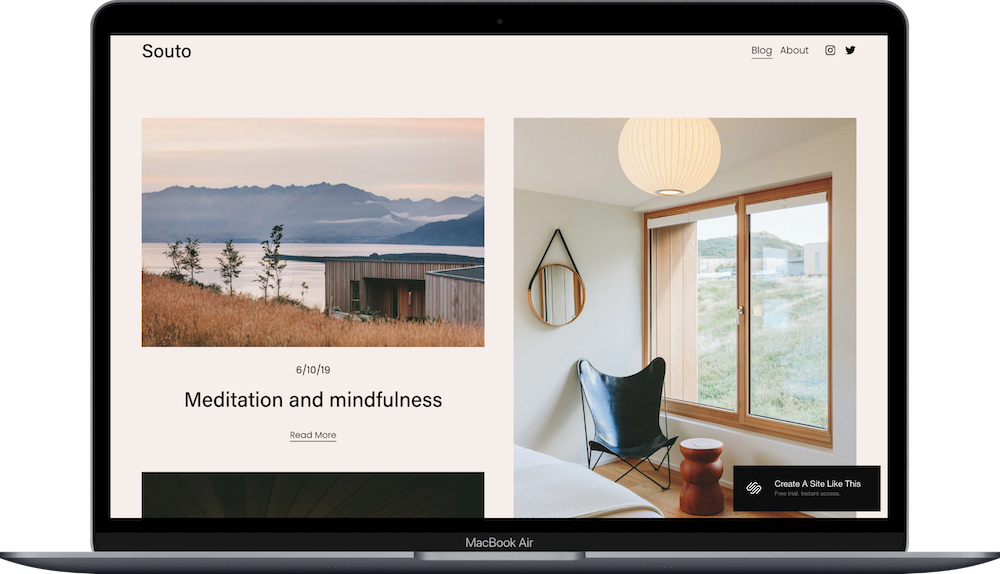
Souto is built for travel bloggers who shoot calming, peaceful photography and want minimal distractions. The homepage IS the blog… no welcome gate, just your latest posts displayed in a two-column grid with abundant white space and muted tones.
The header is just your site name and simple navigation (Blog, About). The two column layout can be adjusted to a variety of different formats, but this one works well when you run a travel blog with a focus on photography and visual storytelling.
2. Talva
Best for: Travel photographers, anyone whose images are as important as their writing, bloggers who want a gallery-first approach
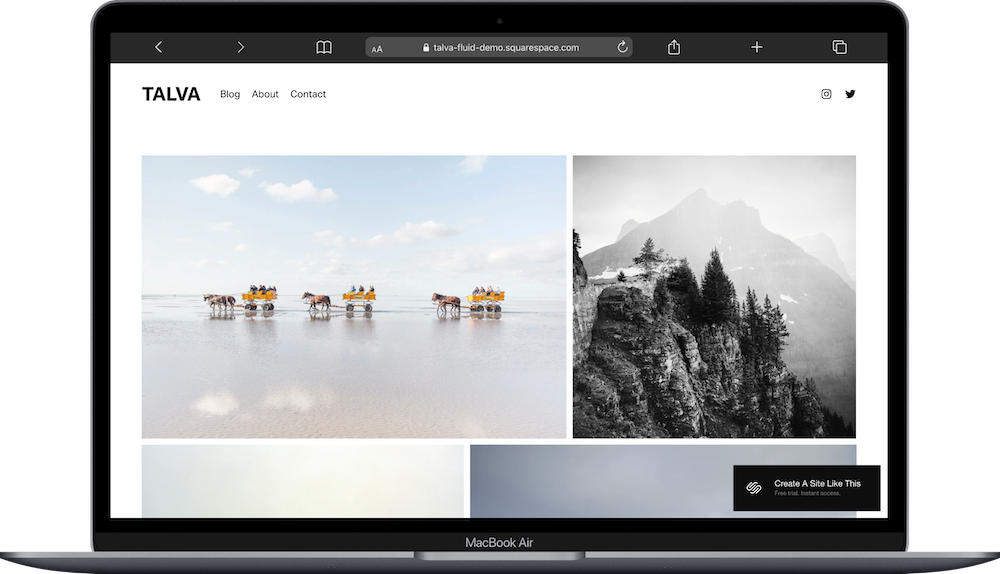
Talva is a professional looking and elgant Squarespace template built for travel photographers who shoot striking landscapes and want visuals to dominate. This is another template that uses the Blog page as the Homepage. It’s displayed in a masonry-style grid with large landscape images, no text except navigation (Blog, About, Contact).
The demo shows dramatic travel photography displayed in a masonry-style grid. Again, you can change the display grid to suit your format, but this is a good option for photography-forward travel blogs. And there's a lightbox feature for zooming into images.
If you shoot striking landscape or street photography, Talva is a solid option to start with.
3. Rivoli
Best for: Travel and food bloggers, influencers, travel writers, anyone building a membership community, bloggers offering exclusive guides or courses
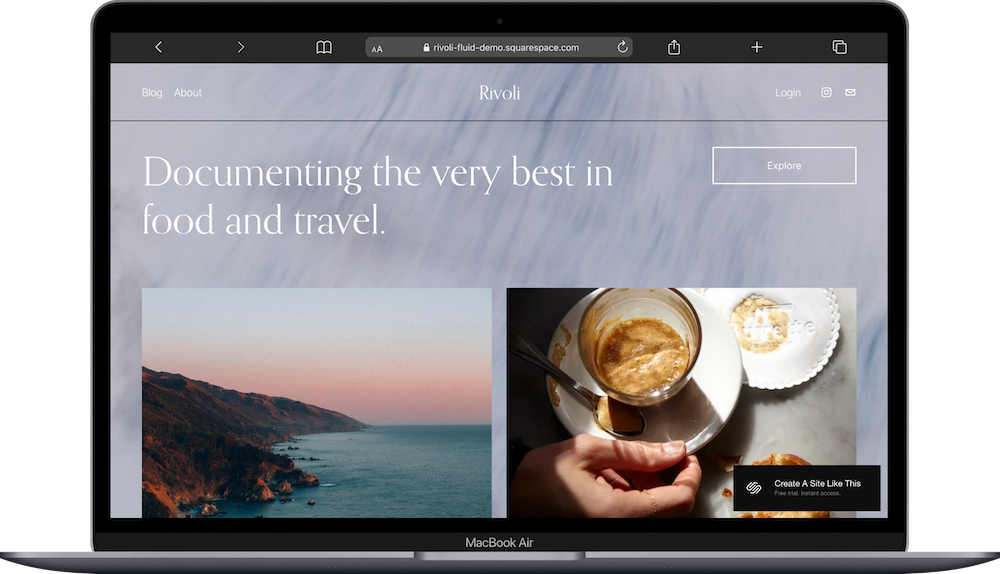
Rivoli is one of the most popular templates to get started with, and for good reason. It’s robust, includes a home page, blog page, about page, and member login, and is easy to customize. It’s built for multi-topic travel bloggers who need to keep different content categories visually separate. The homepage has two grid galleries that pull from different blog categories: think Europe vs. Asia, or food guides vs. hiking trails.
The split-screen blog layout keeps posts looking cohesive, and the intro section gives you space to connect with readers. And there's a Login button in the top navigation, which means you can easily set up a gated membership with subscriber-only content. A great choice if you write about multiple types of travel and need that structure on your homepage.
4. Harman
Best for: Long-form travel writers, solo travelers documenting their journeys, bloggers who write narrative-style posts with depth
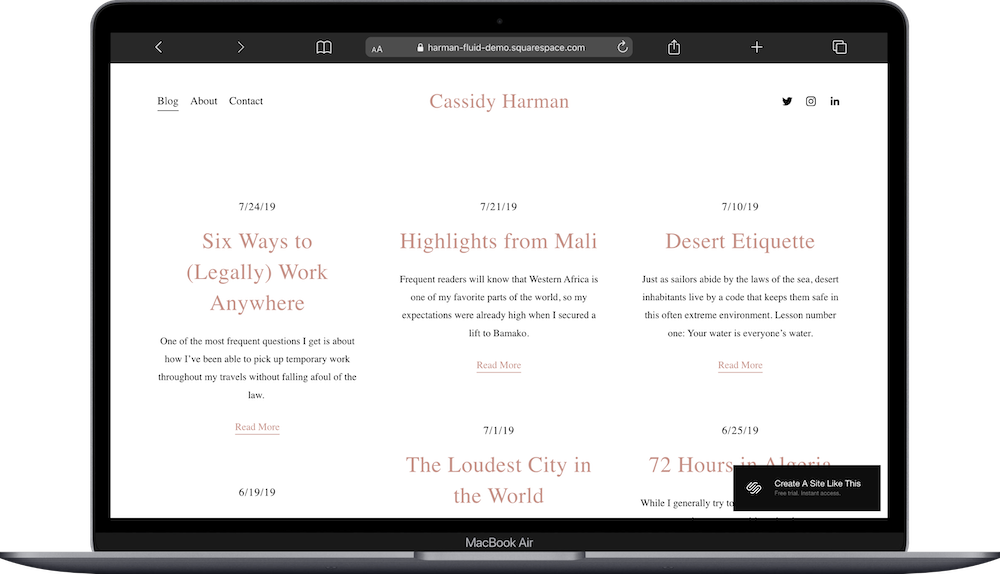
Harman is built for writer-first travel bloggers who want their words to take center stage. The homepage displays blog posts in a simple grid — like postcards laid out on a table — with serif fonts and subtle colors.
This format works if you write long-form stories and don't want photography dominating your site. The posts display chronologically, and the whole thing looks clean on mobile. Buy Harman if you're a writer who happens to travel, not a photographer who happens to write. Skip it if stunning imagery is your main draw; this template treats photos as supporting actors, not the star.
5. Vester
Best for: Bloggers covering multiple destinations or topics, anyone who wants category filtering, travel bloggers who also write about food, style, or hotels
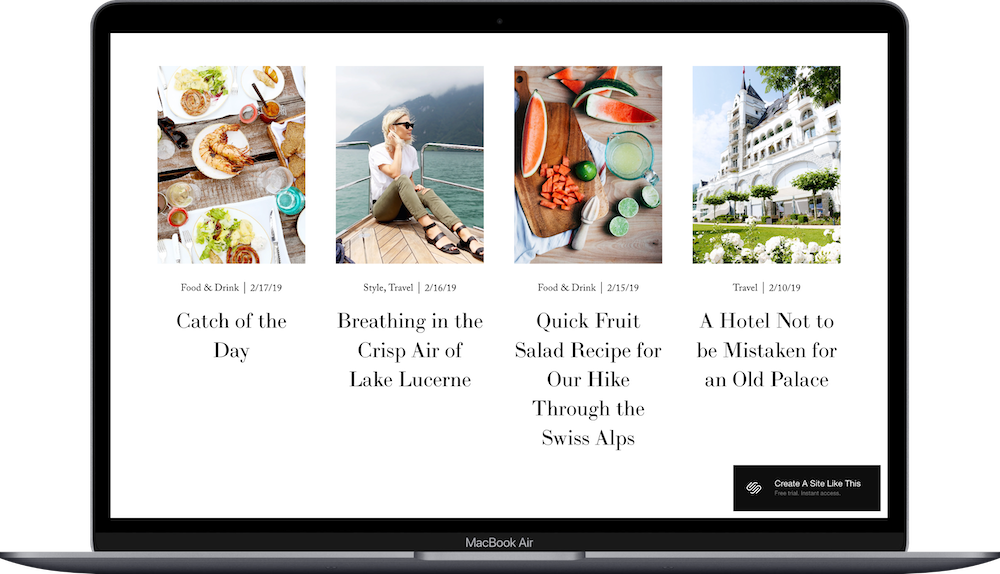
Vester is built for travel bloggers who write about multiple destinations and need readers to find specific content fast.
The homepage shows blog posts in a four-column grid with a filtering feature in the header: click "Food" and only food posts show up, click "Hotels" and you get hotel reviews, etc. The article pages have optimal spacing for readability, with content width under 80 characters and generous paragraph breaks.
Vester is a good choice if you cover different types of travel content and want built-in category filtering.
How to Choose the Right Template
Here's what you need to know: Pick based on how you actually create content, not what looks prettiest in the demo.
Post often and want your latest work front and center? Souto. Your photography needs to dominate before anyone reads a word? Talva. Planning to sell memberships or exclusive content eventually? Rivoli has that structure built in.
Think about organization too. If you cover multiple destinations or mix travel with food and lifestyle, Vester's category filtering keeps readers from getting lost. If you write long-form narrative posts, Harman's layout supports that editorial feel.
The demo content is just an example of what's possible. You can customize these templates to fit your needs, so pick the structure that matches how you create content, then adjust the design to match your brand.
Getting Started with Your Template is Easy:
Sign up for Squarespace and start a free trial (no credit card required)
Select your template from the gallery
Replace demo content with your own
Customize colors and fonts in the design settings
Configure blog settings (post display, metadata, comments)
Add features you need (membership login, category pages, newsletter forms)
Upload high-quality images for featured photos and thumbnails
Test on mobile (most readers browse on phones)
Connect your domain and choose your Squarespace plan
Then you're ready to go live and launch
Which Template Should You Use? (Quick Decision Guide)
Still not sure? Here's the quick version:
Souto: Bloggers who want balanced photo + text and post regularly (homepage is the blog, two-column grid)
Talva: Photography-first bloggers who want visuals to dominate (masonry grid, minimal text)
Vester: Multi-topic bloggers who need readers to filter content easily (category filtering in header)
Harman: Writer-first bloggers where text is the priority (chronological, text-forward layout)
Rivoli: Multi-topic bloggers who want content organized separately and/or plan to monetize with memberships
All of these are free, fully customizable, and mobile-responsive. Pick the structure that matches how you work, then customize the design.
Squarespace Travel Blog FAQs
Is Squarespace good for SEO and getting traffic from Google?
Yes, but you need to put in the work. Squarespace gives you all the SEO basics: clean URLs, meta descriptions, alt text for images, mobile responsiveness, fast loading speeds. But the platform doesn't automatically rank you in Google. You need to write quality content, use keywords naturally, optimize your images, and build backlinks. Many successful travel bloggers use Squarespace and rank well in search results.
Do I need to know how to code to customize these templates?
Nope. Customization happens through Squarespace's visual editor. You can change colors, fonts, layouts, and spacing by clicking and adjusting settings. Code is optional for deeper customization or more advanced tweaks.
Can I add a shop to sell travel guides or merchandise later?
Absolutely. All these templates support Squarespace's e-commerce features, so you can add product pages and payment processing whenever you're ready. It's built into the platform, you just turn it on and start adding products. This works well for selling digital downloads like destination guides, physical products like prints or merch, or even booking paid experiences.
How do I organize my blog posts by destination or topic?
Squarespace has categories and tags built into the blog feature. You can assign posts to categories like "Europe," "Southeast Asia," or "Food Travel," and readers can filter by those categories. Vester makes this especially easy since it displays category tags prominently on each post. You can also create dedicated category pages or use the search function to help readers find specific content.
Can I add affiliate links to my blog posts?
Yes. You can add affiliate links anywhere in your blog posts: in the text, in buttons, in image captions. Squarespace doesn't restrict affiliate marketing. Just make sure you're disclosing affiliate relationships to your readers, which is both an FTC requirement and builds trust with your audience.
How many blog posts can I publish?
There's no limit. You can publish as many posts as you want on any Squarespace plan. The only limitation is storage space for images and videos, which varies by plan (See Squarespace’s current plans and pricing here)
Can I start a travel blog on Squarespace if I'm not a photographer?
Absolutely. While these templates showcase photography well, you don't need to be a professional photographer to use them. You can use high-quality stock photos from sites like Editorial Stock Images (paid membership), Pexels or Dupe (both free), or just take decent photos with your phone. The key is choosing images that are well-lit and properly sized. Harman and Vester work particularly well if your writing is stronger than your photography.
What's the difference between the blog being on the homepage versus a separate page?
When the blog is on the homepage (like Souto and Harman), your latest posts are the first thing visitors see when they land on your site. When it's on a separate page (like Talva), you can create a different homepage experience - like a photo gallery or a welcome message - then direct people to the blog section. It depends on whether you want your latest posts or a curated introduction to be the entry point.
Can I make money from my travel blog on Squarespace?
Yes. Travel bloggers on Squarespace make money through affiliate marketing, selling digital products like guides or presets, display advertising, sponsored posts, and offering services like trip planning or photography. The platform supports all of these monetization methods. Rivoli is particularly good if you're planning to offer paid memberships or exclusive content to subscribers.
Will my blog look good on phones?
Yes. All Squarespace templates are mobile-responsive and adjust to different screen sizes. You should preview on mobile before launching, but the templates handle the technical work.
Can I have multiple authors on my blog?
Yes. You can add contributor accounts for other people to create and publish posts. This is helpful if you travel with a partner or want guest writers.
Start Building Your Travel BlogReady to get started? Start your free Squarespace trial and pick the template that fits your style. All these templates are free and fully customizable.