Emmeline Squarespace Template Review
This post contains affiliate links. If you purchase through them, I may receive a small commission at no extra cost to you.
Table of Contents Show
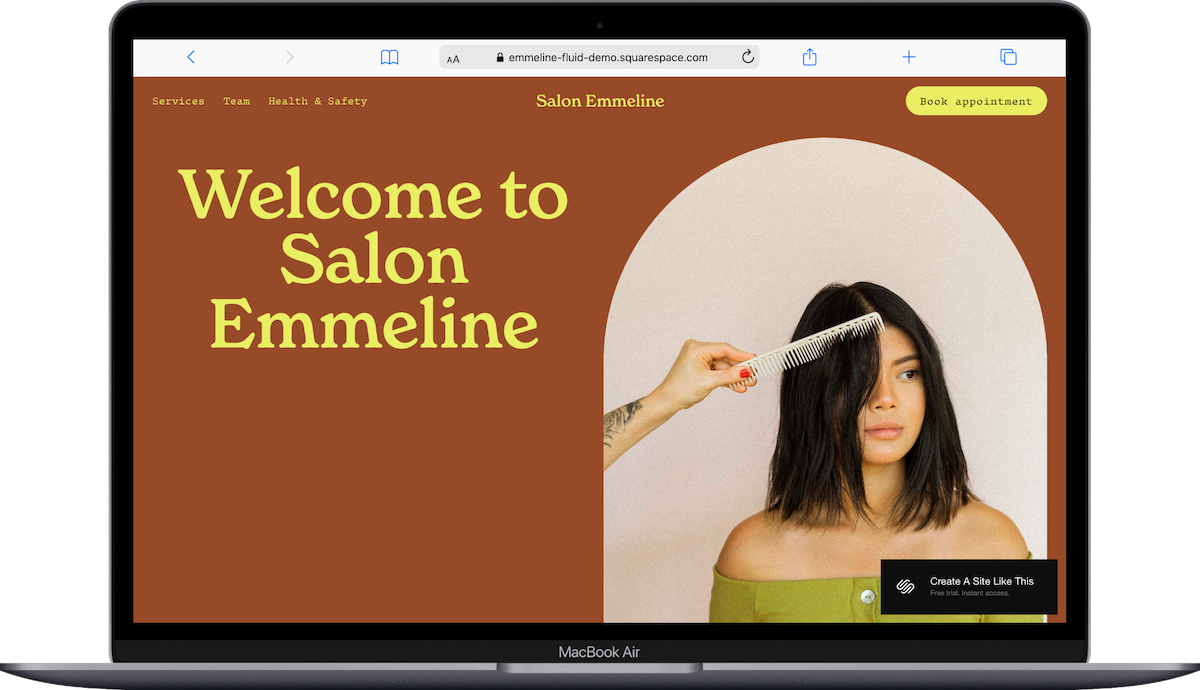
Emmeline is a Squarespace template designed for service businesses: hair salons, spas, massage therapists, estheticians.
The layout is clean with big images and a floating header that keeps the booking button visible while people scroll. It’s an easy, modern and functional template. If you're tired of clients texting you at weird hours asking about availability, or you're losing bookings because people can't schedule online, Emmeline is worth looking at.
This in-depth review covers what's included, pros and cons, what works well, and what might frustrate you.
The goal: help you figure out if this Squarespace template will work for your salon business, or if you should keep looking.
Who the Emmeline Template Works Best For
Emmeline works best for salon service business where clients need to schedule appointments with you.
Hair salons with a team of stylists
You've got 3-6 stylists, each with their own clients and specialties. Some do color, some focus on cuts, maybe one specializes in extensions. You need a site where clients can see who's who, what services you offer, and book with a specific stylist without calling during your busiest hours.
Solo stylists or beauty pros going independent
You’re a solo stylist. You need a professional site that doesn't look like you threw it together in an afternoon, and you need clients to be able to book online because you're working and can't answer texts all day.
Spas and wellness practices
Massage therapists, estheticians, acupuncturists - if you offer treatments that require booking specific time slots, this template handles that. The clean layout works well for creating that calm, professional vibe people expect from wellness businesses.
Beauty specialists who book one-on-one
Makeup artists for weddings and events, brow artists, lash techs, spray tan specialists. If your business is appointment-based and clients need to see your work before booking, Emmeline's structure makes sense.
Personal stylists or image consultants
You offer closet audits, shopping sessions, or styling consultations. Clients need to understand what you do, see examples of your work, and book time with you - that's what this template is set up to handle.
What You Get with the Emmeline Template
Home Page
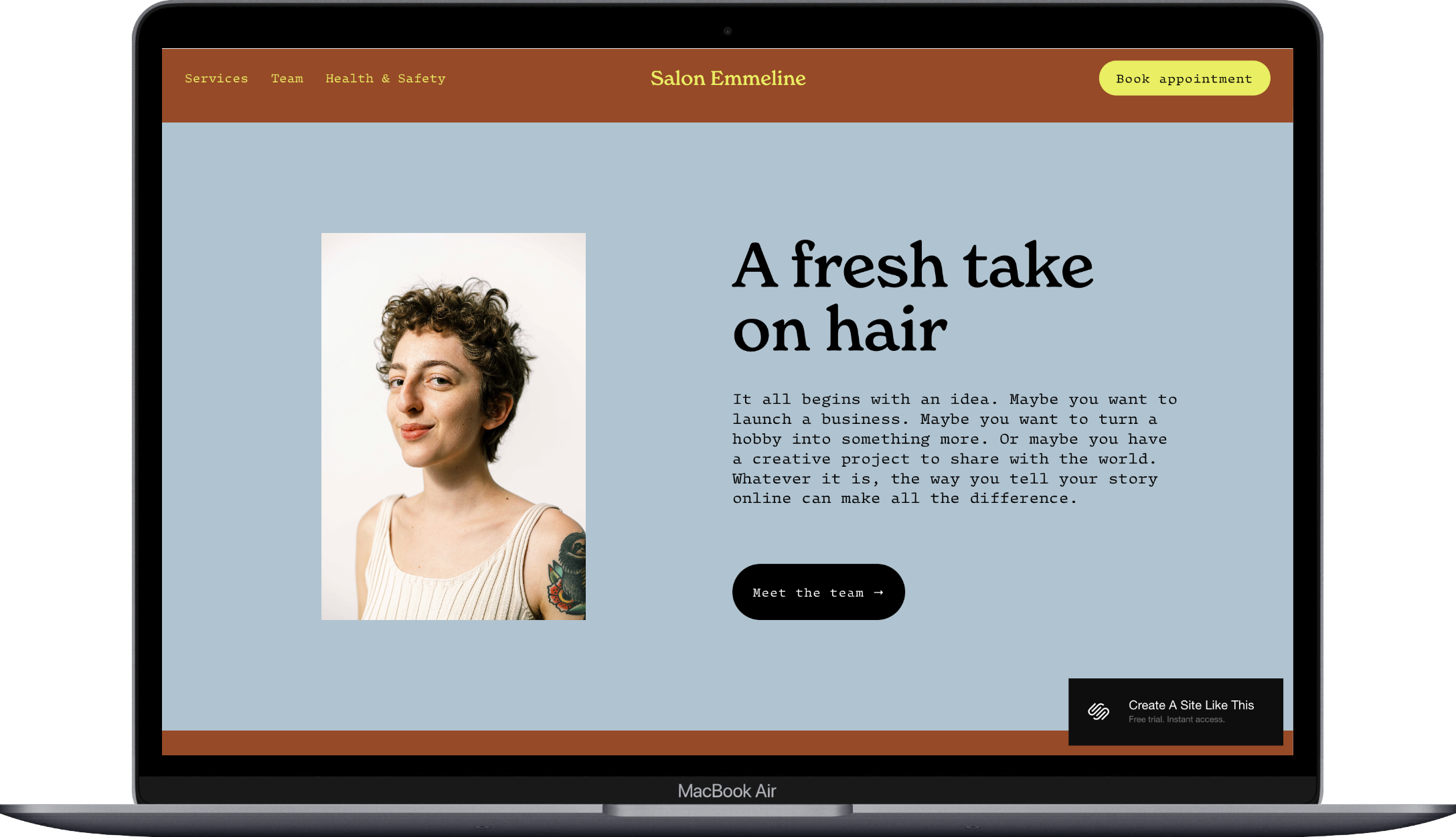
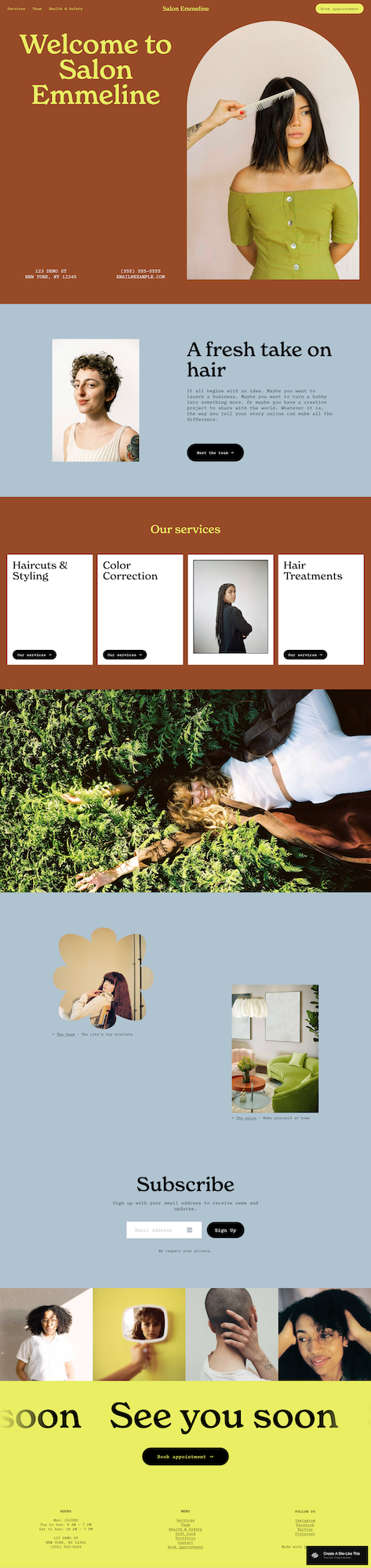
Your business name and a big "Book Appointment" button at the top - that's the first thing people see. Below that, a short intro section (think 2-3 sentences about your vibe or approach), a services overview showing your main service categories, and an image gallery. The demo shows this set up for a salon, but it could work for any appointment-based business.
Services Page
Where you list everything you offer with descriptions. Haircuts, color services, treatments, facials, massage - whatever applies to your business. You can add pricing here if you want.
Team Page
Photos and short bios for each person on your team. If you've got 5 stylists or 3 massage therapists, this is where clients can learn a bit about each person before deciding who to book with. Solo? You can skip this page entirely or use it to talk about your training and experience.
About Page
Your story. Why you started your business, what your approach is, what makes you different from the salon or spa down the street. This is where you get a little more personal and help people connect with your business beyond just the services.
Extras
Acuity Scheduling integration (Squarespace's booking system)
Newsletter signup form
Floating header (the booking button stays visible as people scroll - honestly pretty useful)
Social media links
Contact info that shows up prominently
Mobile-responsive like all Squarespace templates
One thing to note: the demo doesn't include a blog, but you can add one if you want. More on whether that's a good idea in the FAQs.
Key Strengths of the Emmeline Template
Everything Points Toward Booking The floating header keeps the booking button visible no matter where someone is on your site. This does sometimes matter; people often decide they want to book while they're looking at your gallery or reading about your services, and if they have to scroll back up or hunt for the booking link, some of them just... won't. The template removes that friction.
Big Images, Simple Layout Hair transformations, before-and-afters, photos of your space - you get room to show your work without a bunch of text competing for attention.
Team Section If you've got multiple people on your team, the structure here is helpful. Clients can see who they're booking with, which matters more than you'd think - some clients specifically want the stylist who specializes in curly hair, or the massage therapist who does deep tissue. The team page handles this without fuss.
Services Are Easy to Scan People want to see what you offer and roughly how much it costs (if you list prices) without reading paragraphs of text. Emmeline's services section is straightforward - you list cuts, color, treatments, extensions, whatever, with brief descriptions. Clients can figure out what they need and book it. Wham bam.
What the Emmeline Template Is Not Best For
You mainly sell products. If you're selling hair care products, skincare lines, or beauty tools as your primary business, this template won't work well. It's built for booking services, not for product catalogs with shopping carts and inventory. (You CAN add products to any Squarespace template, but if that's your main thing, start with a template designed for e-commerce, like Altaloma or Seen.)
You need detailed portfolio pages for each project. If you're a makeup artist who needs to show full photo sets from each wedding or editorial shoot with descriptions and details, Emmeline's gallery setup is too basic. You get image galleries, but not structured portfolio pages with room for extensive project information. Check out Oritz if that’s the case.
You want to publish regular blog content. The template doesn't feature a blog, and the layout is really designed around services and booking. If your marketing strategy relies on weekly blog posts to drive traffic, you'll be fighting against the template's structure. That said, you CAN add a blog, just know there’s not a template pre-made for you.
Pros & Cons of the Emmeline Template
Pros
Setup is fast. The structure is already there - you're replacing content and adjusting colors, not figuring out where everything should go. If you don't have weeks to spend building a website, hundreds to spend of a custom template, or thousands on a designer, this is a great template choice if you’re a salon owner.
Flexible; good for teams or if you’re solo. If you've got multiple stylists or providers, the team page lets clients see who they're booking with without creating separate mini-sites for each person. It's organized but not overwhelming.
The layout is simple. Your work is what people care about - the before-and-after transformations, the space itself, the results. The design is clean enough that it doesn't compete with your images for attention.
Cons
Limited if you need a lot of written content. There's not much room for detailed service explanations, educational content, or blog posts. If you're trying to use content marketing to drive traffic (like weekly hair care tips or skincare advice), this template makes that harder.
The services section is basic. Great if you offer a few straightforward services. Limiting if you need to explain package options, pricing tiers, what's included vs. what's an add-on, or anything that requires more detail.
Looks like all the other Emmeline template-based websites. I mean, duh. But if you’re a salon owner and choose this template, you can be sure a lot of other salon owners have, too. So it won’t make your brand stand out as much as if you chose a different template or started from scratch.
Getting Started with the Emmeline Template is Easy:
Once you decide on this template and create your Squarespace account, here’s what to do:
Start with the basics - your business name, contact info, hours, address. Update the header and footer first.
Upload your best photos. Not all your photos - your BEST photos. Hair transformations, your space, your team members. Make sure images are optimized (here’s how and why to optimize your images). Blurry or pixelated images will make your site look unprofessional no matter how good the template is.
List your services with real pricing (if you're including it). Some businesses list prices, some don't - that's your call. If you don't list prices, at least make the service descriptions clear so people know what they're booking.
Update the team page. If you have multiple people, add their photos and write short bios (2-3 sentences, maybe their specialties or how long they've been doing this). If you're solo, either delete this page entirely or repurpose it to talk about your training, certifications, or approach.
Set up Scheduling. You can use Acuity, Squarespace’s built-in scheduling (there is an additional fee for this), or any scheduling app you have. Add your services with durations and pricing, set your availability, and link the booking button to your scheduling page.
Customize colors and fonts to match your brand. Go to Design → Site Styles. Set your brand colors and update your fonts - you can choose from Squarespace’s hundreds of fonts, or easily upload your own brand fonts.
Fix your heading structure for SEO. Squarespace template’s generally don’t have this set for you. Your main page title should be H1, and you should only have ONE H1 per page.
Connect your email platform. If you're collecting emails via the newsletter signup, make sure it's actually connected to Kit, Flodesk, Squarespace Email Campaigns, or whatever you use.
Test everything before you launch. Go through your site like you're a client who's never been there before. Can you easily find services? Is the booking process clear? Do all the links work? Don’t forget to check it on your phone, too.
Once everything works and looks right, connect or transfer your domain, choose your Squarespace plan, and hit publish.



Emmeline Squarespace Template FAQs
Can I sell products on the Emmeline website template?
Technically yes. You can add Squarespace's shop functionality to any template, including Emmeline. But this template is built around booking appointments. If you want to sell a few retail products alongside your services - like a salon selling shampoo and styling products at the front desk - you can make it work. But if selling products is a major part of your revenue, start with a template designed for e-commerce, like Altaloma or Seen. You'll save yourself a lot of frustration.
Is the Emmeline template good for SEO?
Yes. It has the technical foundation (fast loading, mobile-responsive, clean code), but you still have to do the actual SEO work. Squarespace doesn't automatically structure your content properly for search engines. You need to set up your headings correctly, write good page titles and meta descriptions, and add alt text to images.
Can I change fonts and colors on the Emmeline template?
Yes, easily. Go to Design → Site Styles and you can change colors, fonts, spacing, button styles - all without touching code. The template is flexible enough to look like your brand while keeping the same structure and layout.
Does Emmeline come with a blog?
Not in the demo, but you can add one if you want. The question is whether you should. If you're planning to blog weekly about hair care tips or skincare advice to drive traffic from search engines, be aware that Emmeline wasn’t designed to feature blog content. You can add a blog page and link to it in your navigation if you like. But if blogging is central to your marketing strategy, this might not be the best template choice to start with.
How does the booking system work with Emmeline?
Emmeline is designed to work with Acuity Scheduling (which Squarespace owns). The "Book Appointment" button links to your Acuity page where clients pick a service, choose a time slot, and complete their booking. Acuity sends confirmation emails, reminder emails, and syncs with your calendar. You'll need to set up your services, availability, and settings after choosing the template - it's not automatic.
Can I showcase individual portfolios for each team member?
Not easily. The team page is designed for short bios and photos, not full portfolios for each person. If you need separate gallery pages for each stylist or provider, you'll have to build that manually using additional pages. It's doable, but the template isn't set up for it. If showcasing individual work is critical to how your business operates, think about whether Emmeline's structure will require too much customization.
Is Emmeline good for a solo service provider?
Yes, fairly easily. If you're solo, remove the team page (or repurpose it to talk about your background and training). The rest of the template works fine for one person - the booking focus, service list, and clean layout all make sense for a solo business.
Does Emmeline work for businesses outside the beauty industry?
Maybe. The core functionality - service listings, team members, appointment booking - could work for other appointment-based businesses. A tutoring center, yoga studio, therapy practice, or consulting business could adapt it. The real question is whether the visual style fits your brand. Emmeline has a beauty/wellness vibe to it. If you're a corporate consultant or B2B service provider, this template's aesthetic might feel off even if the functionality technically works.
View Emmeline Demo
Want to see if Emmeline actually fits what you need? Check out the Emmeline demo and click around. Look at how the booking button works, see how services are laid out, imagine your own photos and content in place. That'll tell you more than reading about it.
Ready to Give Squarespace a Try?
If Emmeline looks like it'll work for your business, you can get started with Squarespace using this link. All Squarespace templates are built on the same platform, so if you start with Emmeline and realize later it's not quite right, you can edit it until you get your website just how you like.