Altaloma Squarespace Template Review
This post contains affiliate links. If you purchase through them, I may receive a small commission at no extra cost to you.
Table of Contents Show
Altaloma is a Squarespace e-commerce template built for product-based businesses looking for a clean, minimalist aesthetic.
It's set up as an online shop with a soap and skincare focus in the demo, but the simple design works well for any small-batch, artisan, or boutique brand selling physical products. If you're launching something like a handmade goods business or small online shop and want something elegant, Altaloma probably caught your eye for good reason.
This review covers what Altaloma includes, pros and cons, where it shines, and where you may hit limitations.
The goal: help you figure out if this e-commerce template is the right fit for your business or if you should keep looking.
Who the Altaloma Squarespace Template Works Best For
Altaloma works best for makers and small business owners who sell physical products and want their work to speak for itself. The demo is styled for a soap maker, but the template's structure adapts easily to other handmade or small-batch product businesses.
Small-batch product makers
If you make soap, candles, skincare, or other artisan goods in small quantities, Altaloma's clean layout gives each product room to breathe.
Boutique shop owners
Selling a curated collection of a few dozen products? This template works well when you're not managing hundreds of SKUs and want to showcase each item individually.
Makers transitioning from craft fairs to online sales
If you've been selling at markets and pop-ups and need a new, easy online presence, Altaloma offers the essentials without complications or set up headaches.
Wellness and natural product brands
The calm, spacious design fits well with wellness and natural brands that emphasize natural ingredients, sustainability, or mindful consumption (like the soap in the demo site).
Creatives selling physical goods
Artists, ceramicists, or designers selling prints, pottery, or other handmade items will find the template's minimal aesthetic lets the work shine.
Businesses focused on wholesale or stockist relationships
The template includes a stockist page in the demo, making it easy to highlight where customers can find your products in person.
What You Get with the Altaloma Template
Home Page
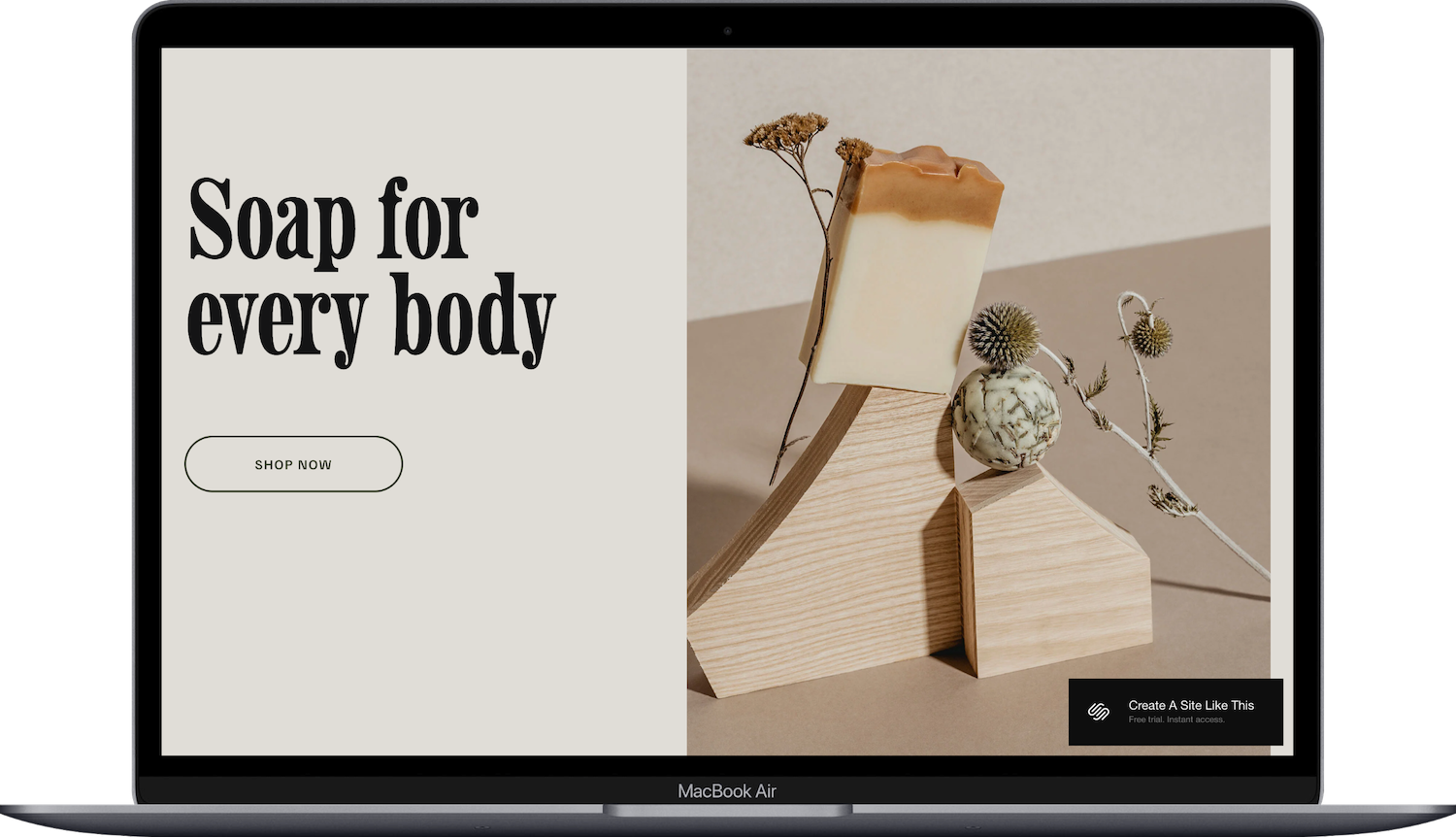
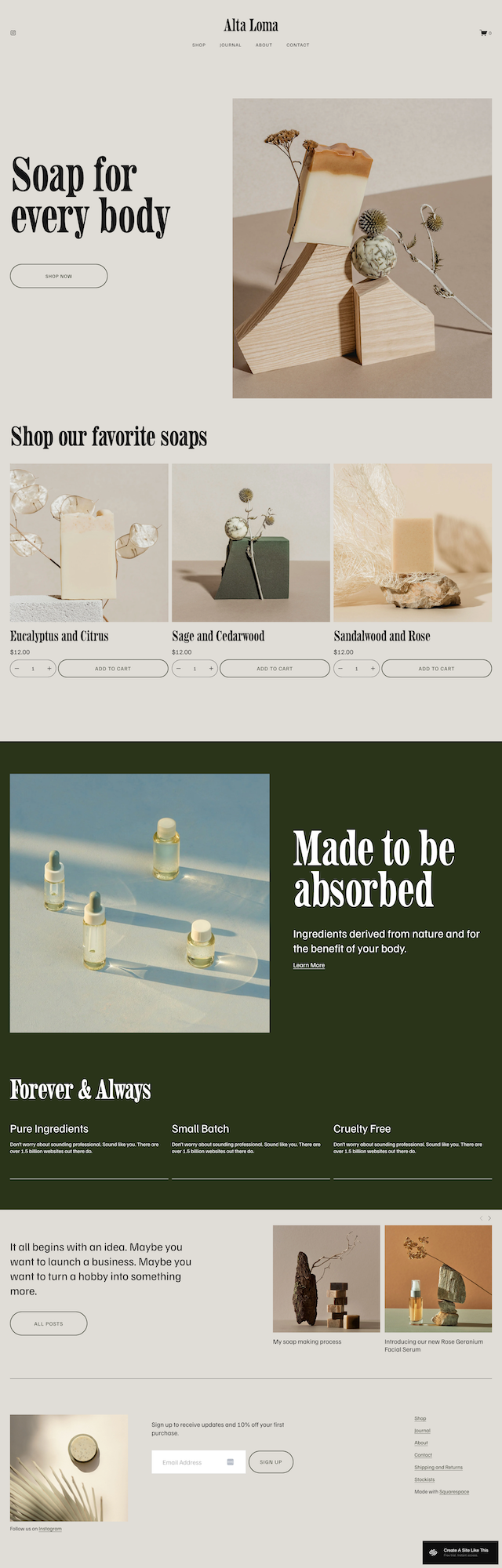
The homepage uses a split-screen hero section with an image on the right and headline/text/CTA button on the left. Below that, you'll find sections for highlighting product features (Pure Ingredients, Small Batch, Cruelty Free in the demo), a text block with imagery, and a brief brand story section. Content appears as you scroll, creating a smooth, engaging experience.
Shop Page
A clean shop layout with product thumbnails displayed in a grid format. The shop includes a "Custom Collab" CTA section encouraging custom orders. Products load as you scroll, maintaining the template's calm aesthetic.
Product Pages
Individual product pages feature a large product image with zoom capability, product title, description, pricing, and an add-to-cart button. There's space below to add additional product images, ingredient lists, or detailed information.
Journal (Blog)
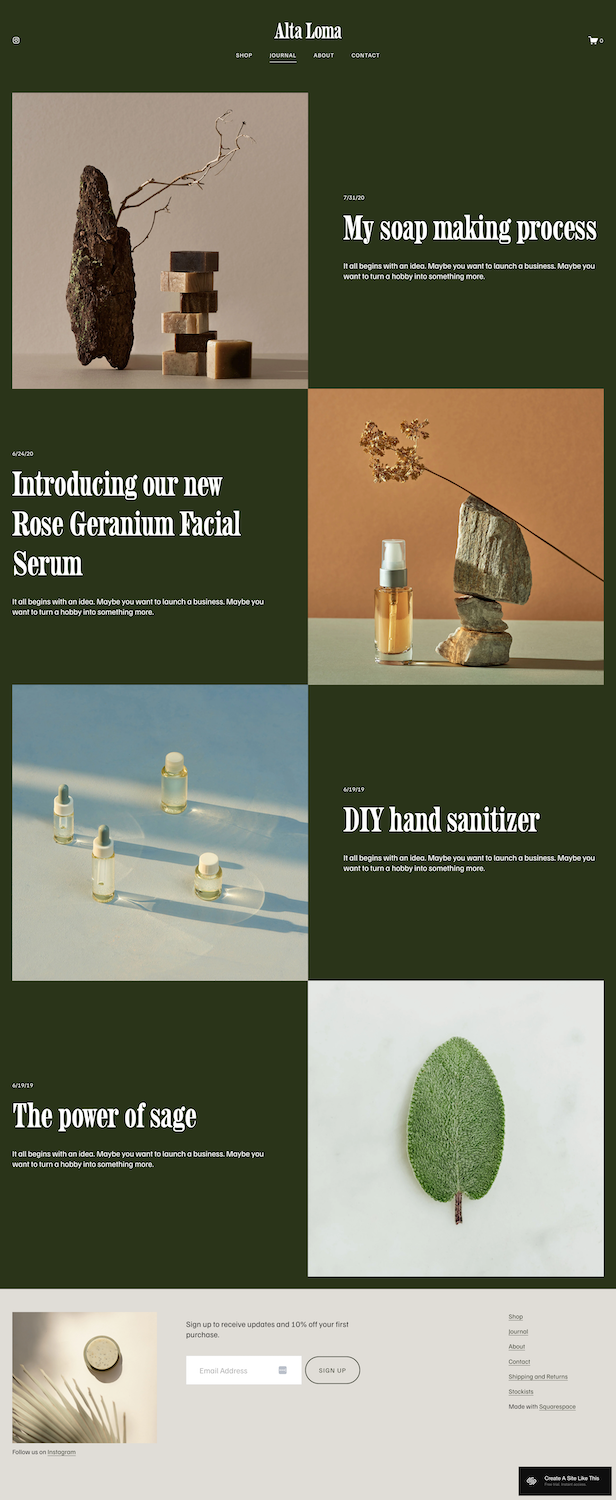
A single-column blog layout where content loads as you scroll. Posts alternate between images, titles, and excerpts, keeping the reading experience clean and uncluttered. Individual post pages are boxed without sidebars, keeping focus on the content.
About Page
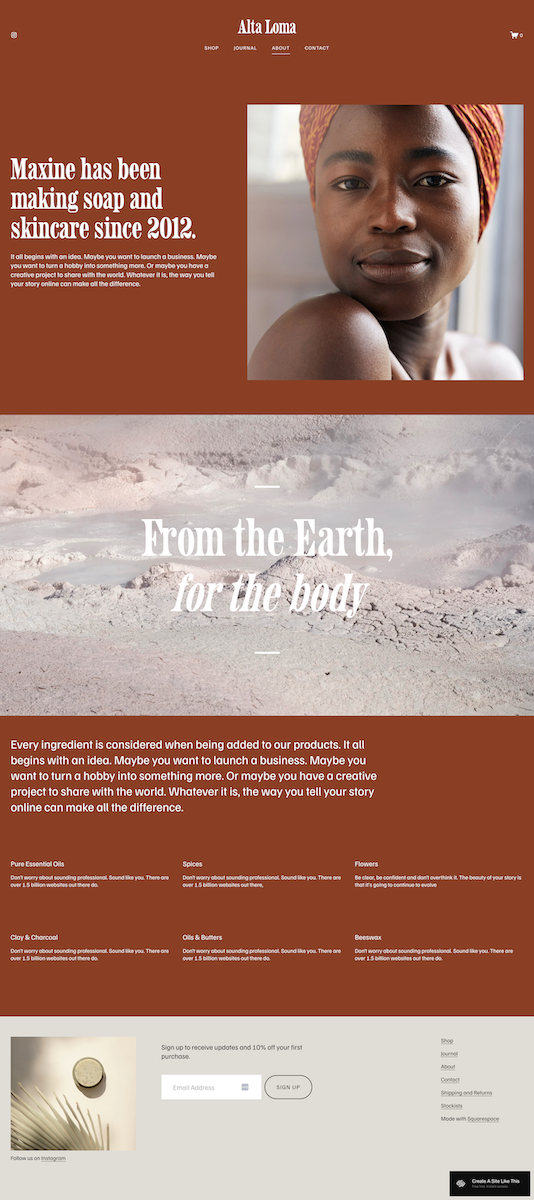
The demo shows a founder story section with imagery, followed by an ingredients showcase featuring six categories (Pure Essential Oils, Spices, Flowers, Clay & Charcoal, Oils & Butters, Beeswax). Each ingredient category includes a small text block — perfect for transparency about what goes into your products.
Contact Page
A simple contact form for customer inquiries.
Extras
Newsletter subscription form in the footer
Instagram icon/link in the header and footer
Shopping cart integration in the header
Three-column footer with menu links, Instagram integration option, and subscription widget
Content loads on scroll throughout the site for a more engaging browsing experience
Mobile-responsive design
Key Strengths of the Altaloma Template
Calm, Spacious Design: Altaloma uses generous white space and a minimal color palette to create a serene experience. This works especially well if you're selling visually appealing products, like handmade soap, skincare or candles.
Scroll-Triggered Content Loading As visitors scroll down the page, content smoothly appears on screen. This adds a subtle level of polish and engagement without being gimmicky. It makes exploring the site feel more like an experience than just clicking through static pages.
Built for Small Product Catalogs If you're selling somewhere between 10-40 products, Altaloma handles this range beautifully. The shop layout is straightforward, product pages have room for details and multiple images, and the overall structure works well for small shops.
Journal(/Blog) for Content Marketing, Thought Leadership, and SEO The blog layout is clean and easy to read, which works well if you want to share behind-the-scenes content, ingredient spotlights, or skincare tips. For makers who want to build trust and educate customers about their products, having a functional blog that matches the site's aesthetic is valuable.
Transparency-Focused About Page The About page includes dedicated sections for ingredients, which is perfect if transparency is part of your brand story. Customers who care about what's in their products appreciate seeing this information presented up front and clearly.
Best Use Cases of Altaloma
1. Launching a small-batch skincare or soap business
You make 15-20 products in your home studio, photograph them on simple backgrounds, and want a site that looks professional without feeling corporate. Altaloma's demo is literally set up for this, making it easy to swap in your own product photos and text without redesigning anything.
2. Transitioning from Etsy to your own storefront
You've been selling on Etsy and want to establish your own branded website while maintaining a similar product count. Altaloma gives you the e-commerce functionality you need with a more curated, elevated feel than marketplace platforms.
3. Artisan goods with a story to tell
Your products are handmade, small-batch, or use specific ingredients or materials you want to highlight. The About page structure makes it easy to share your sourcing, your process, or your values.
4. Wellness brands selling supplements or natural products
If you're selling herbal teas, natural supplements, or wellness products and want to emphasize ingredient quality and transparency, Altaloma's clean design supports that message without needing custom development.
5. Boutique candle companies or home fragrance brands
The template's emphasis on imagery and calm aesthetics works well for products where scent, mood, and ambiance are part of the appeal. You can showcase candles or home fragrance products in lifestyle settings or clean product shots equally well.
What the Altaloma Template Is Not Best For
The Altaloma template may NOT be the best fit if you:
Sell more than 50 products (or plan to scale quickly): The clean, curated aesthetic works best with smaller catalogs. If you're managing hundreds of products or multiple product categories, you'll need more robust filtering and navigation than this template offers.
Need complex product options: If your products come in 6 scent variations, 4 size options, and 3 package types, the basic product page setup might feel limiting. (Read my review of Shopify to see if that will be a better fit.)
Run a service-based business: This template is very clearly built around selling products, not services. If you're a coach, consultant, or service provider, other templates would better suited to sharing your offers. (Check out my post on the best free Squarespace templates for service providers)
Need a portfolio showcase with multiple projects: While you could adapt it, Altaloma doesn't have the portfolio structure photographers, designers, or creative professionals typically need.

Pros & Cons of the Altaloma Template
Pros
Exceptionally clean design that works across industries: While the demo is soap-focused, the template's simplicity means you can easily adapt it to candles, pottery, prints, or other handmade goods without major redesign.
Newsletter subscription built into the footer: Email marketing is quite important for small businesses, and having the signup form already integrated means one less thing to set up.
Strong foundation for content marketing: The blog layout is clean and readable, making it easy to publish helpful content that drives organic traffic and builds customer trust.
Product pages have room for storytelling: Altaloma gives you space to add multiple images, detailed descriptions, and ingredient/material information that helps your potential customers be informed and makes it easy to buy.
Cons
Heading hierarchy is lacking: Like all Squarespace free templates, Altaloma is set up to be visually pleasing and easy to launch…. not so much set up to have proper headers and body font. Not a big deal, but you’ll have to manually update the headers per page.
Not built for large inventories: Once you exceed probably 30-40 products, the single-scroll shop page will start being cumbersome. You'd need to create multiple shop pages or collections manually.
Getting Started with Altaloma is Easy:
Once you check out the demo and decide on Altaloma in the Squarespace 7.1 template library, here's what to do:
Replace the hero section content. Update the homepage split-screen section with your own headline, brand message, and CTA button text. Upload your hero image on the right side; make sure it's high quality and represents your brand well.
Customize the product feature sections. The demo shows "Pure Ingredients," "Small Batch," and "Cruelty Free." Update these with your own brand values, product features, or unique selling points.
Set up your shop and add products. Go to the Shop page and start adding your products. For each product, write clear descriptions, add multiple high-quality photos, set your pricing, and include any relevant details about ingredients, materials, or sizing.
Create product categories or collections. Even though the template doesn't show category navigation in the demo, you can create collections in Squarespace to help organize your products. This will be important as your catalog grows.
Update the About page with your story. Replace the demo text with your own founder story or brand background. If you want to keep the ingredient/material sections, update them with what's relevant to your products. If they don't apply, delete or replace these sections with something else.
Set up your Journal if you plan to blog. Go to the Journal page and delete the demo posts. Write your first 2-3 blog posts before launch so the page doesn't look empty. Focus on content that helps your customers understand your products or process.
Customize the Contact page. Update the contact form and add any additional information customers might need: your email address, response time expectations, or customer service hours.
Update the footer. Add your newsletter signup copy, customize the menu links to match your site structure, and add your Instagram link if you want that integration. Consider what's most important for visitors to access from any page.
Adjust colors and fonts in Site Styles. Go to Design > Site Styles to customize the template's color palette and typography. Altaloma uses a minimal palette, so small changes here will have a big impact on the overall feel.
Check your heading hierarchy. Squarespace templates don't always include proper heading structure by default, so make sure your main headline is an H1 and subheadings follow logical order (H2, H3, etc.) for better SEO and accessibility.
Test the shopping cart and checkout process. Before launching, make a test purchase to ensure the checkout flow works properly, shipping is configured correctly, and customers receive the right confirmation emails.
Double check everything, connect your domain, and go live. Review every page on desktop and mobile (the little phone icon in the upper right), test all links and forms, and make sure your product inventory and pricing are correct before you connect your domain and publish your site.
Altaloma Squarespace Template FAQs
Can I sell products on the Altaloma website template?
Yes! Altaloma is built specifically for e-commerce and includes a full shop setup. You can add products, set pricing, manage inventory, and process orders through Squarespace's built-in e-commerce functionality. The template works best for small to medium-sized product catalogs (10-50 items).
Is the Altaloma template good for SEO?
Altaloma is built on Squarespace 7.1, which includes solid SEO fundamentals like mobile responsiveness, fast loading times, and clean code. However, you'll need to do your part by adding proper page titles, meta descriptions, alt text for images, and using a logical heading hierarchy. The blog functionality makes it easy to publish content for organic traffic, which is one of the best long-term SEO strategies for product-based businesses.
Can I use the Altaloma template on mobile?
Yes, absolutely. All Squarespace templates are fully responsive and work well on mobile devices. Since a significant portion of online shopping happens on phones, this is crucial. The clean, minimal design of Altaloma actually translates really well to mobile — there's no clutter to navigate around.
Can I change fonts and colors on the Altaloma template?
Yes. You can customize fonts and colors through Squarespace's Site Styles panel. You'll be able to change heading fonts, body text fonts, button styles, background colors, and accent colors without any coding. The minimal design means small changes to the color palette will have a noticeable impact.
Does Altaloma include a blog?
Yes, the template includes a Journal section that functions as a blog. It has a clean, single-column layout where content loads as you scroll. This is useful for sharing behind-the-scenes content, ingredient spotlights, product launches, or educational content that helps customers understand what you make and why it matters.
Can I add appointment booking to Altaloma?
Not built-in, but you can integrate third-party booking tools like Acuity Scheduling (which Squarespace owns) or Calendly. You'd need to add these through embedded blocks or links. If booking is central to your business model, you might want to look at templates that have this functionality built in from the start.
How many products can I list on the Altaloma template?
Technically, you can list as many products as your Squarespace plan allows. Practically, Altaloma works best with 10-50 products. The shop page doesn't include category filtering or advanced navigation, so once you have more than 50 products, the single-scroll shop page becomes difficult for customers to navigate.
Does the template include a stockist or wholesale page?
According to the demo and sources, yes — there's a stockist page where you can list retail locations that carry your products. This is great if you do wholesale or want to direct online visitors to physical stores. However, there's no built-in wholesale ordering functionality or separate pricing tiers.
Can I add custom product options like scent or size variations?
Yes, Squarespace allows you to add product variants like size, color, or scent options. However, the Altaloma product pages are fairly simple, so if you have very complex product configurations (like 6 scents × 4 sizes × 3 package types), you might find the display gets cluttered. The template works best for straightforward product options.
Is Altaloma good for selling digital products?
You can sell digital products on any Squarespace template, including Altaloma. However, the template is clearly designed and demonstrated for physical products. If digital products are your main offering, you might want a template with a different structure that highlights courses, downloads, or memberships more prominently.
Does Altaloma work for service-based businesses?
Not really. While you could technically adapt it, Altaloma is built around product sales, not service packages. If you're a coach, consultant, photographer, or other service provider, you'd be better off with a template that has service page structures, package displays, and testimonial sections built in.


