Vivid Glow vs Ocotillo: Which Squarespace Music Festival Template Should You Use? (2026)
This post contains affiliate links. If you purchase through them, I may receive a small commission at no extra cost to you.
Table of Contents Show
Organizing a music festival and need a website? Then you probably need a website that handles lineups, sells tickets, and builds hype.
And if you’re looking at Squarespace templates, Squarespace has two templates specifically designed for music festivals: Vivid Glow and Ocotillo.
Both handle the essentials (lineup displays organized by day, ticket sales, event schedules, and bold visual branding) but they take different approaches.
And both templates are free with any Squarespace subscription and built on Squarespace 7.1.
So which one should you use? Let's break it down.
Vivid Glow
Best for: Multi-day music festivals, events with strong visual branding, festivals selling tickets and merch.
Use cases: EDM festivals, electronic music events, raves, high-energy dance festivals
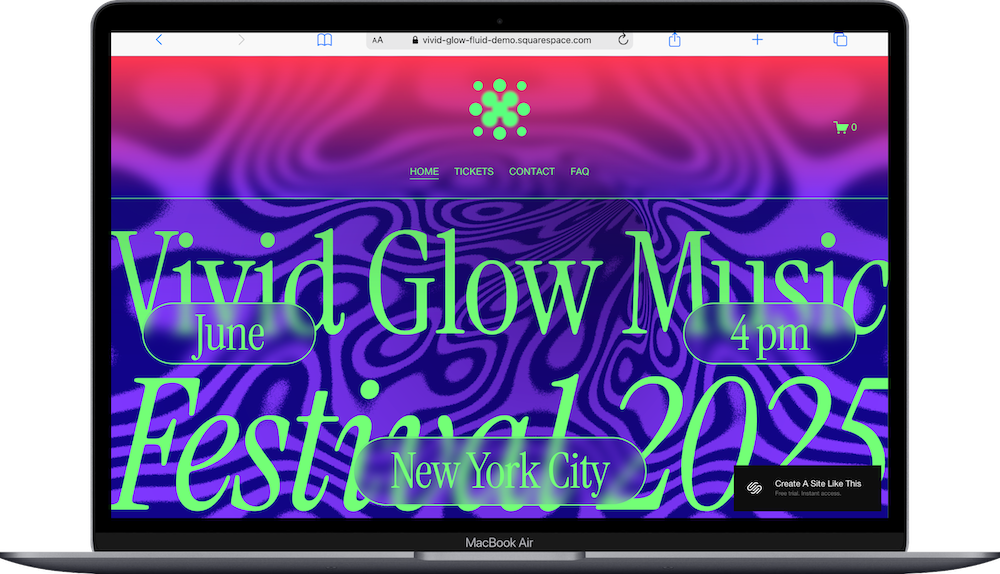
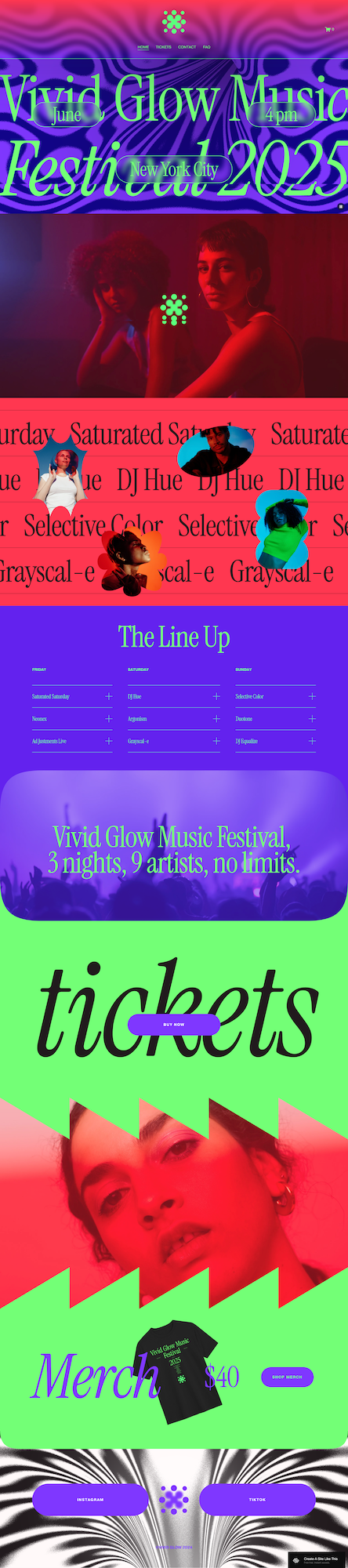
Vivid Glow is designed for music festivals with bold branding and multiple performers. The template includes pages for Home, Tickets, Contact, FAQ, and a cart for merch sales.
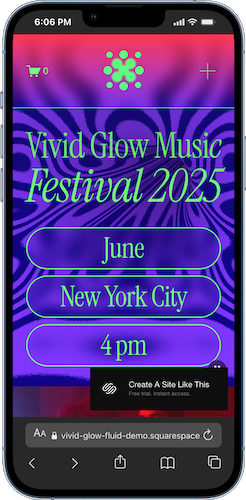
The homepage uses a ton of dynamic movement (seriously, click through to see the demo in action) large, eye-catching graphics with space for festival name, dates, and location. There's a lineup section showing all performers organized by day, with space for artist descriptions. The "Buy Tickets" call-to-action appears multiple times throughout the page.
Vivid Glow has a bright, dynamic visual style and clear organization of performers by day. If you're running a festival or rave with multiple stages or artists and want to build hype with strong graphics and easy ticket purchasing, this template is a great starting point.
Ocotillo
Best for: Immersive festival experiences, events in unique locations, multi-day music festivals with extensive lineups
Use cases: Indie music festivals, folk festivals, destination festivals, events with a laid-back or curated vibe
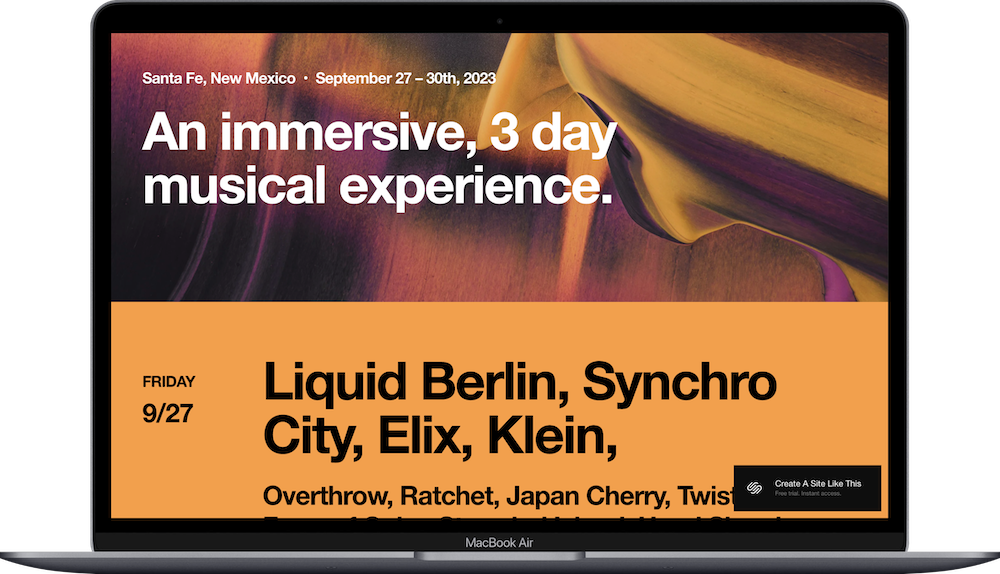
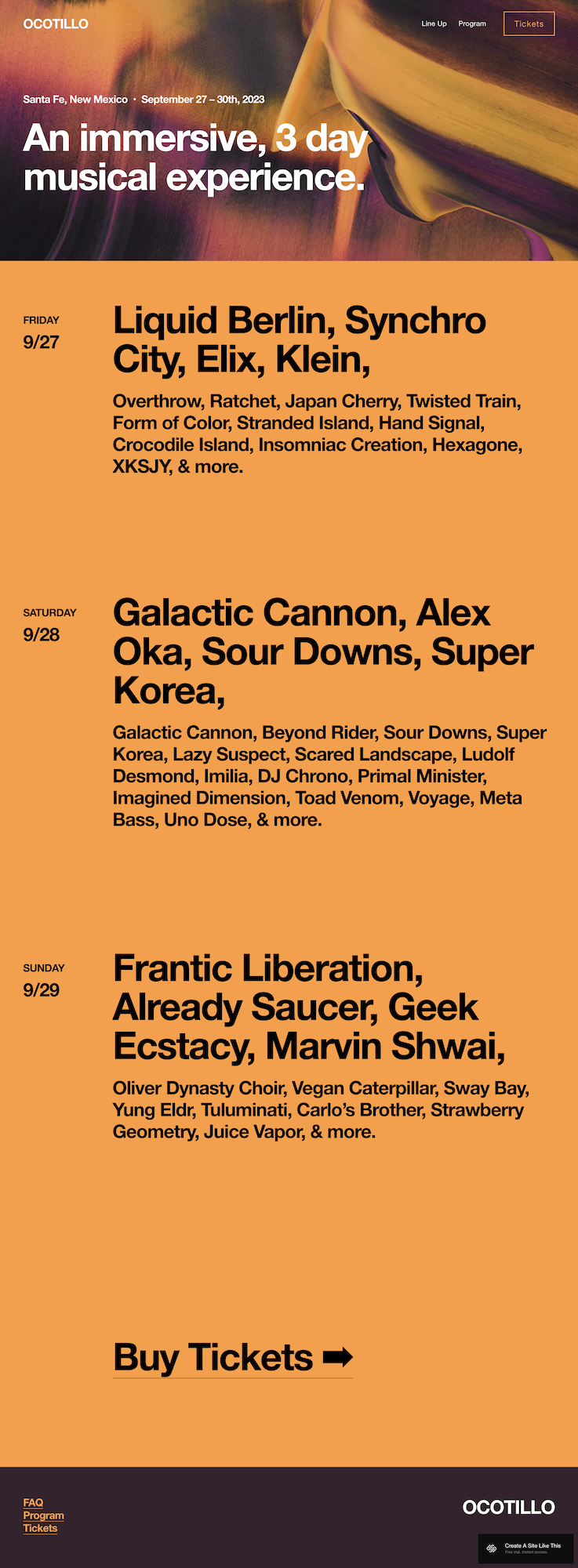
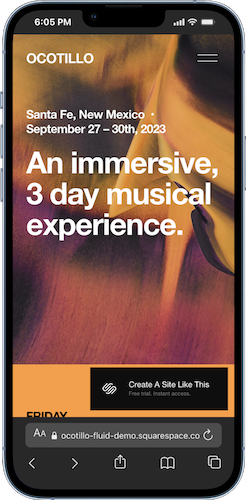
Ocotillo has a desert-inspired, artistic aesthetic with warm tones and big san serif typography. The template includes pages for Lineup, Program, and Tickets.
The homepage sets up space for location and dates, describes the festival experience, and displays performers organized by day with full lineups visible. The design feels intentional and grounded, which works well for festivals with a specific vibe or location identity.
If you're running a destination festival or have curated experiences, Ocotillo is a great choice.
Vivid Glow vs Ocotillo: What's the Difference?
Both templates handle all the basics well: lineup organization, ticket sales, and event information. The real difference is visual style and how you want to tell your festival's story.
Choose Ocotillo if:
You're running an indie, folk, or mixed-genre festival
Your festival has a destination or camping component
You want a warmer, more organic aesthetic
Choose Vivid Glow if:
You're running an EDM, electronic, or dance music festival
Your festival has neon, rave, or high-energy branding
You're selling merch directly from your site (cart included)
Remember, these templates are both starting points. You can customize colors, fonts, images, and layouts to match your festival's brand. Pick the one that's closest to your vision, then make it your own.
Getting Started with Your Music Festival Squarespace Template
Here's how to get started and go live when you choose either of these templates:
Sign up for Squarespace if you haven't already (free 14-day trial, no credit card required)
Select your template when you create your site
Replace demo content with your festival name, dates, location, and lineup
Customize colors and fonts in Site Styles to match your brand
Add your favicon and social share image to your site
Add your full lineup organized by day/stage
Set up ticket sales by connecting to a payment processor or linking to an external ticket platform
Add FAQ section with info about parking, camping, prohibited items, etc.
Test everything on mobile
Go live by connecting your domain and choosing your Squarespace plan
Squarespace Music Festival Website Template FAQs
What is the best Squarespace template for music festivals?
Both Vivid Glow and Ocotillo are designed specifically for music festivals. Vivid Glow works well for festivals with bold branding and high-energy visuals. Ocotillo suits destination festivals or events with a specific atmosphere or sense of place. Both handle multi-day lineups and ticket sales.
Which Squarespace template is best for EDM festivals?
Vivid Glow is designed for electronic music festivals and raves. It has vibrant, neon-inspired graphics and bold branding that matches the EDM festival aesthetic.
Which Squarespace template is best for indie or folk music festivals?
Ocotillo works well for indie, folk, or mixed-genre festivals. It has a warmer, more organic design with earth tones that suits laid-back or destination festival vibes.
Can I sell festival tickets directly through either Squarespace template?
Yes. Both templates support e-commerce features, so you can sell tickets directly through your site by connecting to Stripe or PayPal. You can also link to external ticket platforms like Eventbrite, Ticketmaster, or Dice if you prefer to handle ticketing through those services.
How do I organize my lineup by day or stage?
Both Vivid Glow and Ocotillo include lineup sections that let you organize performers by day. You can create separate sections for Friday, Saturday, Sunday, or organize by stage if you have multiple stages running simultaneously. The templates use accordion-style or list formats to keep everything scannable.
Can I sell festival merchandise on my Squarespace site?
Absolutely. Vivid Glow includes a cart and merch functionality built in. You can sell t-shirts, posters, or other festival merchandise directly through your site. Ocotillo can also support e-commerce, you’ll just need to add a shop page.
What's the difference between Vivid Glow and Ocotillo?
Vivid Glow has a vibrant, contemporary design with bold graphics and bright colors that work well for high-energy festivals. Ocotillo has a warmer, more organic aesthetic with earth tones and a grounded feel. Choose Vivid Glow for a bold festival site. Choose Ocotillo if your festival has a specific sense of place or immersive atmosphere you want to convey.
Can I add a schedule or program page to the ocotillo or vivid glow template?
Yes. Ocotillo includes a Program page built in. Vivid Glow doesn't have a dedicated program page in the demo, but you can easily add one. Both templates let you create schedule pages showing set times, stage locations, and other programming details.
How do I add a FAQ section for festival information to the ocotillo or vivid glow template?
Vivid Glow includes an FAQ page in the template. You can use this to answer common questions about parking, camping, prohibited items, age restrictions, accessibility, and other festival logistics. Ocotillo doesn't include a FAQ page in the demo, but you can add one easily.
Are these templates good for single-day events or smaller concerts?
Yes, but they're designed for multi-day festivals with extensive lineups. If you're running a single-day event or smaller concert, these templates might feel like overkill. You'd be better served by one of the musician/band templates like Vandam or Kitui, which handle tour dates and ticket sales in a simpler format.
Can I integrate with ticketing platforms like Eventbrite or Dice?
Yes. You can link to external ticketing platforms from your "Buy Tickets" buttons or embed ticket widgets directly into your Squarespace pages. Both templates support these integrations.
How do I showcase multiple stages or venues?
You can organize your lineup section by stage instead of by day. Create separate sections or use tabs/accordions to show which artists are performing on which stage. Both templates give you flexibility in how you structure this information.
Can I add sponsor logos or partner information?
Yes. You can add image blocks or gallery sections to showcase sponsor logos, partner organizations, or "As Featured In" media logos. This works well in the footer or in a dedicated sponsors section on your homepage.
Can I add video or photo galleries from past festivals?
Yes. Both templates support video embeds and image galleries. You can add highlights from previous years to build excitement and show people what to expect. This works especially well on your homepage or in an "About" or "Experience" section.
What should I include on my music festival website?
At minimum: festival name, dates, location, lineup organized by day/stage, ticket information and purchase options, FAQ section with logistics info, and contact information. Nice additions include artist bios, schedule/program, parking and camping info, sponsor logos, photo/video galleries, and a blog for festival updates.
Can I add a newsletter signup to collect emails?
Yes. Both templates support newsletter signup forms. This is helpful for building your email list so you can announce next year's festival, early bird tickets, or lineup additions. You can add signup forms in your footer, as pop-ups, or in dedicated sections on your homepage.