Suffolk vs. Barbosa: Which Squarespace Template for Hotels & Vacation Rentals?
This post contains affiliate links. If you purchase through them, I may receive a small commission at no extra cost to you.
Table of Contents Show
If you landed here, you probably run a small hotel, B&B, guesthouse or vacation rental – and you're deciding between Suffolk and Barbosa, two of Squarespace’s free built-in templates.
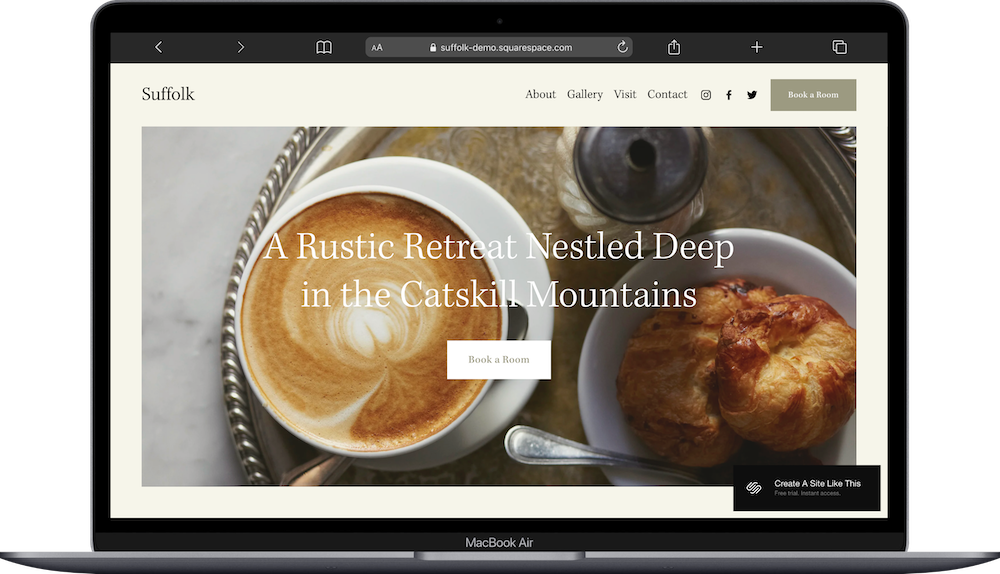
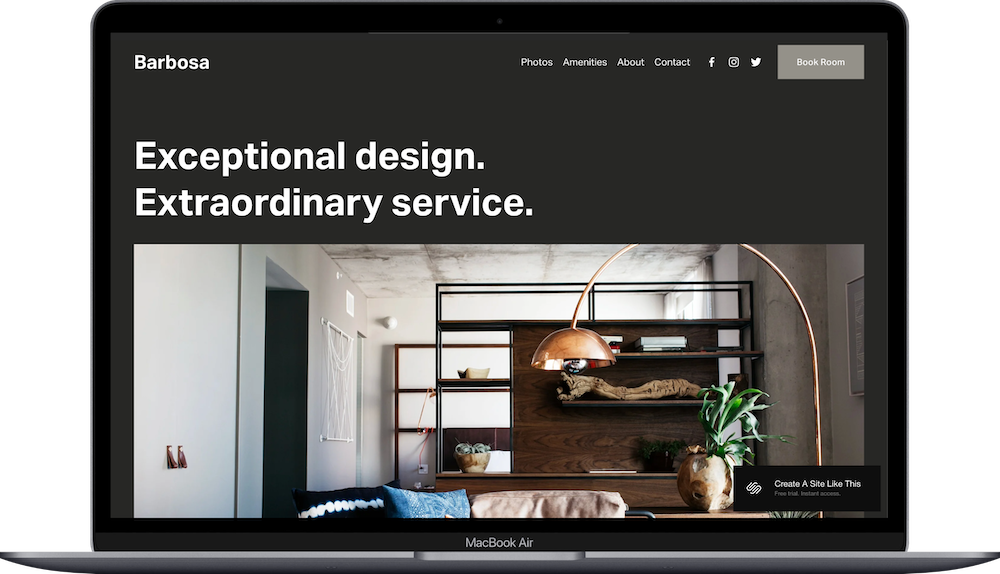
What’s the difference? One's got rustic farmhouse vibes (Suffolk), the other's sleek and modern (Barbosa).
In this post I’ll cover what each template includes, who they're for, what to expect timeline-wise, and when free templates actually won't cut it (plus what to do instead).
Both work for independent hotels, B&Bs, inns, and vacation rentals. The question is which aesthetic matches your property; because your website sets expectations for what guests will experience before they even arrive.
~ Quick Look: Suffolk vs. Barbosa ~
Choose Suffolk if you're running:
Countryside B&Bs, farmhouse inns, rural retreats
Properties with outdoor spaces, nature access, farm-to-table dining
Cozy, rustic accommodations where "escape the city" is the pitch
Vacation rentals in rural areas, wine country, mountain towns, coastal regions
Choose Barbosa if you're running:
Urban boutique hotels, city accommodations, design-forward stays
Properties where interiors, style, and contemporary design matter
Hotels or rentals targeting creative travelers, digital nomads, design lovers
Vacation rentals in cities, arts districts, downtown neighborhoods
Price: Both free with any Squarespace plan
When Free Templates Won't Cut It
Running multiple properties? Managing a hotel with dozens of rooms? Dealing with complex booking systems or operating at scale?
Free templates probably aren't going to work for you.
Consider premium Squarespace templates from shops like Studio Mesa or Big Cat Creative, or investing in custom design. Free templates work great for small independent properties, single-location B&Bs, and individual vacation rentals. But bigger operations are going to need infrastructure that these free templates just don't provide.
Choosing Between These Two Hotel Templates is Important
Why This Choice Affects Your Business:
Your website sets guest expectations.
If you're charging $450/night for a design hotel, but your website looks like a farmhouse B&B, that's confusing, no? Guests would show up expecting quilts and breakfast on a porch, not concrete floors and a cocktail bar.
Same goes the other way. If your rustic inn's website looks sleek and modern, city people book expecting boutique style. They arrive and it's... not that.
Your website is doing the job of setting expectations. Pick the wrong template and you're setting the wrong expectations.
And when the visual style has less impact:
If most of your bookings come through Airbnb or VRBO (not your website), the template aesthetic becomes less critical. Your site exists to show up in search results and provide basic info; guests are booking through the platform anyway.
Same if you're in a low-competition market with very little lodging inventory. If you're the only B&B within 50 miles, people will book regardless of whether your website looks rustic or modern.
But if you're competing with other properties, taking direct bookings, or charging premium rates? Your website's vibe needs to match what you're selling.
What Comes With Each Template
Suffolk's Structure
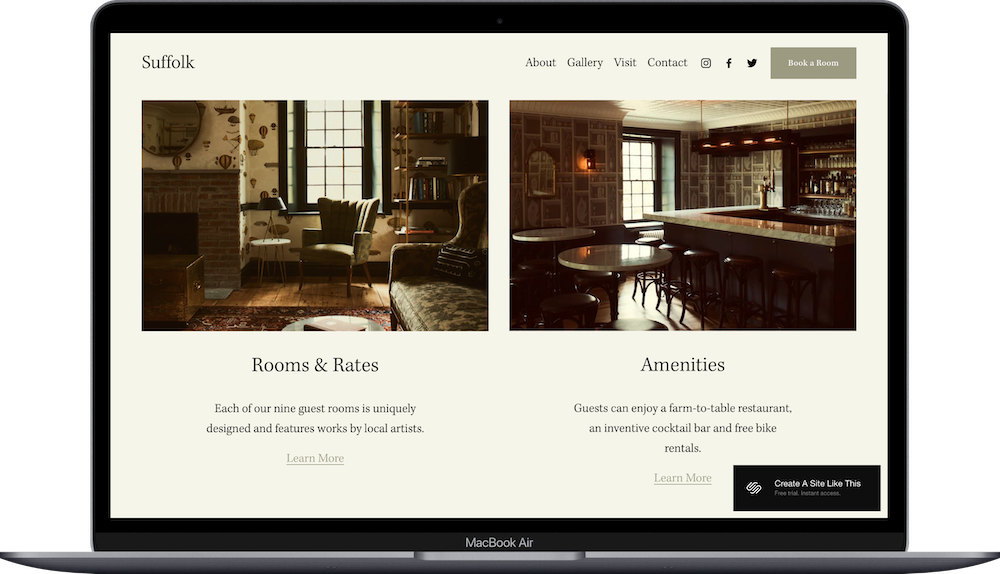
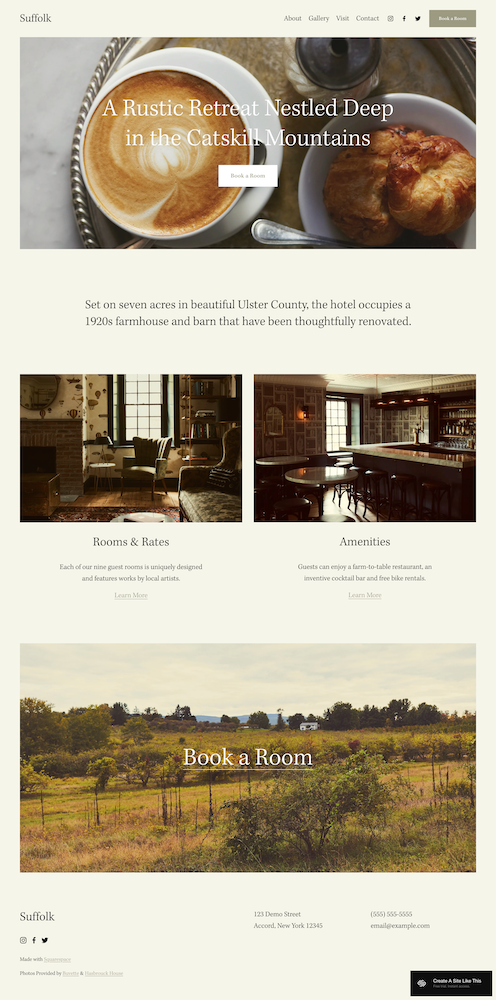
Suffolk's homepage opens with a large hero image and "Book a Room" button.
Below that: intro paragraph, two cards (Rooms & Rates, Amenities) with images, another full-width image, footer with booking CTA.
What you get:
7 pages: Home, Amenities, Rooms & Rates, Gallery, Visit, Contact, Book a Room
About folder with 4 sub-pages (Amenities, Rooms & Rates, Gallery, Visit)
Contact page with form
Book a Room page with booking inquiry form
Warm color palette (wood tones, earthy greens, cream)
Suffolk comes with more foundational infrastructure built-in—organized folders and dedicated pages. If you need that structure, it's there out of the box and you just add your content.
Who this fits: Farmhouse inns in areas like upstate New York or Vermont. Wine country B&Bs. Coastal retreats. Mountain lodges. Vacation rentals marketed as rustic getaways or countryside escapes. Airbnb properties in rural areas.
→ Read my full Suffolk review.
Barbosa's Structure
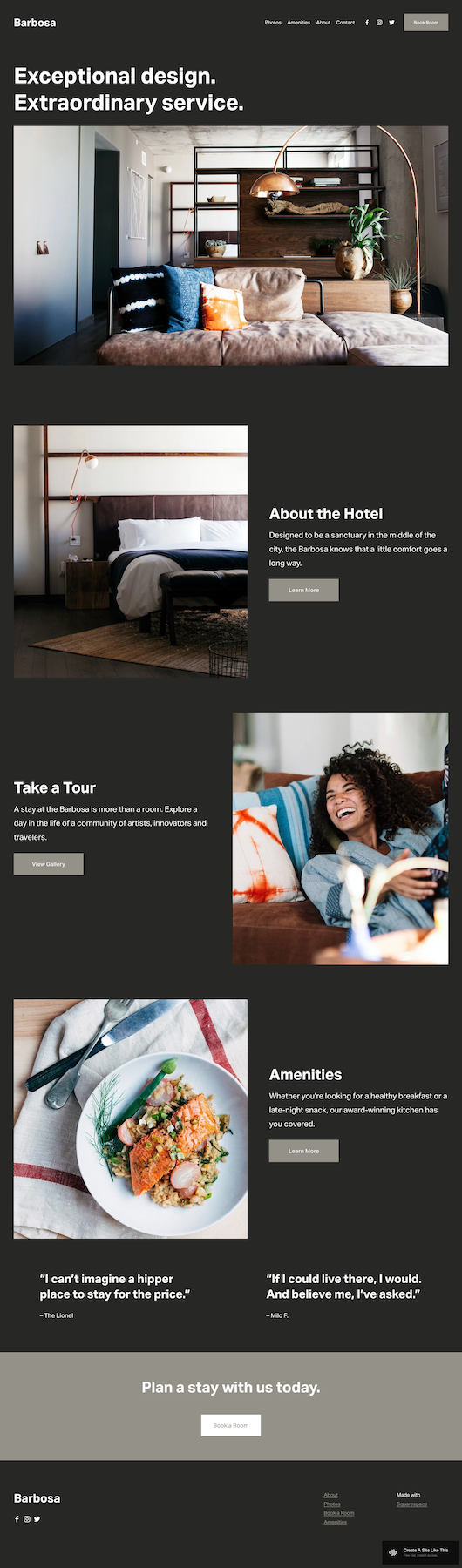
Barbosa's homepage opens with dark background, white text, and large editorial-style images.
Below that: three sections (About, Tour, Amenities) with images, testimonial slider, booking CTA.
What you get:
6 pages: Home, Photos, Amenities, About, Contact, Book Room
No folders—all pages at top level
Photos page (gallery)
Simple navigation
Dark color palette (charcoal/black background, white text, high contrast)
Barbosa has a simpler structure with everything at the top level. If you need detailed room breakdowns and amenities pages, you're building those yourself. But if you don't need all that? Less to manage.
Who this fits: Boutique hotels in US cities like Brooklyn, Portland, or Austin, or international cities like Glasgow, Berlin, or Barcelona. Accommodations in arts districts or downtown neighborhoods. Converted warehouse lodging. Design-forward properties targeting creative travelers. Urban vacation rentals or Airbnbs marketed to remote workers, designers, people who care about aesthetics. VRBO properties in city centers.
Suffolk Works Great For:
Properties where there’s plenty of outdoor space. Your guests come for hiking, vineyards, riverside walks, mountain views. Suffolk's nature-focused aesthetic is great for this. It works for properties in rural areas, wine country, mountain regions – anywhere people go to be in the great outdoors.
Vacation rentals with unique character. Restored barn, converted schoolhouse, historic farmhouse. Suffolk's warm, rustic vibe works for properties with history and charm. Great for Airbnbs marketed as "authentic countryside experience" or "charming rustic retreat."
Properties with food as part of the experience. Farm-to-table breakfast, vineyard with tastings, orchard with farmstand. Suffolk's demo includes restaurant messaging – if food is a big part of the experience, Suffolk is a great template to start with.
B&Bs with several rooms to showcase. Suffolk's Rooms & Rates page lets you detail different room types, sizes, and pricing. Helpful if you have different rooms like a King Suite, Queen Room, and Twin Room all at different rates.
Barbosa Works Great When:
You're running urban vacation rentals & city properties. Your Airbnb or VRBO is walkable to restaurants, galleries, nightlife. Barbosa's modern aesthetic is a great template to start with. Works for rentals in urban neighborhoods, arts districts, or downtown areas – anywhere walkable & city-focused.
Your property is design-focused & charging premium rates. Your rental has curated art, custom furniture, architectural details. Guests are paying more because of the design.
You're targeting specific travelers. Remote workers, digital nomads, creative professionals. People who care about aesthetics and vibe.
You're running a simple vacation rental that doesn't need a bunch of pages. You're renting one loft, one condo, one converted space. You don't need separate pages for amenities, rooms, rates. Barbosa's slightly simpler structure means less to manage.
What If Neither Template Feels Quite Right?
Coastal retreat that's modern, not rustic? You could start with Barbosa and lighten the dark palette, or start with Suffolk and modernize the fonts & colors. Both are customizable through Site Styles.
Mountain property that's sleek & contemporary? Same deal – Barbosa's structure works, you'd just swap the dark urban vibe for lighter, brighter tones.
Something in between? Pick based on which structure makes more sense (Suffolk's organized folders vs. Barbosa's simpler setup), and then customize the aesthetic from there.
Still not feeling either one? Check out premium templates from Big Cat Creative or Applet Studio – more variety, more customization options. Or hire a designer for custom work that matches your exact vision.
How Much Can You Customize These Templates?
Both the Suffolk and Barbosa templates are Squarespace 7.1 fluid engine, so you can:
Add or delete pages
Change colors & fonts through Site Styles
Rearrange sections
Add booking integrations
Customize all images and text
Everything works on mobile automatically
You can lighten Barbosa's dark background. You can modernize Suffolk's rustic tones.
But. If you pick Suffolk and spend hours trying to make it look sleek and urban, you should've started with Barbosa. If you pick Barbosa and keep reshaping it to feel warm and rustic, Suffolk would've been a lot easier.
Pick the template that matches your property best from the start.
You've Picked Your Template – Now What?
You've read through the comparisons, demoed both templates, and picked the one that matches your property. Here's how to go from generic demo to your site.
Timeline: Plan for a weekend if you have all your content ready (photos, text, booking setup). Closer to a week or two if you're writing descriptions, taking photos, and figuring out your booking system as you go.
Skill level: You don't need design skills. Squarespace's drag-and-drop editor is straightforward – if you can use Google Docs, you can build this. You don’t have to code anything (though you can if you want!)
10 Steps to Get Your Site Live:
Replace all text – property name, descriptions, room details.
Upload high-quality photos of your property. Optimize file sizes (under 500KB) so your site loads fast. Opening a new property without photos yet? Use architectural renderings or construction progress photos as placeholders, but plan to swap them for real photos before you're fully live.
Update all pages with your info. Delete or disable pages you don't need. Add pages you DO need (like a page for your specific neighborhood or local recommendations).
Set up your booking system. Options:
Contact form for inquiries (built into both templates – guests fill out a form, you respond with availability and rates)
Acuity Scheduling (Squarespace's built-in booking tool – lets guests book appointments or reserve dates directly)
Embed Airbnb or VRBO calendar (go to your Airbnb/VRBO dashboard, grab the embed code for your calendar, paste it into a Code Block on your Squarespace site)
Link to your Airbnb or VRBO listing (the simplest option – just add a button that takes people to your listing on the platform)
Check heading hierarchy – one H1 per page (usually page title), then H2s for sections, H3s and H4s for subsections. This matters for both SEO (getting found) & accessibility.
Adjust colors & fonts to match your branding. Don't use demo colors if they're not your colors.
Add location details – address, directions, parking, local recommendations. Make it easy for guests to find you and know what's nearby.
Test everything – forms, booking links, mobile display. Submit a test inquiry. Book a test stay if you're using integrated booking.
Check on your phone – make sure images display well, text is readable, and booking buttons are easy to tap.
Go live 🎉 – final proofread, test links, connect domain, choose plan, publish.
FAQs: Suffolk vs. Barbosa Squarespace Templates
Which Squarespace template is better for a bed and breakfast website?
Depends on your B&B's style and location. Suffolk works better for countryside or rural B&Bs with rustic vibes. Barbosa works better for urban or design-forward B&Bs. Both include the pages you need (like rooms, amenities, booking), so pick based on which aesthetic matches your property.
Can I use Suffolk or Barbosa for an Airbnb vacation rental website?
Yep. Both work for vacation rentals, whether you're listing on Airbnb, VRBO, or taking direct bookings through your own site. Suffolk fits rural/rustic rentals, Barbosa fits urban/modern rentals. Pick based on your property's location and vibe.
What's included with a free Squarespace template?
Suffolk and Barbosa are both free with any Squarespace plan. The template itself costs nothing – you pay for the Squarespace plan (starting at $16/month annually). Both templates include all pages, navigation, and design elements you see in the demo. You customize everything with your own content, photos, and branding.
How do I add booking to my Suffolk or Barbosa template?
Four options: use a contact form for inquiries (built into both templates), set up Acuity Scheduling (Squarespace's booking tool), embed your Airbnb or VRBO calendar using a Code Block, or add a button that links directly to your listing on Airbnb/VRBO. Pick based on how you want to manage reservations.
How do I add my vacation rental photos to Suffolk or Barbosa?
Upload photos through the Squarespace editor. Click on any image in the template and replace it with your own. You can add as many photos as you want, create galleries, and rearrange images however makes sense for your property. Optimize your photos (under 500KB each) before uploading so your site loads fast.
Can I customize the colors and fonts on the Suffolk or Barbosa template?
Yep, through Site Styles in the Squarespace editor. Both are 7.1 fluid engine templates, so you can change colors, fonts, button styles, and spacing. Suffolk uses warm earth tones by default, and Barbosa uses dark backgrounds – but you can easily adjust everything to match your branding.
How long does it take to build a vacation rental website with Suffolk or Barbosa?
Plan for a weekend if you have all your content ready (brand, photos, descriptions & booking info). If you're still working on your brand, writing copy, taking photos, or setting up your booking system, expect a couple weeks. But I really do recommend having everything in place BEFORE you begin designing. That will save you endless hours of tweaking and moving stuff around as you edit or add things.