One-Page Squarespace Website Templates: The Ultimate Guide
This post contains affiliate links. If you purchase through them, I may receive a small commission at no extra cost to you.
Table of Contents Show
Squarespace has almost 200 free templates (and growing all the time), but if you need a one-page site for a product launch, event, portfolio, or single service, you'd have to click through every single demo to find what you’re looking for.
So I did it for you.
I went through all of Squarespace's 194 templates and pulled out every single one-page template they offer.
That's 32 total one-page website templates, organized below by industry below: coaching, restaurants, portfolios, landing pages, coming soon pages, and more.
All 32 are free with any Squarespace subscription and built on 7.1 Fluid Engine. You can easily customize colors, fonts, and layouts and go live, without having to buy a premium template or hire a designer.
I've organized these by category so you can jump straight to your industry using the table of contents above ⬆️. Each template includes details about what's included, the visual style, and what it's built for.
Let’s get into it.
Business & Coaching One-Page Templates
1. Byron Squarespace Template
Best for: Byron is best for career coaches, business coaches, consultants
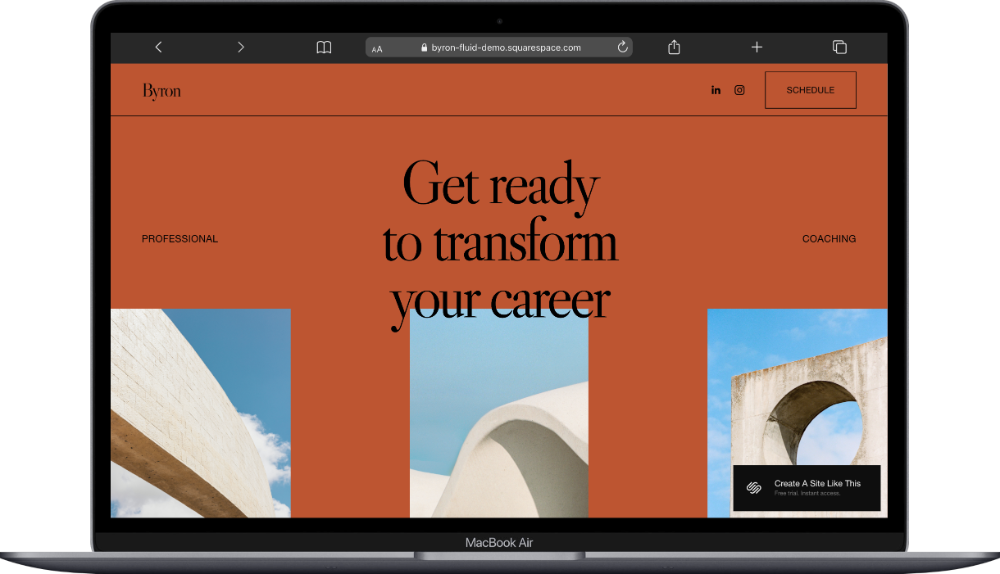
Byron is a one-page Squarespace template with earthy tones, dynamic scrolling elements, and icons throughout. Built for coaches and consultants, it includes sections for your approach, services, process, and testimonials.
The homepage opens with a hero section that includes a call-to-action button and three photos, followed by an about section, scrolling message bar, services breakdown, process overview, testimonials, another CTA, and footer with newsletter signup.
If you're building a personal brand around your coaching practice and need to showcase your services and convert visitors into clients, this template handles that well.
2. Forma Squarespace Template
Best for: Forma is best for online course creators, entrepreneurs, membership sites
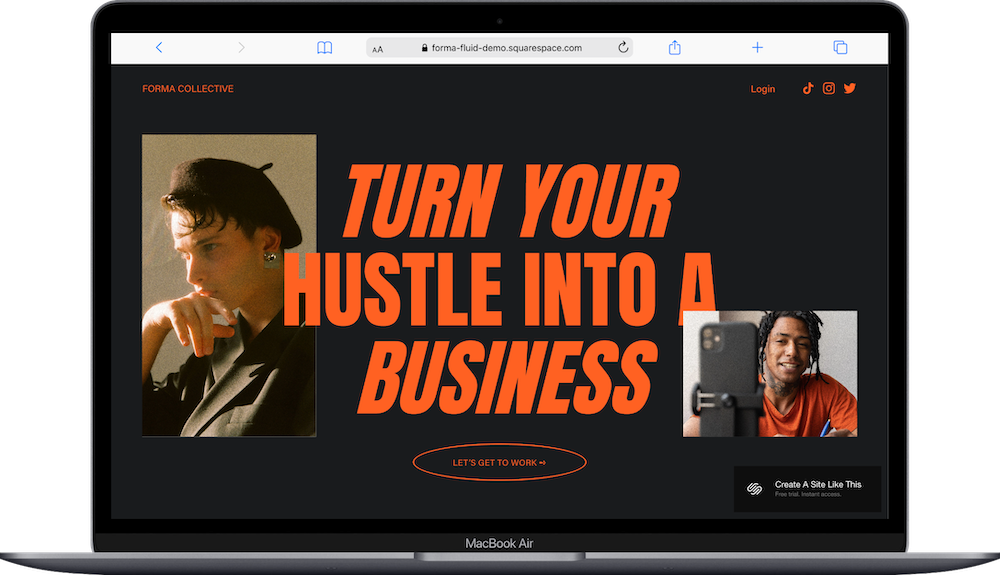
Forma is a one-page Squarespace template with bold black typography, bright accent colors, and a modern, high-contrast design. Built for course creators and membership sites, it includes a separate login page for students or members.
The homepage opens with a split hero section: large headline on the left, sign-up form on the right. Below that: scrolling logo bar, course/program features with icons, testimonials, pricing table, FAQ accordion, final CTA section, and footer with social links. The login page is a simple centered form with minimal branding.
If you need to showcase what's inside your program, collect email addresses, and give people a way to log in and access content, Forma handles all three well.
3. Grant Squarespace Template
Best for: Grant is best for entrepreneurs, investors, personal brands with multiple projects
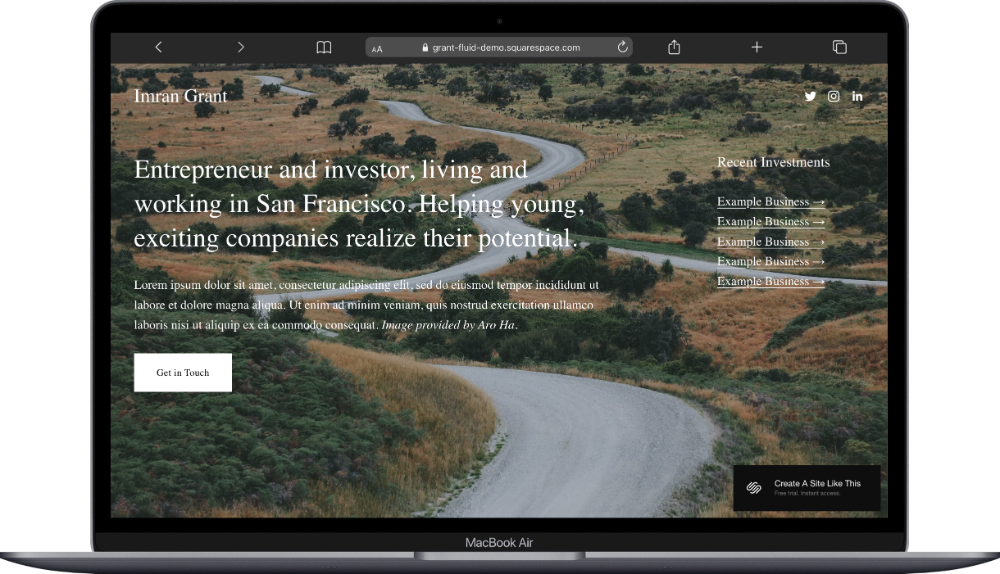
Grant is a one-page Squarespace template with bold typography and a grid-based layout. Built as a professional link hub, it's designed for entrepreneurs, investors, or anyone managing multiple projects or ventures.
The homepage opens with a centered headline and bio, followed by a grid of linked cards (each with an image, title, and description) that direct visitors to external sites, social profiles, or specific projects. Below the grid: an about section with photo and longer bio, then a footer with contact links and social icons.
This template is a good fit if you're an entrepreneur with multiple ventures, an investor who wants a polished online presence, or anyone who needs a professional link-in-bio style page.
Creative & Portfolio One-Page Templates
4. Devoe Squarespace Template
Best for: Devoe is best for actors, models, performers, creators, and influencers
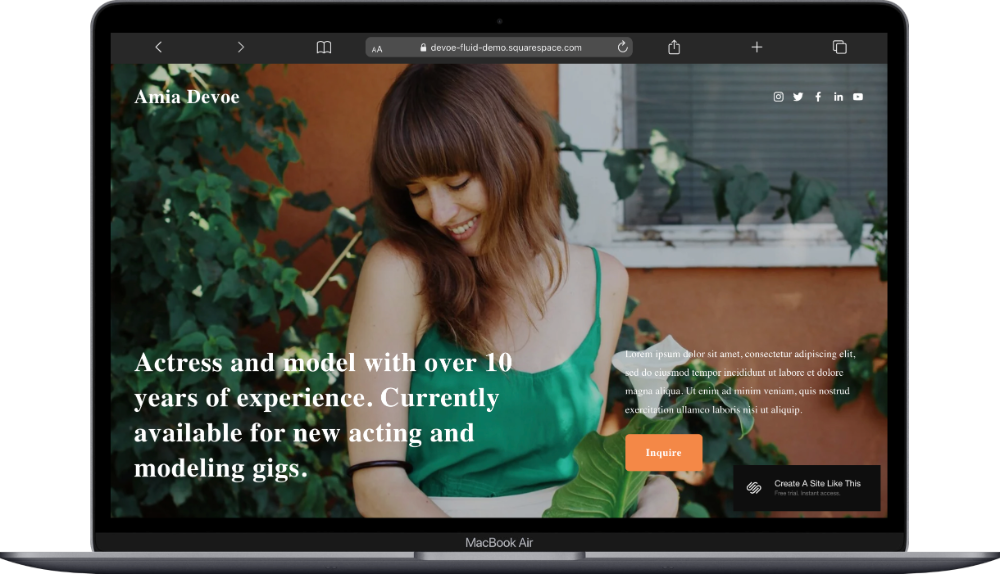
Devoe is a one-page Squarespace template with a single full-screen photograph and text placed directly over it. Built for actors and models, it's a no-scroll landing page that shows casting directors exactly what they need to see.
The entire page is one hero section: your name in the header, a headline about your experience, a few lines of bio copy, an "Inquire" button, and social links across the top.
If you need a professional web presence to share your work and make it easy for industry contacts to reach you, this template keeps everything accessible in one place.
5. Manual Squarespace Template
Best for: Manual is best for authors, book launches, single product promotions
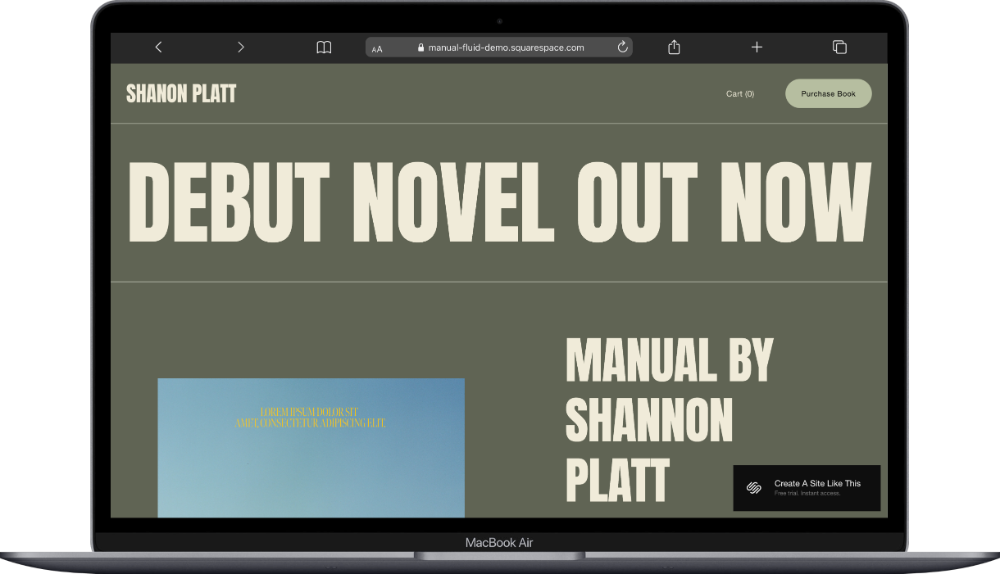
Manual is a one-page Squarespace template with muted olive and cream tones and bold condensed typography. Built for authors promoting a book, it centers the product and funnels readers toward purchase.
The homepage opens with a banner headline announcing the book release, followed by a product section with book cover image, title, price, and "Add to cart" button. Below that: a pull quote review, an "About" section with author photo and bio, then a footer with email signup form and navigation links to "Buy the Book," "Reviews," and "About the Author."
6. Otto Squarespace Template
Best for: Otto is best for tech professionals, developers, minimal portfolios
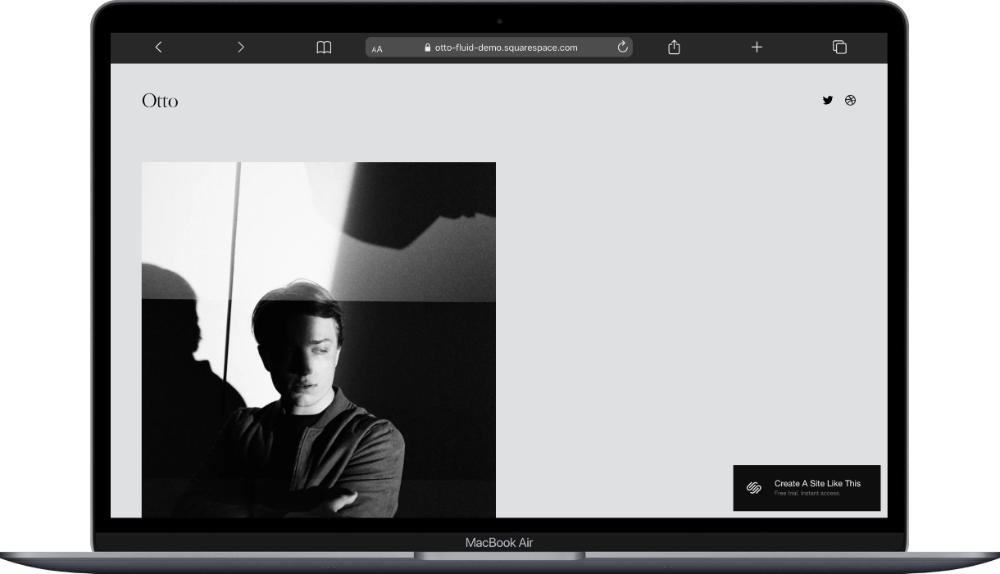
Otto is a one-page Squarespace template with a pale gray background, serif headlines, and abundant white space. Built for designers and developers, it presents your work history and portfolio in a resume-style format.
The homepage opens with a large black-and-white portrait photo, followed by an intro paragraph with current role and work history. Below that: an "About" section with professional summary, a "Projects" section with a slider showcasing mobile app designs, an "Experiments" section describing side projects, and a "Contact" section with email, social links, phone number, and "Contact Me" button. The footer displays a physical address.
This works well for developers, UX designers, or anyone in tech who wants a minimal portfolio that lets their projects speak for themselves.
7. Suhama Squarespace Template
Best for: Suhama is best for copywriters, freelance writers, content creators
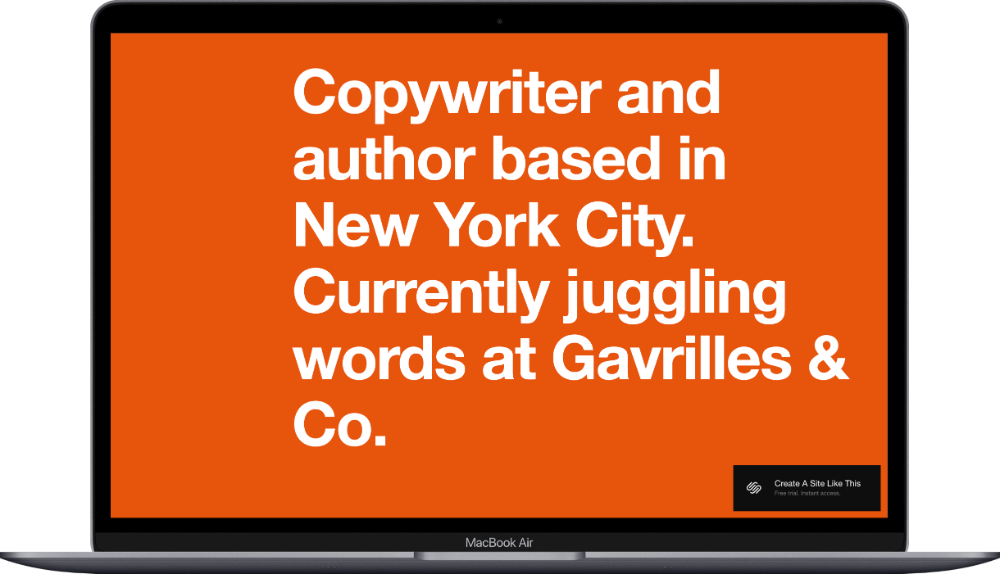
Suhama is a big bold one page website for copywriters. It’s minimal, but gives you space to introduce your services, show off your writing style and projects, and make it easy for potential clients to reach out.
The homepage opens with a large headline introducing who you are and where you work, followed by an "Intro" section with bio copy, a "Work" section highlighting your expertise, a numbered project list (Project 01 through Project 08) that functions as clickable portfolio links, an "About" section with detailed professional background, a "Values" statement, and a "Get in Touch" section with phone number, email, physical address, and a link to book on Calendly.
You can adapt it to highlight different types of work: web copy, brand messaging, editorial content, whatever you specialize in.
8. Toledo Squarespace Template
Best for: Toledo is best for illustrators, visual artists with external portfolios
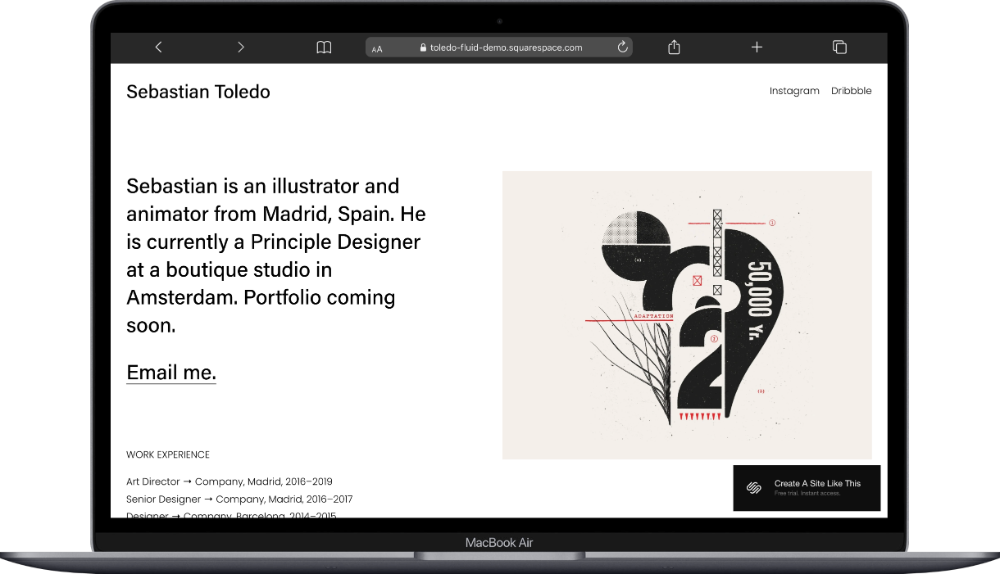
Toledo is a minimalist one-page Squarespace template with an "above-the-fold-only" section. The demo includes a concise bio on the left and complementary image on the right, with direct email link and work experience timeline. This makes sense if your main portfolio lives on platforms like Instagram or Dribbble but you want a branded home base with a custom domain.
9. Sidney Squarespace Template
Best for: Sidney is best for musicians, bands, solo artists
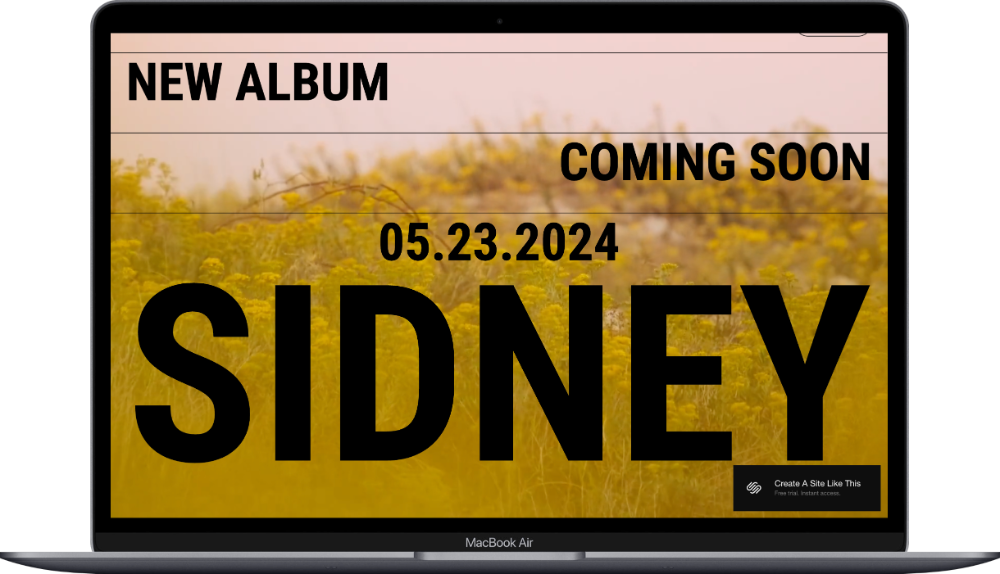
Sidney is a one-page Squarespace template designed to give fans a central place to find your music, upcoming shows, and ways to follow you. It’s just a single announcement screen. This is a good option if you want something more professional than just social media links. You can promote new releases, share tour dates, and connect with your audience.
Built for musicians promoting an album release, it displays key details about an upcoming drop without any additional sections.
The homepage is one full-screen section with a background photo, a Coming Soon headline, the release date, and the artist or band name in large type across the image. This works if you need a placeholder while you build out a full site, or if you're running a targeted promo campaign for an upcoming specific release.
E-commerce & Products One Page Templates
10. Essex Squarespace Template
Best for: Essex is best for digital products, downloadable goods, SaaS platforms, AI tools
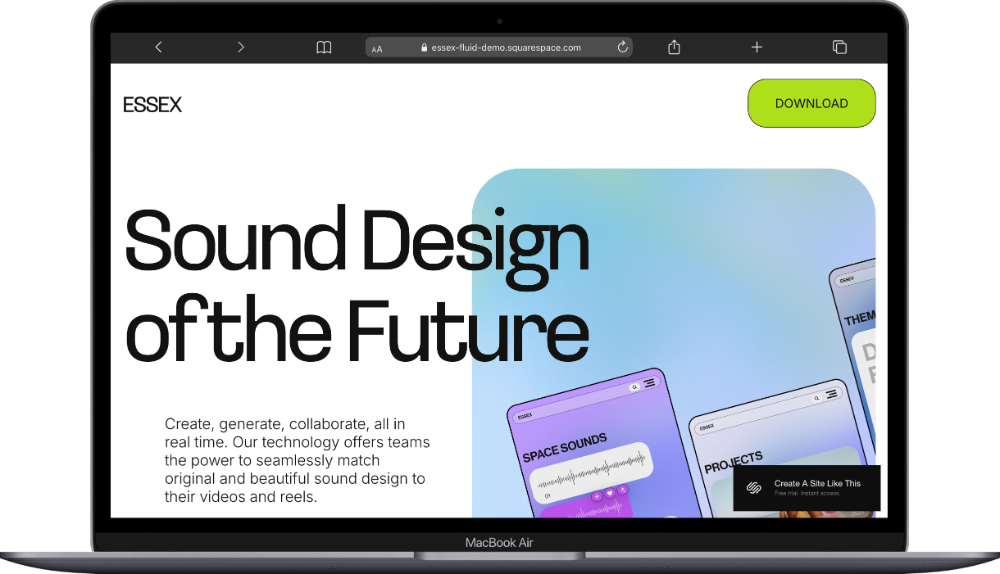
Essex is a one-page Squarespace template with playful & bright gradient colors and bold rounded typography. Built for SaaS platforms, AI tools, and digital products, it guides your visitors & customers straight to what your product does and why they should download it.
The homepage opens with a hero section featuring a large headline, product description, app mockup images, and a "Download" button. Below that: a section explaining the key benefit, a four-column features breakdown with icons (Generate, Edit, Enhance, Collaborate), a testimonial quote on a gradient background, and a footer with email signup form.
Get Essex if you have a product-based business and want a simple, well-designed template to get started.
11. Mariana Squarespace Template
Best for: Mariana is best for small online shops, product launches, limited collections
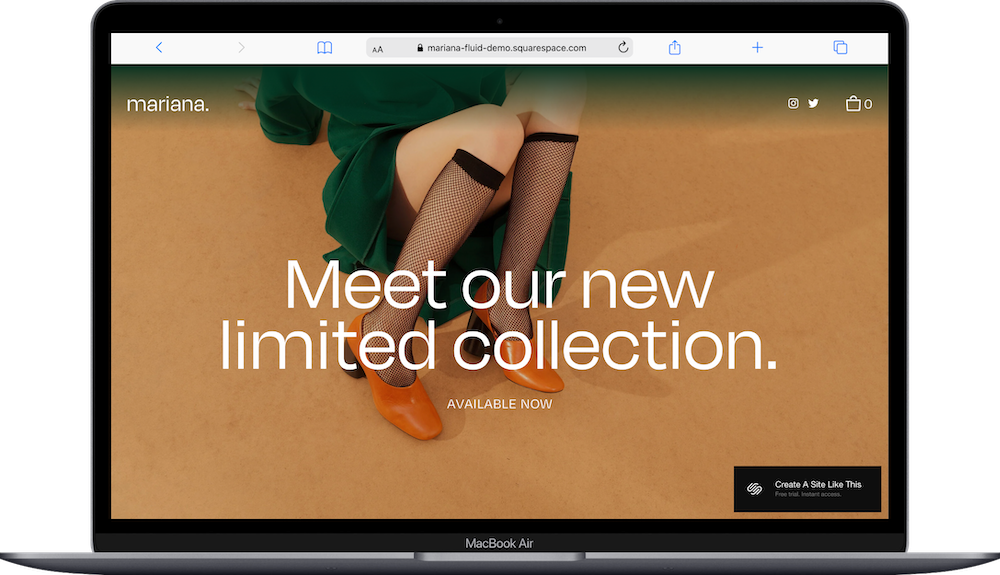
Mariana is a one-page Squarespace template with warm terracotta, navy, and cream tones and bold photography throughout. Built for small online shops or limited product releases, it lets you showcase a curated collection and sell directly from one scrolling page.
The homepage opens with a hero section announcing a new collection, followed by a three-product grid with images, titles, prices, size selectors, quantity pickers, and "Add to Cart" buttons. Below that: a full-width lifestyle image, an "About" section with brand story and two supporting photos, a ten-image gallery grid, and a footer with email signup form and a "Stay in the loop" call-to-action.
Mariana is a good choice if you're testing a product idea, launching a capsule collection, or want to sell a handful of items without building out a full e-commerce site.
12. Zorayda Squarespace Template
Best for: Zorayda is best for upscale brick-and-mortar shops, retail coming soon pages
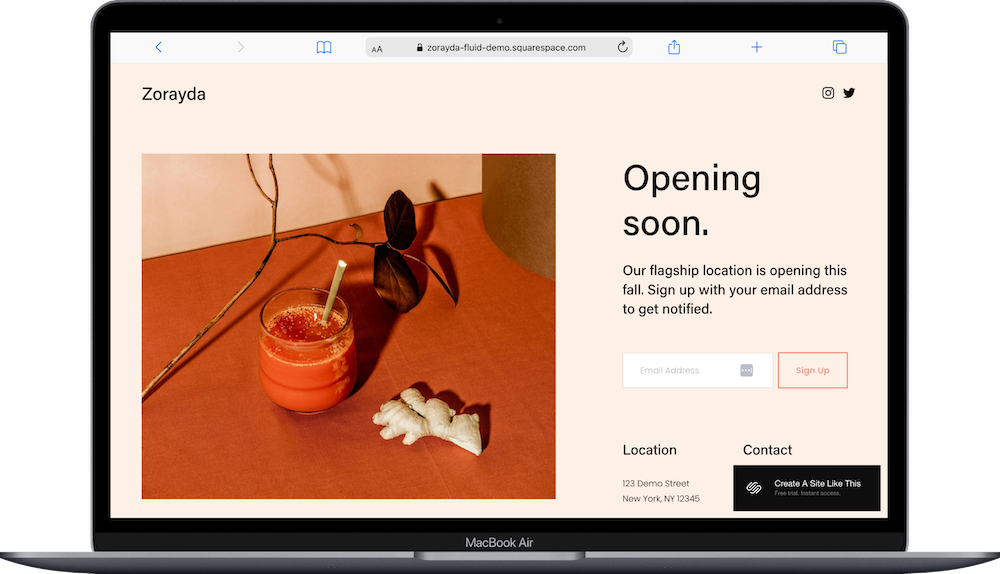
Zorayda is a one-page Squarespace template with a warm terracotta and cream color scheme and a clean split-screen layout. Built as a coming soon page for brick-and-mortar shops, it lets you announce your opening and start collecting email addresses before launch day.
The homepage is divided into two sections side by side: the left shows a lifestyle product photo, while the right displays an "Opening soon" headline, brief announcement text, email signup form, and two columns below listing "Location" and "Contact". Social media icons appear in the top right corner.
The Zorayda template works if you're opening a physical retail location and want to build buzz and gather interested customers before you open your doors.
Events & Celebrations One-Page Templates
13. Morais Squarespace Template
Best for: Morais is best for weddings, couple websites
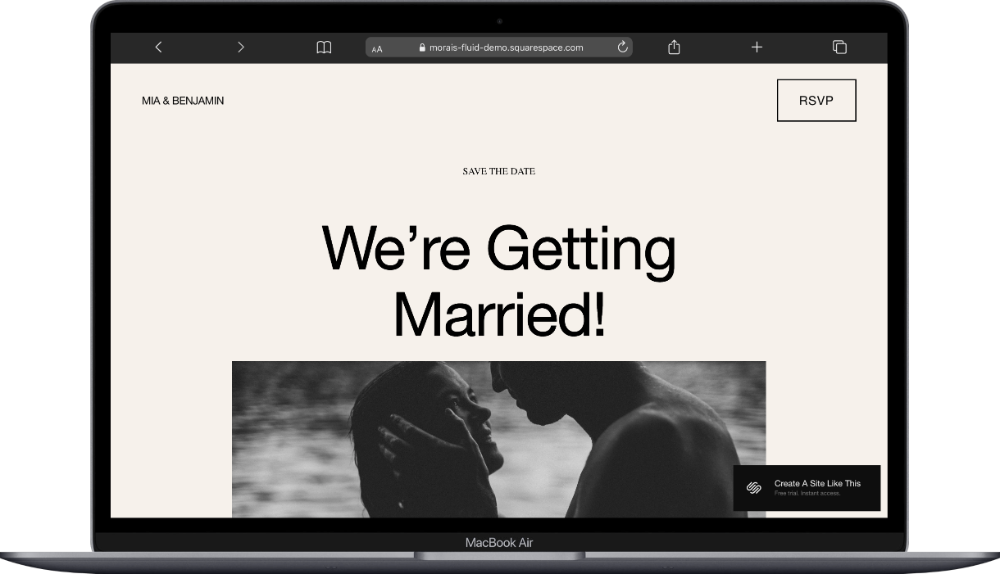
Morais is a one-page Squarespace template for couples getting married. With soft beige tones, classic serif typography, and a romantic, understated aesthetic, it’s 100% built for weddings. It functions as a comprehensive one page wedding website where you can share your story, event logistics, and collect RSVPs all in one place.
The homepage opens with the couple's names and an "RSVP" button in the header, followed by a "Save the Date" announcement, "We're Getting Married!" headline, engagement photo, and wedding date. Below that: event details paragraph, two-column breakdown of ceremony and reception locations with times and addresses, and an "RSVP" button. Further down: a "Travel" section with hotel block information and recommended accommodations, a three-image photo gallery, a "Registry" section explaining gift preferences with a link to registry or honeymoon fund, and a final full-width "RSVP" section.
The Morais template works for your wedding if you want to give guests everything they need without sending them to multiple pages or external sites.
Read mySquarespace Wedding Template Roundup for seven more template options for your wedding.
14. Singularity Squarespace Template
Best for: Singularity is best for festivals, conferences, collaborative events
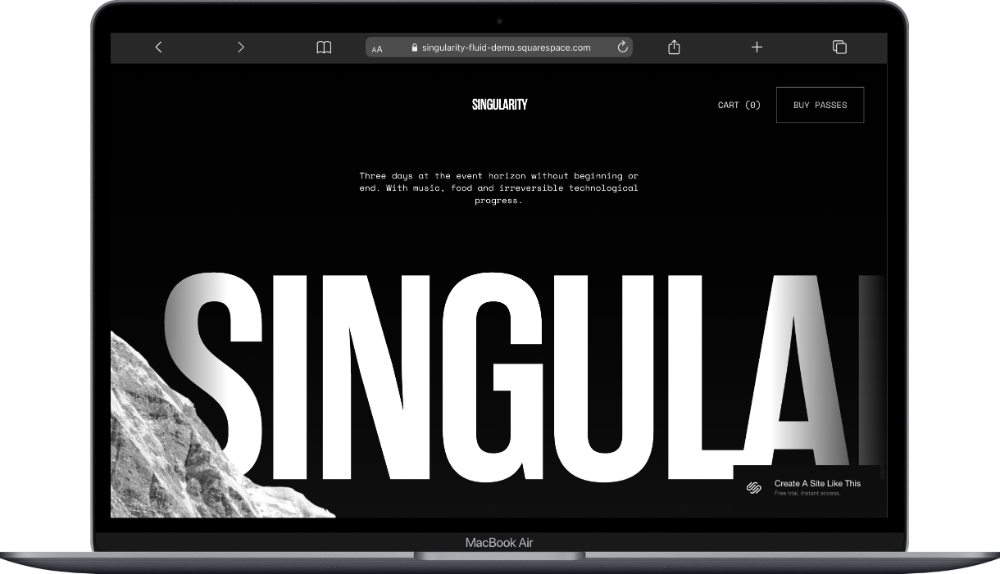
Singularity is a dynamic one-page Squarespace template with a bold black-and-white design and dramatic typography. Built for festivals, conferences, and large-scale events, it uses anchor links in the navigation to jump between sections so attendees can find what they need quickly.
The homepage opens with a full-screen hero featuring the event name overlaid on a landscape photo, followed by "The Location" section with venue details and image collage, "Registration Passes" section with a four-column ticket grid (each showing pass type, price, perks list, and "Register" button), "Shop the Presale" section with merchandise for sale, and a footer with "Register" call-to-action.
Singularity works if you're organizing a creative festival, conference, or collaborative event and need to sell different ticket tiers, promote merchandise, and give people all the event information on one page.
15. Wycoff Squarespace Template
Best for: Wycoff is best for parties, graduation celebrations, casual events with RSVP
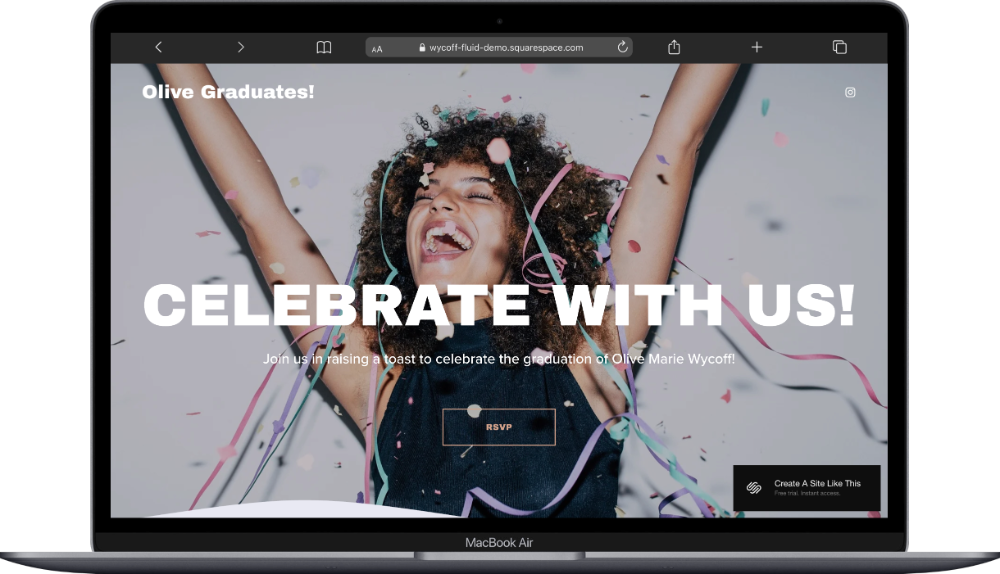
Wycoff is a one-page Squarespace template with a light, airy color palette and full-page photo backgrounds. Built for casual celebrations like graduation parties, birthdays, or informal gatherings, it gives you a good space to share event details and collect RSVPs.
The homepage opens with a hero section featuring a celebration photo, "Celebrate with us!" headline, event description, and "RSVP" button. Below that: a section with the date and time paired with a photo, a venue section showing the location name and address with another photo, an "RSVP" section with "Let us know if you can make it!" text and "I'll Be There!" button, and a footer with event hashtag and social media link.
Wycoff is a good simple event template that works if you're throwing a party and need a simple way to get the word out and track RSVPs.
16. Hoyd Squarespace Template
Best for: Hoyd is best for event receptions, post-ceremony gatherings
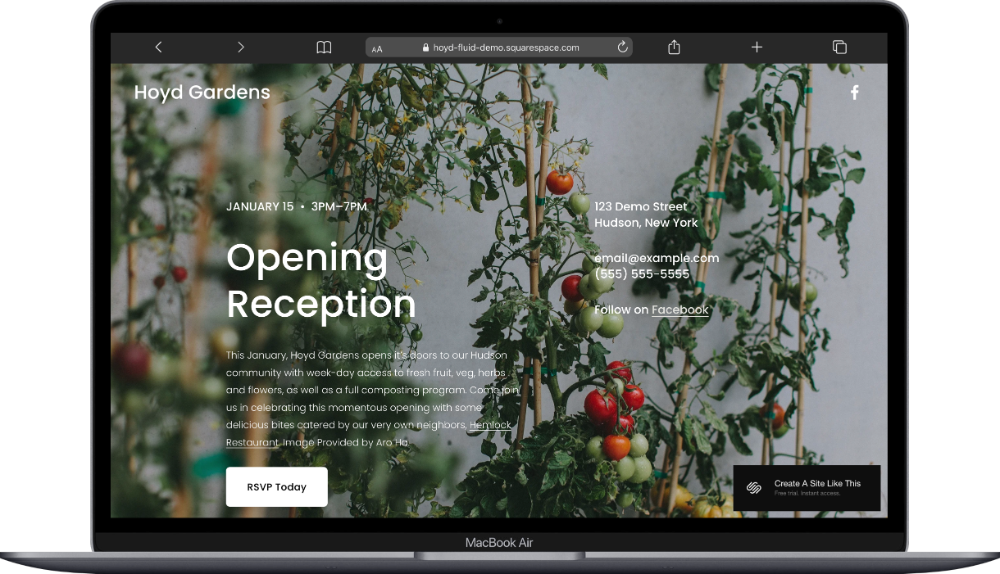
Hoyd is a one-page Squarespace template with text overlaid on a full-screen background photo. Built for event receptions or post-ceremony gatherings, it's a simple, focused landing page that announces the celebration and collects RSVPs.
The homepage displays a single section with the venue name in the header, a background image, "Opening Reception" headline centered on the page, event date and time on the left, venue address on the right, a paragraph describing the event below the headline, contact information, and an "RSVP Today" button at the bottom.
Hoyd works well if you're hosting a reception that's separate from your main event - like a wedding after-party, gallery opening, or community celebration - and need a dedicated page just for that portion.
Food & Beverage One-Page Templates
17. Belisa Squarespace Template
Best for: Belisa is best for vibe-y restaurants, cafes, casual dining
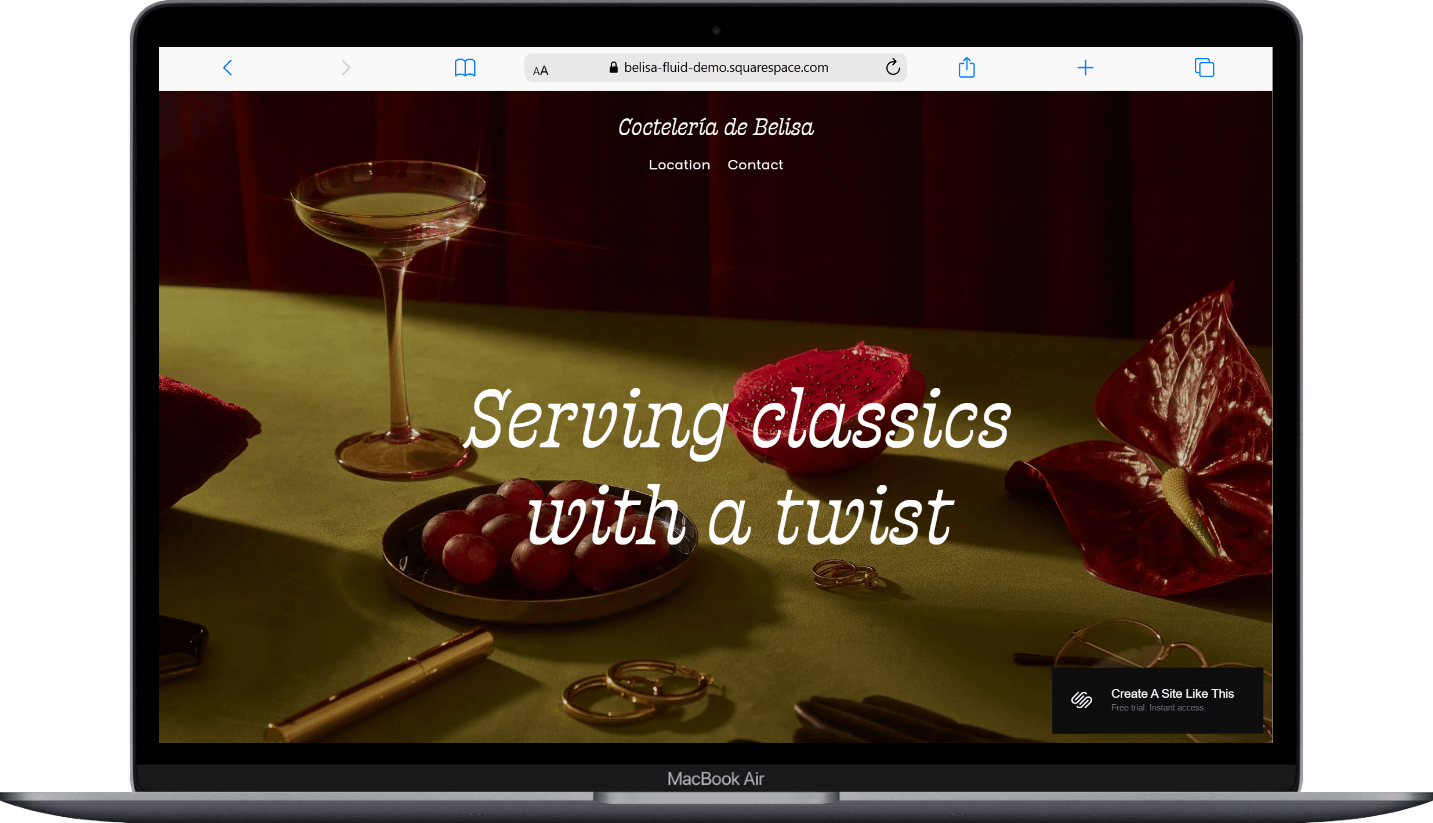
Belisa is a one-page Squarespace restaurant template with rich burgundy and cream tones, moody food and drink photography, and a retro aesthetic. Built for restaurants, cafes, and casual dining spots, it gives you space to showcase your vibe, menu highlights, and make it easy for customers to find you or book a table.
The homepage opens with a hero section featuring a cocktail photo and tagline, followed by an "About" section with oval photo and description, a "Drinks you can't put down" section with four circular drink photos and names, a food partnership callout with plated dish photo, a customer quote on a dark background, a location section with neighborhood details and exterior photo, a reservation form, a four-image gallery grid, and footer with address, hours, phone, and social links.
Belisa is a great choice if you run a vibey restaurant or bar and need to communicate your atmosphere and share what's on offer.
18. Fayette Squarespace Template
Best for: Fayette is best for bars, speakeasies, nightlife venues
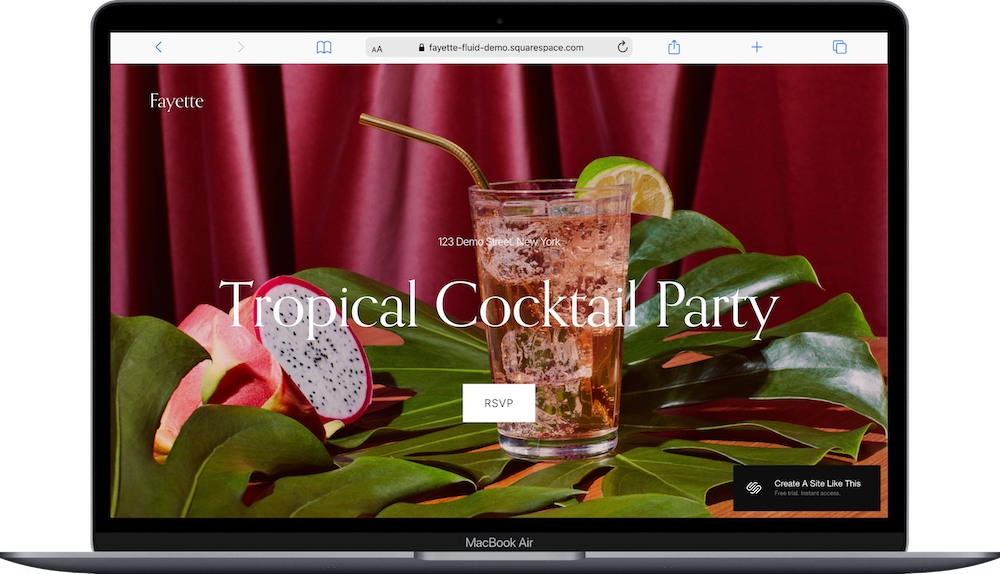
Fayette is a one-page Squarespace restaurant template with deep burgundy backgrounds and lush cocktail photography. Built for bars, speakeasies, and nightlife venues, it includes a pop-up RSVP form that lets you manage capacity or maintain an exclusive vibe.
The homepage opens with a hero section showing a tropical cocktail, event name, venue address, and "RSVP" button that triggers the pop-up form. Below that: a "Fine Drinks" section with cocktail photo and drink menu description, a "Good Vibes" section describing the atmosphere with another cocktail photo, an "RSVP" section with "Join Us" button and walk-in policy note, and a footer displaying the venue address. The RSVP pop-up form collects name, email, and attendance confirmation.
Fayette is a good choice if you're running a bar, speakeasy, or event space where you want people to request access or RSVP.
19. Heron Squarespace Template
Best for: Heron is best for restaurant collabs, pop-ups, multi-vendor dining events
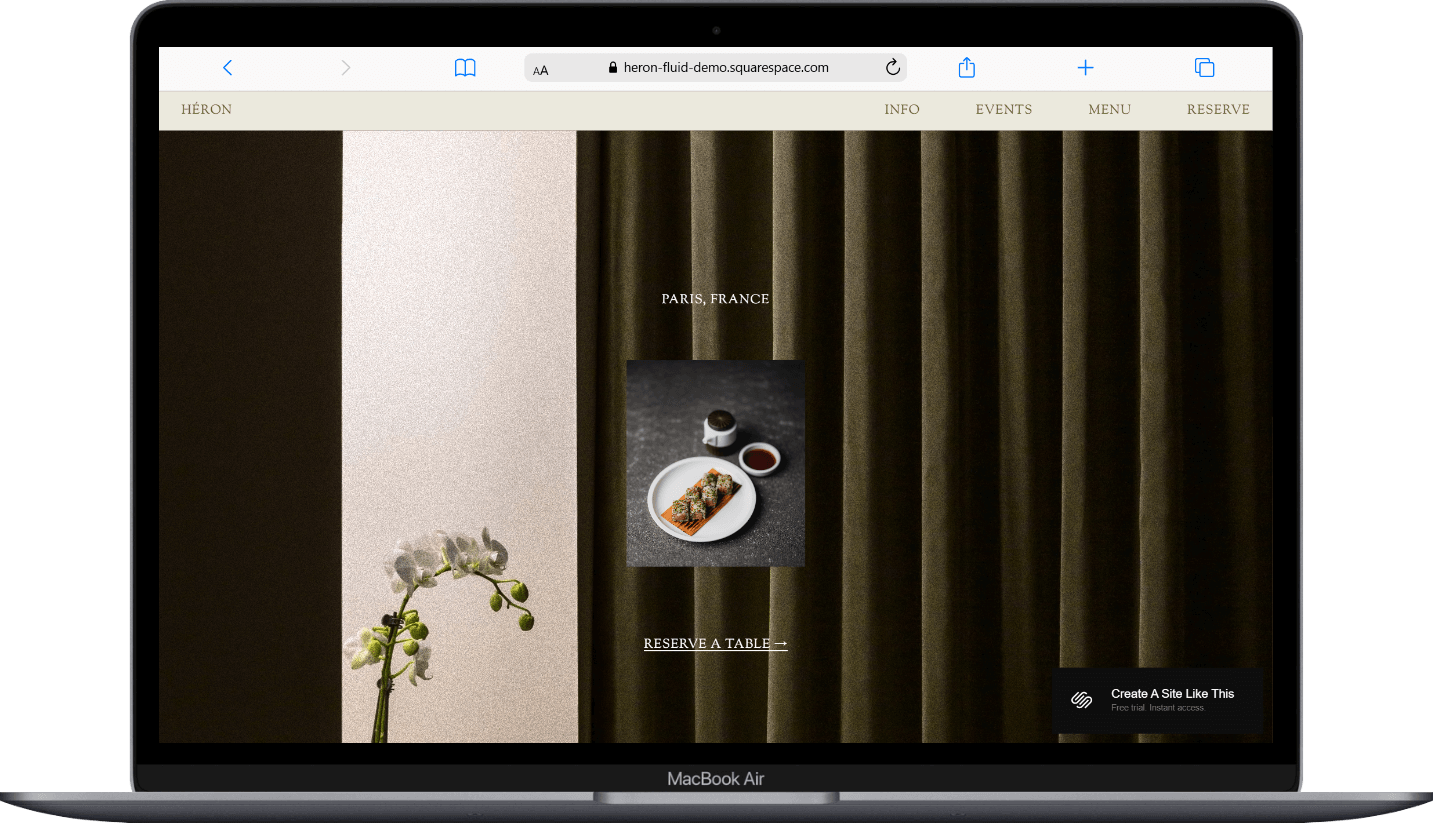
Heron is a one-page Squarespace template from the Collaboration Collection with muted, elegant earth tones and a sophisticated, gallery-like layout. Built for restaurants, it uses anchor links in the navigation to jump between Info, Events, Menu, and Reserve sections, making it easy for diners to find what they need.
The homepage opens with a hero section featuring the restaurant name and minimal navigation links across the top. Below that: an "Our Vision" section with brand story and interior photos, an "Events" section highlighting upcoming dinners or collaborations with event details and food photography, a "Menu" section, styled food photography throughout, a "Dinner Specials" section, and a "Reservations" section with booking information and contact details.
Heron is beautiful. It will work for restaurant collaborations, pop-up dining experiences, or venues that host rotating events and want to showcase both their concept and what's happening next.
Health & Wellness One-Page Templates
20. Florence Squarespace Template
Best for: Florence is best for spas, wellness centers, beauty services
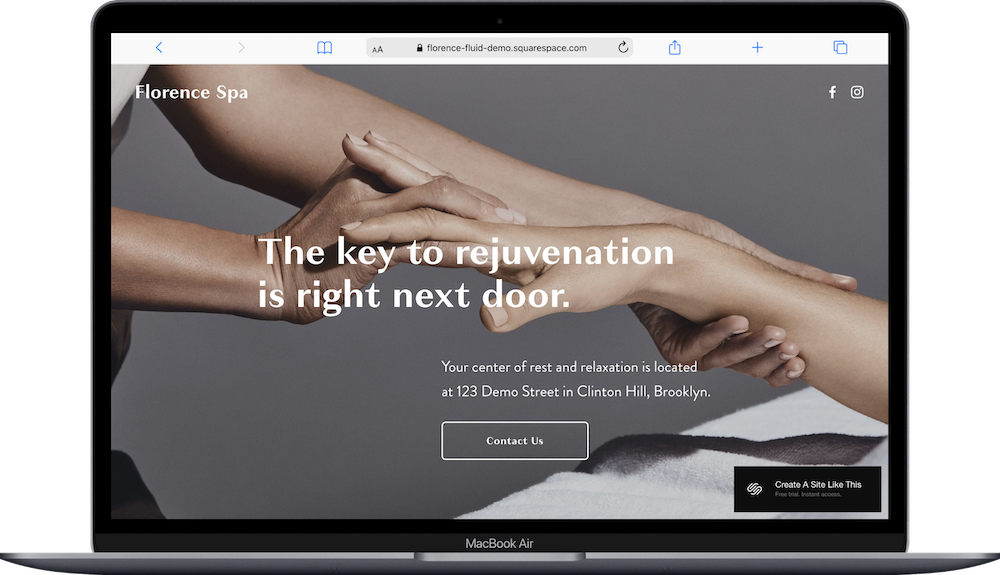
Florence is a one-page health & wellness Squarespace template with a calming grayscale palette and serene spa photography. Built for spas, wellness centers, and beauty services, it's a simple landing page that introduces your space and drives phone inquiries.
The homepage displays a single hero section with the spa name in the header, a full-screen background photo of hands in a massage pose, headline "The key to rejuvenation is right next door," location description, and a "Contact Us" button that links to your phone number. Social media icons sit in the top right corner.
While very simple, Florence will work for you if you run a spa or wellness practice that primarily books by phone and need a simple (how many times can I say simple?) polished web presence that gets people to call and make appointments.
21. Noll Squarespace Template
Best for: Noll is best for nutritionists, wellness coaches, holistic health practitioners
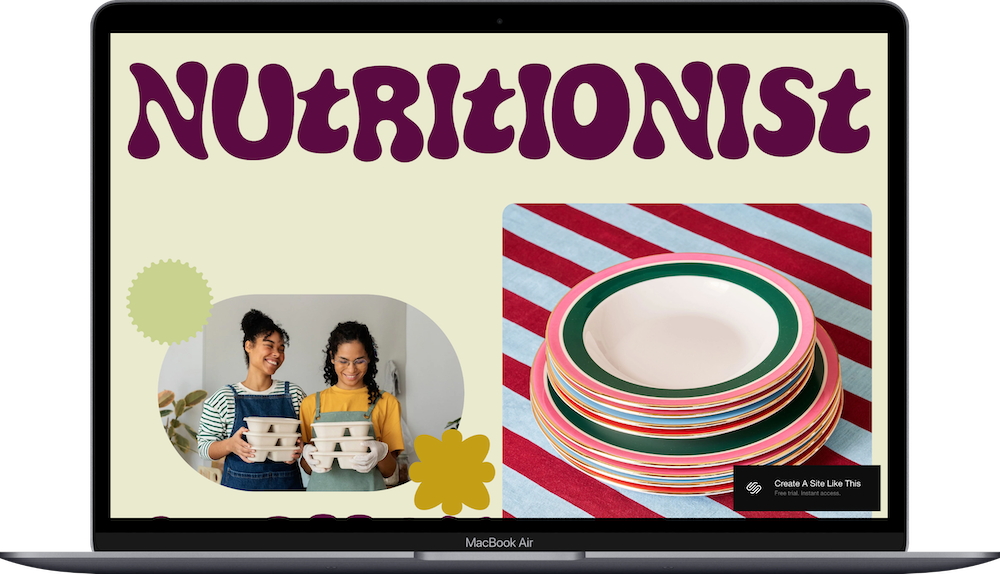
Noll is a robust one-page Squarespace template with a vibrant and playful color palette and retro rounded typography. Built for nutritionists, wellness coaches, and holistic health practitioners, it walks potential clients through your credentials, services, and how to work with you.
The homepage opens with a hero section featuring the "Nutritionist & Chef" title and circular photos of food and the practitioner. Below that: an intro paragraph with "Book a Session" button, a "Background" section with credentials and experience, a "Services" section breaking down offerings like meal planning and consultations with decorative accents, a "Sample Menu" with example meal plans, a "How It Works" section with a detailed intake form asking about dietary needs and health goals, a closing photo and call-to-action, and footer with contact information.
Go with Noll if you like the aesthetic and offer personalized wellness services and need to explain your approach, collect detailed client information upfront, and guide people toward booking consultations.
22. Randi Squarespace Template
Best for: Randi is best for dietitians, yoga instructors, multi-service wellness providers
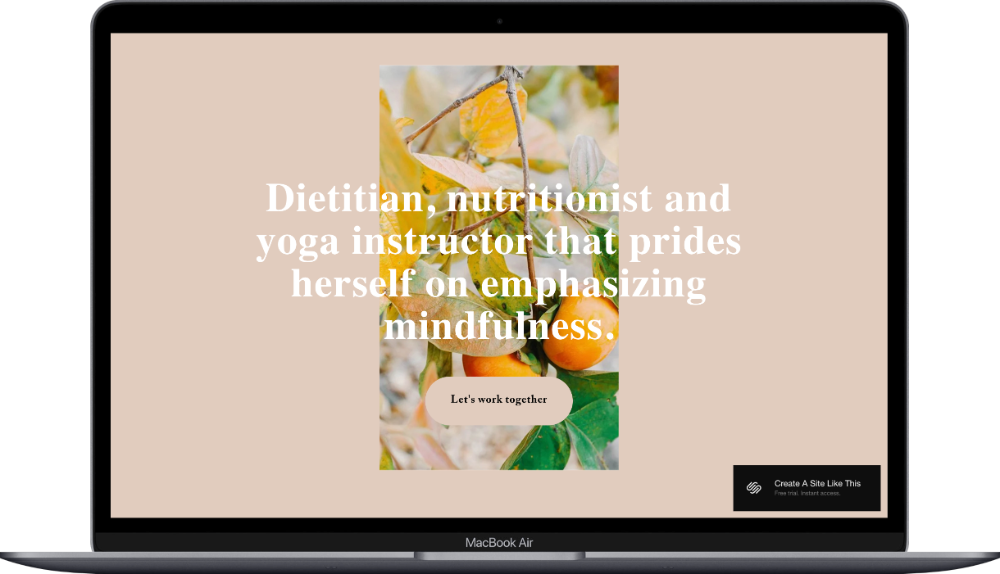
Randi is another very simple one-page Squarespace template. With a soft beige background and a centered layout featuring a single photo with overlaid text, it’s built for dietitians, nutrition coaches, and yoga instructors. It also includes a contact form to collect inquiries or class sign-ups.
The homepage displays a hero section with a bright citrus photo, headline describing your services and approach, and a "Let's work together" button that likely triggers a contact form.
Use Randi if you need something simple to get started and offer multiple wellness services - like nutrition counseling and yoga classes.
Real Estate & Design One-Page Templates
23. Colton Squarespace Template
Best for: Colton is best for interior designers, design consultations

Colton is a simple, one-page Squarespace template with a full-screen interior design photo and elegant serif typography. Built for interior designers, it's a minimal website with just a landing page, and focused on booking consultations rather than showcasing a full portfolio.
The homepage displays only a single hero section with the designer's name in the header, a background photo of a minimalist bedroom, a headline and a tagline, and a "Get in Touch" button. Social media icons appear in the top right corner.
Colton is another landing page style one-page website. It works if you're focused on landing initial client conversations and want to qualify leads through a consultation process before showing them your full body of work.
24. Radian Squarespace Template
Best for: Radian is best for architects, design studios, minimal portfolios
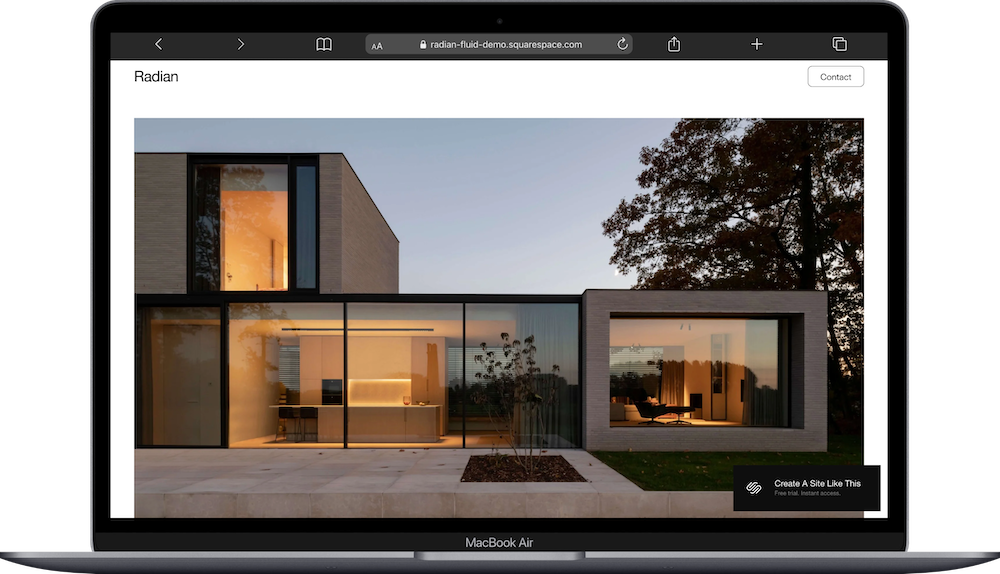
Radian is a versatile one-page Squarespace template with a minimalist, modern design that highlights large, high-quality projects. With a minimalist design, generous white space, and large architectural photography, it’s built for architects, design studios, and modern construction firms.
The homepage opens with a hero image of a contemporary home, followed by a mission statement. Below that: a "Projects" section with a grid of featured work images and titles, an "Explore" section listing individual projects with descriptions and accompanying photos, a "Clients" section displaying past client names in columns, a "Let's Build!" section with a detailed project inquiry form, and an "About" section on a black background with interior photo and four-column breakdown covering Services, Clients, Locations, and Recognition.
Go with Radian if you're an architect or designer who wants to lead with your work and collect detailed project information from potential clients upfront.
25. Sellwood Squarespace Template
Best for: Sellwood is best for real estate agents, property listings, open house promotions
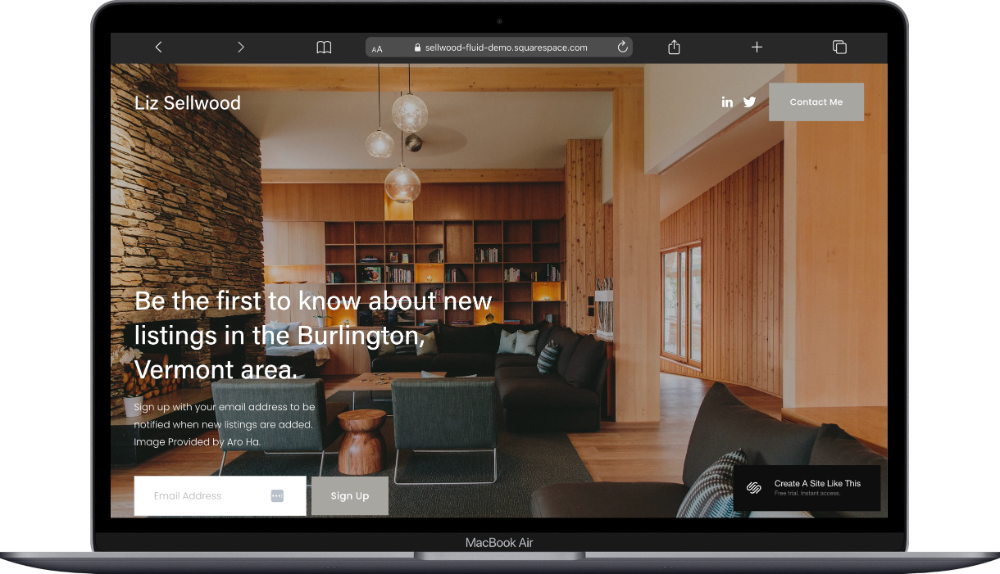
Sellwood is a simple Squarespace landing page for real estate listings. With warm wood tones and a full-screen property photo, it’s built for real estate agents, it's a landing page designed to promote specific listings or open houses and capture leads through email signup.
The homepage displays a single hero section with the agent's name in the header, a background photo of a modern interior, headline announcing new listings in a specific area, description inviting people to sign up for notifications, an email signup form with "Sign Up" button, social media icons, and a "Contact Me" button in the top right corner.
Choose Sellwood if you're running targeted property campaigns or want to create dedicated landing pages for individual listings rather than building a full real estate business site. You can highlight property details, share photos, and make it easy for interested buyers to contact you or schedule a viewing.
Recreation & Education One-Page Templates
26. Air Squarespace Template
Best for: Air is best for class-based businesses, lesson booking, activity providers. And skydiving schools.
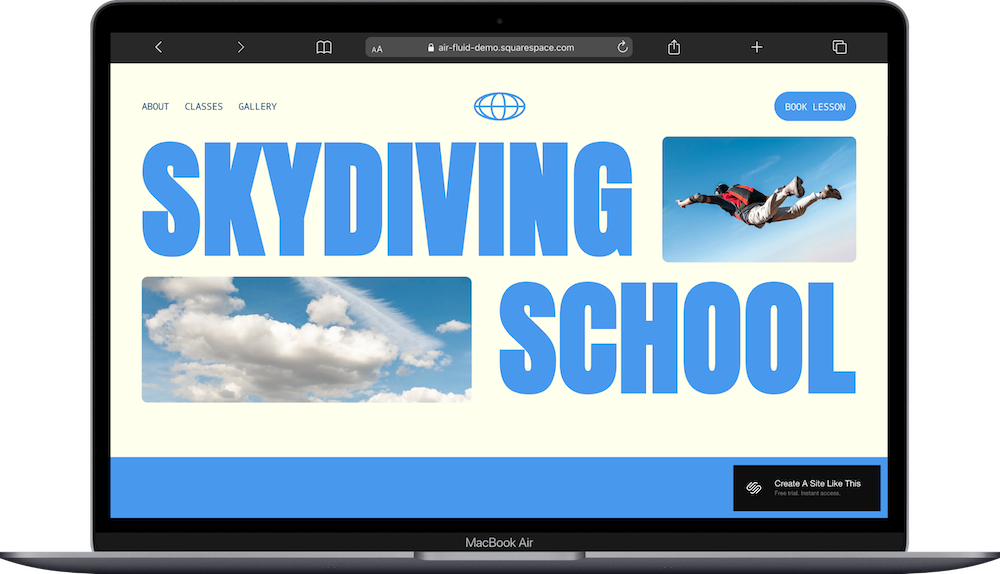
Air is an energetic and dynamic one-page Squarespace template with bright blues and a cream background. Built for class-based businesses like skydiving schools, it uses anchor links in the navigation to jump between About, Classes, Gallery, and Book Lesson sections.
This is one of the one page templates that function as a whole site, just condensed onto one page. The homepage opens with a hero section featuring large text and action photos. Below that: a "Meet Your Instructor" section with instructor bio and photo, a "Class Packages" section listing different lesson options with icons and descriptions, a three-card grid highlighting top classes, a "Fly With Us" booking section showing available appointment slots with "Book" buttons, a "Gallery" section with scattered skydiving photos on a blue background, and a footer with contact information and social links.
Choose the Air template if you like the teach yoga, offer cooking classes, run a dance studio, or provide any lesson-based service where people need to understand your offerings and book specific time slots.
Air is one of my favorites. It’s just fun.
Services One-Page Templates
27. Kearny Squarespace Template
Best for: Kearny is best for service providers, craftspeople, studios
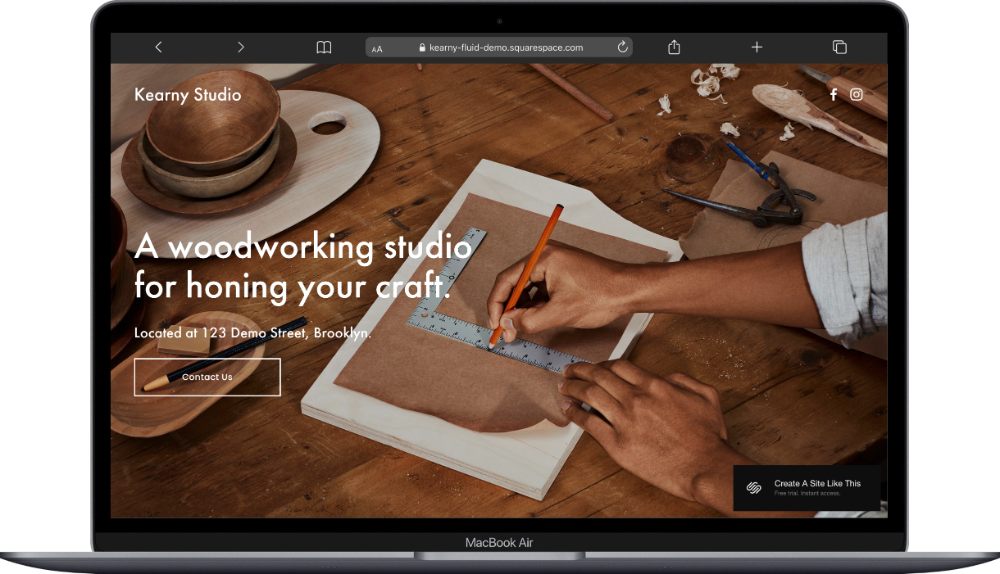
Kearny is a one-page Squarespace template built for a woodworking studio, with warm wood tones. Built for service businesses and makers, it's a simple landing page that explains what you do and collects client inquiries through a contact form.
The homepage opens with a hero section showing a woodworking table, studio name in the header, headline, location details, and "Contact Us" button. Below that: a "Let's work together" section with a detailed contact form. Social media icons sit in the top right corner.
Choose Kearny if you're a maker or service provider who doesn’t need a ton of info and just wants an easy website to explain your craft and make it easy for potential clients to reach out about working with you.
28. Oranssi Squarespace Template
Best for: Oranssi is best for construction companies, contractors, trade services
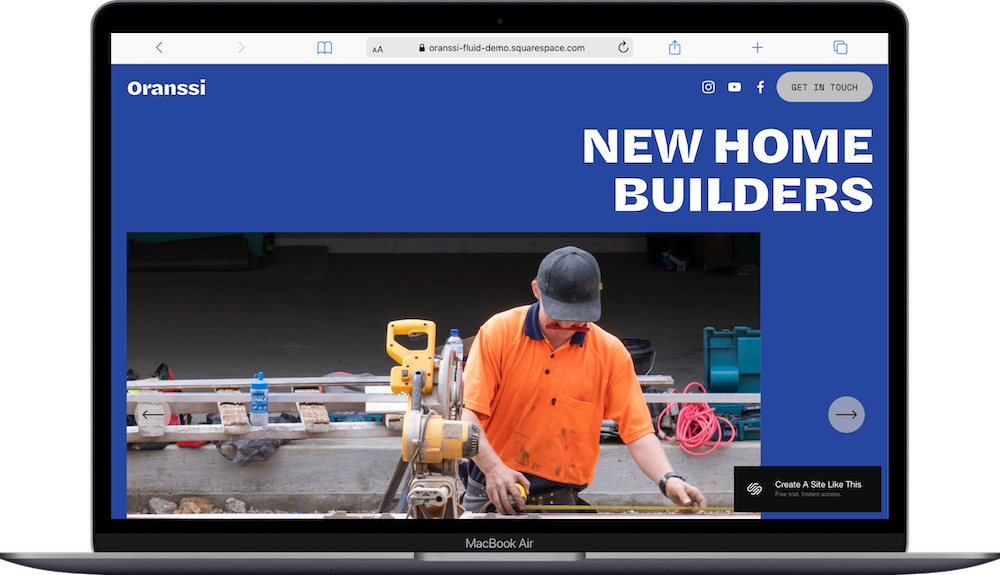
Oranssi is a robust one-page Squarespace website template with bold royal blue accents. Built for construction companies and contractors, it showcases your services, completed projects, and team while collecting quote requests.
The homepage opens with a hero section and below that, an "Our Services" section with a four-column grid with icons and descriptions, an "Our Projects" carousel showing before-and-after or completed work photos with project names, a call-to-action section with button, a section with company history and construction photos, an "Our Team" section, a "What Our Clients Say" testimonial slider, and a "Contact Us" footer.
Choose Oranssi if you are a home, construction or service based business and need to demonstrate your expertise, share past work, and generate leads through quote requests.
Coming Soon One-Page Templates
29. Archer Squarespace Template
Best for: Archer is best for book clubs, subscription services, upcoming launches
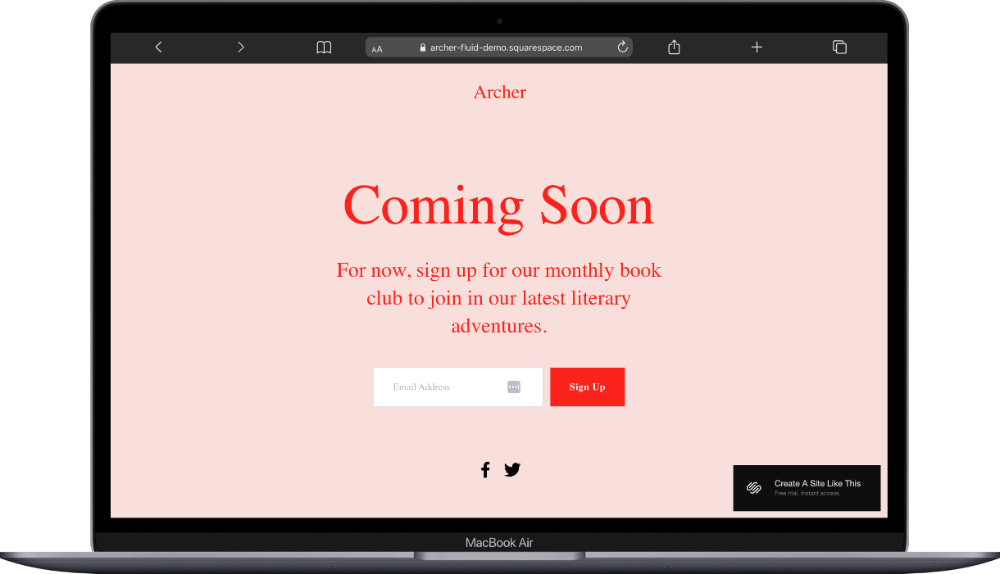
Archer is a coming soon template designed for a monthly book club in the demo, but it’ll really work for any subscription or membership you're launching. The one-page layout includes space to explain your concept, share what subscribers can expect, and collect email addresses to build your list before launch.
Get Archer if you're building anticipation for a new subscription service or membership offering, and want to start gathering an interested audience.
30. Bogart Squarespace Template
Best for: Bogart is best for athletic communities, fitness groups, sports organizations
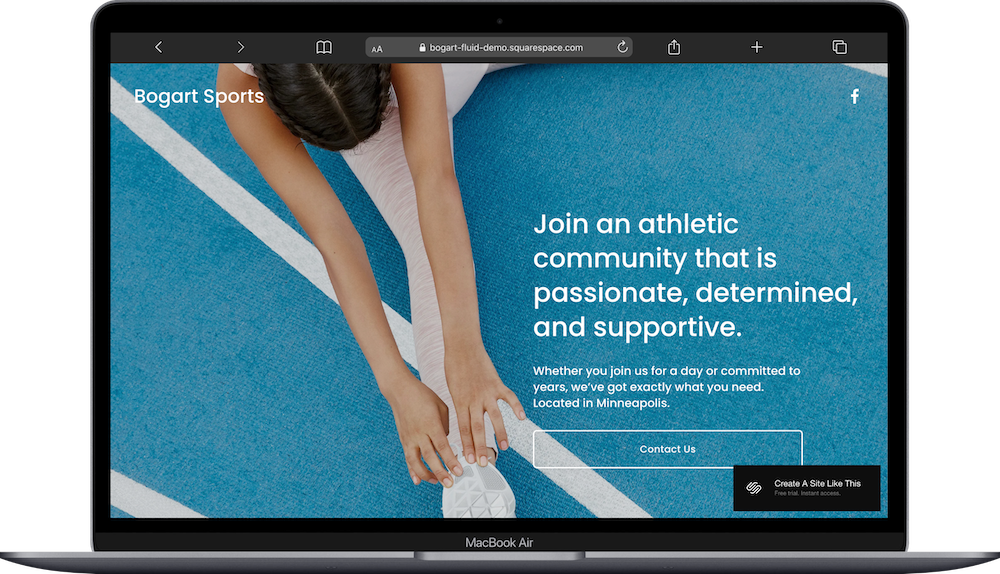
Bogart is a one-page coming soon Squarespace website template for athletic communities with a bold, energetic design. Built as a coming soon page for fitness communities and sports organizations, it announces what's launching and collects interested members.
The layout includes minimal navigation and focuses on announcing what's coming with a headline, brief description, and email signup form.
Choose Bogart if you're building a fitness community, sports league, running club, or athletic brand and want to start collecting interested members before your official launch.
31. Manor Squarespace Template
Best for: Manor is best for clothing brands, fashion launches, retail coming soon
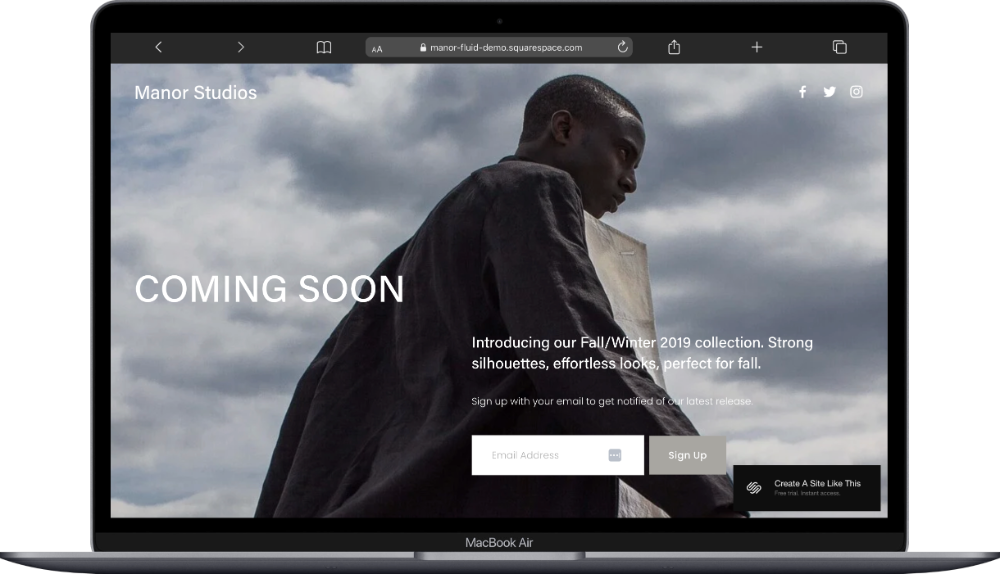
Manor is a one-page Squarespace template with a moody editorial photo and minimalist white typography. Built as a coming soon page for fashion and clothing brands, it teases an upcoming collection and captures email signups.
The homepage displays a full-screen section, a dramatic editorial-style photo, a Coming Soon headline, brief collection teaser describing the Fall/Winter line, email signup form with "Sign Up" button, and social media icons in the top right corner.
Get started with Manor if you're launching a fashion brand or retail concept and want to create anticipation and grow your email list before opening.
32. Mason Squarespace Template
Best for: Mason is best for apparel brands, retail pre-launch, fashion announcements
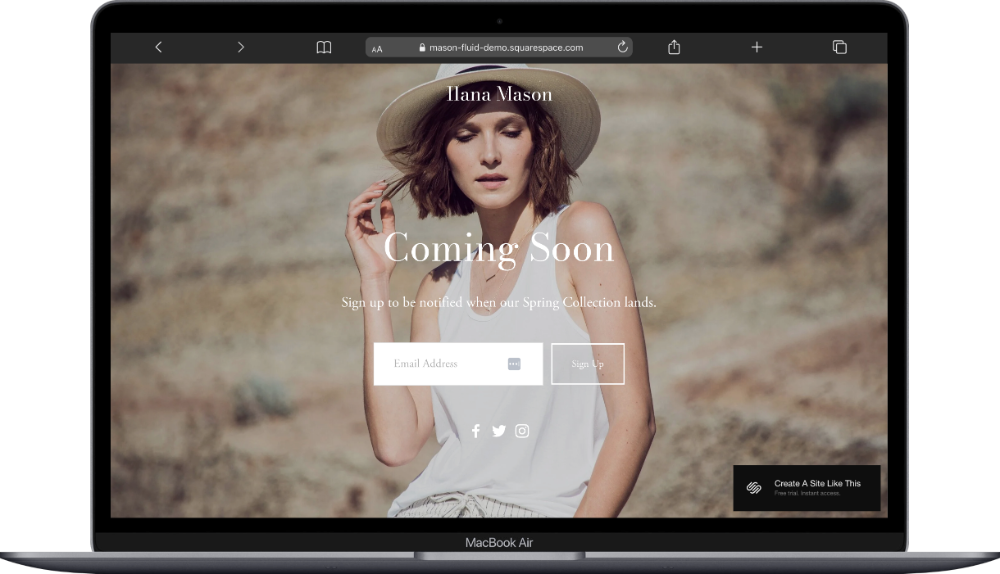
Mason is another coming soon one-page Squarespace template for clothing and fashion with a slightly different aesthetic than Manor. Like Manor, it's designed to announce a brand before launch and collect email addresses, but with its own visual style. The layout includes space for brand imagery, a teaser about what's coming, and a signup form.
Mason is a good choice if you're launching a clothing line or fashion brand and need a polished announcement page to build your audience before launch. Choose between Manor and Mason based on which design feels closer to your brand personality and which visual mood - dramatic or dreamy - fits your brand better.
How to Choose the Right One-Page Squarespace Template
First, think about what your goals are with your business and your website before picking a template.
Are you promoting a single event? Showcasing your portfolio? Launching a product? Booking consultations for your service? Each of these Squarespace one page templates free with your subscription is designed with a specific use in mind, but you can adapt any of them to fit your needs.
And quick word to the wise: Don't get too hung up on the demo content. If you're a yoga instructor and you like how Air is structured (even though it shows a skydiving school), you can absolutely use it. The demos are just examples, what matters is whether the layout and sections work for what you're trying to do.
Think about how your potential clients or customers will interact with your site too. If they need all the information at once to make a decision, a one-page format works great. If you're directing them to take one specific action like book a call, buy a ticket, download something, RSVP, these streamlined one-pagers keep them focused on your main call to action.
Here’s How To Get Started With Your One-Page Website Template:
Click through to view the demo of any templates that sound like a fit. See how the sections are organized and whether the overall structure works for what you need.
Sign up for a Squarespace free trial if you haven't already. You get 14 days to build your site before you need to choose a plan.
Select your template when you create your site. You can also start with a blank template, or buy a premium template.
Replace the demo content with your own text, images, and information. Start with the most important sections first (your headline, main service or product, contact information).
Customize your colors and fonts to match your brand. Squarespace makes this easy in the Site Styles settings.
Set up any specific functionality you need, like contact forms, booking calendars, or email collection. Most of these templates already include forms or call-to-action buttons you can customize.
Create anchor links if your one-page site has multiple sections. This lets visitors jump to specific parts of your page (like "Services" or "Contact") without scrolling through everything. It was built into Squarespace last year which is a godsend, and doesn't require coding anymore.
Add your content to any forms, RSVP functions, or booking systems. Make sure everything is connected properly and test it yourself before launching.
Check how your site looks on mobile. Squarespace templates are responsive, but you should still preview and make sure everything displays well and the spacing isn’t wonky on phones and tablets.
Connect your domain name (or buy one through Squarespace). You'll also need to choose a Squarespace plan, and then you’re ready to publish and go live.
One-Page Squarespace Website Template FAQs
Can I add more pages to a one-page template later?
Yes. These templates start as one-page sites, but you can add as many pages as you want. If you begin with a one-page layout and your business grows, you can expand your site without switching templates. All Squarespace 7.1 Fluid Engine templates work the same way underneath.
Do one-page templates work for SEO?
They can, but there are limitations. One-page sites give you less opportunity to target multiple keywords since you only have one page to optimize. That said, if you're focused on a very specific service or product, a well-optimized one-page site can rank just fine. Use clear headings, write descriptive page titles and meta descriptions, and make sure your content includes the keywords people would search for.
Can I use these templates if I'm not in the exact industry shown in the demo?
Absolutely. The demo content is just an example. If you like how a restaurant template is laid out, you can use it for a consulting business. The structure and sections matter more than the industry shown in the demo. These one page website examples from Squarespace are just starting points you can customize completely.
What's the difference between a one-page site and a landing page?
They're similar, but a landing page usually has one specific goal (getting someone to sign up, buy something, or take a particular action), while a one-page website is really like a whole website condensed into one strategic page. All of these templates can work as either, depending on how you set them up and what you're trying to accomplish.
Are these templates mobile-friendly?
Yes. All Squarespace 7.1 Fluid Engine templates are responsive and adjust automatically for phones and tablets. You should still preview your site on mobile to make sure everything looks the way you want, but the technical responsiveness is built in. Test on different devices before launching to check spacing and image display.
Can I customize the colors and fonts?
Yes. You can change colors, fonts, and most layout elements through Squarespace's Site Styles settings. You don't need to know code; it's all point-and-click customization. You can adjust typography, color palettes, button styles, and spacing to match your brand.
Do I need to pay extra for these templates?
No. All Squarespace templates are included free with any subscription plan. You only pay for your monthly or annual Squarespace plan; there are no additional template fees. These Squarespace one page templates are included with your subscription; they’re yours to use and customize however you want.
Can I switch templates after I've started building my site?
Kind of. On Squarespace 7.1 Fluid Engine, all templates share the same underlying structure, so you don't technically "switch" templates the way you did on the old 7.0 platform (like Brine or other legacy templates). Instead, you redesign within the same framework by changing Site Styles, layouts, and page structures. This gives you flexibility without losing your content.
How do I add anchor links to my one-page site?
In Squarespace, you can add anchor links by creating sections on your page, then linking to them from your navigation menu or buttons. Here’s the tutorial from Squarespace (it’s easy). This lets visitors jump directly to specific parts of your page (like "Services" or "Contact"). It's built into the platform in the page settings and doesn't require any coding.
What's the difference between the coming soon templates?
The main differences are visual style and the industries they're designed for. Archer works well for subscription-based offerings, Bogart fits athletic communities, and Manor and Mason are both geared toward fashion. Choose based on which aesthetic matches your brand and what kind of launch you're doing.
How long does it take to set up a one-page site?
If you have your content ready (text, images, contact information), you can build a basic one-page site in a few hours. More complex setups with forms, booking systems, or custom design tweaks might take a day or two. The beauty of one-page sites is that they're faster to build and launch than multi-page websites.
Can I use a one-page template for e-commerce?
Yes, but with limitations. Templates like Mariana and Essex work well for selling a small number of products or promoting a single item. If you're planning to run a full online store with lots of products, categories, and inventory management, you'll probably want a different Squarespace template designed for e-commerce with product pages and other more detailed shopping features.
Ready to Build Your One-Page Website?
Start your Squarespace free trial and choose from any of these 32 Squarespace one page templates. They're all free with your subscription, built on Squarespace 7.1 Fluid Engine, fully customizable, and ready to adapt to whatever you're building.