Lakshi Squarespace Template Review
This post contains affiliate links. If you purchase through them, I may receive a small commission at no extra cost to you.
Table of Contents Show
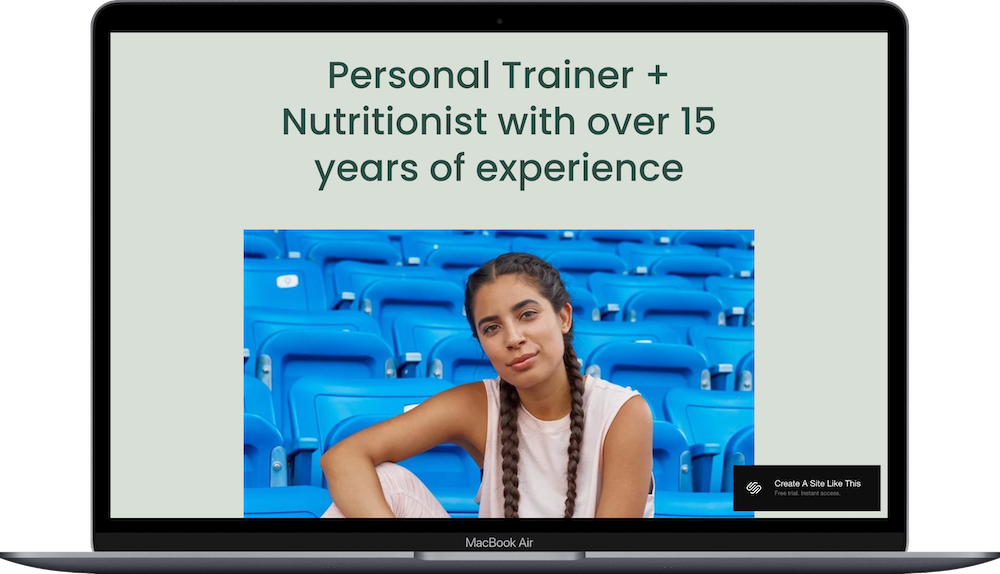
Lakshi is a Squarespace template built for personal trainers, fitness coaches, and nutritionists.
The demo shows a personal trainer and nutritionist with service breakdowns, testimonials, and clear next steps throughout. The design uses calming colors, plenty of white space, and a conversion-ready layout. If you're a health coach, trainer, or wellness professional, Lakshi probably caught your eye for good reason.
This review covers what Lakshi includes, where it shines, and where you'll hit limitations.
The goal: help you figure out if this Squarespace template is the right fit for your fitness or nutritionist business, or if you should keep looking.
Who the Lakshi Template Works Best For
Lakshi works well if you offer one-on-one or small group coaching and want a site that makes it easy for people to understand your services and book with you.
Personal Trainers
If you offer personalized training (whether in-person or virtual) Lakshi's service breakdown sections and testimonial spots let you explain what you do and build trust.
Nutritionists and Dietitians
The template's clean layout works great for nutritionists who need to explain their approach, showcase different nutrition packages, and direct people to consultations or programs.
Health and Wellness Coaches
If you're a holistic health coach, lifestyle coach, or wellness consultant, Lakshi gives you space to describe your philosophy, highlight client results, and guide people toward working with you.
Fitness Instructors with Multiple Services
The four-panel service section works well if you offer several related services (like personal training, nutrition planning, customized programs, and physical health assessments) and need to explain each one clearly.
Service Providers Who Want Lead Capture
With built-in newsletter signup sections and contact forms, Lakshi works for coaches who prioritize building an email list and capturing leads.
Who the Lakshi Template Is Not Best For
The Lakshi template probably isn't the best fit if you:
Run a gym or fitness studio with class schedules, multiple instructors, and facility information (this is built for individual coaches, not fitness centers)
Sell a lot of physical products like supplements, apparel, or fitness equipment (the template focuses on services, not e-commerce)
Need a blog-heavy site with tons of articles and resources (there's a blog page, but it's not the focus)
Want a bold, energetic, high-contrast design (Lakshi is calm and minimal, not punchy and loud)
Offer group fitness classes with public schedules (there's no class schedule functionality built in)
What You Get with the Lakshi Template
Lakshi comes with several pages ready to customize:
Home Page
The main page with multiple sections:
Hero section with your headline, credentials, photo, and intro text
Four-panel service overview (Personal Training, Nutrition, Physical Health, Customized Plans in the demo)
Client testimonial section
Logo display area (certifications, press, credentials)
Two image-and-text sections for explaining your approach or methodology
Full-width call-to-action section with background image
Newsletter signup section
Blog Page
Standard blog layout for sharing tips, advice, and client stories.
Contact Page
Simple contact form for inquiries and booking requests.
Login/Member Area
Built-in access for gated content or member-only resources.
Extras:
Mobile-responsive design
Works with Squarespace scheduling
Newsletter signup forms
Member area functionality for online programs or exclusive content

Pros & Cons of the Lakshi Template
Pros
The whole site feels like it was designed by someone who actually coaches people. Every section answers a question potential clients have. You don't need to fight the layout or shoehorn your content into random sections.
White space makes everything feel approachable instead of overwhelming. When someone lands on your site thinking about hiring a coach, they're often nervous or uncertain. The calm, spacious design puts them at ease instead of hitting them with visual chaos.
You can capture emails even when people aren't ready to book yet. The newsletter signup gives you a way to stay in touch with people who need more time to decide. That's smarter than losing them forever.
It looks professional without trying too hard. The design hits that sweet spot between "I'm credible and know what I'm doing" and "I'm not some corporate gym chain." Perfect for independent coaches.
The member login opens up options most coaches don't think about. You could offer paid programs, create a resource library for existing clients, or build a membership community. It's already there waiting.
Cons
If your brand personality is loud and energetic, this might feel too quiet. Lakshi is calm and minimal. If you're the kind of trainer who yells motivational stuff and posts high-energy workout videos, the soft colors and lots of white space won't match your vibe.
The service section is locked into a four-panel grid. If you offer three services, one panel sits empty or you have to get creative. If you offer six services, you'll need to combine some or the layout gets messy.
There's no good place for class schedules or group session info. If you teach Tuesday morning yoga or Saturday bootcamp, you'll be adding that functionality yourself. The template assumes you do one-on-one work.
The blog page is pretty basic. If blogging is a big part of how you attract clients, Lakshi's blog layout is functional but not exciting. It won't help your content stand out.
Getting Started with the Lakshi Template is Easy:
Once you pick Lakshi in the Squarespace 7.1 template library, here's what to do:
Replace the hero section with your info. Update the headline with your name and credentials, swap in your professional photo, and write a brief intro that explains what you do and who you help.
Update the four service panels. Change these to match your actual services. Write clear descriptions that focus on benefits (not just features). If you only offer three services, you can delete one panel or combine related services.
Add a real client testimonial. Replace the demo quote with an actual testimonial from a client. Include their full name and a brief identifier if they're comfortable with it. Make it specific. "I’m so strong I can move the refrigerator by myself" is more credible than "This coach is amazing."
Decide what to do with the logo section. You could use this for certifications (NASM, ACE, etc.), brands you've been featured in, corporate wellness clients, or training credentials. Or delete it if you don't have logos to showcase.
Customize the image-and-text sections. Replace the demo content with information about your approach, methodology, or what makes you different. These sections should answer questions potential clients have before they book.
Set up your final call-to-action. Update the headline and button text. Decide if you're offering a free consultation, discounted first session, or free discovery call. Make the offer clear.
Configure the newsletter signup. Connect your email service (Mailchimp, ConvertKit, Flodesk, etc.) and write compelling copy for why people should subscribe. "Weekly tips" is vague. Be specific about what they'll get.
Update colors and fonts in Site Styles. Go to Design > Site Styles and adjust the color palette to match your brand. Lakshi's calming blues and greens work well for wellness, but swap them if you have different brand colors. Review fonts to make sure they match your vibe.
Check your heading hierarchy. Squarespace templates don't always include proper heading structure by default, so make sure your main headline is an H1 and subheadings follow logical order (H2, H3, etc.) for better SEO.
Add your blog content. If you plan to blog, add at least 3 to 5 posts before launching so your blog page doesn't look empty. Write about topics your ideal clients are searching for.
Set up your member area if you're using it. If you plan to offer gated content, online programs, or resources for existing clients, configure your member area settings and create your first few pieces of content.
Double-check everything, connect your domain and choose your Squarespace plan, and go live. Preview your site on mobile and desktop, test all forms and buttons, then publish when ready.
Lakshi Squarespace Template FAQs
Can I sell products on the Lakshi website template?
Yes, you can add e-commerce to Lakshi since all Squarespace 7.1 templates support product sales. But the template is designed for coaches and service providers, not online stores. If you're selling a few products like workout guides or nutrition plans, you can add a shop section. If you're running a supplement store or fitness apparel business, choose a template built for e-commerce.
Is the Lakshi template good for SEO?
Yes, Lakshi works fine for basic SEO. You can optimize page titles, meta descriptions, headings, and image alt text on each page. The blog lets you create ongoing content, which helps with SEO. The clean code and fast loading times are good for search engines. That said, no template automatically makes you rank. You still need to do keyword research, write good content, and build backlinks.
Is the Lakshi template good for mobile?
Yes. Lakshi is fully mobile-responsive like all Squarespace templates. The clean, simple layout works well on smaller screens. Images stack properly, text stays readable, and buttons are easy to tap. The calm design with plenty of white space actually works better on mobile than busier templates. Just preview your site on your phone before launching.
Can I change fonts and colors on the Lakshi template?
Absolutely. You can customize fonts, colors, button styles, and spacing through the Site Styles panel. Change background colors for individual sections, update your accent colors, modify heading and body fonts, and adjust spacing. The template structure stays the same, but you control colors and typography to match your brand.
Can I add more testimonials to Lakshi?
Yes. The home page template includes one featured testimonial section. You can add more testimonials by creating additional sections with quote blocks, building a dedicated testimonials page, or adding testimonial blocks to your service descriptions. The template doesn't limit you. You just need to decide where additional testimonials make sense.
What's the member area good for?
The built-in member area works great if you want to offer online programs, workout plans, nutrition guides, or exclusive content to paying clients. You could create a monthly membership with weekly workouts, build a course, or give existing clients access to resources. It requires a Business plan or higher to use member areas.
Can I use Lakshi if I teach group fitness classes?
You can, but you'll need to add class schedule functionality yourself. Lakshi doesn't include built-in class schedules like some fitness studio templates do. You could use Squarespace's scheduling feature with some customization, or integrate a third-party booking system. If group classes are your main offering, look for a template specifically designed for fitness studios.
How many services can I showcase on the home page?
It’s flexible. The demo shows four service panels in the main overview section. You can adjust this. Delete one to show three services, or add more panels if you have five or six offerings. Just be aware that too many options can overwhelm visitors. If you have lots of services, consider grouping them into broader categories.
Is Lakshi good for building an email list?
Yes. The template includes newsletter signup spots, and the clean design makes it easy to add compelling opt-in forms. The layout supports getting emails, which is smart for service providers who want to stay in touch with potential clients before they're ready to book.