Crosby Squarespace Template Review
This post contains affiliate links. If you purchase through them, I may receive a small commission at no extra cost to you.
Table of Contents Show
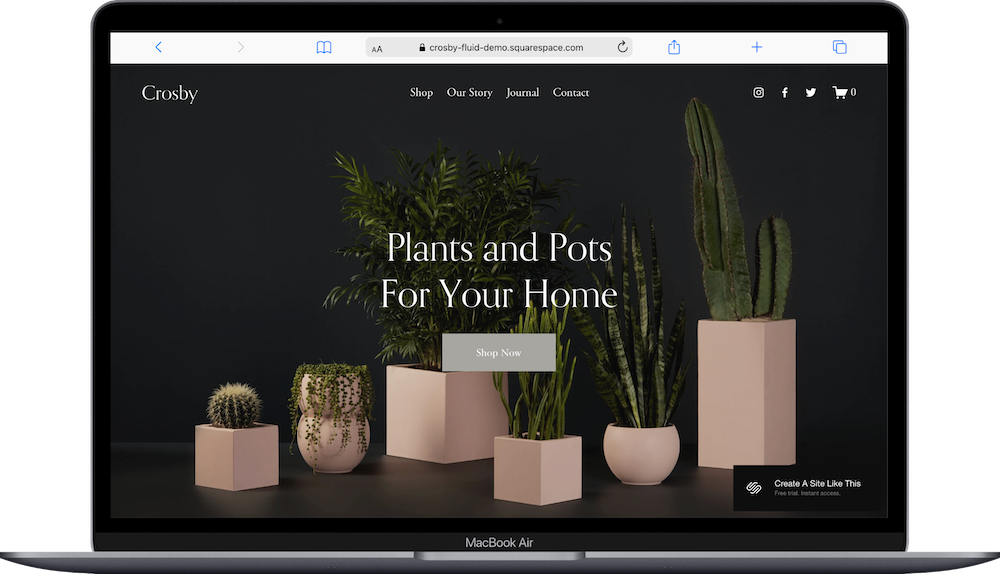
Crosby is a Squarespace template that's built for small online shops selling physical products that want a dark, moody aesthetic.
You get black backgrounds, a three-column product grid, and a sophisticated layout. The homepage opens with a full-screen hero, shows featured products, and includes blog teasers and newsletter signup. If you sell a small selection of curated products and want a dark theme, Crosby works. If you prefer bright, airy designs or have hundreds of products, it doesn't.
Let's figure out if this template fits your shop.
Who the Crosby Template Works Best For
Crosby works well if you have a curated product collection and want an aesthetic, image-focused store that doesn't overwhelm visitors.
Small online boutiques
If you sell a limited range of items (like handmade goods, home decor, or specialty products) Crosby's simple grid layout shows each product clearly without needing category filters or advanced search.
Product businesses with strong photography
When you've invested in quality product photos, Crosby's full-screen images and grid layout display them at large sizes.
Shops that want to include content marketing
The built-in blog uses the same design as your shop pages, so you can add how-to guides, product stories, or brand updates that match your site visually. Also great for SEO.
Brands that want to feel upscale
The dark theme with serif headings and carefully spaced sections creates a premium, gallery-like experience.
Who the Crosby Template Is Not Best For
The Crosby template probably isn't the best fit if you:
Have 100+ products that need extensive filtering and sorting options (if you have hundreds of products, Shopify would be a better option - read my Shopify review.)
Want a simple, one-page website. Crosby is a multi-page template with separate sections for different content
Prefer colorful, playful, or casual designs. Crosby leans sophisticated and restrained
Run a service-based business; the template is very definitely built around product grids and shopping
What You Get with the Crosby Template
Home Page
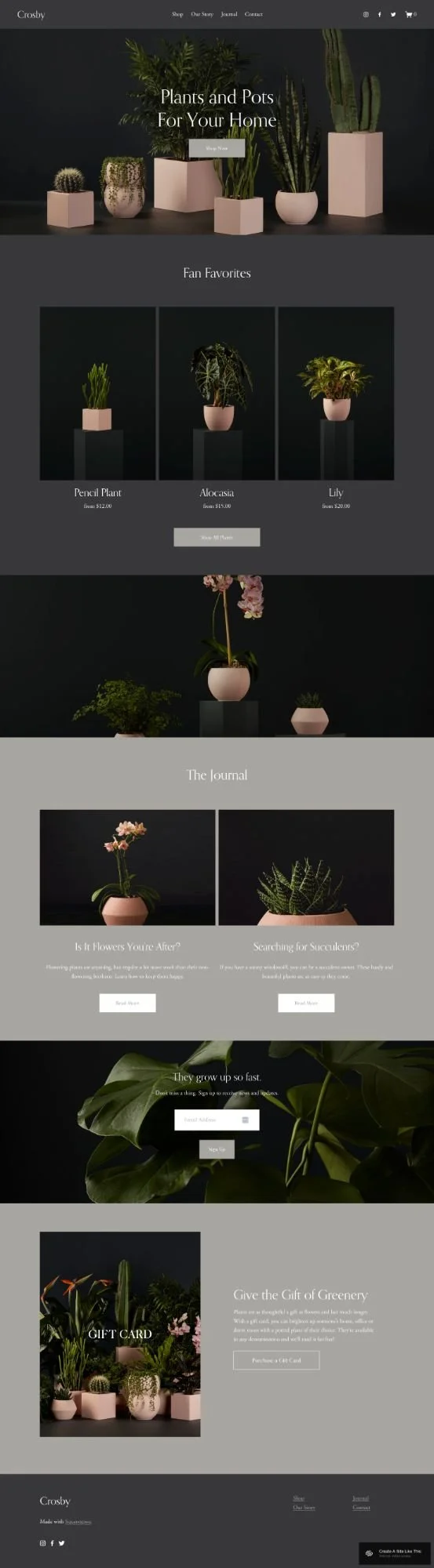
Full-screen hero image with headline and CTA button, "Fan Favorites" section showing three featured products, large lifestyle product image section, blog section (called "The Journal" here) with two featured posts, newsletter signup with headline and form, and a gift card promotional section.
Shop Page
Three-column product grid with hover effects, product names and prices below images, "Shop All Items" button.
Individual Product Pages
Image gallery, product name and price, variant dropdowns, product description, related products section.
Our Story (About)
This is a standard about page with 2-3 text blocks, 2-4 image placeholders, and optional quote sections. The layout alternates text and images down the page.
Blog (The Journal)
Crosby includes a blog section where you can share care guides, product stories, or brand updates. The blog layout is clean and readable, with featured images and excerpt previews.
Contact
A simple contact page with room for a contact form, business hours, location information, and social media links.
Extras
Gift card page pre-built and ready to activate
Newsletter signup forms integrated throughout
Social media icons in the header
Product hover effects that show multiple angles
Support for product variants (size, color, etc.)
Mobile-optimized design
Integration with Squarespace's built-in e-commerce tools
Email collection capabilities
Design elements: Dark backgrounds throughout, serif display font for headings, sans-serif body text, generous white space between sections.
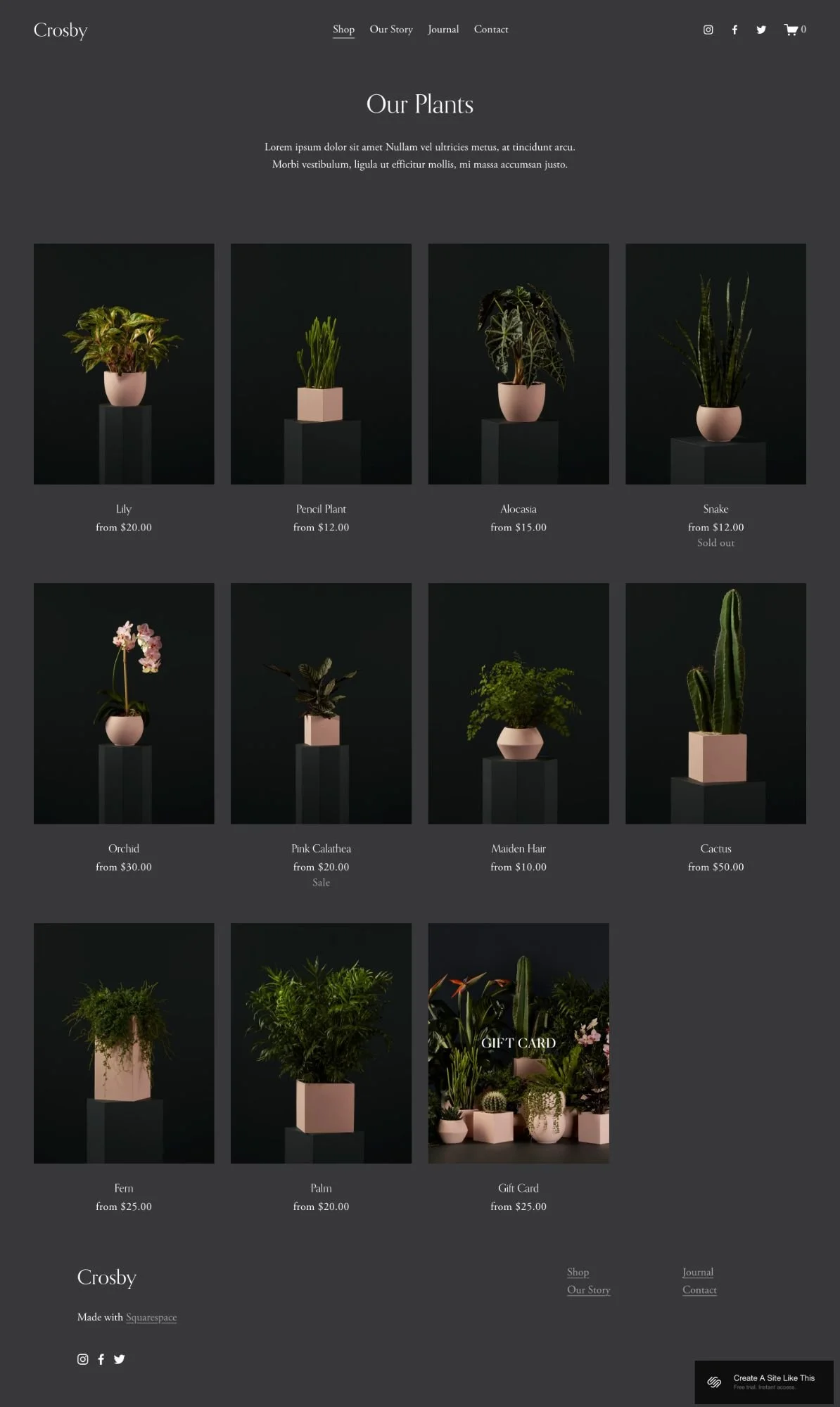
Crosby Shop Page
Pros & Cons of the Crosby Template
What Works Well
The dark theme. If your brand is sophisticated or moody, this template delivers that feeling without custom design work.
The visual hierarchy makes shopping intuitive. Full-screen images and clear sections guide visitors from browsing to buying without confusion.
Gift card setup is fast. Most templates make you build this from scratch. Crosby includes a pre-styled page you can activate in minutes.
The blog integration supports content marketing. If you're using SEO to drive traffic, having a blog that matches your store design makes the strategy easier.
Product pages handle multiple images effectively. The gallery shows products from different angles without cluttering the layout.
Where It Falls Short
The dark theme is not exactly flexible. If you want a light, bright design, you'll need to customize it a lot more. The entire template is built around dark, moody backgrounds.
Limited filtering for larger catalogs. If you have 50+ products across multiple categories, visitors will struggle to find items. This template doesn't include robust filtering.
The sophisticated aesthetic is narrow. If your brand is casual, playful, or budget-friendly, Crosby's upscale vibe might feel wrong for your audience.
Getting started with the Crosby template is easy.
Once you pick Crosby in the Squarespace 7.1 template library, here's what to do:
Replace the hero image on your homepage. Upload a high-quality, full-screen image that represents your brand.
Customize your color palette in Site Styles. Go to Design > Site Styles and change the grey default colors to match your brand. Update background colors, text colors, and button styles.
Upload your logo and adjust header settings. Replace the demo logo with your own. Check both desktop and mobile views.
Set up your shop and add products. Go to Commerce > Inventory and start adding your products. Include multiple high-quality photos for each item, detailed descriptions, pricing, and any variants like size or color.
Update the About page with your story. Replace the demo content with your own brand story, mission, and values.
Set up your blog (if you’re using it). Delete the demo blog posts and create a few initial posts about your products, care instructions, or brand updates. This helps with SEO from day one.
Configure the gift card page or hide it. If you want to offer gift cards, update the page with your pricing options. If not, delete it or move it to "Not Linked" in the Pages panel.
Check your heading hierarchy. Squarespace templates don't always include proper heading structure by default, so make sure your main headline is an H1 and subheadings follow logical order (H2, H3, etc.).
Add your contact information and social links. Update the contact page with your actual email, phone number, and location. Add your social media accounts to the header icons.
Set up email marketing integrations. Connect your email service provider (like Mailchimp or ConvertKit) to your newsletter signup forms so you start capturing emails immediately.
Test the checkout process. Add test products to your cart, go through the entire checkout flow, and make sure payment processing, shipping options, and confirmation emails all work correctly.
Double check everything, connect your domain and choose your Squarespace plan, and go live. Review all pages on desktop and mobile, fix any broken links or formatting issues, then publish your site.
Crosby Squarespace Template FAQs
Can I sell products on the Crosby website template?
Yes, that’s exactly what it’s designed for. Crosby is specifically designed for e-commerce and includes all of Squarespace's built-in shop features. You can sell physical products, digital products, or services, manage inventory, process payments, and handle shipping all within the template. The shop page displays products in a grid, and individual product pages include image galleries, description areas, and add-to-cart buttons.
Is the Crosby template good for SEO?
Yes, but with the caveat that all Squarespace 7.1 templates have the same SEO capabilities; the design itself doesn't give you an SEO advantage. One thing that makes Crosby useful for SEO is the integrated blog, which makes it easy to create content that drives organic traffic. Just make sure to check your heading hierarchy (as mentioned in the setup steps) since proper heading hierarchy matters for search engines.
Is the Crosby template good for mobile?
Yes, Crosby is fully responsive and automatically adjusts for mobile devices. The product grid reformats to a single column on phones, images scale appropriately, and the checkout process works smoothly on smaller screens. But you should still test your actual content on mobile since your specific product photos and text might need adjustments.
Can I change fonts and colors on the Crosby template?
Yes, you can change fonts, colors, button styles, and spacing through the Site Styles panel. You don't need any coding knowledge to customize the look and feel. That said, the underlying layout structure is fixed unless you're comfortable adding custom CSS.
Does Crosby work for service-based businesses?
Not really. While you technically can use Crosby for services, the entire template is designed around showcasing physical products with image galleries, product grids, and shopping carts. If you're a service provider, you'd be better off with a template like Clove, Almar, or Colima that's built with service businesses in mind.
Can I add more than 50 products to Crosby?
Yes, there's no product limit. But the simple grid layout and limited filtering options mean customers have to scroll through everything to find items, unless you use a paid plugin. If you're planning to sell 100+ products across many categories, you might want to consider a dedicated e-commerce platform like Shopify.
How many pages can I add to the Crosby template?
As many as you want. The demo includes five main pages, but Squarespace 7.1 allows unlimited pages. You can duplicate existing pages, create new ones from scratch, or reorganize the navigation structure however you need.
Is the gift card page easy to set up?
Yes, it's one of Crosby's best features. The template includes a pre-built gift card page that's already styled to match the rest of the site. You just need to enable gift cards in your Commerce settings, set your denominations and amounts, and the page is ready to go. Much faster than building one from scratch.