Brower Squarespace Template Review
This post contains affiliate links. If you purchase through them, I may receive a small commission at no extra cost to you.
Table of Contents Show
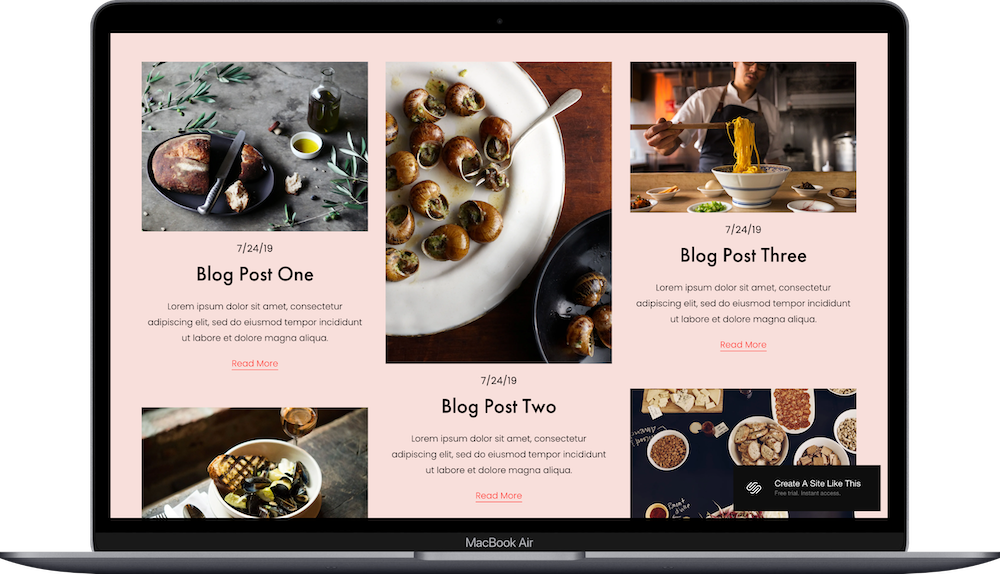
Brower is a Squarespace website template designed for food bloggers.
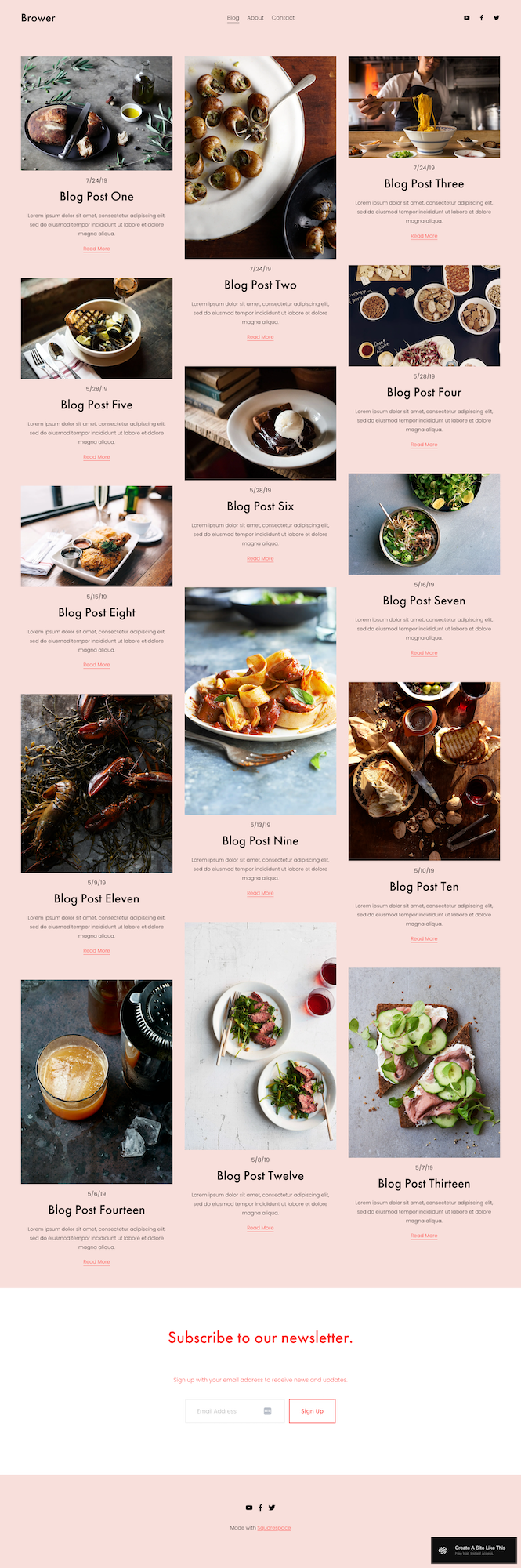
The homepage IS the blog - there isn’t a separate landing page, it’s just a masonry grid of food posts. If you're starting a food blog, developing recipes, or even building a culinary brand, Brower is a really nice free starting point.
This review covers what Brower includes, where it shines, and where you might run into limitations.
The goal: help you figure out if this Squarespace template is the right fit for your food blog, or if you should keep looking.
Who the Brower Website Template Works Best For
Brower works well for food bloggers including:
Recipe Developer s
Home cooks sharing family recipes, people developing original dishes, or cookbook authors building and growing an audience.
Specialty Food Blogs
Vegan cooking, baking blogs, regional cuisine sites (like Italian, Thai, or Mexican), dietary-specific recipes (keto, gluten-free, allergy-friendly).
Food Content Creators
YouTube cooking channels needing a recipe archive, Instagram food accounts wanting a simple home base, or TikTok creators sharing full recipes.
Who the Brower Template Is Not Best For
Honestly, Brower is pretty flexible. You can add e-commerce pages, change it to non-food content, customize the colors and fonts - all the usual Squarespace stuff.
The main limitation is that it's a basic free Squarespace template. If you need really specific customization or advanced features, you might outgrow it. You can add plugins and integrations to extend functionality, but if you're looking for something highly specialized right out of the gate, you might want to look at premium templates or custom development.
If the masonry blog-as-homepage layout doesn't appeal to you at all, or if you're not planning to blog regularly (which kind of defeats the purpose of a blog-focused template), then yeah, maybe pick a premium template from a studio like Big Cat Creative, Applet Studio, Kseniia Design or Studio Mesa.
What You Get with the Brower Template:
Home Page (Blog Grid)
Masonry blog grid showing your posts
Images, dates, titles, and excerpts for each post
"Read More" links
Newsletter signup section at the bottom
About Page
Here’s where you can put your story, cooking philosophy, background, and/or what readers can expect from your blog.
Contact Page
Contact form for reader questions, collaboration inquiries, or recipe feedback.
Individual Blog Posts
When you click into posts, you get full recipe and story layout with space for:
Hero image
Title and date
Story/introduction
Recipe ingredients
Instructions
Additional photos
Author bio or related posts
How to Get Your Website Live with the Brower Template:
Update content on all pages - Replace all that demo text with your actual information
Replace images throughout the site - Upload your own photos (make sure they're optimized for web so your site doesn't load super slowly)
Delete any unused pages - Or move them to the "Not Linked" section, disable them, and turn off SEO so they're not accessible to the public until you're ready
Add your favicon and social share image - These show up in browser tabs and when you or other people share your website on social media
Set up SEO - Add meta descriptions and alt text for images (Squarespace AI can help with this now and it makes it super painless)
Customize Site Styles - Change the colors, fonts, and buttons to match your brand. The demo has that soft pink background, but you can make it whatever works for you and your brand
Set up newsletter email integration - Connect Squarespace Campaigns, Kit, or whatever email service you're using to that signup form. Building your email list is huge for food blogs.
Add recipe card functionality if you want it - Install a recipe plugin or use Squarespace's recipe block feature if you want those fancy structured recipe cards with print buttons and nutrition info
Test all forms, buttons, and links - Double and triple check to make sure everything actually works before going live
Connect your domain and choose your Squarespace plan
Publish your site 🎉
Brower Squarespace Template FAQs
What is Brower Squarespace template best for?
Brower works really well for food bloggers. The homepage is the blog itself - just a masonry grid of posts, there isn’t a separate landing page. This works great for recipe developers, home cooks building an audience, and specialty food bloggers focusing on things like vegan cooking, baking, regional cuisines, or dietary-specific recipes.
Can I use Brower for non-food blogging?
Yep. The masonry layout works for any visual blog content - lifestyle, travel, photography, design, whatever. The demo is set up for food, but you can easily swap that out for your own content and images.
What is the best food blog template on Squarespace?
Browser is the best food blog template on Squarespace in my opinion. It’s got the foundations all set up, is easy to optimize, and if you’d like to include things like recipe cards, there are some good affordable & easy to install options.
How do I add recipe cards with print buttons?
Use Squarespace's recipe block feature, or add third-party recipe card plugins if you want more functionality. A lot of food bloggers use structured recipe formats because they're great for SEO - they help Google show your recipes in search results with star ratings, cook times, and all those helpful details people are looking for.
Is Brower good for SEO?
For food blog SEO, yes - but you have to do the actual work. Optimize your post titles, use headings properly, write alt text for all your images, include meta descriptions. Food blog SEO is pretty competitive (there are a LOT of food blogs out there), so you need solid content, the right keywords, and ideally some backlinks. The template gives you a good foundation, but it's not magic.
How do I monetize my food blog with Brower?
There are a bunch of ways. Add display ads once you qualify for networks like Mediavine or AdThrive (they have traffic requirements). Include affiliate links in your posts - Amazon links for kitchen tools work really well. Create and sell digital products like meal plans or ebooks. Offer sponsored posts to food brands once you have an audience. You can add shop pages separately if you want to sell physical products or courses.
Can I feature specific posts or create categories?
Yep. Use Squarespace's blog categories to organize your posts - Breakfast, Dinner, Desserts, Vegetarian, whatever makes sense for how you cook and write. You can create category pages or add category navigation so people can find exactly what they're looking for. Featured posts would take a bit of customization, but it's definitely doable.
What if I want to sell cookbooks or courses?
You'd add e-commerce pages separately from the blog. Create a Shop page for selling digital cookbooks or physical products. For courses, you'd need membership functionality or you could integrate with third-party platforms like Teachable or Thinkific that specialize in online courses.
How do I grow traffic to my food blog?
Pinterest is absolutely huge for food blogs - create vertical pin graphics for every single recipe you post. Instagram helps with community building and getting people to know you. SEO brings in organic search traffic if you target specific recipe keywords (like "easy weeknight chicken recipes" instead of just "chicken recipes"). Email marketing keeps people coming back instead of just hoping they remember your site. And honestly, consistency matters way more than perfection. Post regularly, even if everything isn't Pinterest-perfect.
Should I start with Brower if I'm just beginning?
Yes, it's a good choice. It's simple enough that you won't get overwhelmed trying to figure out complex features, and it's professional enough that you won't feel like you need to upgrade immediately. Focus on creating good recipes and improving your food photography - the template handles the website structure just fine while you're learning everything else.