Fayette Squarespace Template Review
This post contains affiliate links. If you purchase through them, I may receive a small commission at no extra cost to you.
Table of Contents Show
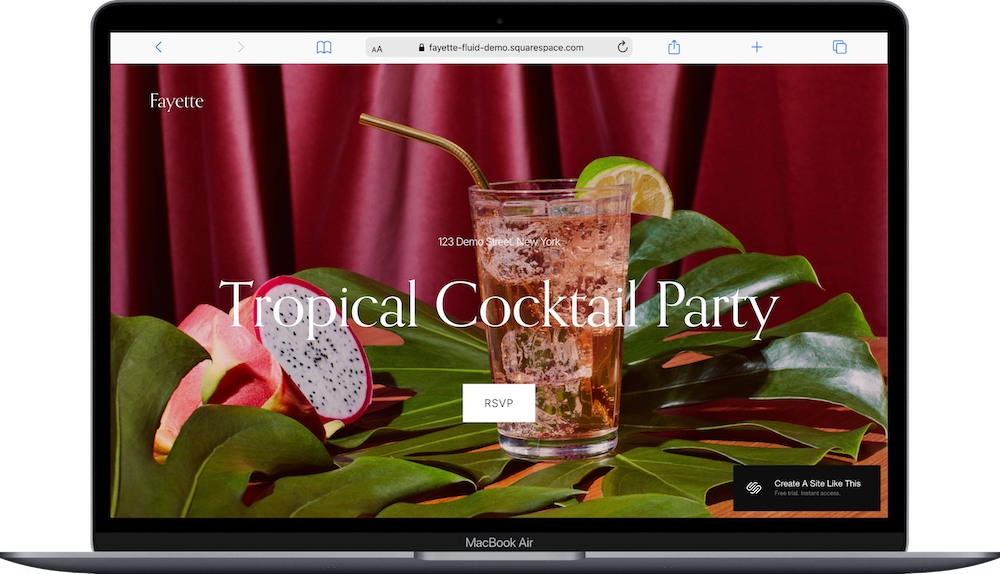
Fayette is a one-page Squarespace template for bars, restaurants, and event venues that want a stylish one-page website.
The demo shows a tropical cocktail party with a deep red background, large serif typography, and moody product photography. If you run a bar, lounge, restaurant, or host events and want a site that feels upscale and atmospheric, Fayette probably caught your eye for good reason.
This review covers what Fayette includes, where it shines, and where you might hit limitations.
The goal: help you figure out if this Squarespace template is the right fit for your business, or if you should keep looking.
Who the Fayette Template Works Best For
Fayette works best if you run a hospitality or entertainment business where atmosphere and vibe are central to what you do and you need a simple one-page site.
Bars and Cocktail Lounges
The demo is literally a cocktail party. If you run a bar, speakeasy, or cocktail lounge, Fayette's moody aesthetic matches that energy.
Restaurants Hosting Special Events
If you're a restaurant promoting recurring events like wine nights, live music, or chef's table dinners, Fayette gives you space to highlight what makes those events special.
Event Venues
Wedding venues, party spaces, or event halls can use Fayette to showcase their atmosphere and how to book.
DJs, Performers, and Entertainers
If you host shows, DJ nights, or performances and need to promote upcoming events and collect RSVPs, Fayette works.
Lifestyle Bloggers Focused on Food and Drinks
Food and cocktail bloggers who want a stylish, atmospheric site to showcase their content can use Fayette's visual layout.
Who the Fayette Template Is Not Best For
The Fayette template probably isn't the best fit if you:
Run a casual, family-friendly business. The dark, moody aesthetic and elegant typography feel upscale and adult. If you run a pizza place or family restaurant, Fayette feels too formal.
Need lots of content pages from the start. While you can add pages, Fayette is designed as a one-page site. If you know you need extensive menu pages, about sections, blog, and portfolio from day one, start with a multi-page template.
Need e-commerce for browsing and buying products. You can add a shop, but the one-page layout isn't built for product catalogs. It's built for atmosphere and promotion.
Require detailed service or portfolio pages. The template gives you highlight sections, but if you need in-depth case studies or service breakdowns, the structure doesn't naturally support that.
What You Get with the Fayette Template
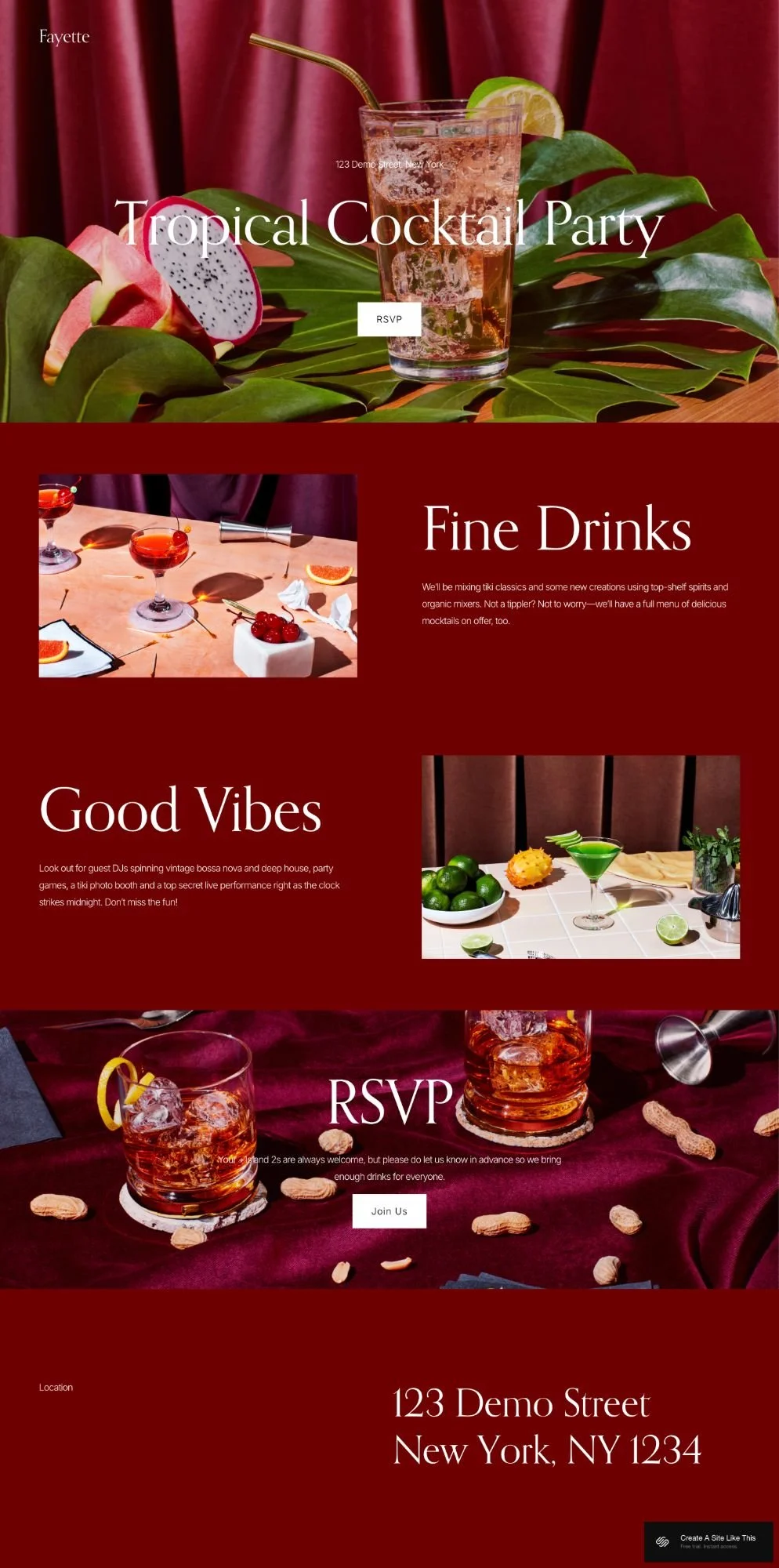
Fayette is a one-page template where everything lives on a single scrolling page:
Hero Section
Large background image with your business or event name in big serif text ("Tropical Cocktail Party" in the demo), location and address at the top, and a button below the headline.
Highlight Sections
Two to three sections explaining what you offer. The demo shows "Fine Drinks" and "Good Vibes" - each with a heading, descriptive text, and a supporting image. You'd customize these to match your business (like "Our Cocktails," "Live Music," "The Space").
RSVP/Contact Section
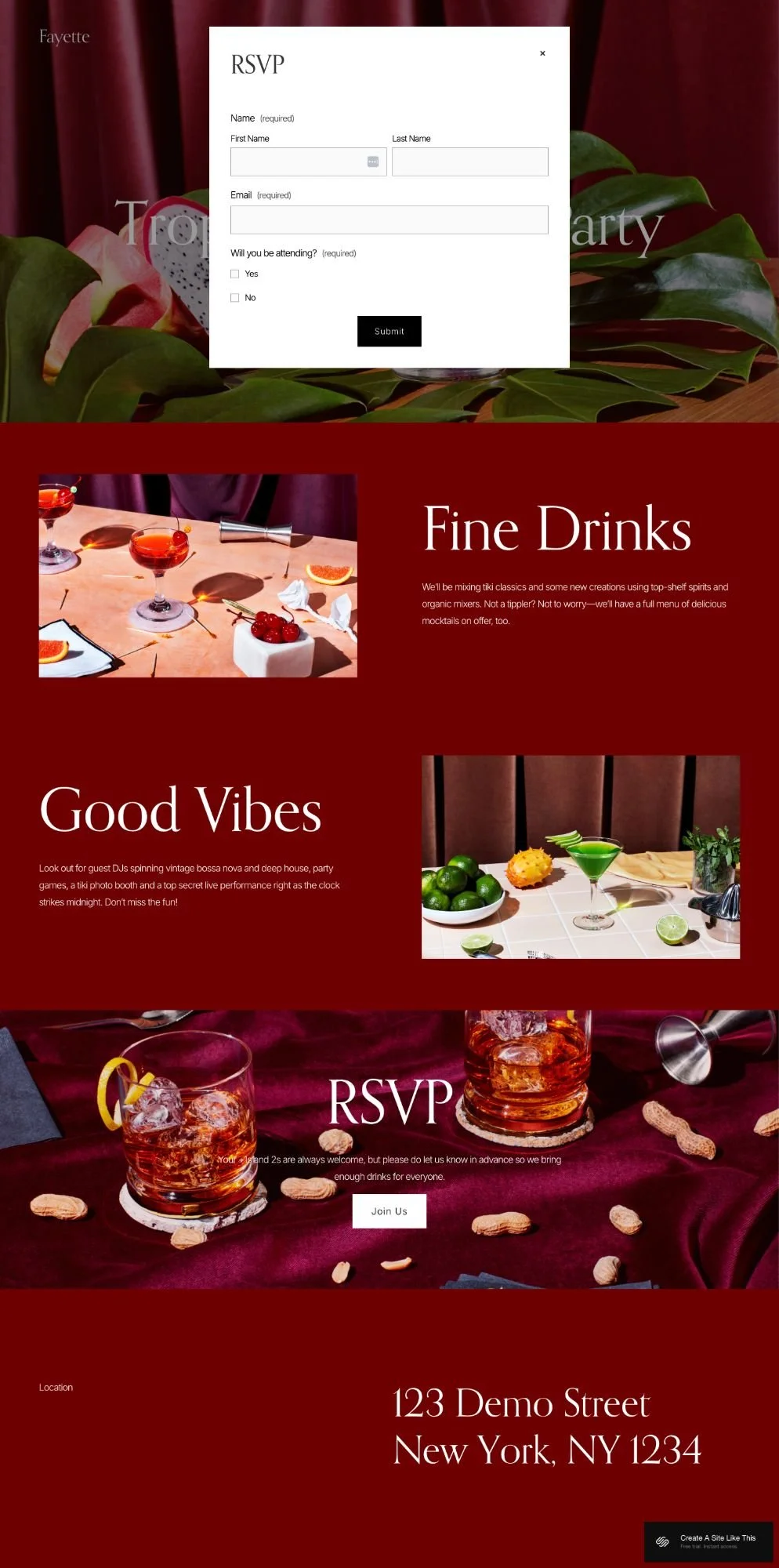
A section with large text ("RSVP" in the demo), a message, and a "Join Us" button that opens a pop-up contact form where people can submit their name, email, and whether they're attending.
Location Information
Address displayed at the bottom in large serif text.
Built-in Features
Pop-up contact form for RSVPs or inquiries
Mobile responsive design
Squarespace 7.1 Fluid Engine for editing
Ability to add additional pages if needed
Pros & Cons of the Fayette Template
Pros
The dramatic aesthetic creates immediate atmosphere. The rich colors and moody photography set a tone before people even read your content. If vibe is important to your business, Fayette delivers that.
One-page layout keeps your site simple. People scroll, see what you're about, and fill out the form. No navigation menus or multiple pages to manage.
The pop-up form is already set up. You don't need to create or link to an external form. The RSVP/contact form is built in and ready to use.
Quick to set up and launch. You're filling in one page with 3-4 sections. If you need a site up fast, Fayette gets you there quickly.
The elegant design positions you as upscale. The serif fonts and sophisticated color palette make you look established without being stuffy.
Cons
It is meant to be a one page site. If you need to share a full menu, multiple service offerings, blog posts, or detailed information, the single-page layout gets crowded fast.
The formal aesthetic doesn't work for casual brands. If your business is laid-back, playful, or family-oriented, Fayette's upscale vibe doesn't match.
Growing this into a full website will take work. You can add pages, but the template is designed as one page. If your business needs expand, you're either customizing heavily or switching templates.
Getting Started with the Fayette Template is Easy
Once you pick Fayette in the Squarespace 7.1 template library, here's what to do:
Replace the demo content with your business information. Change "Tropical Cocktail Party" to your business or event name, update the location and address, and swap the demo text with your details.
Customize the highlight sections to match what you offer. Rename "Fine Drinks" and "Good Vibes" to your section titles.
Upload your photos. Replace the demo cocktail images with photos of your venue, drinks, food, or events. Use images at least 1500px wide and optimized. Even phone photos can work if they're well-lit and styled.
Update the pop-up form fields if needed. The default form asks for name, email, and attendance. You can customize these fields in the form settings if you need to.
Change the colors and fonts. Open Site Styles and adjust the colors and update your fonts.
Test the pop-up form. Click the button to make sure the form opens properly and test submitting it to see where responses go.
Double check everything, connect your domain, choose your Squarespace plan, and go live. Preview on mobile and desktop, test the form, fix typos, then launch.
Fayette Squarespace Template FAQs
Can I add a menu to the Fayette template?
Yes. You can add a section with your menu items on the one-page layout, or add a separate menu page. If you have a large menu with categories and descriptions, adding a dedicated page makes more sense than cramming it onto the homepage.
Is the Fayette Squarespace template good for SEO?
It has basic SEO tools like any Squarespace template - page titles, meta descriptions, image alt text. But as a one-page site, you're limited on content and keyword targeting compared to multi-page sites. If SEO is important to your business, consider adding more pages with content.
Is the Fayette template good for mobile?
Yes. The one-page scrolling layout works great on mobile. Images scale down, text stays readable, and the pop-up form is easy to use on phones.
Can I change fonts and colors on the Fayette template?
Yep. You can change background colors, fonts, and button styles through Site Styles. The template looks best with rich, saturated colors and elegant serif fonts, but you can adjust both.
Can I add more pages to Fayette?
Yes. Fayette starts as a one-page template, but if you like the look of it, you can add pages like About, Menu, Contact, or Blog. Just know that the template is designed for a single-page experience, so adding lots of pages changes how it works.
Does Fayette work for casual restaurants or bars?
It can. The elegant design and dramatic colors lean upscale though. If you run a sports bar, casual pub, or family restaurant, Fayette might feel too formal.
Can I customize the pop-up form?
Yep - You can change the form fields, add or remove questions, and adjust what information you're collecting. Go to the form settings to customize it.
Can I use Fayette for a wedding or private event?
Yes. The demo shows a party, and you could adapt it for a wedding, anniversary, or private event. Update the sections for your event details and use the pop-up form to collect RSVPs.
Where do form submissions go?
Form submissions go to the email connected to your Squarespace account. You can change the notification email in the form settings and view all submissions in your Squarespace dashboard.