Cailles Squarespace Template Review
This post contains affiliate links. If you purchase through them, I may receive a small commission at no extra cost to you.
Table of Contents Show
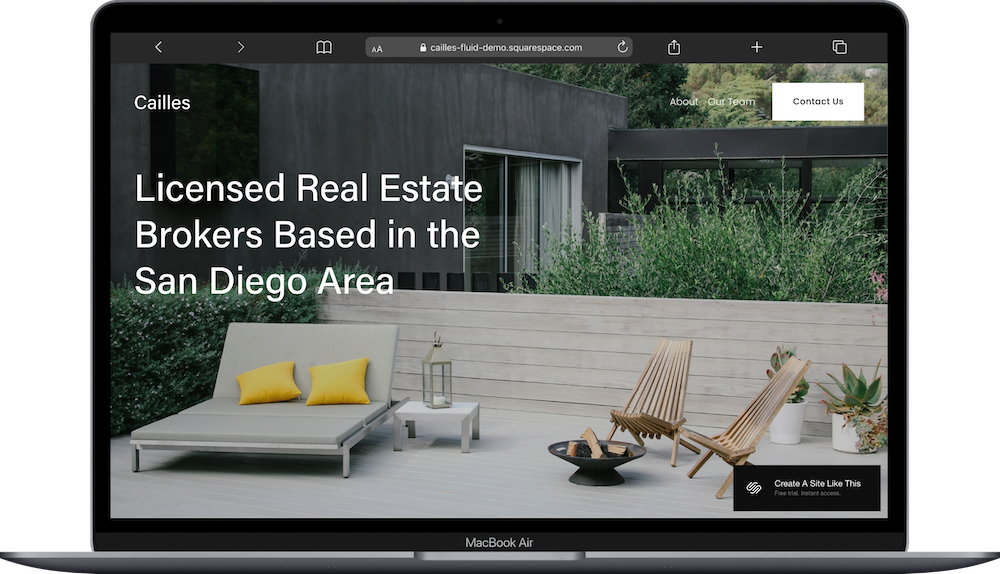
Cailles is a free Squarespace template designed for real estate agents & brokers.
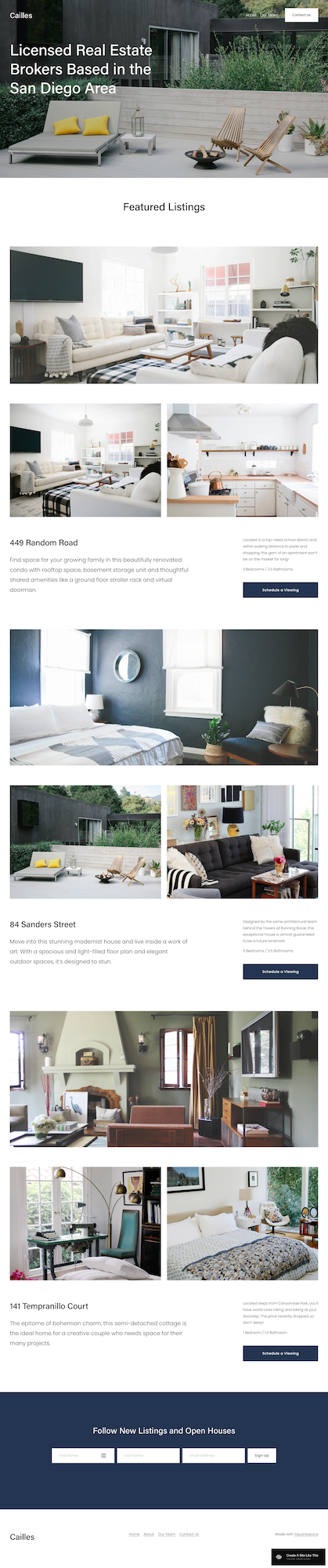
The demo shows a brokerage with featured property listings - each with multiple photos, descriptions, bed/bath counts, and "Schedule a Viewing" buttons. If you're a real estate agent, broker, or property team looking to showcase your listings, Cailles probably caught your eye for good reason.
This review covers what Cailles includes, where it shines, and where you might hit limitations.
The goal: help you figure out if this Squarespace template is the right fit for your real estate business, or if you should keep looking.
Who the Cailles Real Estate Template Works Best For:
Individual Real Estate Agents
Solo buyer or sell realtors building a personal brand - they can easily feature their current listings and portfolio.
Real Estate Brokerages & Teams
Small to mid-size brokerages can feature the team's top listings.
Luxury Real Estate Agents
Agents specializing in high-end properties can share luxury homes for sale with professional photography.
Boutique Real Estate Firms
Independent brokerages competing with big chains can highlight personalized service and local expertise.
Real Estate Investors or Flippers
If you buy, renovate, and sell properties, Cailles works for displaying your current inventory.
Who the Cailles Template Is Not Best For
Honestly, Cailles is pretty flexible for real estate pros. You can customize it however you need.
The main limitation is that it's designed to showcase select featured properties, not integrate with full MLS databases. If you need hundreds of searchable listings with map search and filtering, you'll need to add third-party IDX integrations or look at specialized real estate platforms.
If you're looking for something highly customized with advanced features right out of the gate, you might want to check out premium Squarespace templates (like from Big Cat Creative or Applet Studio) or work with a Squarespace web designer who specializes in real estate sites.
What You Get with the Cailles Template:
Home Page
Hero section with location and credentials
Featured property listings (the demo shows three)
Multiple photos per property
Property descriptions
Bed/bath counts
"Schedule a Viewing" buttons for each listing
Newsletter signup form for new listings and open houses
Footer with navigation
About Page
Information about your brokerage or approach to real estate.
Our Team Page
Agent profiles with photos and bios.
Contact Us Page
Contact form and office information.
And remember, like all Squarespace 7.1 templates, you can add or remove pages and customize the structure.
Getting Started with the Cailles Template is Easy:
Update content on all pages - Replace demo text with your actual information and location
Replace images throughout the site - Upload your own photos (make sure they're optimized for web)
Delete any unused pages - Or move them to "Not Linked" section, disable them, and turn off SEO so they're not accessible until you're ready
Add your favicon and social share image - These show up in browser tabs and when people share your website
Set up SEO - Add meta descriptions and alt text for images (Squarespace AI can help with this now and makes it way easy)
Customize Site Styles - Change colors, fonts, and buttons to match your brand
Configure "Schedule a Viewing" buttons - Link these to a contact form, calendar booking tool (like Calendly or Acuity), or email
Set up newsletter lead capture - Connect your email service (Mailchimp, Constant Contact, whatever you use) to the signup form
Test all forms, buttons, and links - Double and triple check to make sure everything works before going live
Connect your domain and choose your Squarespace plan, then you’re ready to publish your site 🎉
Cailles Squarespace Template FAQs
What is Cailles Squarespace template used for?
Cailles works well for real estate agents and brokers who want to showcase select properties with professional photography. It's designed to feature your best current listings - think curated portfolio rather than comprehensive MLS database. This works great for individual agents, small brokerages, luxury agents, and boutique firms.
Can I integrate with MLS or IDX for automated listings?
Not directly through the template, but you can add third-party IDX widgets through code blocks if your MLS provides them. That said, Cailles works best as a curated showcase rather than an automated property search tool with hundreds of listings.
How many listings can I feature at once?
The demo shows three properties, but you can add more by duplicating the listing sections. Feature your best 5-10 properties and rotate them as they sell. If you try to showcase too many, the page gets really long.
Can I include property prices?
Yes. Add pricing to the property descriptions or create a dedicated specs section. Some agents display prices publicly, others prefer to share them after initial contact. Totally up to you and your market.
Is Cailles good for SEO?
For local real estate SEO, yes. Optimize for "[your name] real estate [city]" and "[city] real estate agent" type searches. Add neighborhood pages, market insights blog, or buyer/seller resources if you want more content. Local SEO matters way more than national for real estate anyway.
How do I keep listings current?
You'll manually update sections when properties sell or new listings come available. Set a calendar reminder to review weekly. You could also archive sold properties on a "Past Sales" page to show your track record.
Can I add virtual tours or video walkthroughs?
Yes. Embed YouTube videos or Matterport virtual tours in property sections using video blocks. Virtual tours are pretty much expected now, especially for out-of-town buyers.
What about testimonials from past clients?
Add a testimonials section to your About page or create a dedicated Testimonials page. Client reviews build trust with potential sellers deciding whether to list with you.
Can I use this for rental properties?
You could, but it's set up for sales. If you primarily handle rentals, you'd need to adjust the language (like "Schedule a Showing" instead of "Schedule a Viewing," rental rates instead of sale descriptions, lease terms, that kind of thing).
How do I generate leads beyond the newsletter signup?
Add more lead capture options throughout your site - contact forms on individual listings, downloadable "Seller's Guide" in exchange for an email, home valuation request forms, buyer consultation booking. Multiple ways for people to connect with you means more leads.