Ortiz Squarespace Template Review
This post contains affiliate links. If you purchase through them, I may receive a small commission at no extra cost to you.
Table of Contents Show
Ortiz is a Squarespace template designed for photographers, artists, and other visual creatives.
If you're looking for a portfolio site for your projects that feels polished and with a bit of personality, but won’t take a lot of time to get live, Ortiz probably caught your eye for good reason.
Ortiz uses a bright, high-contrast demo palette - bright butter yellow, lavender, tan and dark green - so it feels energetic and modern right out of the box. The colors are fresh & bold. The typography is big and stylish, with oversized headlines (Swear Display font) and classic minimal body text (Helvetica Neue). It gives everything a slightly editorial feel, like a designer’s portfolio or a creative studio site.
Overall vibe of Ortiz:
modern
polished
visuals-first
slightly bold
not soft, neutral, or cozy unless you fully restyle it
This in-depth review covers what Ortiz includes, pros and cons, where it excels, and where you may hit limitations.
The goal: help you figure out if this free Squarespace template fits your business or creative needs, or if you should keep looking.
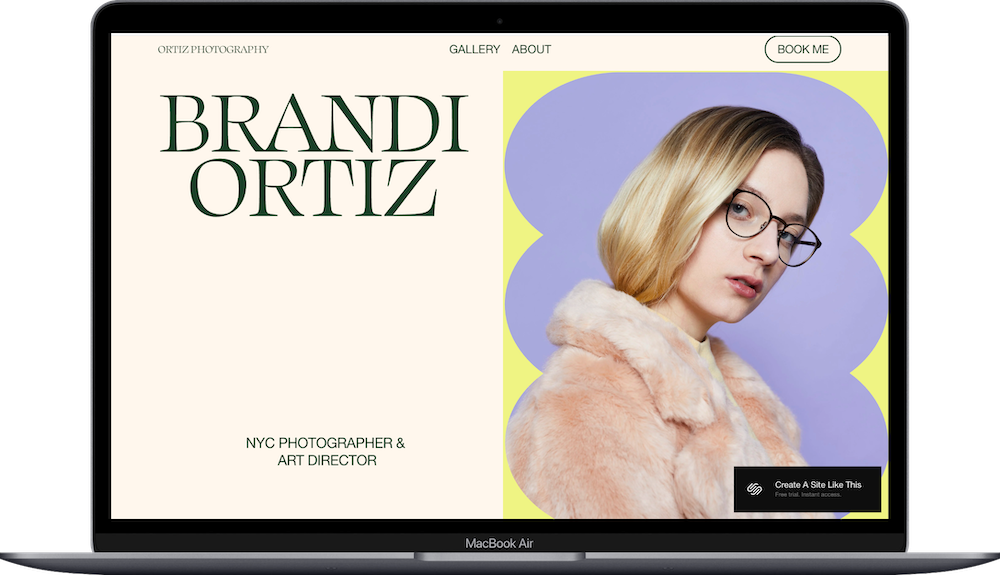
Who the Ortiz Template Works Best For
Ortiz works well if your primary goal is to show your photography or artwork, and you may offer a few clear services.
Portrait and editorial photographers. The gallery sections give you room for multiple images from shoots - bridal portraits, fashion editorials, family sessions.
Art directors and visual artists presenting editorial work, commercial projects, or fine art portfolios.
Freelance creatives offering specific services like photography, retouching, and art direction. The services section is simple - you list what you do, add brief descriptions, and you're done.
Photographers and artists who book appointments - whether that's photo sessions, creative consultations, or commissioned pieces. The contact form is easy to find, and you can add scheduling tools without hassle.
What You Get with the Ortiz Template
Home Page
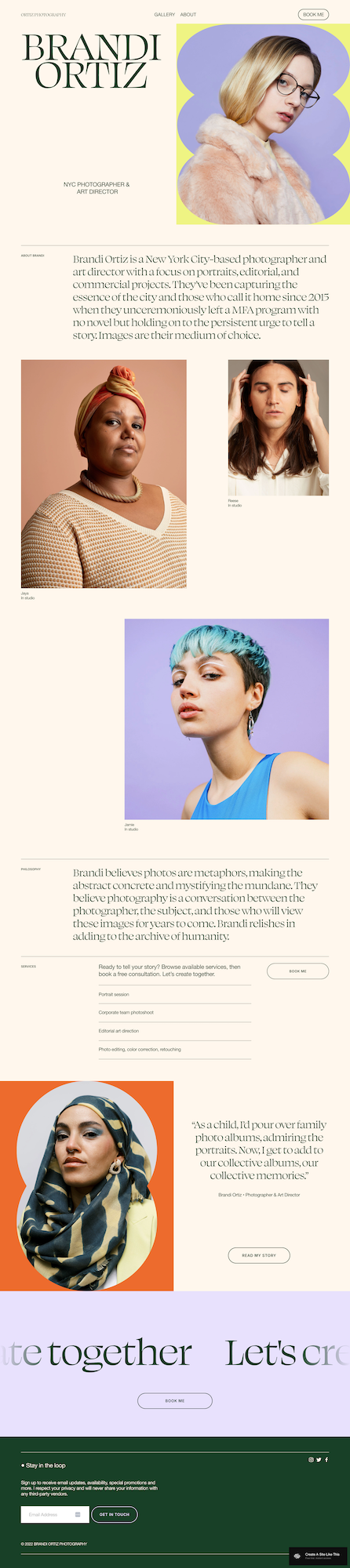
Opens with large text showing your name and title. Below that is a short about section, gallery section with project images (visitors can click through for full projects), space for your creative philosophy or approach, services overview, testimonial quote, and newsletter signup in the footer.
Gallery/Portfolio Pages
Multiple gallery pages that display your images in grid layouts. You can organize by project type, client, style, or however makes sense for your work.
Services Page
The demo includes portrait sessions, editorial art direction, corporate photoshoots, and photo editing. Each service gets a section where you can add descriptions, pricing, or "starting at" rates.
Book Me/Contact Page
Contact form that collects name, email, phone, and message. Potential clients can reach out and inquire without jumping through hoops.
Extras
Newsletter signup in the footer (appears on every page)
Responsive design (like with all Squarespace templates)
Works with Acuity Scheduling, Mailchimp, Kit, and other integrations
Key Strengths of the Ortiz Template
Images Get Priority Ortiz is structured around large, high-quality images. If your photography or artwork is your strongest selling point, the template's design stays out of the way. Visitors see your work immediately without scrolling past paragraphs of text or competing visual elements.
Clean Services Section The services area is simple but not boring. You list what you offer - headshot sessions, full-day editorial shoots, commissioned paintings - with enough room for brief descriptions.
Email List Building Happens Automatically Newsletter signup sits in the footer on every page. You're collecting emails from interested visitors without pop-ups or aggressive tactics. Connect your email platform (Kit, Flodesk, Squarespace Email Campaigns, etc) and you're building your list from day one.
Mobile Experience Holds Up Your portfolio looks professional on phones and tablets. Images scale properly, text remains readable, and navigation adapts to smaller screens. Since a majority of people discover photographers and artists through Instagram or Pinterest on mobile devices, this is important.
Booking Integration Is Easy If clients need to schedule time with you - engagement sessions, art consultations, creative direction meetings - you can add Acuity Scheduling or similar tools without custom code. Drop scheduling links on your services page and contact page, and clients can book directly.
Best Use Cases of the Ortiz Tempalte
1. New-ish Photographers Building Their First Professional Site
Moving from social media to a real portfolio? Ortiz gives you professional structure. The demo shows you how to organize sessions and services - follow the same layout and replace with your content. You don't need design skills or hours figuring out page structure.
2. Established Creatives & Creators Refreshing Their Online Presence
When your current site feels outdated, Ortiz offers a clean, modern update. The layout brings your portfolio up to current standards without requiring you to rewrite everything or reorganize your entire content library.
3. Art Directors Presenting Editorial & Commercial Work
If you shoot fashion editorials, direct commercial campaigns, and do personal projects, Ortiz handles multiple project types well. Create separate gallery pages for editorial work, commercial clients, and passion projects; the structure supports variety without feeling scattered.
4. Service Providers Who Primarily Book Appointments
Your business relies on clients scheduling photo sessions, creative consultations, or commissioned work. Ortiz makes the path to booking clear. The contact form is prominent, scheduling tool integration is simple, and the services page explains what you offer without overwhelming visitors.
5. Creatives Who Prefer Visuals Over a Ton of Text
You'd rather let your images tell the story than write extensive about pages or detailed case studies. Ortiz gives you space for a brief bio, philosophy statement, and service descriptions - but the emphasis stays on your visual work.
What the Ortiz Template Is Not Best For
Skip Ortiz if you:
Sell physical or digital products regularly. Ortiz is designed for services and portfolio presentation, not product catalogs with variations, shopping carts, and inventory tracking.
Write long-form content or run a blog-focused site. The template is image-heavy with minimal text space. If blogging or content marketing drives your business, this won't give you the structure you need.
Offer packages with multiple tiers and detailed pricing. The services section is simple - great if you offer three clear services, limiting if you need to explain bronze/silver/gold packages with add-ons and pricing breakdowns.
Need detailed case studies or project walkthroughs. If you need to explain your process, show before-and-after comparisons, or walk clients through results with substantial text alongside images, this template doesn't provide that structure.
Want a homepage with multiple content types. Ortiz is clean and minimal. If you need featured blog posts, video embeds, client logos, press mentions, and multiple calls-to-action on your homepage, this won't offer enough flexibility.
You can add e-commerce to Ortiz (Squarespace lets you add a shop to any template). But the template is built around portfolios and services, not product sales, so you'd be fighting the structure if selling products is your main revenue source.
Pros & Cons of Ortiz
Pros
Gallery layouts are clean and polished. Your images fill the screen nicely. The grid structure looks professional and lets your photography or artwork be the focus.
Fast to set up and launch. The structure is simple - replace demo content with yours, adjust colors and fonts, and you're already close to done.
Integrates with common tools. Acuity Scheduling for bookings, Mailchimp or ConvertKit for email, social media feeds - these connect without custom code or developer help.
Cons
Limited space for text-heavy content. If you need detailed service explanations, extensive case studies, or a content-focused blog, you'll be working against the template's image-first design.
Services section is basic. Great for simple offerings (portrait sessions, retouching, art direction), but limiting if you need to explain tiered packages, detailed pricing, or multiple add-on options.
No built-in SEO heading structure. Like most Squarespace templates, Ortiz doesn't include proper heading hierarchy by default. You'll need to manually set header tags properly for search engine optimization and accessibility.
Getting Started with the Ortiz Template is Easy:
Once you choose Ortiz in the Squarespace 7.1 template library, here's what to do:
Replace demo images with your work. Start with your strongest, most representative pieces. Upload high-resolution images - wedding portraits, product photography, editorial shoots, artwork - and choose a compelling hero image for your homepage.
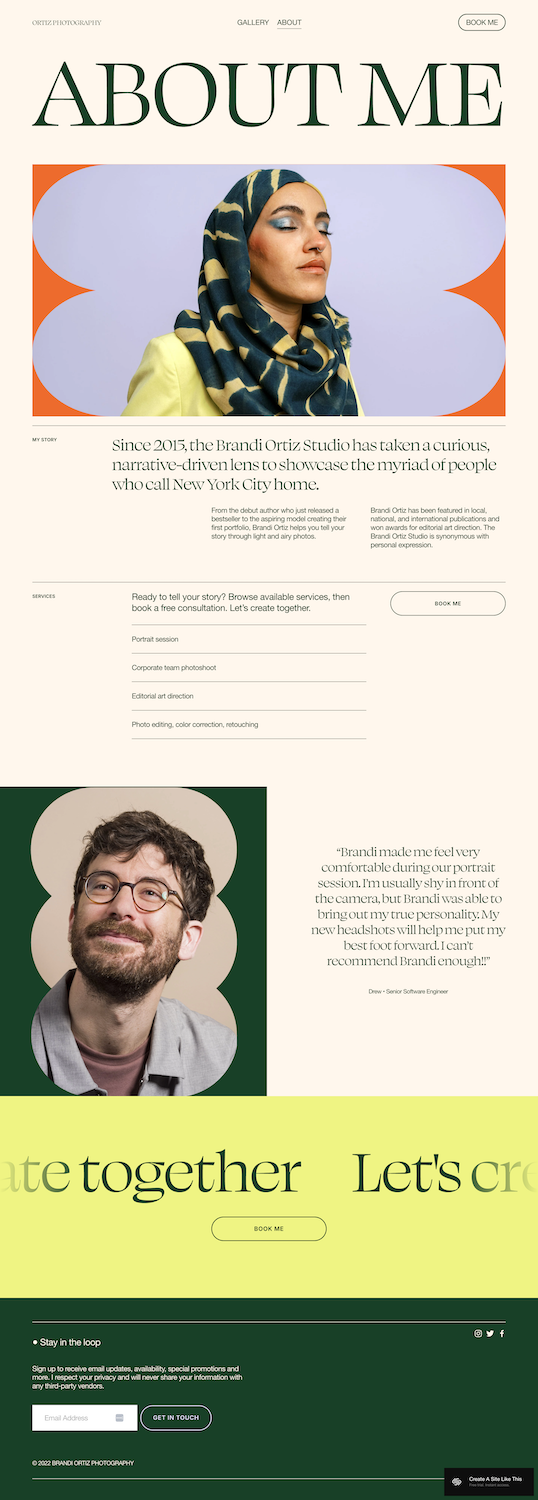
Update homepage text. Replace "Brandi Ortiz" with your name and professional title (Portrait Photographer, Visual Artist, Creative Director). Rewrite the about section in 3-4 sentences. Update the philosophy section to reflect your creative approach or what drives your work.
Fill in the services section. List what you actually offer: engagement sessions, commercial photography packages, custom portrait commissions, etc. Be specific about what each service includes. Add pricing if that fits your business model, or mention "inquire for pricing" if you prefer consultations first.
Set up your contact form. Edit form fields to collect information you need - name, email, phone, event date, project type, budget range. Customize which fields are required and add specific questions relevant to your booking process.
Check heading hierarchy for SEO. Make sure your main headline is H1, section headers are H2, and subheadings are H3. Only one one H1 per page. This matters for both search engines (getting found online) and screen readers (accessibility).
Customize colors and fonts. Go to Design → Site Styles. Adjust the color palette to match your brand. Pick fonts that fit your aesthetic - the demo uses bold type, but you can choose from Squarespace's library or upload custom fonts.
Connect your email platform. Start collecting emails from interested visitors immediately.
Add booking or scheduling tools. If clients book sessions with you, connect Acuity Scheduling or another appointment tool. Add booking buttons on your services page, contact page, or wherever makes sense for your business flow.
Test on mobile. Use Squarespace's mobile preview. Check that images load properly, text is readable, navigation works smoothly. Make adjustments if anything looks off on smaller screens.
Review everything, connect your domain, pick your Squarespace plan, and launch. Go through all pages, test forms and links, make sure everything reflects your work accurately before going live.
Ortiz Squarespace Template FAQs
Can I sell products on the Ortiz website template?
You can, but it's not ideal. Squarespace lets you add e-commerce to any template, including Ortiz. But this template is designed for portfolios and service-based businesses, not online stores. If selling prints, digital downloads, or physical products is your main revenue source, start with a template designed for e-commerce (like Altaloma or Seen).
Is the Ortiz template good for SEO?
Yep. Squarespace is good for SEO generally. You will still have to set up a few things thought. You'll need to manually doublecheck/set headings (H1 for main titles, H2 for section headers, H3 for subsections, H4) to follow proper structure. Squarespace gives you tools to optimize page titles, meta descriptions, image alt text, and URLs, but you have to actually use them. The template is mobile-responsive and fast-loading, which helps with SEO, but content optimization is your responsibility.
Can I use the Ortiz template on mobile?
Yep. Ortiz is fully responsive. Images scale to fit smaller screens, text remains readable, and navigation adapts to mobile menus. Your portfolio looks professional whether someone visits on an iPhone, Android tablet, or laptop. Which is great since many people discover photographers and artists through Instagram, Pinterest, or Google searches on their phones.
Can I change fonts and colors on the Ortiz template?
Yes. Squarespace 7.1 templates use the Site Styles editor where you can customize fonts, colors, spacing, and button styles. Pick from Squarespace's font library (includes Google Fonts and Adobe Fonts) or upload your own custom fonts. The color palette is fully customizable - change background colors, text colors, button colors, link colors to match your brand. Changes apply site-wide automatically.
Does Ortiz work for artists selling commissions?
Yes, it can work well. Gallery pages let you display your artwork - paintings, illustrations, digital art - and the services section lets you explain your commission process. The contact form makes it easy for potential clients to inquire about commissioned work. However, if you also sell prints or finished pieces regularly through your site, you might want a template with stronger e-commerce features built in.
Can I add a blog to the Ortiz template?
Yep. Squarespace includes blog functionality with every template. But the Ortiz demo doesn't feature a blog prominently - you'll need to add it to your navigation and potentially customize the blog page layout to match your site's aesthetic. If blogging is a major part of your marketing strategy (weekly photography tips, behind-the-scenes posts, SEO-driven content), consider whether Ortiz's image-heavy, minimal-text approach aligns with that goal.
Is Ortiz good for wedding photographers?
It depends on your needs. If you want to display full wedding galleries and don't need detailed package information or pricing calculators on your site, Ortiz works well. The gallery sections handle wedding photography beautifully - ceremony shots, reception photos, detail images. However, if you need to explain multiple packages (8-hour coverage vs. 12-hour coverage, engagement sessions included, second shooter add-on), display pricing charts, or provide detailed service breakdowns, the template's simple services section might feel limiting.
Can I customize the layout beyond what's in the demo?
Yes, absolutely 100%. Squarespace 7.1 uses Fluid Engine, which gives you drag-and-drop flexibility. You can add new sections, rearrange blocks, adjust layouts within pages, change spacing and alignment.