Barbosa Squarespace Template Review
This post contains affiliate links. If you purchase through them, I may receive a small commission at no extra cost to you.
Table of Contents Show
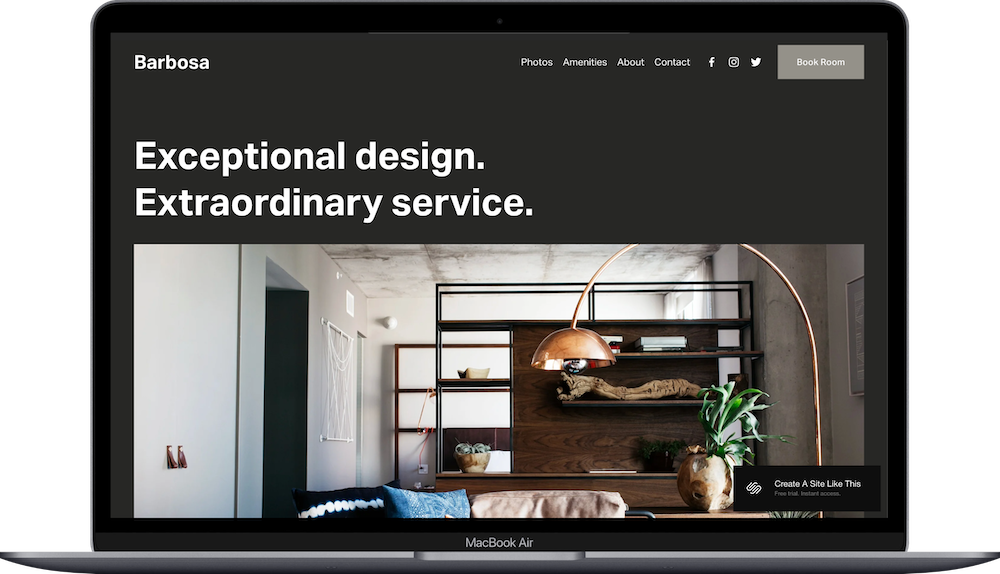
Barbosa is a Squarespace template designed for boutique hotels, bed and breakfasts, and small independent hotels.
Hotel templates are pretty rare on Squarespace, and Barbosa is one of the best options available IMO. If you run a boutique hotel, design-forward inn, or creative hospitality space, this one probably caught your eye for good reason.
This review covers what Barbosa includes, where it shines, and where you might hit limitations.
The goal: help you figure out if this Squarespace template is the right fit for your hotel or hospitality business, or if you should keep looking.
Who the Barbosa Template Works Best For
Barbosa is designed to work well for small hotels and hospitality businesses, including:
Boutique Hotels
AirBnBs
Design Hotels & Creative Spaces
Urban Hotels
Modern Bed and Breakfasts
Who the Barbosa Template Is Not Best For
The Barbosa template probably isn't the best fit if you:
Run a large hotel or resort (but if you have a large hotel with hundreds of rooms, you're probably not using a free Squarespace template anyway)
Need complex booking systems with multiple room types, rate calendars, or inventory management
Operate a budget hotel or hostel where the template aesthetic doesn't match your pricing
What You Get with the Barbosa Template
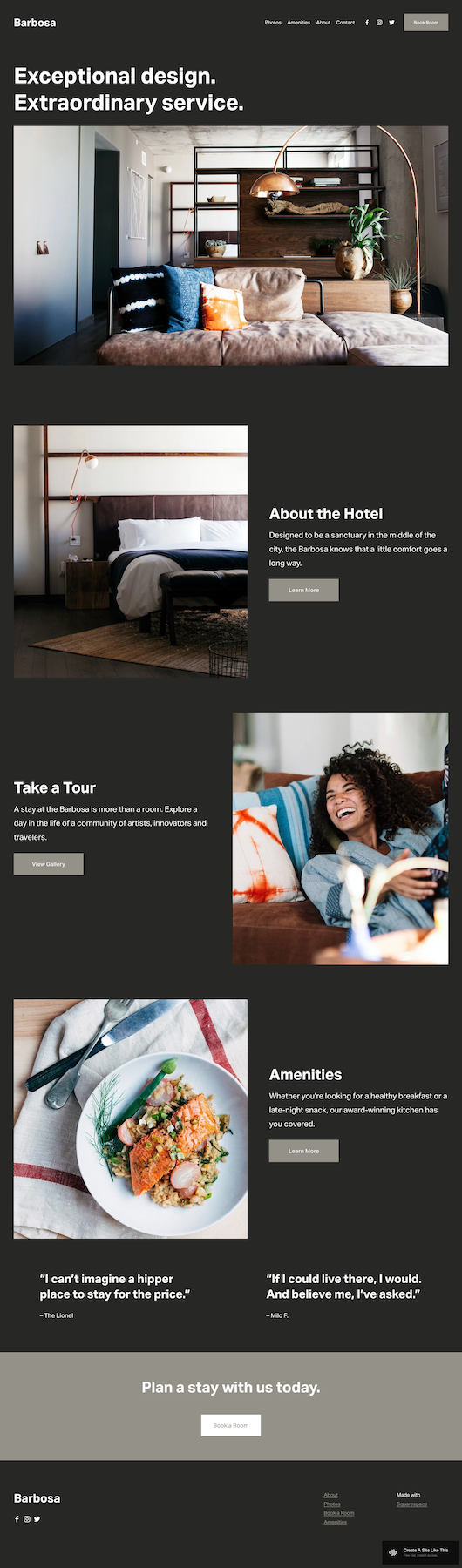
Home Page
Hero section
Hotel story
Tour invitation
Amenities highlight
Guest testimonials
Booking call-to-action
Photos Page
Gallery for your property photos.
Amenities Page
Details about what your hotel offers.
About Page
Your hotel story and background.
Contact Page
Contact form and booking inquiries.
Booking Integration
The template has "Book Room" buttons throughout. You'll need to connect these to Squarespace Scheduling or your own booking system.
Like all Squarespace templates, you can add or remove pages and customize however you need.
Getting Started with the Barbosa Template is Easy:
Once you select Barbosa from the Squarespace template library:
Replace images throughout the site - Upload your own photos (make sure they're optimized for web)
Update content on all pages - Replace demo text with your actual information
Delete any unused pages - Or move them to "Not Linked" section, disable them, and turn off SEO so they're not accessible until you're ready
Add your favicon and social share image - These show up in browser tabs and when people share your website
Set up SEO - Add meta descriptions and alt text for images (Squarespace AI can help with this now)
Customize Site Styles - Change colors, fonts, and buttons to match your brand
Set up booking integration - Connect your "Book Room" buttons to Squarespace Scheduling or your hotel booking system. Test thoroughly
Test all forms, buttons, and links - Make sure everything works before going live
Connect your domain and choose your Squarespace plan
Publish your site 🎉
Barbosa Squarespace Template FAQs
What is Barbosa Squarespace template best for?
Barbosa works for boutique hotels, bed and breakfasts, and small independent hotels. The demo shows a hotel setup, but the structure works for any small hospitality business that needs to showcase their property and handle bookings.
Can I use Barbosa for a bed and breakfast?
Yes. The demo shows a hotel, but the structure works for B&Bs. Adjust the language to emphasize breakfast, mention hosts, and highlight local recommendations.
Can I use Barbosa for Airbnb or vacation rental properties?
Yes. If you run vacation rentals and want to handle bookings outside of Airbnb or VRBO (to avoid their fees), Barbosa would work great. You can use your own site for direct bookings and SEO, while still listing on rental platforms for additional reach. Just integrate booking software that handles availability and payments.
How do I handle room booking and availability?
You'll need to integrate with hotel booking software like Cloudbeds, Bookerville, or WebRezPro. These systems handle availability calendars, room types, and rates. Connect the "Book Room" button to your booking portal. For very simple properties with one or two rooms, Squarespace Scheduling might work.
Can I show different room types and rates?
Yes, but you'll need to build this yourself. Add a Rooms page with sections for each room category - photos, descriptions, amenities, pricing. Or integrate with booking software that displays room options. The demo doesn't include this structure by default.
Is Barbosa good for SEO?
For local hotel SEO, yes. Optimize for your hotel name and "[city] boutique hotel" type searches. Add your address for local search. Write content about your neighborhood and local attractions. Consider adding a blog for ongoing content about your area.
How do I integrate with Airbnb or Booking.com?
You can't directly integrate inventory, but you can link to your profiles on these platforms as additional booking options. Many boutique hotels use their own website for direct bookings (no commission) and also list on booking sites for broader reach.
Can I add a restaurant or bar page?
Yep. Create a dedicated Dining page showcasing your food and beverage offerings. Include menus, photos, hours, and whether it's open to non-guests.
What about events or wedding bookings?
You'd need to add this separately. Create an Events page describing your space, capacity, and packages. Add inquiry forms. If events are a major revenue stream, consider whether Barbosa's structure supports that focus or if you need a different approach.
How do I compete with hotel booking sites?
Offer incentives for direct booking; lowest rate guarantee, welcome amenities, flexible cancellation, room upgrades. Build your email list. Create packages or experiences only available through direct booking. Use your website to showcase personality that OTAs can't capture.