The 5 Most Versatile Squarespace Templates
This post contains affiliate links. If you purchase through them, I may receive a small commission at no extra cost to you.
Table of Contents Show
Building a website in 2026 means you’ve got lots of options. AI can generate a site in minutes. Drag-and-drop builders are everywhere. And there are still custom coded website options too. So why pick a Squarespace template at all?
Squarespace is different. It’s a tested platform with strategic infrastructure. You can start from scratch if you’re feeling confident, or get started with a built-in template that’s tested, professional, and has the basics baked in.
There are almost 200 templates in Squarespace’s template library, plus they’ve recently started offering generated AI website templates (although I haven’t touched those yet.)
So which Squarespace templates are most versatile?
I’ll answer that in this blog post by sharing the five templates I personally think are the most robust, versatile, and a great starting point for a wide swath of creators and DIY business owners.
All five are included with any Squarespace subscription. They're built on Squarespace 7.1, which means you get the same drag-and-drop flexibility and customization options across all of them. They come with more built-in pages and more structure than most templates, which means you spend less time building from scratch and more time customizing what already works.
These five templates are Maca, Skyloop, Bennie, Lusaka, and Suffolk.
1. Maca Squarespace Template
Best for: Maca is a Squarespace template for product-based businesses, beauty brands, wellness companies, anyone selling physical products online
Page count: 6 pages (Home, Shop, About, Blog, Contact, Ingredients)
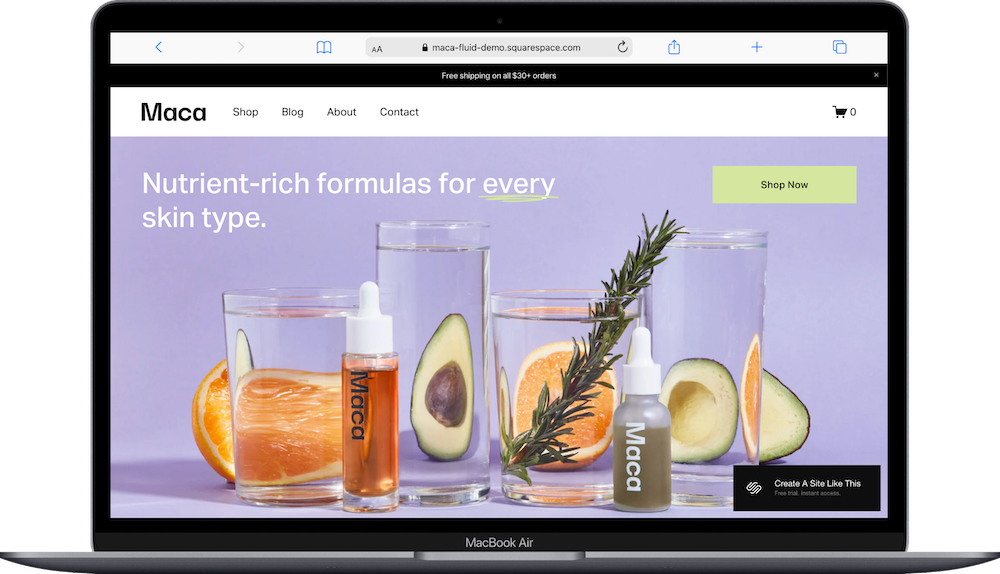
Maca is one of the more robust e-commerce templates Squarespace offers. The demo shows a skincare brand, but the structure works for almost any product business.
What makes Maca versatile is how it combines shop functionality with content areas. You're selling products and you're telling a story. The Ingredients page is particularly useful here. Repurpose it for brand values, sustainability practices, product details, or whatever builds trust with your customers.
The shop page has sidebar filtering by category. Product pages support variants (like sizes, colors, or scents). There's member login built in if you want to add exclusive content later.
The minimal design means you can adapt it beyond beauty and wellness. Change the soft color palette to something bolder and it works for apparel, home goods, art prints, or handmade products.
2. Skyloop Squarespace Template
Best for: Skyloop is a robust e-commerce Squarespace template that’s surprisingly perfect for online stores, children's brands, apparel shops, and lifestyle products
Page count: 10+ pages (Home, Shop, New Arrivals, Baby, Kids, Sale, About, Contact, Size Guide, Shipping & Returns, Gift Cards, Login)
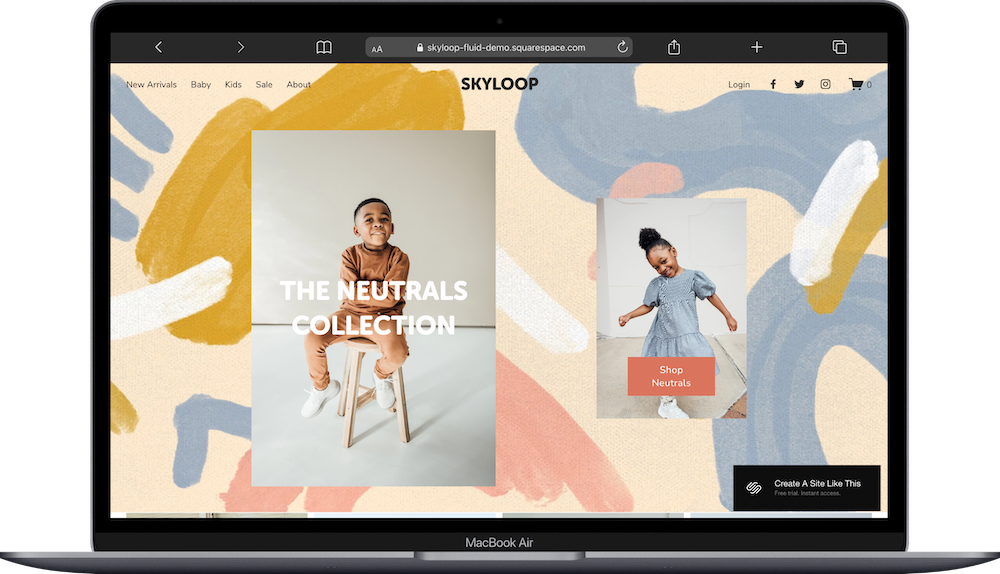
Skyloop has the most pages of any free Squarespace template. The demo features children's clothing which might make you pass right over it, but the secret of Skyloop is that the structure will work well for really any retail business (especially clothing).
You get separate category pages (like Baby and Kids in the demo, but again, you can use them for anything), a New Arrivals page, and a Sale page. The Shop page includes sidebar filtering so customers can browse without getting overwhelmed.
What makes Skyloop stand out is all the supporting pages most stores need: Size Guide, Shipping & Returns, Gift Cards. These are already built, which could save you hours of setup.
The warm colors and lifestyle photography give it a friendly feel, but the structure is solid. Swap the playful aesthetic for something minimal or sophisticated, and Skyloop works for anything from women's apparel to activewear to sustainable fashion to een home goods.
3. Bennie Squarespace Template
Best for: The Bennie Squarespace Template is set up as a summer camp website, but can be used for multi-program businesses, camps, workshops, creative classes, family services
Page count: 10 pages (Home, Programs with 3 subpages, About with 4 subpages, Camp Life Contact)
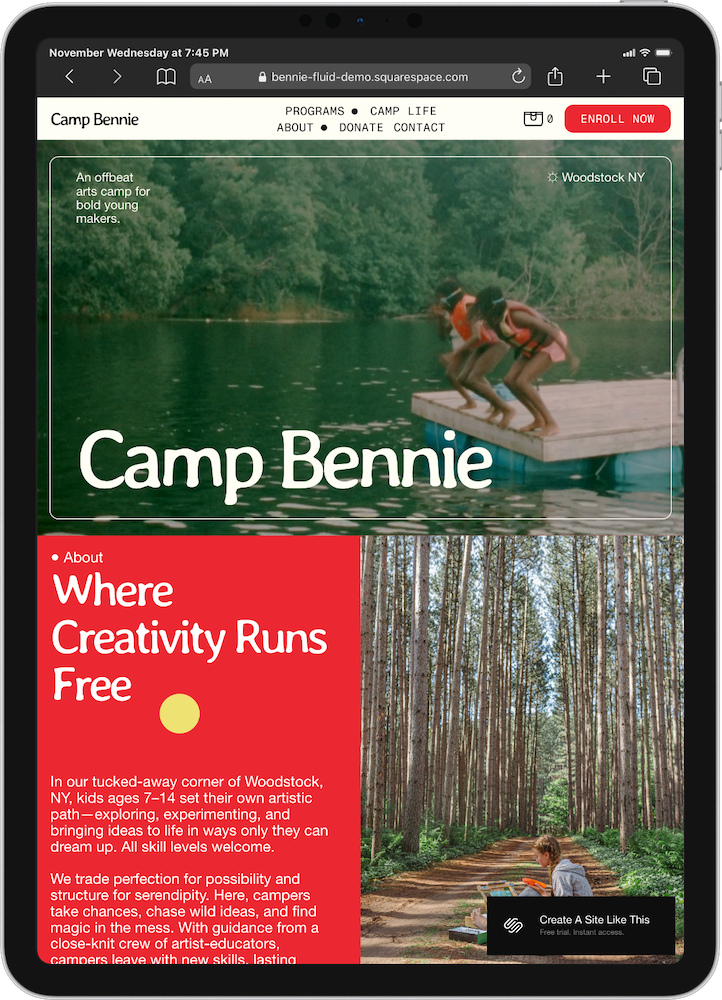
Bennie is built for businesses, non-profits, or organizations offering multiple programs or services. The demo shows a kids' summer camp with three main programs, but the structure works really well for any business with distinct offerings, especially if you have mult-offerings, like three different kinds of programs or services.
The homepage uses full-width color-blocked sections to highlight each program. Each section includes an image, headline, description, pricing, and button. The Bennie template also makes great use of anchor links.
This layout works well for a variety of options: if you run a yoga studio with different class types, offer consulting packages, teach workshops, or run a wellness center with various programs. And the color blocks make it easy to visually separate different offerings.
The About section includes four different sub-pages, and the Programs dropdown has three. There is room to spread out here!
Bennie's bright, energetic design & color palette skews toward family-friendly businesses, but you can tone it down with a more sophisticated color palette. The structure is still solid.
4. Lusaka Squarespace Template
Best for: Lusaka Squarespace template is best for education-focused nonprofits, international development organizations, project-based foundations
Page count: 7 pages (Home, Projects with 3 subpages, Our Vision, Our Team, Blog, Donate)
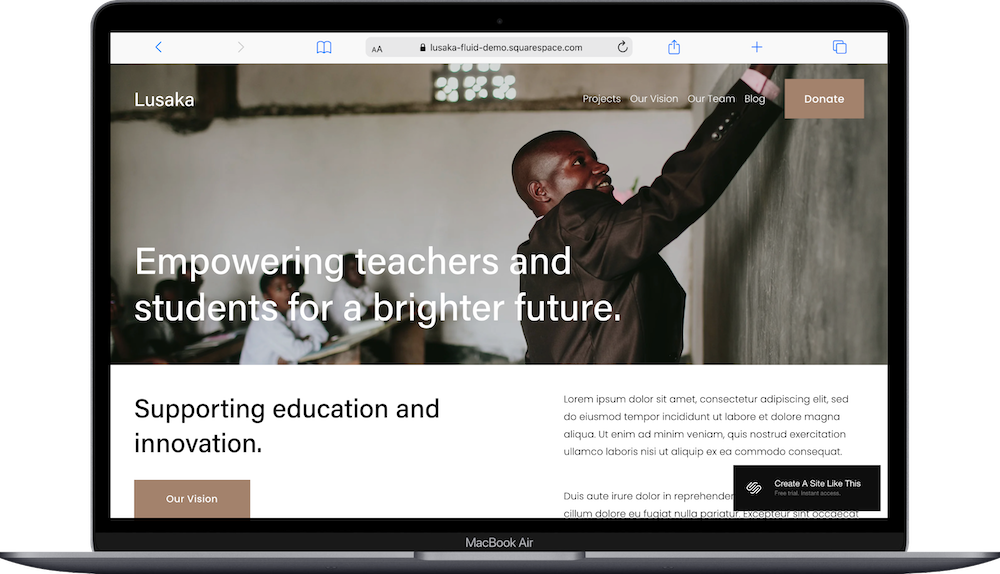
The Lusaka template is built for nonprofits & foundations that run projects and initiatives. It's a solid starting point, easy to customize, and designed specifically for the industry.
The demo features warm, human-centered imagery and a layout that centers your mission. The project pages make it easy to present different programs or initiatives separately, which works well if you're doing work across multiple communities or focus areas.
What makes Lusaka versatile is how you can repurpose its structure. The Projects section works just as well for client case studies, service offerings, or portfolio work. The Our Team page builds credibility whether you're a nonprofit, consulting firm, creative agency, or professional services business.
One bonus: Lusaka includes a blog. Not all nonprofit templates have this built in, so it's helpful if content marketing is part of your strategy.
The professional design with plenty of white space works well for serious, mission-focused organizations. But the structure is flexible enough to adapt for consultants, coaches, agencies, or really any business that leads with story, trust and expertise.
5. Suffolk Squarespace Template
Best for: Suffolk is best for boutique hotels, bed & breakfasts, vacation rentals, small retreat centers
Page count: 6 pages (Home, About with 2 subpages, Gallery, Visit, Contact, Book a Room)
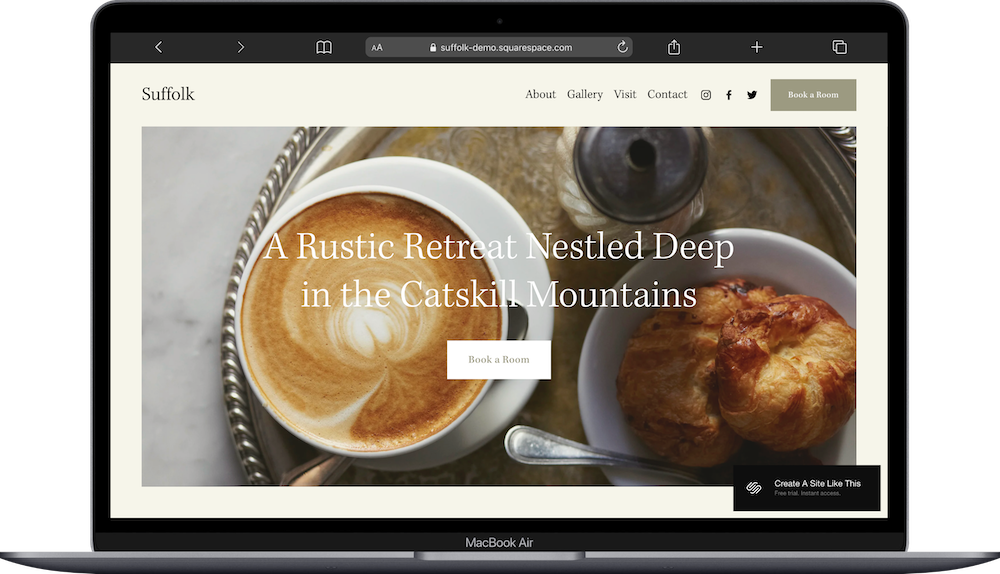
Suffolk is built for boutique hotels and bed & breakfasts, and truthfully is probably best for that or similar purposes, but the structure also works well for any business selling experiences or presenting multiple offerings with rich imagery.
The demo shows a rustic farmhouse property with booking options and room information. The warm design works well for B&Bs where personal touches matter, but you can adapt it for vacation rentals, yoga retreats, writing workshops, or wellness getaways.
What makes Suffolk versatile is how you can repurpose its pages. The Gallery page works for property photos, but also for portfolio work, project images, or service offerings. The Visit page (set up for local area information) can become a resources page, service details, or location information.
The About page includes two subpages for telling your story, but these work equally well for explaining your approach, methodology, or team information in other industries.
Suffolk's warm, rustic aesthetic creates an inviting feel, but the structure is what makes it flexible. If you're a retreat center, event venue, creative studio, or any business where atmosphere matters, Suffolk's image-forward layout lets you show what makes you different.
Change the earthy tones to something modern and Suffolk works for design-focused businesses, experiential brands, or high-touch service providers.
How to Choose the Right Squarespace Template
I am a broken record on this point: pick based on structure, not based on aesthetics.
Colors change. Fonts change. Layouts are customizable. What matters in a template is starting with the right foundation for how you present information.
Selling products online? Start with Maca or Skyloop. They have the most e-commerce pages built in.
Offering multiple programs, services, or packages? Bennie makes it easy to present different offerings clearly.
Leading with mission, story, or case studies? Lusaka gives you the structure to build trust and present your work.
Selling experiences or letting imagery tell your story? Suffolk lets visuals do the heavy lifting while organizing information clearly.
The demo content is just an example. You can customize any of these templates using Squarespace's Fluid Engine editor. Change colors, swap layouts, add or remove pages.
So What Makes These Squarespace Templates Versatile?
Multiple page types built in. You're not starting from a blank homepage. You get About pages, contact forms, content pages, and specialty pages already structured.
Adaptable design. The aesthetic works across different industries with color and font changes. You're not locked into one specific vibe.
Room for growth. You can add blog functionality, e-commerce, member areas, or other features later through Squarespace's platform.
Clear content organization. The template gives you a logical structure for presenting information, whether that's products, services, projects, or programs.
Here’s How to Get Started with Your Squarespace Template:
Click the links above to click around the demos, finding the one that best suits your needs
Sign up for Squarespace and start a free 14 day trial (no credit card required)
Then, replace all demo content with your own text, images, and branding
Customize colors and fonts in Site Styles to match your brand
Add or remove pages based on your needs
Upload high-quality images (optimized for web)
Set up SEO (Squarespace's AI SEO assistant makes this way easier)
Test everything on mobile
Connect your domain, choose your plan, and publish 🎉
Squarespace Template FAQs
What is the difference between these Squarespace templates?
The main difference is structure and what they’re built for.. Skyloop and Maca have full e-commerce built in, so if you’ve got a shop, either of these can be great starting points. Bennie and Lusaka are both built around projects and programs. And Suffolk is a great start for hotels, Airbnb’s, or rental properties. Pick based on which structure and intent generally match what you're building.
Can I customize these templates after I pick one?
Absolutely. You can change colors, fonts, spacing, layouts, add or remove sections, and rearrange content. You can use code if you want to, but there’s certainly no need. You can add site animation, you can do a ton of customization. Squarespace 7.1 uses Fluid Engine, which gives you drag-and-drop control over your layouts.
Do I need to stick with the demo's industry?
Nope. The demos show specific examples, but the structures work across industries. Maca works for any product business, not just skincare. Suffolk works for any experience-based service, not just hotels. I’ll say it again: the structure matters more than the demo content.
Can I add e-commerce to any of these templates?
Sure can. All Squarespace 7.1 templates support e-commerce. Maca and Skyloop just have more e-commerce pages built in from the start (like Size Guide, Sale pages, category pages), so you'll have less setup work.
Which template is easiest for beginners?
Bennie and Lusaka are pretty approachable with clear page structures. Maca and Skyloop have more features, which gives you more options but also more to learn. Suffolk sits in the middle. They're all built on the same platform though, so the learning curve is similar.
Can I delete pages I don't need?
Absolutely. Start with a comprehensive template and remove what you don't need. It's easier than building pages from scratch. You can also just move them down to the ‘Not Linked’ section and turn off the ‘enable page’ toggle & SEO- this will preserve the page if you want to come back to it, but your website visitors won’t be able to see it.
How do Squarespace templates compare to AI website builders?
AI builders generate sites fast but often create cookie-cutter designs with backend issues, limited customization, and scalability problems. Squarespace templates are professional foundations built on a stable platform with trustworthy infrastructure. You get tested structures that work long-term, not quick prototypes that break when your needs grow.