Cedar Squarespace Template Review
This post contains affiliate links. If you purchase through them, I may receive a small commission at no extra cost to you.
Table of Contents Show
Cedar is a Squarespace template made for financial advisors, consultants, and professionals.
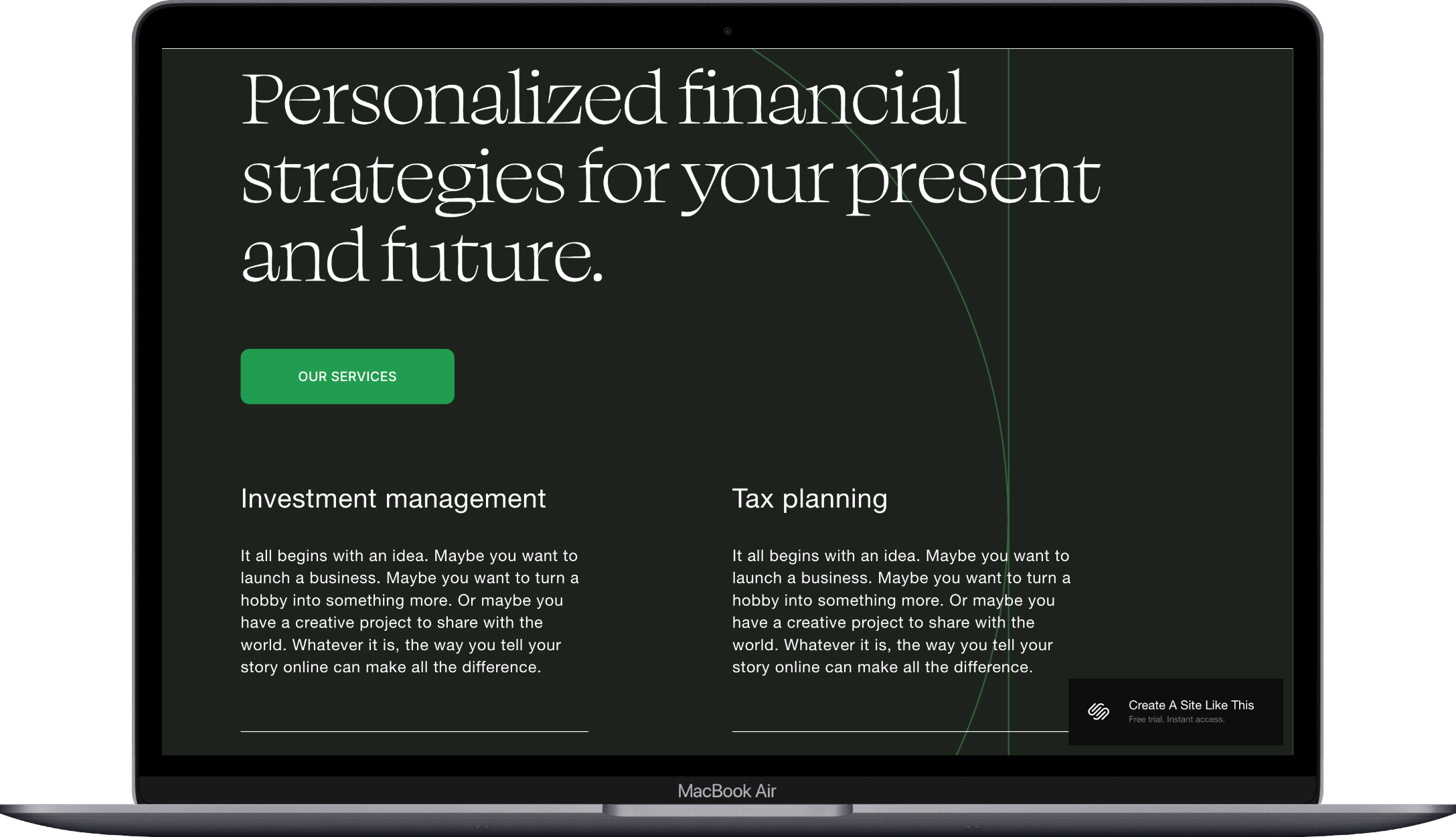
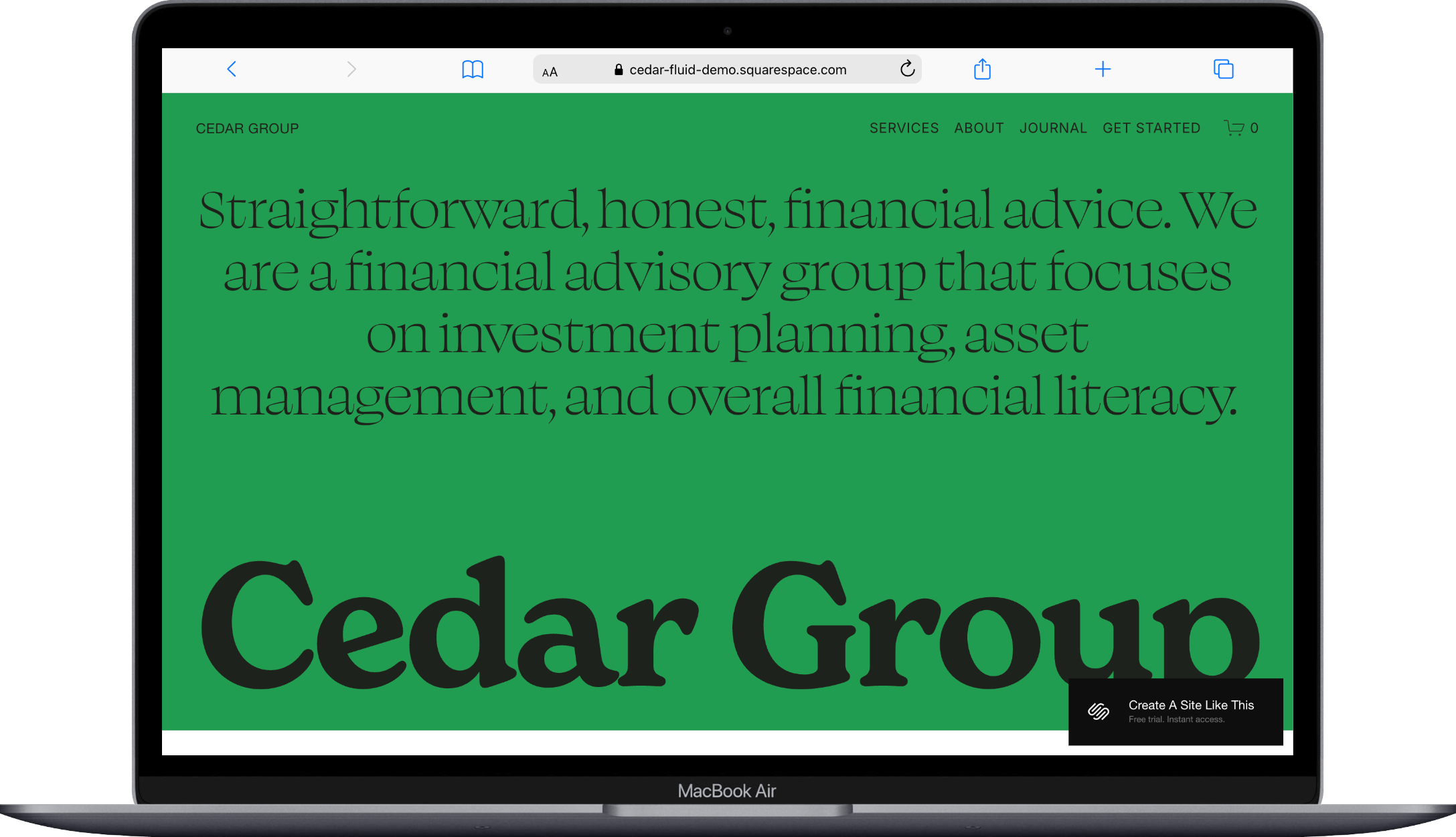
The template uses lots of white space, a vibrant, trustworthy green, and animated text to guide visitors through your services. If you're a service provider who needs a financial website, Cedar probably caught your eye for good reason.
This review covers what Cedar includes, pros and cons, where it shines, and where you may hit limitations.
The goal: help you figure out if this Squarespace template is the right fit for your financial business, or if you should keep looking.
Who the Cedar Template Works Best For
Cedar works for finance professionals who need a polished website that’s easy to set up. The template focuses on content and readability, making it a good fit for businesses where expertise and trust matter more than visual flair.
Financial advisors and planners
Who need to present services like investment management, estate planning, and tax strategies in a straightforward, professional way.
Business consultants
Looking to explain their methods, showcase client results, and become thought leaders through blog content.
Professional service providers
Like therapists, career coaches, or legal consultants who want a site that feels friendly but professional.
Small service businesses
That offer multiple packages or tiers and need clean organization to help clients understand their options.
Solopreneurs building a personal brand
Around expertise in fields like finance, business strategy, or wellness coaching.
What You Get With the Cedar Template
Homepage
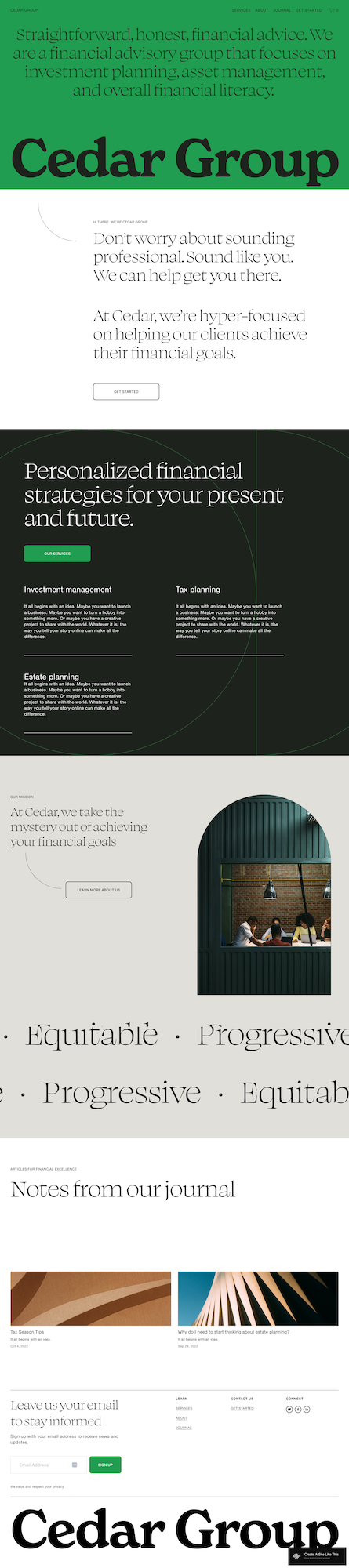
The homepage has a hero section with your headline and intro text, an about section explaining your mission, a three-column area showing your services with icons or images, animated scrolling text that highlights your values, and a blog preview section labeled "Articles" in the demo.
Services Page
A page dedicated to your services with intro text, individual service cards that link to detail pages, description text for each service, and space for pricing or package information.
Blog/Articles Section
Cedar includes a blog page where you can share insights, updates, and thought leadership content to build trust and keep clients informed.
Extras
Built-in appointment booking (works with Acuity Scheduling)
Newsletter signup form in the footer
Social media icons
Map section to show your business location
Email capture forms
Large footer with quick links and navigation
Key Strengths of the Cedar Template
Text-Heavy Design
Cedar uses a simple, content-first approach that's perfect for explaining financial or complex services. The different background colors between sections guide your eye naturally from one area to the next. The generous white space keeps the text from feeling overwhelming. If you need room to explain what you do without relying on dozens of images, this layout is a good choice.
Built-In Appointment Scheduling
The template includes booking for appointments, which is huge if consultations are part of your business. Clients can schedule directly on your site without you needing to add extra widgets or tools. For financial advisors, consultants, or therapists, this feature alone can make your booking process much easier.
Professional Without Being Stuffy
Cedar balances credibility and approachability. The serif fonts and color blocking give it a polished, trustworthy feel. But the animated text elements and curved line details keep it from feeling too corporate or stale. It works for professionals who want to show expertise without seeming cold or hard to approach.
Organized for Multiple Services
If you offer different service packages, tiers, or specializations, Cedar's structure makes it easy to present them clearly. The services page layout lets you break down what you offer without cluttering the homepage. Each service can link to its own detail page if you need more explanation space.
Strong Content Focus with Blog Integration
The built-in blog section (labeled "Articles" in the demo) is positioned prominently. This makes it clear that content and thought leadership are part of your strategy. For consultants and advisors who use blogs to show expertise and attract clients, this layout supports that approach naturally.
Best Use Cases of the Cedar Template
1. Financial Advisory Firms with Multiple Service Lines If you offer investment management, retirement planning, estate planning, and tax services, Cedar's structure helps you present each service clearly while keeping everything organized. The booking feature lets potential clients schedule consultations. The blog section positions you as a trusted advisor sharing valuable insights.
2. Management Consultants Building Authority Through Content For consultants who use thought leadership to attract clients, Cedar gives you a platform to showcase your methods, share case studies, and publish articles regularly. The text-heavy design supports longer explanations of your approach. This works well when you're selling expertise rather than products.
3. Solo Practitioners Building a Personal Brand Whether you're a career coach, business strategist, or wellness consultant, Cedar helps you establish credibility as an individual expert. The clean design keeps the focus on your message and services. The straightforward navigation makes it easy for potential clients to understand what you offer and how to work with you.
4. Service Businesses That Need to Explain Complex Offerings If what you sell requires a fair amount of explanation (like strategic planning services, specialized consulting, or professional coaching programs), Cedar's layout works well. Overall, this is a great template if you have a lot of copy, and that can be kind of hard to find with Squarespace’s free templates.
What the Cedar Template Is Not Be Best For
The Cedar template may not be the best fit if you:
Run a photography, design, or creative business where visuals need to be the star; Cedar focuses on text
Sell physical products as your primary business: the template doesn't have strong product display sections
Want a bold, colorful, or highly visual brand look
Run an e-commerce store with dozens or hundreds of products
That said, you can add e-commerce to this template. Squarespace lets you add a shop to any site. But because Cedar is built for service-based businesses, not product sales, it's not the best starting point if selling products is your main business model.
Pros & Cons of the Cedar Template
Pros
Clean, professional design that builds trust without feeling boring, corporate, or cold
Built-in appointment booking saves you from adding scheduling tools from other companies
Text-focused layout works perfectly for explaining complex services or building authority through content
Different section backgrounds and white space make the site easy to scan and navigate
Cons
Minimal visual elements may feel too plain if you have strong brand imagery or want a more vibrant look
Like most free Squarespace templates, Cedar doesn't have proper heading structure by default, which means you'll need to manually adjust for SEO
The text-heavy design requires quality written content to work well; if you don't have copy ready, the template can feel empty
Getting Started with the Cedar Template is Easy:
Once you pick Cedar in the Squarespace 7.1 template library and you're ready to build, here's what to do:
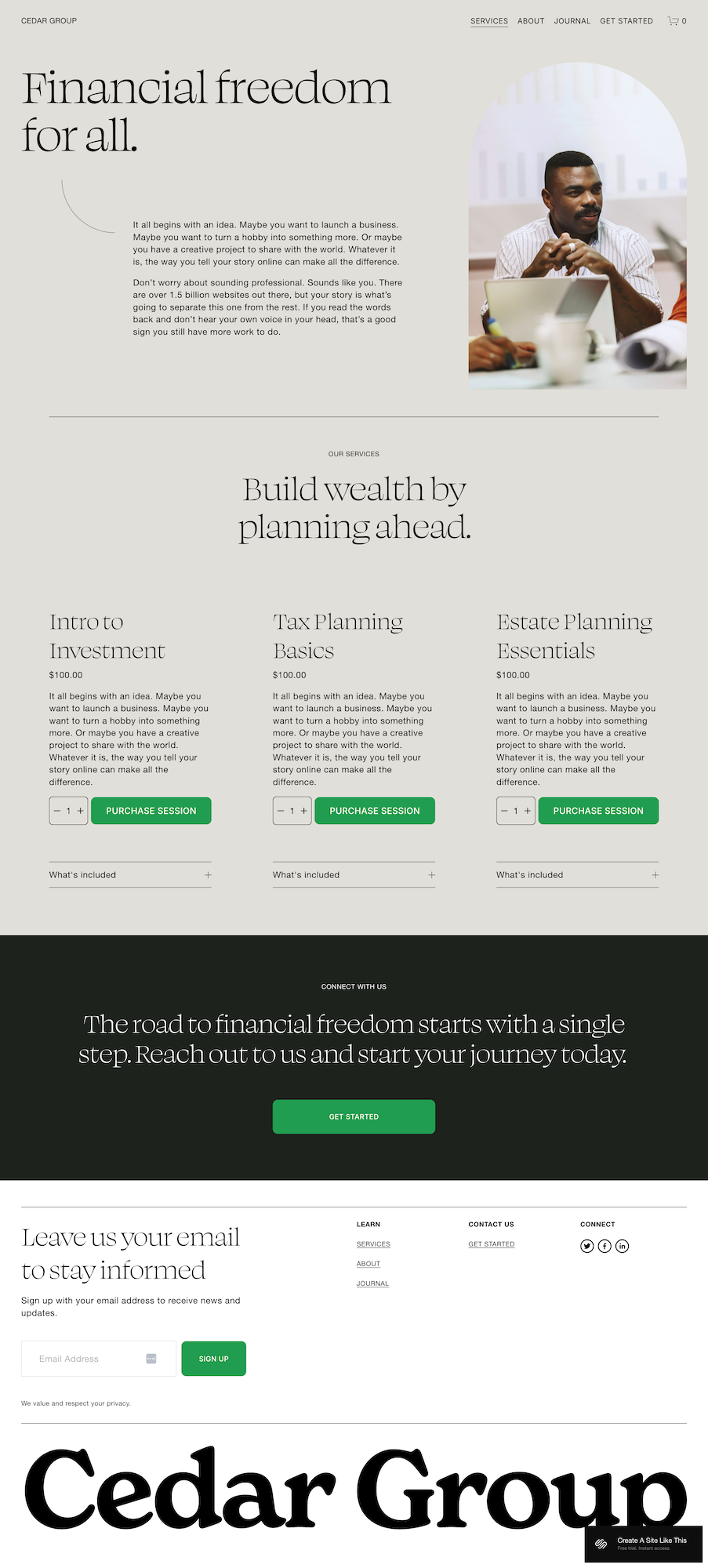
Replace the demo content with your business information. Start with the homepage hero section; swap in your headline, subheadline, and what you actually do.
Update your services section with your offerings. Replace the generic "Investment Management," "Estate Planning," and "Tax Planning" placeholders with your actual services.
Check your heading structure. Squarespace templates don't always include proper heading structure by default. Make sure your main headline is an H1 and subheadings follow a logical order. (This matters for both accessibility and SEO.)
Set up your appointment booking. If you're using Acuity Scheduling or Squarespace Scheduling, connect it now so the booking feature actually works. Test it yourself to make sure it works.
Customize colors and fonts in Site Styles. Click Design > Site Styles to adjust the color palette and fonts. Cedar's simple design means your brand colors and font choices will have a big impact on the overall feel.
Delete or change sections you don't need. Not every business needs every section in the demo. If the animated scrolling text doesn't fit your brand, remove it. If you don't have a blog yet, hide that section until you're ready.
Set up your footer navigation and newsletter form. The footer takes up significant space, so make sure the quick links actually go somewhere useful. Connect the newsletter signup to your email service provider.
Upload high-quality images for the few spots that use them. While Cedar focuses on text, the images you do include matter. Use professional photos that support your brand, not generic stock images.
Double check everything, connect your domain and choose your Squarespace plan, and go live. Test the site on mobile. Make sure all links work. Verify your booking system is connected. Publish when you're confident it represents your business accurately.
Cedar Squarespace Template FAQs
Can I sell products on the Cedar website template?
Yes, you can add e-commerce to Cedar. Squarespace allows you to add a shop to any template. But Cedar is designed for service-based businesses that focus on content and expertise over product catalogs. If selling physical products is your primary business, you'd be better off starting with a template built specifically for e-commerce like Altaloma or Seen.
Is the Cedar template good for SEO?
Yes. You'll need to manually check and adjust your headings so your main headline is an H1 and subheadings follow a logical order. That said, Squarespace includes basic SEO tools like page titles, meta descriptions, and clean URLs, so you can optimize the site easily.
Can I use the Cedar template on mobile?
Yes, Cedar is fully mobile-friendly and works on all devices. The layout adjusts automatically for mobile and tablet screens. It maintains readability and navigation. The text-focused design actually works well on mobile since there aren't complicated layouts that need to change.
Can I change fonts and colors on the Cedar template?
Absolutely. You can customize fonts, colors, and other design elements through Site Styles in the Design menu. Cedar's simple design means your color and font choices will have a big impact on the overall look and feel. You can make it easily match your brand.
Does Cedar include a blog feature?
Yes, Cedar includes a blog section (shown as "Articles" in the demo). The blog is integrated into the template's navigation and design. This makes it easy to share thought leadership content, client insights, and updates. This is particularly useful for consultants and advisors who use content marketing to build credibility.
Can clients book appointments directly on Cedar?
Yes, Cedar includes built-in support for appointment scheduling through Acuity Scheduling or Squarespace Scheduling. Clients can book consultations, meetings, or sessions directly on your site. You'll need to connect your scheduling service, but the template is already set up to support this feature.
Is Cedar suitable for solo consultants or only firms?
Cedar works for both solo practitioners and small firms. The template's structure can showcase a team or position a single expert effectively. If you're building a personal brand as a consultant, coach, or advisor, Cedar gives you a professional foundation.
How many services can I showcase with Cedar?
The demo shows three main service areas on the homepage. But you can add more through the services page or by creating individual service detail pages. The template's structure supports multiple offerings. Though if you have more than five or six distinct services, you'll want to think about how to organize them so visitors don't feel overwhelmed.
Can I add video to the Cedar template?
Yes, you can add video blocks to any Squarespace template, including Cedar. However, the template isn't designed with video in mind, so you'll need to think about placement. A video in the hero section or services explanation could work well. But Cedar's strength is in its text-focused layout, not multimedia presentations.
View Cedar Demo
Ready to see if Cedar fits your needs? Check out the Cedar demo to explore the template and see how your work might look in this layout.
Ready to Give Squarespace a Try?
If Cedar feels like the right fit for your creative business, you can get started with Squarespace using this link. All Squarespace templates are built on the same platform, so you can switch up your vibe later if you need.