Skyloop Squarespace Template Review
This post contains affiliate links. If you purchase through them, I may receive a small commission at no extra cost to you.
Table of Contents Show
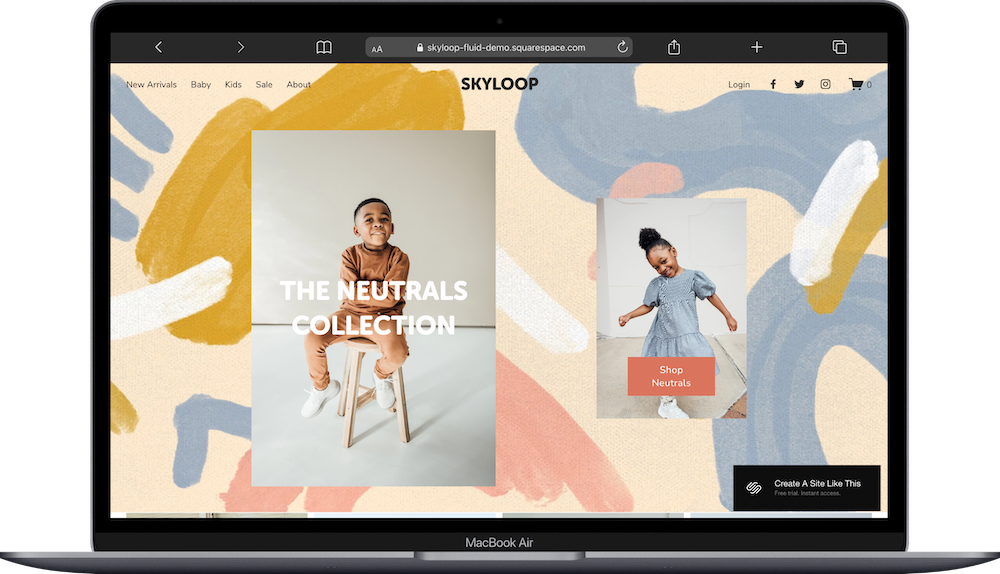
Skyloop is a Squarespace shop template built for children's clothing brands (but can easily be adapted for other industries)
The demo shows kids' apparel with artistic painted backgrounds, warm colors, and lifestyle photography of children wearing the clothes. But don't let the demo fool you, the Skyloop template adapts easily to casual wear, pet products, handmade goods, or any boutique shop with a warm, approachable vibe.
The design balances fun, whimsical elements with clean product displays and easy shopping. If you're selling kids' clothes, pet accessories, or craft goods and want a site that feels joyful without looking chaotic, Skyloop probably caught your eye for good reason.
This review covers what Skyloop includes, where it shines, and where you may hit limitations.
The goal: help you figure out if this Squarespace template is the right fit for your product-based business, or if you should keep looking.
Who the Skyloop Template Works Best For
Skyloop works well if you sell children's clothing and want a site that appeals to parents while celebrating childhood. That said, the template isn't locked into kids' clothes. You can absolutely adapt it for other uses.
Independent Kids' Clothing Brands
If you design and sell your own line of children's clothes with a distinctive style, Skyloop's playful aesthetic and lifestyle photography displays let you show off your brand personality.
Sustainable or Ethical Kids' Fashion
The template includes sections for brand values and story, which works perfectly if you want to highlight organic materials, ethical manufacturing, or sustainable practices that matter to conscious parents.
Clothing Brands with a Playful Aesthetic
The warm colors, artistic backgrounds, and lifestyle photography work just as well for women's casual wear, loungewear, or activewear brands with a fun, approachable vibe. Just swap the kids' photos for adult models.
Pet Products or Accessories
The category structure and lifestyle photography setup work great for pet clothing, accessories, or toys. The playful design fits the pet product market naturally. You can also checkWesley if you want a template set up for pet products from the get-go.
Small Batch or Handmade Goods
If you make handmade jewelry, ceramics, art prints, or other craft items with a warm, artistic brand, Skyloop's layout and brand story sections support that. The painted backgrounds complement handmade aesthetics.
Any Boutique Shop with Products
Whether you sell candles, bath products, stationery, or small home goods, Skyloop's organized layout makes a focused collection feel intentional and special. The key is having lifestyle photography that shows your products in use.
Who the Skyloop Template Is Not Best For
The Skyloop template probably isn't the best fit if you:
Run a large-scale retailer with hundreds or thousands of products across dozens of categories (Shopify might be a better choice)
Want a minimal, sophisticated, or luxury aesthetic
Want a dark, moody, or edgy brand vibe
What You Get with the Skyloop Template
Skyloop comes with pages designed for selling products:
Home Page
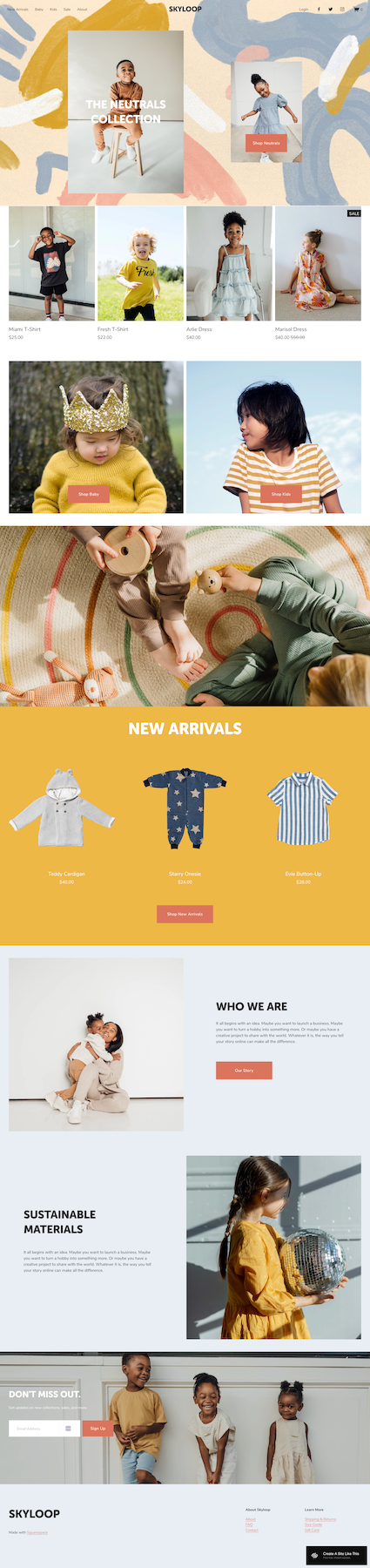
The main landing page with several sections:
Hero section with large lifestyle images and collection callouts
Product grid showing featured items with lifestyle and product photos
Large image sections with Shop Now buttons
New Arrivals section with product carousel
Who We Are section with brand story and image
Section highlighting brand values
Newsletter signup
Footer with navigation links
Shop Pages
Main shop page with sidebar filtering by category. Products display with images, names, prices, and sale tags.
New Arrivals Page
Dedicated page for newest products.
Category Pages
Separate pages for Babies and Kids with filtered product grids.
Sale Page
Products on sale with original and sale pricing clearly marked.
About Page
Space for your brand story, mission, and values.
Contact Page
Contact form for customer questions.
FAQ Page
Pre-built FAQ section for common questions.
Shipping and Returns Page
Policy information for shipping and returns.
Size Guide Page
Sizing information for customers.
Gift Card Page
Digital gift card purchase option.
Login Page
Customer account login.
Extras:
Size selection dropdowns on products
Sale price display with strikethrough original price
Multiple category filtering options
Mobile-responsive design
Newsletter signup
Customer account functionality
Artistic painted background elements
Getting Started with the Skyloop Template is Easy:
Once you pick Skyloop in the Squarespace 7.1 template library, here's what to do:
Replace hero images and collection callouts. Update the large lifestyle photos with images of kids wearing your clothes. Change the collection name from "The Neutrals Collection" to whatever makes sense for your brand.
Add your products to the shop. Upload product photos, write descriptions, set prices, add size options, and organize into categories.
Set up your category structure. Update the filtering options to match how you organize your shop. Keep categories simple and intuitive. Delete any you don't need.
Customize the homepage sections. Update the New Arrivals carousel, featured products, and brand story sections. Delete sections that don't serve your brand. Add your sustainability practices or brand values.
Write your About page. Tell your story. What makes your brand different? People want to know who they're buying from.
Fill in supporting pages. Write FAQs about sizing, washing instructions, and shipping times. Create an accurate size guide. Set clear shipping and return policies.
Update colors and fonts in Site Styles. Go to Design > Site Styles and update your own brand colors and fonts.
Check your heading hierarchy. Make sure your main headline is an H1 and subheadings follow logical order (H2, H3, H4.) for better SEO and accessibility.
Set up commerce settings. Configure shipping, tax collection, and payment processing.
Double-check everything, connect your domain, choose your Squarespace plan, and go live. Preview on mobile, test the checkout, make sure size selectors work, then launch.
Skyloop Squarespace Template FAQs
Is Skyloop good for selling children's clothing?
Yes. Skyloop is designed with kids' clothing in mind. The category structure, size selection features, and lifestyle photography displays match how this market works. The playful aesthetic fits children's products perfectly. But it's not limited to kids' clothes. See the next question.
Can I use Skyloop for selling products other than children's clothing?
Absolutely. While the demo shows kids' clothes, this template is really versatile and can work for almost any brand/product.
Is the Skyloop template good for SEO?
Yes, Skyloop has the same SEO capabilities as all Squarespace templates. You can optimize page titles, meta descriptions, headings, product descriptions, and image alt text. The clean code and organized structure help with search rankings. Product pages with good descriptions can rank well for specific search terms.
Is the Skyloop template good for mobile?
Yes. Skyloop is fully mobile-responsive. The product grids stack nicely, images resize well, and the category filtering works smoothly on smaller screens.
Can I change the colors and remove the painted backgrounds?
Yes. You can customize colors through Site Styles and remove or replace the painted background graphics.
Does Skyloop work with Squarespace commerce features?
Yes. Skyloop supports all standard Squarespace commerce features including inventory management, discount codes, abandoned cart recovery (on higher plans), customer accounts, and gift cards.
Can I add a blog to Skyloop?
Yes. You can add a blog page to any Squarespace template. A blog works great for building thought leadership and SEO.
How do I handle different product variants like sizes or colors?
Set up variants for each product. You can create different variant sets (sizes, colors, materials, etc.) and apply the right set to each product. Customers select their option from a dropdown on the product page.
Is Skyloop good for a brand just launching?
Yes. If you're launching with a small collection, Skyloop's organized layout makes it a great choice for a new brand.