Reseda Squarespace Template Review
This post contains affiliate links. If you purchase through them, I may receive a small commission at no extra cost to you.
Table of Contents Show
Reseda is a Squarespace template built for photographers & creatives who are looking for a clean, minimalist site to share their portfolio.
With bold typography, plenty of white space, and built-in booking functionality, it's designed to display visual work while making it easy for clients to schedule sessions. If you're a photographer or visual artist who wants a polished, professional site without complexity, Reseda probably caught your eye for good reason.
This review covers what Reseda includes, where it shines, and where you may hit limitations.
The goal: help you figure out if this free Squarespace template is the right fit for your photography business, or if you should keep looking.
Who the Reseda Template Works Best For
This works for photographers showing editorial work, graphic designers with portfolio pieces, or art directors building a visual resume.
Photographers Building a Portfolio Site
If you're a photographer who wants to display your work in clean galleries with minimal distractions, Reseda will do this for you. The homepage highlights three collection previews, and the gallery page keeps things simple.
Visual Creative Artists Who Want a Minimal Aesthetic
If your brand leans toward clean, modern design with lots of breathing room around your images, Reseda's white background and bold typography will work well for you.
Service Providers with Clear Package Tiers
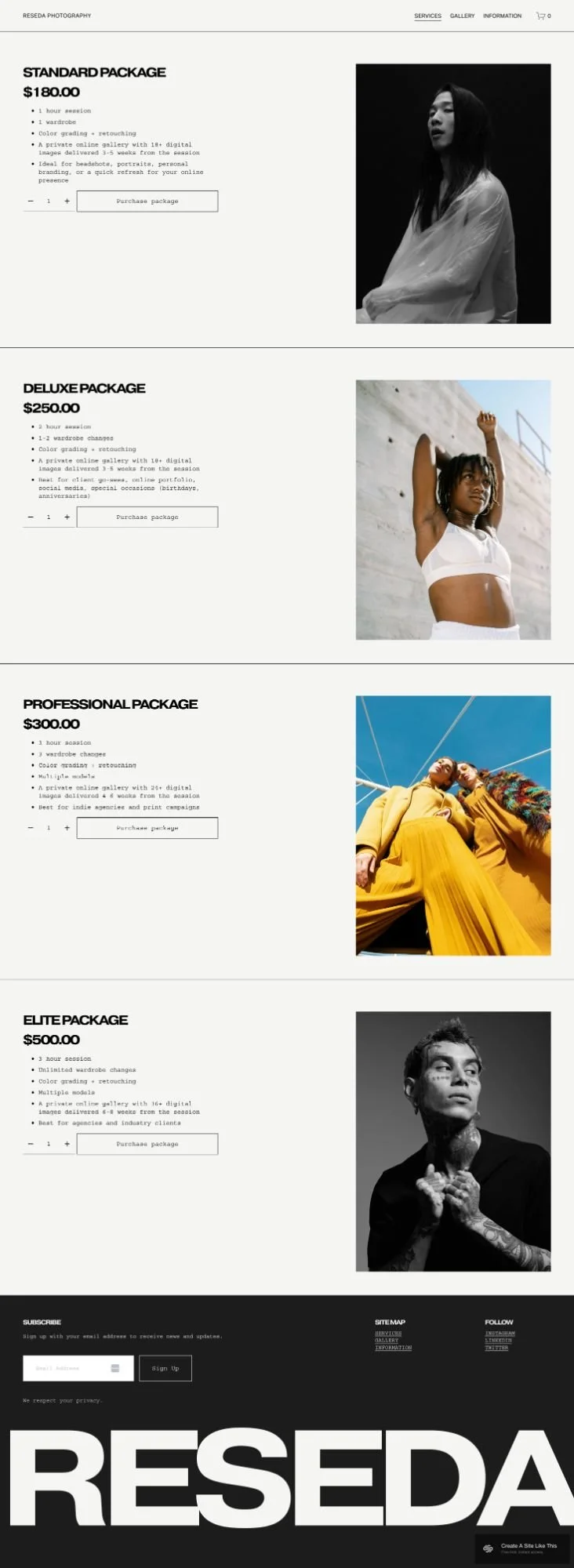
The services page is set up to showcase different packages with pricing, descriptions, and visuals. If you offer Standard, Deluxe, and Premium options, this layout makes it easy for your clients to compare and choose.
Who the Reseda Template Is Not Best For
The Reseda template probably isn't the best fit if you:
Are not a photographer/visual creative
Need a text-heavy site with long-form content or detailed blog posts
Run a business with multiple revenue streams beyond session bookings (coaching, courses, digital products)
Want to sell physical products as your primary business model
Need advanced portfolio features like project case studies or client testimonials displayed prominently
Prefer a more colorful or personality-driven design over minimalism
What You Get With the Reseda Template
Home Page
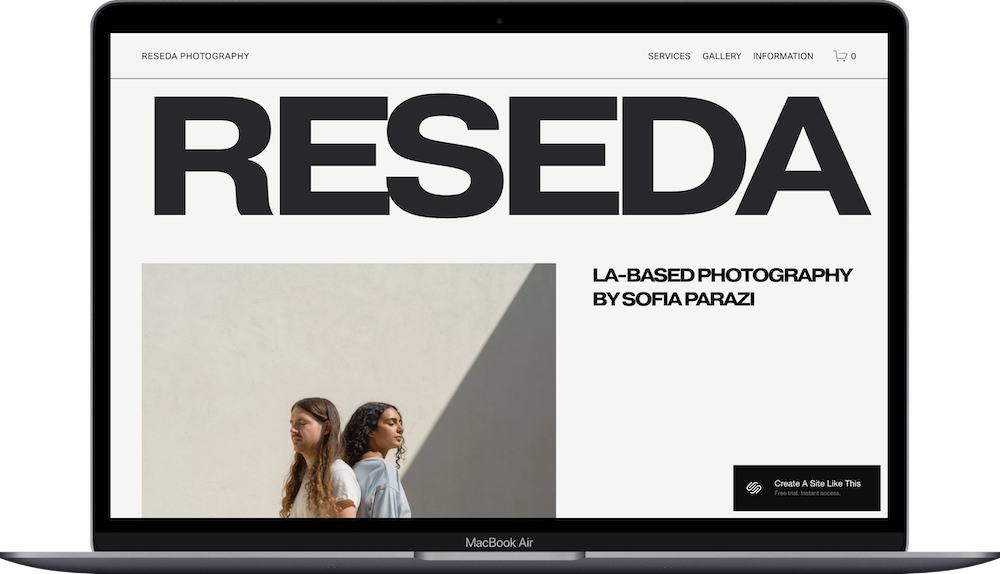
The homepage opens with a full-width hero section featuring your name or business name with a tagline. Below that, you get an about section with text and space for your bio. The main feature is three collection preview sections that show thumbnail images, a short description, and a link to view more. This setup works well for photographers who want to highlight their best work right away.
Services Page
This page displays your service packages in a clean, scrollable format. Each package includes an image, title, description, and pricing. The demo shows four tiers (Standard, Deluxe, Professional, Elite) but you can adjust this to match your actual offers.
Gallery
A simple gallery page that displays images in a disrupted grid pattern. There's no project-by-project breakdown here, just a clean way to show your work.
Information Page
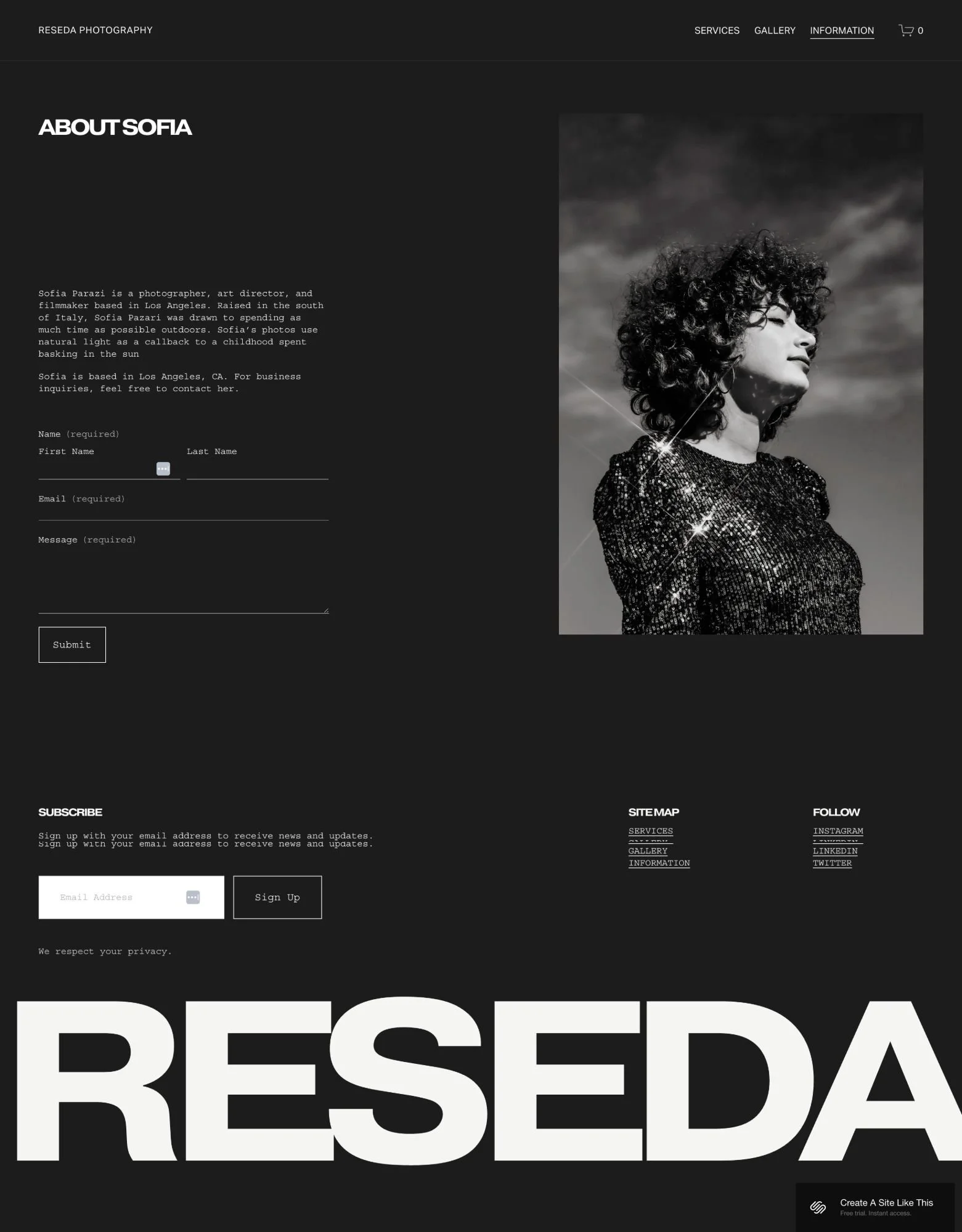
This functions as an about page with room for your story and a contact form. It's straightforward and gives clients a way to reach you outside of booking.
Extras
Acuity Scheduling integration for appointment bookings
Email subscription form in the footer
Social media links in the footer
Mobile-responsive design
Clean navigation bar with all main pages
Support for large, high-quality images

Pros & Cons of the Reseda Template
Pros
Clean, minimalist design
Service page layout works well for displaying package tiers with pricing; it’s a nice-to-have that doesn’t come in a lot of photographer templates
Mobile-responsive and looks professional on all devices
Simple navigation makes it easy for clients to find what they need
Cons
Not ideal for text-heavy content or detailed project storytelling
Gallery page is basic with no project-specific detail pages
White background and minimal color may feel too stark for some brands
Getting Started With the Reseda Template Is Easy.
Once you pick Reseda in the Squarespace 7.1 template library, here's what to do:
Replace the demo images with your own work. Upload high-quality images to the homepage collection sections, gallery page, and services section. Make sure your images are properly sized (at least 1500px wide for full-width sections).
Update the homepage hero text with your business name and tagline.
Rewrite the about section on the homepage and Information page. Share your story, approach, or what makes your work unique.
Edit the services page to match your offers. Replace the demo package names, descriptions, and pricing with your real services. Add or remove packages as needed.
Set up Acuity Scheduling. Connect your Acuity account (or create one if you don't have it), customize your availability, and test the booking flow to make sure it works smoothly.
Add your contact information to the Information page. Make sure the contact form is working and add any other ways clients can reach you if needed.
Customize colors and fonts in Site Styles. While Reseda defaults to white background and black text, you can adjust the color palette and typography to better match your brand. Keep changes subtle to maintain the minimalist aesthetic.
Check your heading hierarchy. Squarespace templates don't always include proper heading structure by default, so make sure your main headline is an H1 and subheadings follow logical order. This helps with both SEO and accessibility.
Set up your footer links. Add social media icons, update any footer text, and make sure the email subscription form is connected to your email marketing tool if you use one.
Double check everything, connect your domain and choose your Squarespace plan, and go live. Test all links, forms, and booking functionality before launching.
Reseda Squarespace Template FAQs
Can I sell products on the Reseda website template?
Yes, you can add e-commerce functionality to Reseda since all Squarespace 7.1 templates support stores. However, Reseda is built for showcasing visual work and booking services, not for running a full online shop. If selling products is your primary business model, you'll be better off with a Squarespae template specifically designed for e-commerce.
Is the Reseda template good for SEO?
Yes, Reseda is built on Squarespace 7.1, which includes solid SEO features like customizable page titles, meta descriptions, clean URLs, and mobile responsiveness. That said, you'll need to check and fix the heading hierarchy since Squarespace templates don't always follow proper H1-H4 structure by default. Add alt text to your images and make sure your content is well-organized for best results.
Is the Reseda template good for mobile?
Absolutely. Like all Squarespace 7.1 templates, Reseda is fully responsive and automatically adjusts to look good on phones, tablets, and desktops. The clean, simple layout actually works really well on mobile since there's not a lot of clutter.
Can I change fonts and colors on the Reseda template?
Yes, you can customize fonts, colors, and other design elements through Squarespace's Site Styles panel. No coding needed. That said, Reseda's minimalist aesthetic works best with subtle changes. If you want to drastically change the look and feel, you might need to reconsider if this template is the right starting point.
Does Reseda work for blogs?
It can, but it's not ideal. Reseda is designed for visual portfolios and service bookings, not for content-heavy blogging. You can add a blog section to the site, but the template doesn't have a blog-focused layout or prominent blog features.
Do I need to pay extra for Acuity Scheduling?
Yes - you do have to pay extra if you want scheduling or booking functionality on a Squarespace site. You don’t automatically get Acuity Scheduling for free with a regular Squarespace website plan. Squarespace Scheduling (formerly Acuity) is its own paid product with its own pricing tiers, and you still need a separate subscription to use it.
The basic plan starts around $20 per month (closer to $16 per month if you pay annually) and includes one booking calendar. If you need more features like multiple staff calendars, advanced customization, or removing Squarespace branding, you’ll need one of the higher-tier plans, which cost more.
Can I add more pages to the Reseda template?
Yep, you can add as many pages as you need. Reseda comes with five main pages (Home, Services, Gallery, and Information), but Squarespace lets you add additional pages like an FAQ, blog, or additional galleries.
Is Reseda good for wedding photographers?
Yes, Reseda works well for wedding photographers who want a clean portfolio site with booking functionality. The gallery sections can showcase different types of shoots (weddings, engagements, portraits), and the built-in scheduling makes it easy for couples to book consultations or sessions.
Can I use Reseda if I'm not a photographer?
Yes, while Reseda is designed with photographers in mind, any visual creative or service provider can use it. It does work BEST for photographers, but stylists, makeup artists, designers, or creative consultants can make Reseda work for their business.
How much does the Reseda template cost?
The template itself is free, it's included with any Squarespace subscription. You'll pay for your Squarespace plan (starting around $16/month for a basic site) plus your domain if you want a custom URL. All Squarespace templates are included in the price.