Selene vs Condesa: Which Squarespace Template is Right for Your Interior Design Business?
This post contains affiliate links. If you purchase through them, I may receive a small commission at no extra cost to you.
Table of Contents Show
You're an interior designer ready to build your website, and you've narrowed it down to two Squarespace templates: Selene and Condesa.
Both are built for interior designers. Both are free Squarespace templates. Both look professional.
So what's the actual difference?
Your starting point.
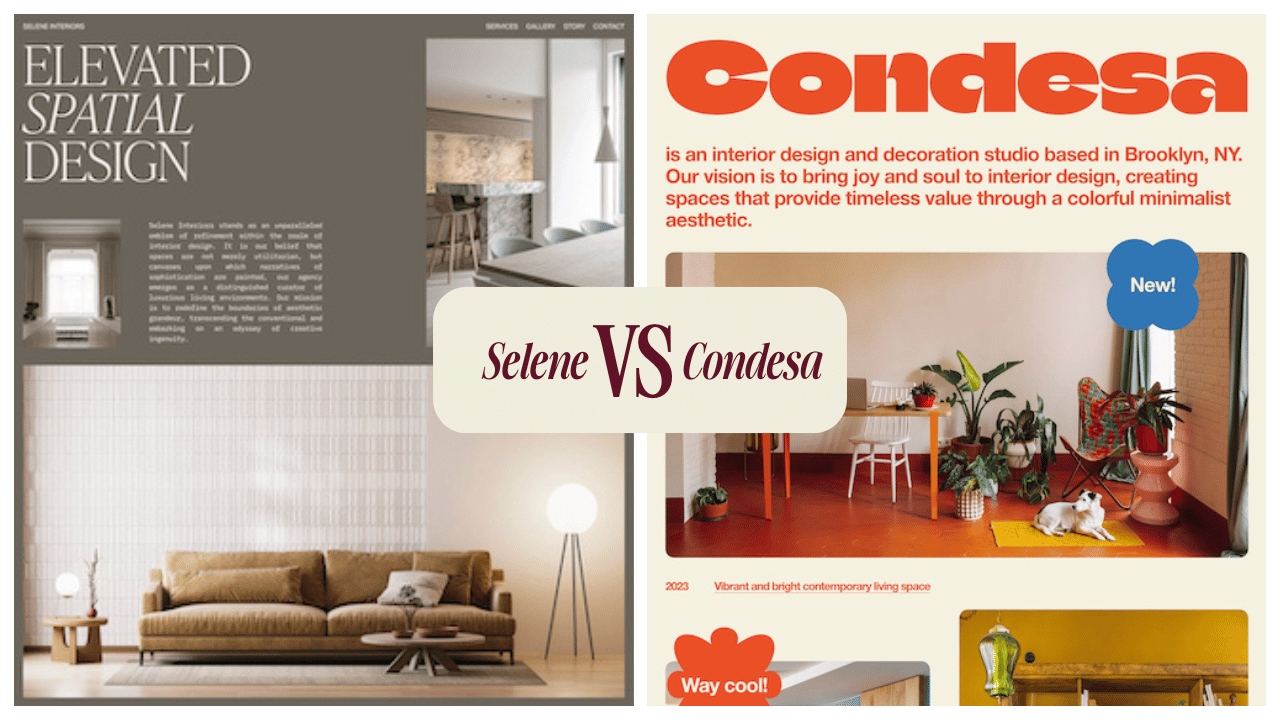
Selene starts with luxury positioning: sophisticated, minimal and editorial.
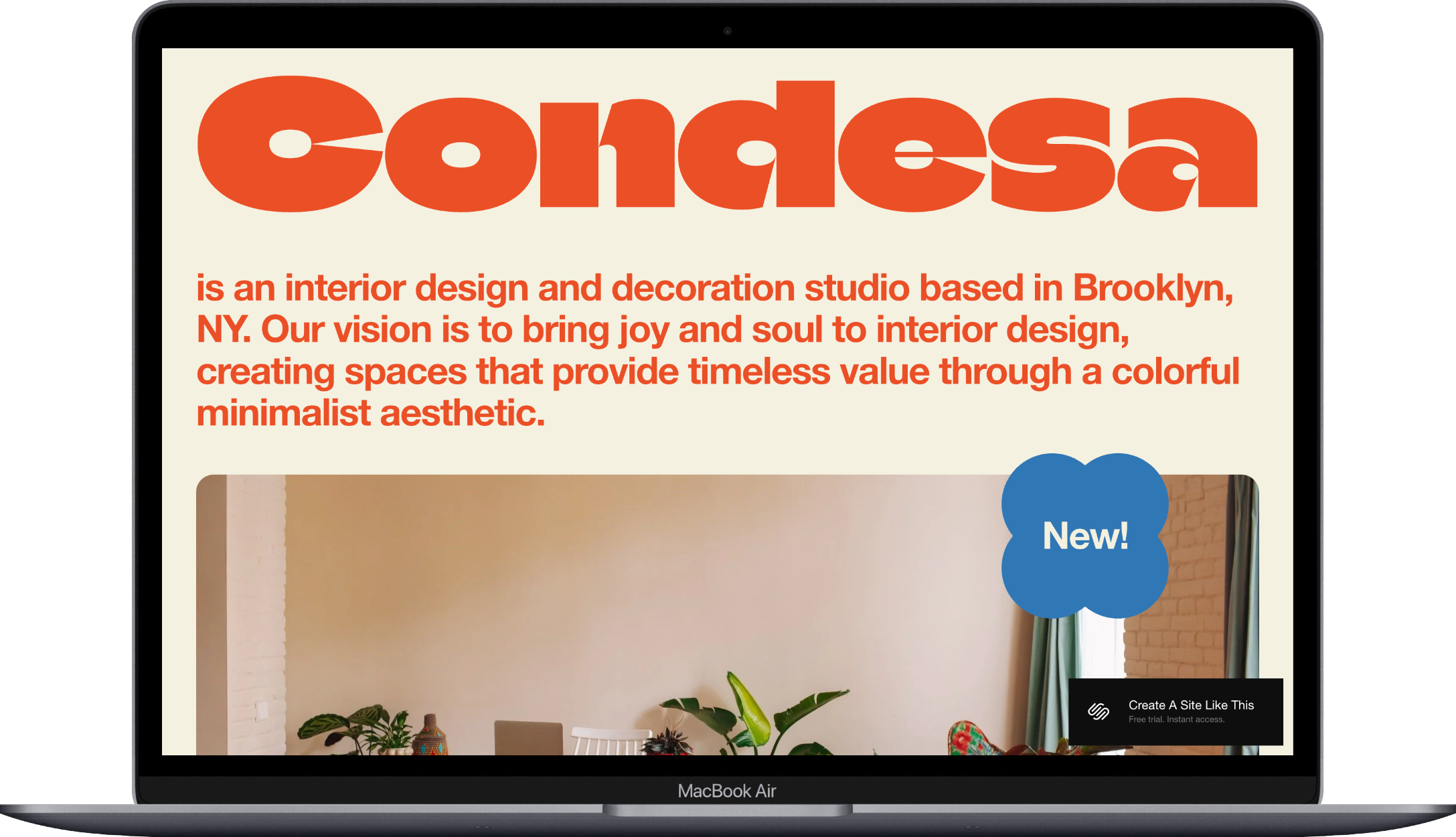
Condesa starts with personality: bright, vibrant, playful and approachable.
And you can customize either one to match your brand, but picking the template closest to your vision will save you time and gives you a better foundation to work with.
This comparison post will show you what each template prioritizes, so you can choose your best starting point.

Quick Note About Squarespace 7.1 Customization
All Squarespace 7.1 templates are fully customizable. You can change colors, fonts, layouts, spacing, and page structures through Site Styles without code. You can move, duplicate, or delete sections. Nothing is locked in.
So why does your template choice matter?
Because the demo shows you the built-in structure and intended positioning. Selene is designed around luxury presentation. Condesa is built for approachable personality. You can customize either one however you want, but starting with the template that matches your direction means less work rebuilding the foundation.
If you're a colorful, personality-driven designer, you could absolutely customize Selene to be vibrant. But you'd be removing the elegant white space and minimal structure that makes Selene work well for luxury positioning. You'd essentially be turning it into Condesa with extra steps.
So, start with the template that's already headed where you want to go.
Selene vs Condesa
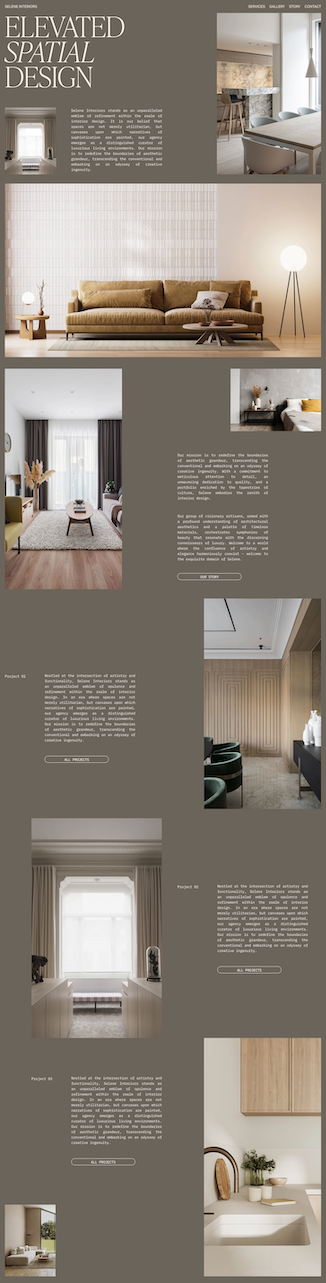
Selene is designed for luxury interior designers and architects targeting high-end clients. The demo features sophisticated, minimal, editorial presentation with large images and generous white space.
Home page with large hero section and project previews
Services page
Gallery page for portfolio work
Story page (your About section)
Contact page
Condesa is designed for colorful, personality-driven designers working with residential clients. The demo features vibrant, playful aesthetics with bold colors and rounded design elements.
Home page with colorful introduction and work previews
Services page ("What I Do")
Work page (portfolio grid)
About page
Contact page (labeled "Inquire Now")
Both templates include the same basic pages. The difference is how they each present them.
How Selene Presents Your Work
Sophisticated, Editorial Aesthetic
Selene uses large images, generous white space, and refined typography. The demo copy talks about "aesthetic grandeur" and "spatial design." Everything about this template says high-end without you having to explicitly state your prices.
The homepage shows three project previews with full-width images and descriptions. Each project gets equal visual weight. The Gallery page organizes all your work, and individual projects can have their own detailed pages.
This template works if:
You have professional photography for multiple substantial projects
Your work is high-end residential or commercial design
You want clients to perceive you as established and luxury-focused
This template needs adjusting if:
Your design style is colorful or eclectic (could create disconnect with the minimal aesthetic)
You work with mid-market clients who might find the vibe intimidating
You only have a few projects (the editorial structure would feel empty)
Pick Selene as Your Starting Point If:
You target luxury or high-end clients with substantial budgets
You prefer minimal, sophisticated presentation
You work with architects, builders, or upscale developers
Your services are custom and project-based
How Condesa Presents Your Work
Vibrant, Personality-Driven Aesthetic
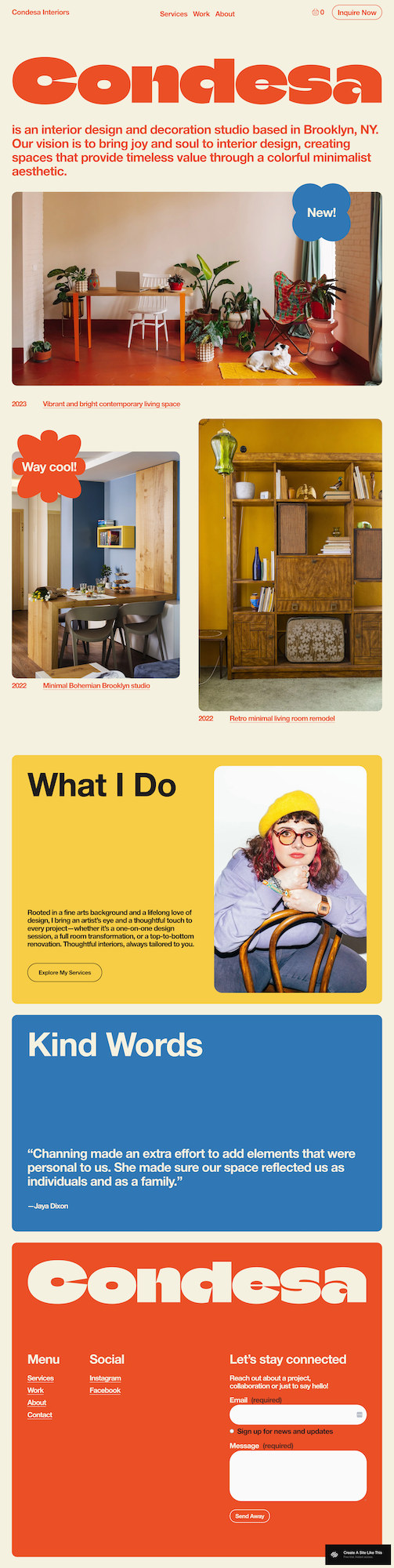
Condesa uses bold colors, rounded design elements, and playful labels on the portfolio pieces. The copy is warm and approachable.
The homepage introduces your studio, shows recent work in an asymmetric grid, includes a "What I Do" section, and features testimonials. The Work page displays your portfolio in a grid format with project labels and dates.
This template works if:
Your design aesthetic includes color, pattern, or eclectic elements
You want clients to feel comfortable and welcome
You serve residential clients
This template may needs adjusting if:
You target ultra-high-end clients who expect refined elegance
Your portfolio is all neutral, minimal work
You design commercial spaces for corporate clients (maybe too casual for that market)
Pick Condesa as Your Starting Point If:
You want vibrant, personality-driven presentation
Your portfolio shows color, pattern, or eclectic style
You work with residential clients who value approachability
You're a solo designer building a personal brand
Both Have Limitations as Squarespace Free Templates:
Selene and Condesa are free Squarespace templates, which means:
You're starting with a very common foundation that other designers use
Your site will look like a bunch of others using the same template (unless you customize it heavily)
You get basic structure that works well, but isn't unique or custom-built
If you want something more unique but still affordable, consider premium templates from designers like Big Cat Creative or Applet Studio, or if you want something completely custom, hire a Squarespace designer who specializes in interior design sites.
Both templates are solid starting points that you can make your own through customization. Just know you're not getting a one-of-a-kind design without putting in customization work or investing in premium options.
Selene vs CondesaTemplates: FAQs
Can I switch between Selene and Condesa later?
Kinda/Not Really. That’s not really how it works anymore. On Squarespace 7.1, all templates use the same underlying structure. You can redesign your site by changing colors, fonts, and layouts through Site Styles without losing your content. You're not "switching templates"; you're rebuilding the design within the same framework.
Which template is better for SEO?
Both have identical SEO capabilities. Squarespace has all the foundations in place with all their free templates, but you’ll need to do the work of onsite best practices, like making your headings are in the right order, and you have meta descriptions and atl text for your images.
Can I add e-commerce to either template?
Yes, but neither is built for product sales. If you want to sell a few items like art prints, either works. For furniture sales or a full shop, start with a template designed for e-commerce. There are several; Maca and Camdez are two of my faves and good starting points.
Can I make Selene more colorful or Condesa more minimal?
Absolutely. You can change any colors, fonts, or spacing through Site Styles. But ask yourself why you're choosing that template if you need to change its core aesthetic. If you want bright colors, start with Condesa. If you want minimalism, start with Selene. You'll save time and have better built-in structure for your actual vision.
I have a minimal aesthetic but mid-market clients. Which template?
Start with Selene and add more approachable copy, photos, and service explanations. The minimal aesthetic matches your work, and you can adjust the positioning through your content without fighting against colorful design elements.
I love color but want to attract high-end clients. Which template?
This is tricky. High-end clients often expect refined, minimal presentation. You could start with Condesa and dial back the playfulness while keeping sophisticated colors. Or start with Selene and add strategic color through your brand palette. Either way, you'll need to customize a fair bit to balance "colorful" with "luxury positioning."
Getting Started is Easy:
Choose your template and start your trial
Click the demo link for your chosen template
Start your free 14-day Squarespace trial
Select your template when creating your site
Replace all demo content
Swap demo projects with your actual portfolio work
Upload high-quality portfolio photography
Write your About page story and Services descriptions
Add real testimonials (or delete the section if you don't have any yet)
Customize Site Styles
Go to Design > Site Styles
Update brand colors to match your business
Adjust fonts (headline and body text)
Customize button styles
Set up SEO basics
Fix heading hierarchy (make sure your main headline is H1, subheadings are H2, H3)
Add page titles and meta descriptions for each page
Add image alt text to all portfolio photos
Configure site settings
Add your business information (Settings > Business Information)
Set up social sharing images (Settings > Marketing > Social Sharing)
Upload a favicon (Settings > Browser Icon)
Connect your social media accounts
Test functionality
Submit a test through your contact form to make sure it works
Check that all buttons and links go to the right places
Preview your site on mobile and tablet
Connect your domain and go live
Choose your Squarespace plan
Connect your custom domain (or purchase one through Squarespace)
Remove the password protection
Publish your site 🎉