Mosley Squarespace Template Review
This post contains affiliate links. If you purchase through them, I may receive a small commission at no extra cost to you.
Table of Contents Show
Mosley is a Squarespace template for actors, performers, and creative professionals who need a portfolio site with personality and booking functionality.
Released in February 2025 as part of Squarespace's Collaboration Collection, Mosley was created for their Super Bowl LIX campaign starring Irish actor Barry Keoghan (and pertinent to my Beatles-loving interests, set to play Ringo Starr in the upcoming Beatles biopic series).
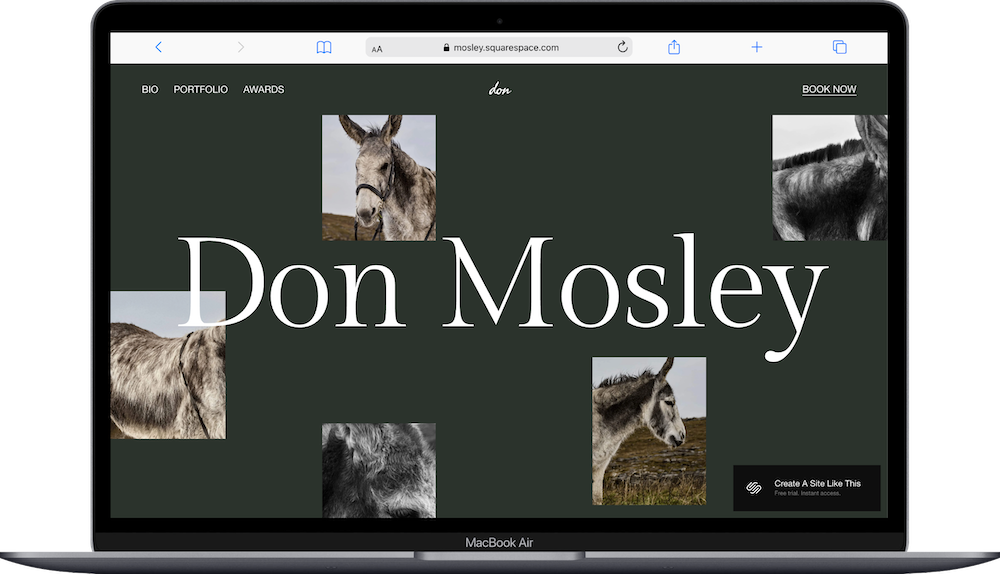
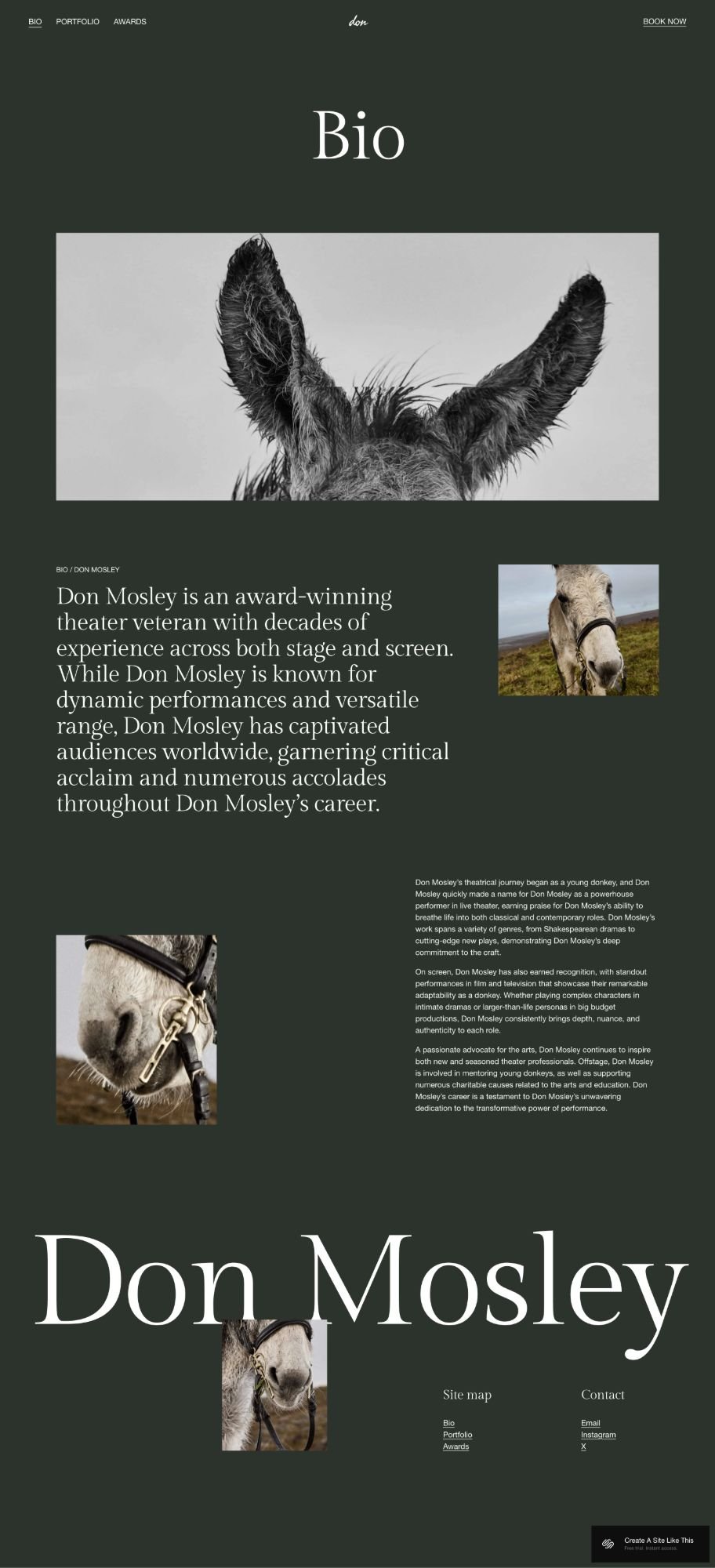
The template is inspired by "Barry and Mosley," a comedic short film where Barry builds a website for his donkey co-star, Don Mosley. The demo site is literally a portfolio for the donkey, complete with headshots, bio ("Don Mosley is an award-winning actor with a long-standing career in both theater and film"), and booking functionality.
If you're an actor, performer, artist, or creative who needs to showcase your work and let people book you, Mosley might be a great fit for you.
This review covers what Mosley includes, where it shines, and where you may hit limitations.
The goal: help you figure out if this free Squarespace template is the right fit for your business, or if you should keep looking.
Who the Mosley Template Works Best For
Mosley works best if you're a performer or creative professional who needs to show your work and handle bookings in one place.
Actors
The template is literally designed for actors. Portfolio images, bio section, expandable categories for your work (like "Stage" and "Film"), and integrated booking for auditions or inquiries.
Performers and Entertainers
Musicians, dancers, voice actors, comedians - if you perform and need people to see your work and book you, Mosley's structure handles both.
Models
Showcase your portfolio with the scattered image layout, share your stats and experience in the bio, and let agencies or clients book you through the integrated scheduling.
Creative Professionals with Portfolios
Photographers, directors, stylists, or other creatives who need to display work and make it easy for clients to schedule consultations or sessions.
Voice Actors and Voiceover Artists
The expandable sections work well for organizing different types of work (commercial, narration, character work), and booking integration handles inquiry calls or auditions.
Who the Mosley Template Is Not Best For
The Mosley template probably isn't the best fit if you:
Have a minimal or bright aesthetic. Mosley uses a dark olive background with dramatic layouts. If your brand is light, airy, or colorful, the template fights you.
Need e-commerce for selling products. Mosley is built for showcasing work and booking time, not selling physical or digital products.
Want a traditional portfolio layout. The scattered, artistic image placement won't work if you prefer clean grids or organized galleries.
Need detailed case studies or project pages. Mosley shows portfolio images with expandable categories, but there's no structure for in-depth project breakdowns.

What You Get with the Mosley Template
Hero Section
Your name in large serif text with portfolio images scattered around it in an artistic, asymmetric layout.
Bio Section
Space for your professional bio or about statement explaining your background and experience.
Portfolio Gallery
Images displayed in a scattered, editorial-style layout rather than a traditional grid. The demo shows photos of Don Mosley throughout.
Expandable Work Categories
Sections that expand to show different types of work. The demo has "Stage" and "Stunts" - you'd customize these to your categories like "Film," "Commercial," "Theater," or whatever fits your work.
Booking Section
With integrated Acuity Scheduling so people can book appointments, auditions, or consultations directly.
Contact Information
Footer with social links and contact details.
Built-in Features
Advanced animations and layouts
Expandable sections for organizing work
Mobile responsive design
Dark olive color scheme
Squarespace 7.1 Fluid Engine
Part of Squarespace's Collaboration Collection
Pros & Cons of the Mosley Template
What works well
The scattered layout feels artistic and distinctive. Not another boring portfolio grid. The asymmetric image placement gives your work an editorial, high-end feel.
Expandable sections organize different work types without cluttering the page. Stage, film, commercial, voiceover - whatever categories you have, the collapsible sections keep it organized.
The dark background makes images pop. If you have good photography, the olive green background creates contrast that makes your work stand out.
Perfect for performers who need both portfolio and scheduling. You're not cobbling together a portfolio site and a separate booking tool - it's all here.
What doesn’t work as well (or just things to be aware of)
The dark aesthetic is hard to change. The olive background and dramatic layout are core to the design. If you want light and bright, you're fighting the template.
The scattered layout needs strong images. If your portfolio photos are inconsistent in quality or style, the artistic placement highlights that instead of hiding it.
Limited text space. Mosley is image-heavy. If you need to write a lot about your experience, training, or background, the minimal text sections feel restrictive.
The artistic layout might feel too stylized for traditional clients. If you're going for corporate work or conservative clients, the dramatic design might feel too edgy.
Expandable sections hide your work initially. People have to click to see what's in "Stage" or "Film" - they don't see everything at once like in a traditional gallery.
Getting Started with the Mosley Template is Easy
Once you pick Mosley in the Squarespace 7.1 template library, here's what to do:
Replace the demo images with your portfolio. Delete Don Mosley photos and upload your headshots, production stills, or portfolio images. Use high-quality images at least 1500px wide.
Update the hero section with your name. Change "Don Mosley" to your actual name in the large text at the top.
Write your bio. Replace the demo text with your real background, experience, and what you do.
Customize the expandable sections. Rename "Stage" and "Stunts" to categories that match your work (like "Film," "Television," "Commercial," "Theater"). Add images and details for each category.
Set up Acuity Scheduling. Connect your Acuity account (or set one up) and configure your availability, appointment types, and booking settings so people can schedule with you.
Update the booking section. Change "BOOK DON" to your name or "BOOK [YOUR NAME]" and adjust the text to explain what people are booking (auditions, consultations, sessions).
Add your contact information and social links. Update the footer with your email, phone, and links to your IMDb, Instagram, or other professional profiles.
Adjust colors and fonts if needed. You can adjust the built in colors and fonts to your brand in Site Styles.
Test the booking system. Go through the booking process yourself to make sure appointments work correctly and confirmations go to the right email.
Double check everything, connect your domain, choose your Squarespace plan, and go live. Preview on mobile and desktop, test booking, fix any issues, then publish.
Mosley Squarespace Template FAQs
Is the Mosley template only for actors?
Nope. While it was designed with actors in mind (inspired by the Super Bowl campaign with Barry Keoghan), Mosley works for any performer or creative professional who needs portfolio and booking functionality - musicians, dancers, models, voice actors, photographers, or directors.
Does Mosley require Acuity Scheduling?
Not necessarily. The booking section is designed to work with Acuity, but you don't have to use it. You can remove the booking section entirely if you don't need scheduling, or replace it with a contact form. But if you're not using the booking feature, you're missing half of what makes Mosley useful.
Is the Mosley template good for SEO?
Yes. Mosley has the same SEO capabilities as all Squarespace templates - custom page titles, meta descriptions, image alt text, and clean code. (You’ll have to fill these in yourself, but Squarepace makes it easy.) The text-light design means you'll want to make sure your bio and work descriptions include relevant keywords for your industry.
Can I change fonts and colors on the Mosley template?
Yep. You can customize colors, fonts, and spacing through Site Styles. But the dark background is central to the design - changing it to white or light colors changes the entire feel of the template.
Can I add more pages to Mosley?
Yes. You can add pages for press, resume, demo reel, or whatever else you need. The template starts as a single scrolling page, but you can build it out with additional pages.
How do the expandable sections work?
The "Stage" and "Stunts" sections (or whatever you rename them) start collapsed. When someone clicks, the section expands to show images, descriptions, or details about that type of work. It's an accordion-style layout that keeps the page organized.
Can I use Mosley without the scattered image layout?
You can rearrange images through the Squarespace editor, but the artistic, asymmetric placement is core to Mosley's design. If you want a traditional grid layout, you'd probably be better off starting with a different portfolio template.
What's included with Acuity Scheduling?
Acuity is Squarespace's scheduling tool (owned by Squarespace). You can set availability, create appointment types, collect payment, send confirmations, and sync with your calendar. Some features require a paid Acuity plan beyond Squarespace's basic subscription.
Can I sell products on Mosley?
Sure. You can add e-commerce since it's a Squarespace template, but Mosley isn't designed for selling products. If you want to sell headshots, courses, or merchandise, you'd be adding shop functionality to a template built for portfolio and booking.