Air Squarespace Template Review
This post contains affiliate links. If you purchase through them, I may receive a small commission at no extra cost to you.
Table of Contents Show
Air is a Squarespace template that works well as a one-page scrolling site for activity-based businesses or service providers.
It's one of my favorite Squarespace templates; it's dynamic, the color palette and fonts are fun, and it feels like a whole website condensed onto one page with smart anchor links. If you're a fitness instructor, adventure business owner, or service provider who needs a simple, energetic website, Air probably caught your eye for good reason.
This review covers what Air includes, where it shines, and where you might hit limitations.
The goal: help you figure out if this Squarespace template is the right fit for your business, or if you should keep looking.
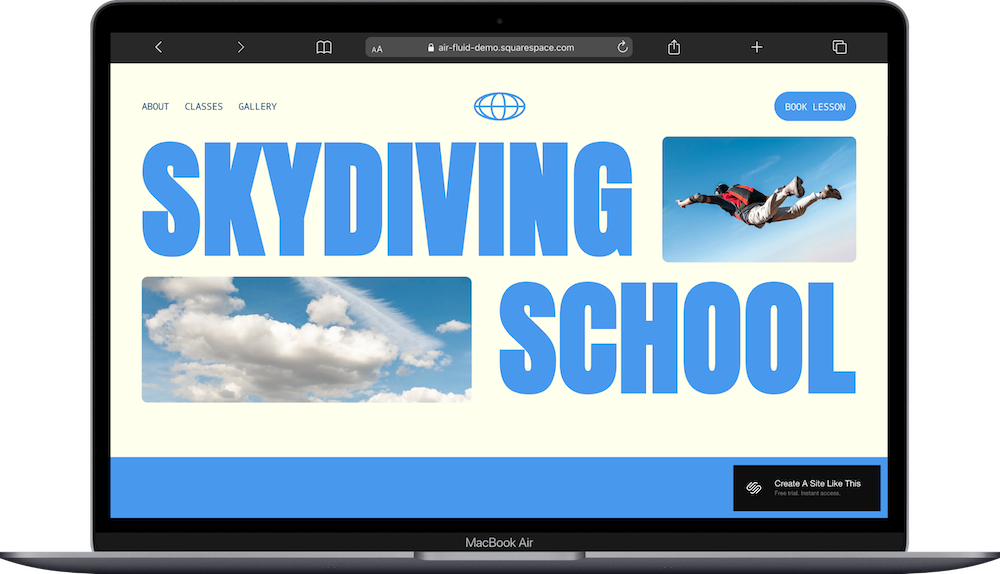
Who the Air Template Works Best For
Air works well if you offer a focused service and want visitors to take one clear action, like booking a class or signing up for an experience.
Adventure and Activity Businesses
If you run skydiving experiences, rock climbing gyms, or outdoor adventure companies, Air's energetic design and simple structure let you showcase what you offer without overwhelming visitors with pages they don't need.
Fitness Instructors and Personal Trainers
The class packages section and clear service breakdown work well for personal trainers, yoga instructors, or fitness coaches who want to display different training options or membership tiers.
Service Providers with Simple Offerings
If you're a consultant, coach, or specialist with 2-4 service packages, Air gives you enough structure to explain what you do and direct people to book or inquire without extra complexity.
Businesses That Prioritize Bookings
The template's layout naturally guides visitors toward scheduling or signing up, making it useful for any business where appointments or reservations are the main conversion goal.
Who the Air Template Is Not Best For
The Air template probably isn't the best fit if you:
Need to explain several different services in detail, or have multiple service categories that each need their own space
Sell physical products as your main revenue source (you need actual shop pages for that)
Want a traditional blog with regular posts and categories (one-page sites don't support blog functionality well)
Need to showcase detailed portfolios or case studies with individual project pages
Prefer a minimal, sophisticated aesthetic (Air's bold typography and bright colors create an energetic vibe that won't suit every brand)
That said, you can add e-commerce functionality to this template. Squarespace lets you add a shop to any site. But because Air is built for service-based bookings and straightforward offers, not product sales, it's not the best starting point if selling products is your main business model.
What You Get with the Air Template
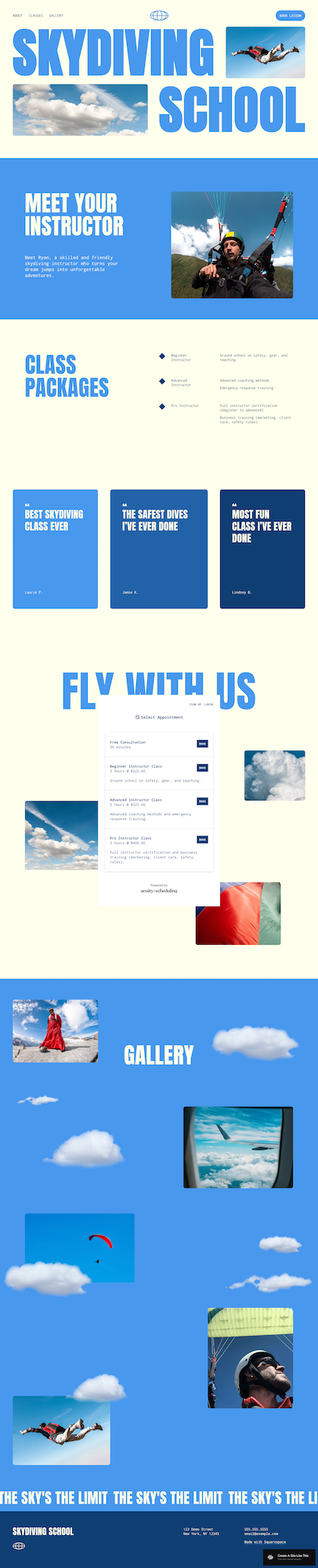
Air is a one-page template organized into clear sections that scroll vertically. Here's what's included:
Hero Section
Large, bold headline with a background image, navigation menu in the header, and a prominent call-to-action button. This section immediately establishes what you do.
Instructor/About Section
Split layout with text on one side and an image on the other, introducing who runs the business. In the demo, this is "Meet Your Instructor" with a photo and brief bio.
Class Packages Section
Grid layout showcasing your service tiers or offerings. The demo shows three class packages with icons, descriptions, and clear structure for explaining different options.
Featured Content Cards
Three card-style sections highlighting key information; in the demo, these are "Best Skydiving Class Ever," "The Safety Rules I've Ever Done," and "Most Fun Class I've Ever Done." You could adapt these for testimonials, features, or key benefits.
Services/Schedule Section
Detailed list-style section titled "Fly With Us" in the demo, showing different class options with times, descriptions, and pricing. Includes small images next to each service for visual interest.
Gallery Section
Large "Gallery" section with scattered image layout on a colored background with cloud graphics, designed to showcase photos from your business in an eye-catching, non-grid format.
Footer Section
Contact information, location details, and final call-to-action. The demo includes address, phone, email, and a newsletter signup button.
Extras:
Mobile-responsive design that adapts to all screen sizes
Built-in form functionality for contact or newsletter signups
Squarespace scheduling integration capability for booking appointments
Customizable color palette (the demo uses that lovely bright blue and cream; you can use whatever your brand colors are)
Section-by-section background customization options
Pros & Cons of the Air Template
What Works Well
It's a full website packed into one page. Air doesn't feel basic or simple like some one-page templates. You get about, services, packages, gallery, and contact sections; everything you'd normally spread across multiple pages, just stacked vertically.
Anchor links make navigation easy. Visitors can click to jump straight to the section they want instead of scrolling through everything. It works like a multi-page site without the hassle of managing multiple pages.
The design has real personality. The bright colors and bold fonts are fun and energetic. This isn't another boring template, Air actually stands out.
Service packages are easy to compare. The three-column package section makes it simple for people to see their options and pick what works for them.
What Doesn’t Work as Well
You're limited to one page of content. If your business needs to explain a lot (like 6+ services, detailed processes, or extensive background info) you'll run out of room or create a page that's way too long.
No blog means no fresh content. You can't add regular blog posts (unless you add a blog, which you can do), which makes it harder to keep people coming back or rank for new search terms over time.
The gallery is more decorative than functional. The scattered photos look cool, but they’re more decorative/vibey than purposeful; if you need organized portfolio work with detailed project pages, this won't cut it.
SEO is more limited. One page means you can only target a handful of keywords. Multi-page sites have way more opportunity to rank for different search terms.
The bold style won't work for everyone. If you're a lawyer, accountant, or luxury brand that needs to look polished and sophisticated, Air's playful energy will feel off-brand.
Getting Started with the Air Template is Easy:
Once you pick Air in the Squarespace 7.1 template library, here's what to do:
Replace the hero headline and background image. Start with your main headline and choose an image that represents your business. Make sure the image has enough contrast for the text to remain readable.
Update the about section with your story. Replace the instructor information with details about yourself or your team. Keep it focused on why clients should trust you.
Customize the service packages section. Change the three package cards to match your actual offerings. Update icons, titles, descriptions, and any pricing information.
Adapt the featured content cards. Decide if you'll use these for testimonials, key features, or benefits. Replace both the text and images to match your purpose.
Fill in your services and schedule details. Replace the demo class listings with your actual services, including accurate times, descriptions, and pricing. Add your own service images.
Upload your own photos to the gallery. Remove the demo images and add photos that showcase your business, clients, or results. Aim for 6-10 high-quality images.
Update colors and fonts in Site Styles. Navigate to Design → Site Styles and adjust the color palette to match your brand. The demo uses bright blue, but you can change this to any color. Review font choices to ensure they align with your brand voice.
Check your heading hierarchy. Squarespace templates don't always include proper heading structure by default, so make sure your main headline is an H1 and subheadings follow logical order (H2, H3, etc.) for better SEO.
Set up contact forms and calls-to-action. Replace placeholder form fields with the information you actually need to collect. Connect any booking systems or scheduling tools.
Double-check everything, connect your domain and choose your Squarespace plan, and go live. Preview your site on mobile and desktop, test all links and forms, then publish when ready.
Air Squarespace Template FAQs
Can I sell products on the Air website template?
Yes, you can add e-commerce functionality to Air since all Squarespace 7.1 templates support product sales. However, the one-page layout isn't ideal for a product catalog. If you're selling a few digital products or simple offerings, you could make it work with a products section. But if running an online store is your main business model, you'd be better off with a multi-page template specifically designed for e-commerce.
Is the Air template good for SEO?
It depends. The one-page format limits your SEO potential compared to multi-page sites. You can only optimize for a narrow set of keywords since everything lives on one page. You also can't create a blog for ongoing content, which is a key SEO strategy. That said, you can still optimize your page title, meta description, headings, and image alt text. Air works fine for local SEO if you're focused on ranking for your business name and location, but it's not the best choice if organic search traffic is a priority.
Is the Air template good for mobile?
Yes. Air is fully mobile-responsive like all Squarespace templates. The one-page scrolling format actually translates well to mobile devices. The bold text remains readable, and sections stack vertically. Just make sure your images are optimized for mobile viewing and test your site on different devices before launching.
Can I change fonts and colors on the Air template?
Absolutely. You can customize fonts, colors, and spacing through the Site Styles panel in Squarespace. Change the background colors for each section independently, adjust button styles, modify heading and body fonts, and update accent colors throughout. The template's structure stays the same, but you have full control over the visual styling.
Can I add more sections to the Air template?
Yes. Even though it's designed as a one-page site, you can add more sections as you want using Squarespace's section editor. Just be careful not to make the page so long that visitors give up scrolling. If you find yourself adding 10+ sections, you might be better off with a multi-page template.
Does Air work with Squarespace scheduling?
Yes. Air works with Squarespace's built-in scheduling feature (available on Business plans and higher). You can add scheduling blocks to sections where you want visitors to book appointments, which fits naturally into the template's service-focused layout.
Can I turn the one-page Air template into a multi-page site?
Technically yes, but it could defeat the purpose of choosing Air in the first place. You can add additional pages to the navigation, but the demo design is built around the one-page concept. If you know you need multiple pages, consider starting with a different template that's designed for that structure.
What if I need a blog with the Air template?
You can add a blog page to any Squarespace site, including Air. However, it will feel disconnected from the main one-page layout. If blogging is important to your strategy, choose a template that integrates blog functionality into the main design rather than trying to force it into a one-page format.