Iduma Squarespace Template Review
This post contains affiliate links. If you purchase through them, I may receive a small commission at no extra cost to you.
Table of Contents Show
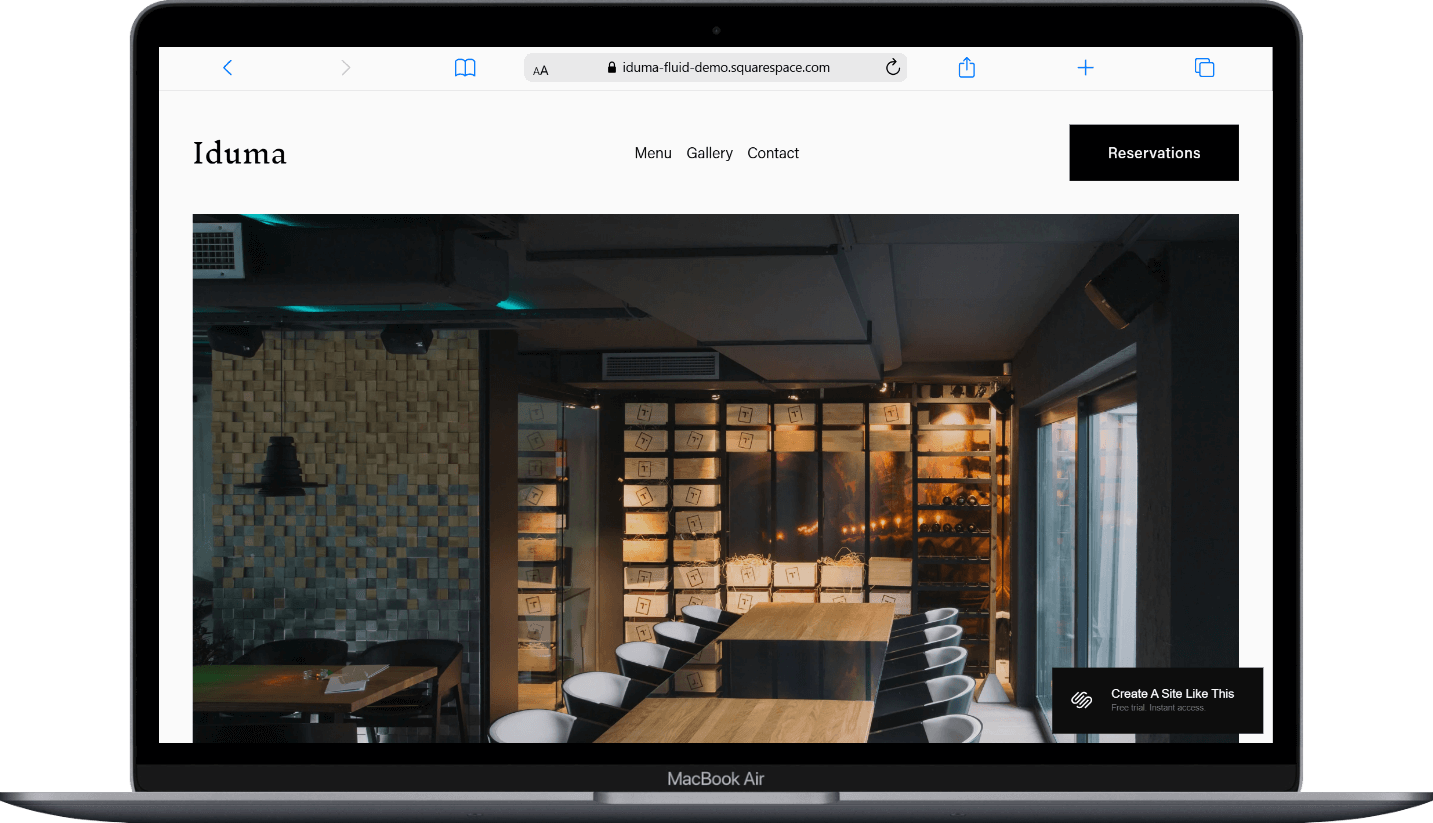
Iduma is a black-and-white Squarespace restaurant website template with a clean, modern look.
The monochromatic color scheme gives it a sophisticated, almost gallery-like feel that's a good fit for high-end dining. If you're a restaurant owner, chef, or food business who values simplicity, minimalism, and elegance over fancier features, Iduma probably caught your eye for good reason.
This review covers what Iduma includes, pros and cons, where it shines, and where you may hit limitations.
The goal: help you figure out if this built-in Squarespace template is the right fit for your restuarant or if you should keep looking.
Who the Iduma Template Works Best For
Iduma is perfect for fine dining restaurants that want their website to feel as elegant and polished as their restaurant itself. If your vibe is "minimal sophisticated without being flashy," this template nails it.
Established fine dining spots
Picture a well-known restaurant in the city where the chef's been written about in food magazines. Maybe it's a modern French place where dinner runs $150+ per person and the wine list is something special. Or a Michelin-starred restaurant where everything from the plating to the ambiance is carefully thought out.
Places where atmosphere is everything
Think of a high-end steakhouse with dark wood, leather booths, and that perfect lighting that makes everyone look good. Or a sushi restaurant where the omakase experience is about more than just food, it's about the whole evening. Maybe it's a rooftop spot where people go for anniversaries and proposals, and they expect that same refinement when they visit your website.
Restaurants with gorgeous food photography
If you're investing in professional food photos and want them front and center, Iduma gives them space to shine. This works great for places where every dish looks like art on the plate. Or if you're already Insta-famous and want your website to feel just as visually stunning.
Simple, focused menus
Works beautifully for tasting menu restaurants that change seasonally but keep the same elegant format. Like upscale Peruvian or Spanish restaurant with a well-curated menu.
What You Get with the Iduma Template
Home Page
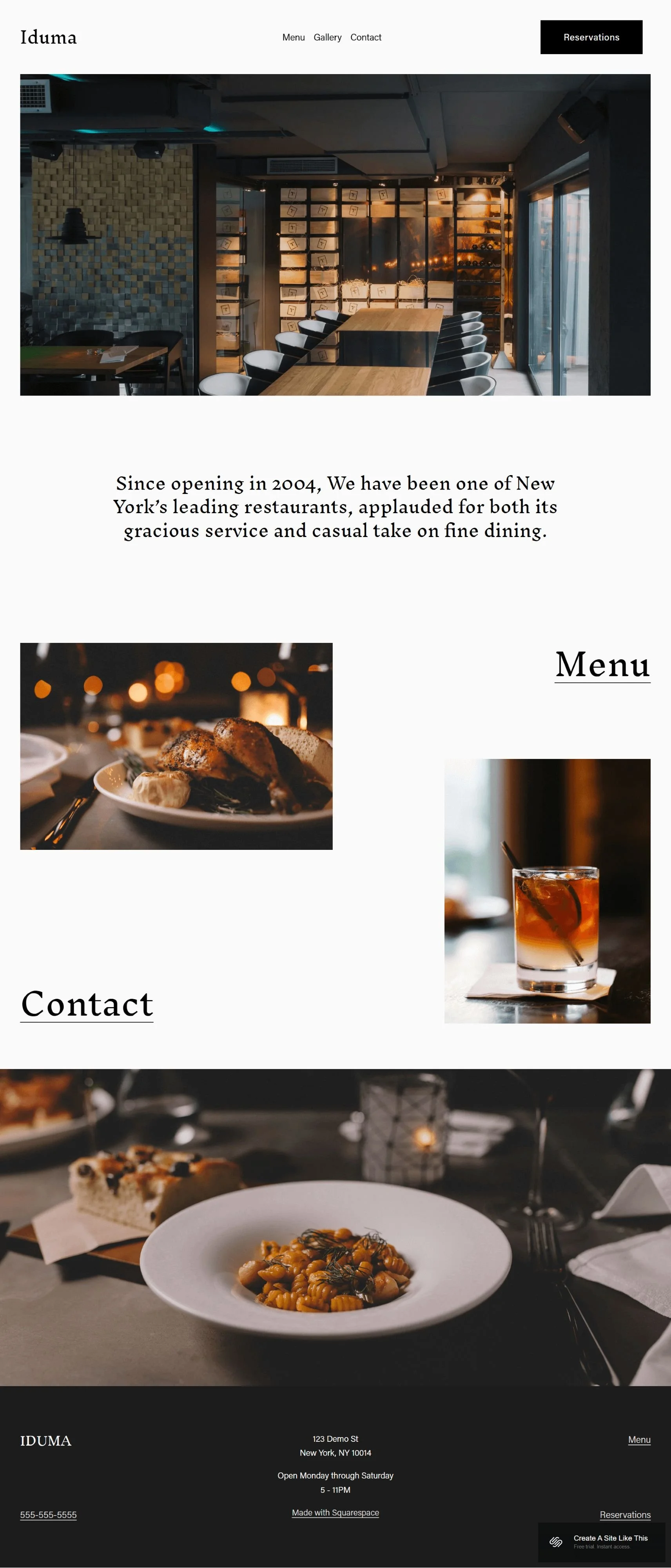
Full-width images that set the mood immediately. A quick intro to your restaurant, gorgeous hero shots, and clean nav links to your menu & contact info. The demo shows a text section about the restaurant's approach paired with drool-worthy food photography.
Menu Page
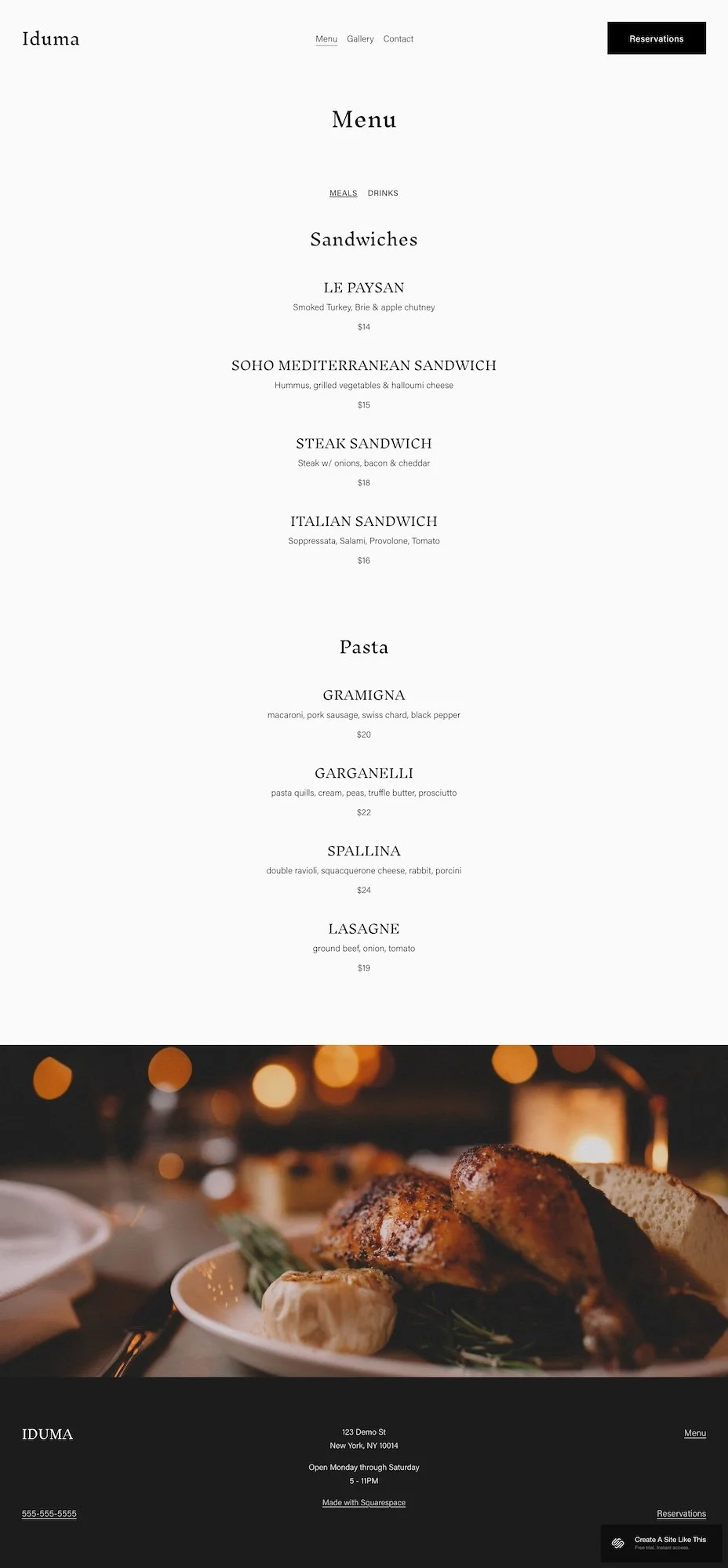
Simple layout organized by category (the demo shows Sandwiches, Pasta, Wine). Each item gets a name, description & price. It's text-focused with one accent image.
Reservations
There's a reservation link in the nav, but you'll need to hook up a third-party booking system like OpenTable, Resy, or Tock to make it functional.
Contact Page
Address & hours go here. You can add a map, as well.
Extras
Simple, transparent header navigation
Mobile-responsive design
Clean footer with essential business information
Support for basic blog functionality (standard with all Squarespace templates)
Ability to add additional pages as needed
Integration capability with reservation systems
Key Strengths of the Iduma Template
Minimalist Aesthetic: Iduma strips away everything except what your guests need. If your food and photography are strong, this template lets them shine.
Black-and-White Design: The monochromatic color scheme is timeless. While colorful designs can feel dated, Iduma's restrained palette will look appropriate for many different styles of restaurants.
Fast to Set Up: The simplicity means you're not spending hours customizing features. If you need a professional site quickly, you can have this running in a day or two.
Best Use Cases of the Iduma Template
1. New Restaurant Launch You're opening soon and need a website fast. Iduma gives you the essentials (menu, location, hours, reservation link) without requiring a thousand design decisions.
2. Seasonal or Limited-Time Concepts You're running a pop-up or holiday dining experience. Iduma's simplicity means you can set it up quickly and move on without weeks of building.
3. Rebranding to Modern Minimalism Your current website feels chaotic. You want something that communicates elevated dining without looking like you're trying too hard.
4. Small Menu, High-End Execution You offer maybe a dozen carefully crafted dishes. Iduma's menu structure works perfectly when you're not displaying fifty items.
What the Iduma Template Is Not Best For
The Iduma template maybe isn't the best fit for:
Fast-casual or counter-service spots If people order at a counter, grab their food, and sit down, like a poke bowl shop, a build-your-own salad place, or a sandwich counter, Iduma will feel too fancy. You need something more approachable that matches the casual ordering vibe.
Family-friendly restaurants If you've got a kids' menu, crayons at every table, and birthday parties on weekends, Iduma's upscale, mature aesthetic won't connect with your audience. Families want something warm and welcoming, not refined and minimalist.
Places that need to show a lot of information If you need separate pages for catering, events, private dining, multiple locations, daily specials, happy hour menus, and a busy calendar, Iduma's streamlined approach might feel limiting. It's built for simplicity, not information overload.
New restaurants needing to explain their concept If you're doing something totally new or unusual (like a restaurant that's also an art gallery, or a dining experience that requires explanation) you'll need more room to tell your story than Iduma's minimal design allows.
Casual, high-energy spots If you're running a lively taco joint with bright colors, fun vibes, and a party atmosphere, Iduma's black-and-white minimalism will feel too serious. Same goes for a sports bar with TVs everywhere, a bustling ramen shop, or a pizza place where families pile in after soccer practice. These places need energy and personality that Iduma just doesn't deliver.
Restaurants with huge, complex menus If you've got a diner with 10 pages of menu items, a Chinese restaurant with 100+ dishes, or an Indian buffet with tons of options, Iduma's minimal layout won't give you the space you need. It's designed for restraint, not abundance.
Fun, quirky, or themed restaurants A 50s-style diner with neon signs and retro vibes? A tiki bar with tropical cocktails and bamboo everywhere? A medieval-themed restaurant where servers dress in costumes? Iduma's sophisticated minimalism would completely miss the mark. These places need templates with personality and playfulness.
Pros & Cons of the Iduma Template
Pros
Timeless aesthetic: The black-and-white design won't look dated in two years
Quick setup: Minimal pages and features mean you can launch fast
Mobile-friendly: Clean layout translates well to phone browsing
Professional without pretense: Communicates quality dining without excessive design elements
Cons
Menu layout is basic: Works for simple menus but can't handle complex categorization or dietary filters
No built-in booking: Requires external reservation system integration
Limited personality: works for elegance, but not quirky or playful brands
Lacks SEO hierarchical structure: Like all Squarespace templates, heading hierarchy isn't properly structured by default
Getting started with the Iduma template is easy:
Once you pick Iduma in the Squarespace 7.1 template library and you're ready to build, here's what to do:
Replace the home page text and images. Start with your welcome text and upload high-quality photos (at least 1500px wide). Make sure they’re also optimized - make the size small and name them accurately. (More about optimizing your photos, and here’s how to do it in Windows)
Build out your menu page. Delete the demo items and add your actual menu. Keep descriptions concise but descriptive.
Add your business information to the Contact page and to the footer. Update your address, phone, and operating hours. (Here’s what else to put in your footer)
Set up your reservation system. Connect your OpenTable, Resy, Tock, or other booking platform and update the Reservations link.
Customize fonts and colors in Site Styles. Adjust typography and add subtle color accents if needed, but keep changes minimal.
Check your heading hierarchy. Squarespace templates don't always include proper heading structure by default, so make sure your main headline is an H1 and subheadings follow logical order.
Test your reservation links. Make sure all external booking links work correctly.
Double check everything, connect your domain and choose your Squarespace plan, and go live. Review every page on desktop and mobile before launching.
Iduma Squarespace Template FAQs
Is the Iduma template good for SEO?
Yes. Like all Squarespace 7.1 templates, Iduma includes the platform's SEO tools. You can customize page titles, meta descriptions, URL slugs, and image alt text. The template doesn't automatically include proper heading hierarchy though; you'll need to check and adjust your H1, H2, H3, and H4 structure manually.
Is the Iduma template good for mobile design?
Yes. All Squarespace templates, including Iduma, automatically adjust to fit whatever device someone is using. So if someone pulls up your restaurant website on their phone, it'll rearrange everything to fit that smaller screen without you having to do anything.
This is actually perfect for restaurants because so many people are searching for places to eat while they're already out. They can quickly check your menu, see your hours, and book a table right from their phone.
The best part is you don't have to create two versions of your website or know any coding. It just works. And since Iduma has that simple, clean design, it loads fast on phones and everything stays easy to read and click on; your photos, menu, and reservation button all look good whether someone's on their laptop or scrolling on their phone.
Can I change fonts and colors on the Iduma template?
Yes! You can change fonts and colors easily in Iduma. Squarespace has a built-in Style Editor where you can customize all of this. You just go into your site's Design panel, click on "Site Styles," and you'll see options to change your color palette and fonts. You can adjust things like your heading fonts, body text, background colors, and accent colors.
It's all point-and-click, so you can play around with different looks until you find what matches your restaurant's vibe. Want to switch from that elegant look to something warmer or bolder? Just swap out the colors and fonts. Everything updates across your whole site automatically, so you don't have to go page by page changing things.
This is one of the nice things about Squarespace templates: they give you a professional starting point, but you're not stuck with exactly how they look in the demo. You can make it feel like your own brand pretty easily.
Do I need to keep the layout, or can I add more pages?
You can definitely add more pages if you want! Iduma comes with a certain number of demo pages already set up (home, menu & reservations), but you can add as many additional pages as you want.
You can also duplicate existing pages if you want to create similar layouts, or build completely new pages from scratch using Squarespace's drag-and-drop builder. As for the layout itself, you can rearrange things, add or remove sections, and customize what appears on each page. So if the demo homepage doesn't quite work for you, you can move things around, add new image sections, change the order of content blocks, whatever makes sense for your restaurant.
The template is really more like a helpful foundation that shows you what's possible. But once you start working with it, you can shape it however you need to tell your restaurant's story and give customers the information they're looking for.
If you find yourself wanting to add four or five additional pages though, you might want to start with a different template.
Does Iduma integrate with reservation systems?
Yes. You can connect popular reservation platforms like OpenTable, Resy, or Tock through the Reservation page. Squarespace also lets you create custom booking forms if you prefer to manage reservations internally. The key is making sure whatever system you use integrates smoothly; test the booking flow from start to finish to avoid losing customers to technical glitches.
Can I use Iduma for a restaurant with multiple locations?
Not really. Iduma's structure isn't built for multi-location businesses. If you have two or three locations, you'd need separate pages for each with different addresses, hours, and possibly menus. At that point, the template's simplicity becomes a limitation rather than a benefit. You'd want something with more robust navigation and content organization capabilities.
Is Iduma good if i have a large, detailed menu?
Not particularly. The template gives you space for menu basics — dish names, descriptions and prices — but it's not designed for huge menus. If you're running a diner with 10 pages of breakfast, lunch, and dinner options, or an Indian restaurant with extensive appetizers, curries, breads, and desserts all with detailed descriptions, Iduma might not give you enough room to display everything comfortably.
How often can I update the content on Iduma?
As often as you want! There's no limit.
You can log into your Squarespace site anytime and update whatever you need, whether that's daily specials, changing your menu, updating your hours, adding new photos, or posting about upcoming events. You could literally update it multiple times a day if you wanted to.
This is actually one of the nice things about having your own website instead of relying only on social media or third-party platforms. You're in complete control. The updates happen in real-time too, so as soon as you save your changes, they're live on your site for customers to see.
This makes Iduma (and really any Squarespace site) pretty flexible for restaurants that like to keep things fresh, whether you're updating seasonal menus, promoting special events, or just tweaking things as your business evolves. You're never stuck waiting for someone else to make changes for you.