Wesley Squarespace Template Review
This post contains affiliate links. If you purchase through them, I may receive a small commission at no extra cost to you.
Table of Contents Show
Wesley is a free Squarespace website template for small e-commerce businesses that want to sell products (especially for doggo and pet related products).
The template includes a shop page with product grid, individual product pages, about page, and contact page. The overall vibe is bright, friendly, and approachable. If you're selling products and want your brand personality to shine through, Wesley's warm design fits.
But here's the question: Is your product catalog small enough for this template, or do you need something more robust?
Let's figure it out.

What's Included in the Wesley Template
Homepage
Hero section with large product image and headline, intro section with brand tagline and description, featured products carousel or gallery, customer testimonial section, and newsletter signup.
Shop Page
Product grid showing your items with images and prices. Filtering and navigation for browsing.
Product Pages
Image gallery, product description, price, size/color options (if applicable), add to cart button, and related products section.
About Page
Space for your brand story and connection with customers.
Contact Page
Contact form for customer questions.
Note: The aesthetic is pet-focused in the demo. Bright colors, playful imagery, friendly language ("Welcome to the Wesley pack"). If you sell pet products, you're set. If you don't, you'll probably need to adjust the vibe.

Who The Wesley Template Is For
Wesley works best if you're:
A pet product business selling dog collars, toys, beds, or accessories (the demo is literally this)
A handmade goods seller making jewelry, candles, soaps, or artisan products
A curated lifestyle shop selling home goods, stationery, or gifts
A niche product business with a focused product line (sustainable baby products, eco-friendly goods)
A small local shop adding online sales to your brick-and-mortar location
Wesley is NOT for you if:
You sell hundreds of products across multiple categories (the layout works best for 10-50 items)
You need advanced filtering or complex product organization (it's simple, not robust. For a more complex shop site, Shopify is likely a better choice)
You want a bold, edgy, or ultra-modern design (Wesley is friendly and approachable, not cutting-edge)
You focus on services instead of products (it's literally built for physical goods)
Pros and Cons of the Wesley Template
What Works Well
Actually built for e-commerce. Unlike service templates with a shop tacked on, Wesley is quite literally designed for selling products from the ground up.
Works best for small, curated catalogs. If you have 10-50 products where each one matters, this layout showcases them without overwhelming shoppers.
Friendly, approachable design. The bright, clean aesthetic feels welcoming. Perfect for small businesses where personality is part of the appeal.
Testimonials build trust. Customer quotes on the homepage help newer shops build credibility with potential buyers.
Simple navigation. Shop, About, Contact. Clean header keeps shoppers focused on products without distractions.
Where It Falls Short
Limited to small product catalogs. If you have hundreds of products or multiple complex categories, you'll need more robust filtering and organization than Wesley offers.
Simple design might feel basic. If you want something unique, bold, or trendy, Wesley's friendly aesthetic might feel too plain for you.
No blog section in the demo. If content marketing is part of your strategy, you'll add a blog separately. The template isn't optimized for regular publishing.
Pet-focused demo aesthetic. The bright colors and playful language work great for pet products. If you're selling something else, you'll adjust the vibe.
Like most Squarespace templates, SEO needs manual work. Heading tags aren't set up correctly by default (no H1 tags). You'll fix that yourself.
Bottom Line
Wesley is perfect if you're selling a small, curated product line (10-50 items) and want a warm, friendly shop that feels more personal than corporate.
The template is literally designed for e-commerce, which means product pages, shop grids, and checkout flows work smoothly.
But if you have hundreds of products, need complex filtering, or want a more sophisticated design, Wesley's simplicity will feel limiting.
My take: If you sell pet products or handmade goods with a focused catalog, Wesley is a great choice. If you're building a large online store with extensive inventory, look for a template with more e-commerce flexibility.
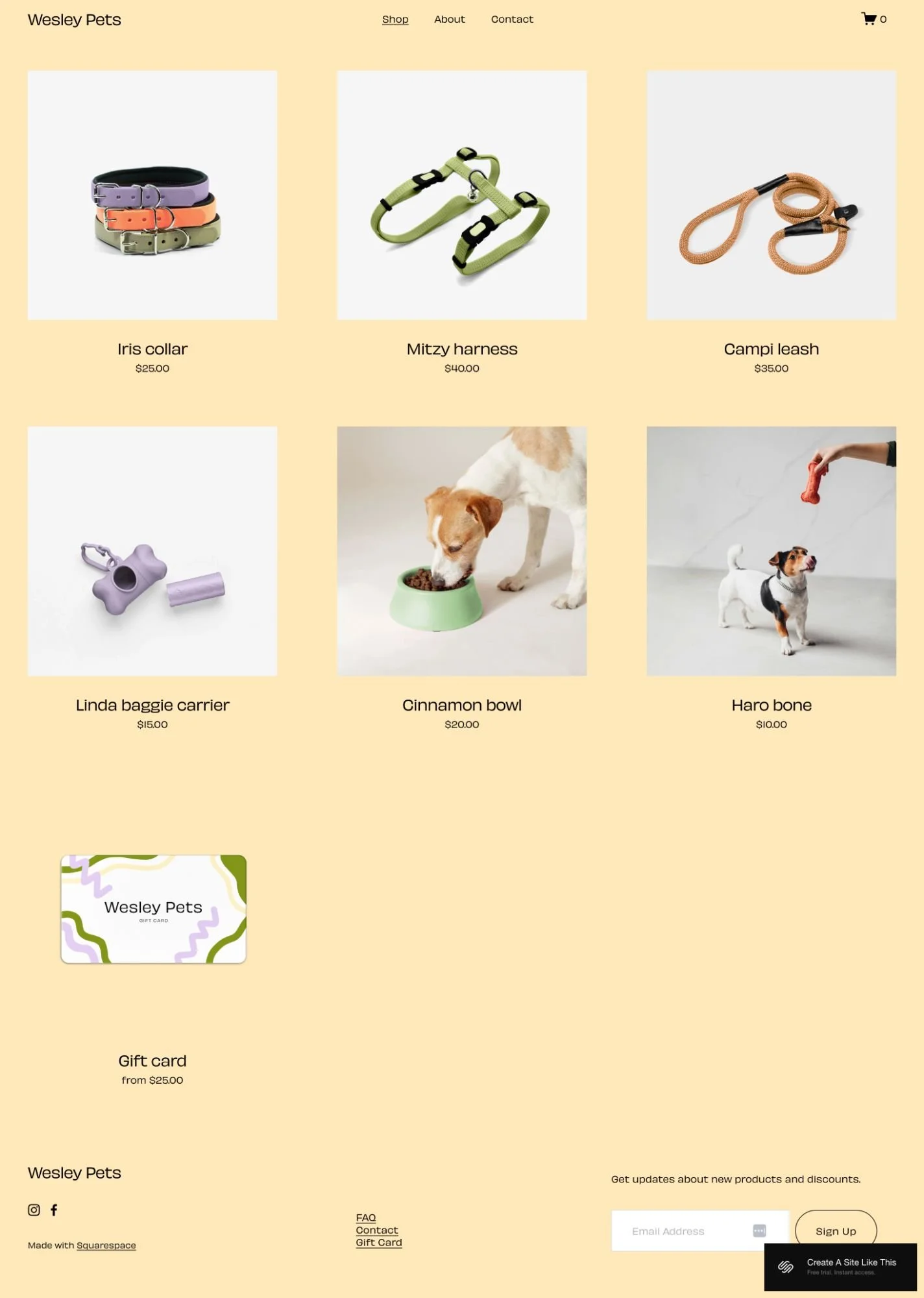
Getting Started with the Wesley Squarespace template is easy:
Once you pick Wesley in the Squarespace 7.1 template library, here's what to do:
Replace the demo content. Start with the homepage hero section. Upload your own product photo and update the headline to match your brand. This is the first thing shoppers see, so make it clear what you sell.
Add your products. Go to the Commerce section and start adding your actual products. For each one, upload high-quality photos, write clear descriptions, set prices, and add any variants like size or color options.
Update your about section. Replace the "Welcome to the Wesley pack" text with your actual brand story. Explain what you sell, why you started your business, and what makes your products special. Keep it friendly and personal.
Set up your shop page. Make sure your product grid is displaying correctly. Organize products in a way that makes sense for shoppers. If you have categories, set those up so people can filter easily.
Add your testimonials. Replace the demo testimonial with real customer quotes. If you don't have testimonials yet, delete this section for now and add it back once you collect some reviews.
Fix your heading hierarchy. Squarespace templates don't set up H1 tags correctly by default. Make sure your main headline is an H1 and your subheadings follow in order (H2, H3). This matters for SEO.
Adjust colors and fonts. Click the paintbrush icon in the upper right to open Site Styles. Change your brand colors and fonts to match your actual brand. Wesley's demo is bright and cheerful, but you can adjust it to fit your vibe.
Set up your commerce settings. Configure shipping rates, payment methods (Stripe, PayPal, etc.), tax settings, and checkout options. This is critical if you actually want to sell products.
Add more pages if you need them. You might want a FAQ page, shipping and returns page, or wholesale page. Add pages through the Pages panel as needed.
Set up your newsletter. Connect your email provider (Squarespace Campaigns, Mailchimp, Flodesk, Kit, whatever you use) in the newsletter block so you can collect email addresses from shoppers.
Double check everything and go live. Look at your site on mobile (most shopping happens on phones), test the checkout process, make sure all your product info is accurate, then hit publish.
Wesley Squarespace Template FAQs
Is the Wesley template good for e-commerce?
Yes. Unlike most Squarespace templates that are built for services and then have a shop added, Wesley is actually designed for e-commerce. It includes product pages, a shop grid, and all the standard e-commerce features. That said, it works best for small shops with a focused product line, not huge catalogs.
Can I sell services on the Wesley template?
You can, but it's not ideal. Wesley is built for selling physical products. If you're selling services, coaching, or digital products, you'd be better off with a service-focused template. You'd need to remove the shop sections and rework the layout, which defeats the purpose of using Wesley.
Is the Wesley template good for SEO?
Yes, It’s responsive and built to load quickly. But like most of Squarespace’s free built-in templates, Wesley doesn't set up heading hierarchy correctly by default. You'll need to manually fix your Header tags. Squarespace itself has solid SEO features, you’ll just need to them, but they make it easy. (custom page titles, meta descriptions, clean URLs).
Can I use the Wesley template on mobile?
Absolutely. Like all native Squarespace templates, Wesley is fully responsive and adjusts to look good on phones and tablets. Since most online shopping happens on mobile, this is critical.
Can I change fonts and colors on the Wesley template?
Yes. Wesley is built on Squarespace 7.1, so you can customize fonts, colors, buttons, and more through Site Styles. No code needed. The demo has a bright, friendly vibe, but you can adjust it to match your brand.
How many products can I sell with Wesley?
Technically, there's no limit. But Wesley's layout works best with smaller catalogs, maybe 10 to 50 products. If you have 200+ products across multiple categories, you'll probably want a template with more robust filtering and organization options.
Can I add a blog to the Wesley template?
Yes. The demo doesn't include a blog, but you can add one through the Pages panel. Just know that the template is optimized for product sales, not content publishing. If blogging is a major part of your marketing strategy, you might want a more blog-friendly template.
Does Wesley work with Squarespace's inventory management?
Yes. All of Squarespace's e-commerce features work with Wesley, including inventory tracking, product variants, digital products, and gift cards. You set all of this up through the Commerce settings.
Can I use Wesley for a physical store that also sells online?
Absolutely. If you have a brick-and-mortar shop and want to add online sales, Wesley is simple enough that you won't get overwhelmed. You can list your products and start selling online while still running your physical location.
Is Wesley good for dropshipping or print-on-demand?
It can work, but Squarespace isn't specifically built for dropshipping like Shopify is. You'd need to integrate with third-party apps for print-on-demand fulfillment. If dropshipping is your main model, you might want to look at platforms designed specifically for that.