Best Squarespace Templates for Authors and Writers
This post contains affiliate links. If you purchase through them, I may receive a small commission at no extra cost to you.
Table of Contents Show
What is the best Squarespace template for authors and writers?
Quick Answer: The best Squarespace templates for authors are Manual (single-page book launch), Jotterpress (direct book sales with built-in shop), Amal (author-speakers with events), Stanton (content-forward bloggers), Sketchbook (newsletter writers), and Suhama (freelance and copywriters). Manual is the most common starting point for debut authors. All Squarespace plans support these templates starting at $16/month.
KEY FACTS:
All Squarespace templates are built on 7.1 and use the Fluid Engine drag-and-drop editor
All built-in templates are free with any Squarespace subscription
You can sell books directly on Squarespace using the e-commerce feature (available on all plans)
Common pages for author websites: Homepage, About/Bio, Books, Blog/News, Events/Appearances, Contact, Media Kit
All 7.1 templates have identical functionality; they differ in fonts, colors, and layout starting points
1. Manual Squarespace Template
Best for: Debut authors, single-book launches, focused book landing pages
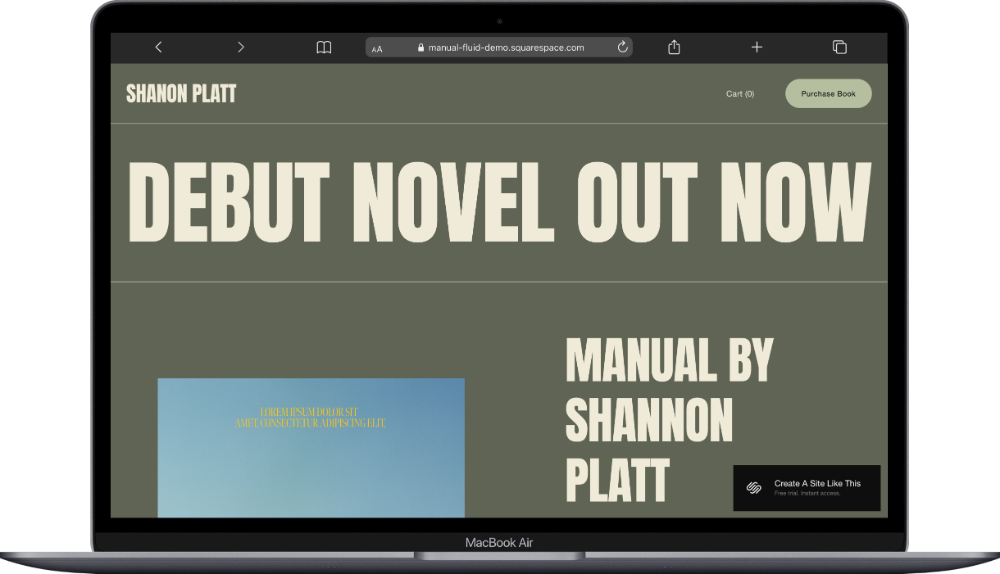
Manual is a one-page template built specifically for authors. The whole site lives on one scrollable page. There’s a focused homepage that shows your book and links out to purchase it externally (Amazon, Bookshop, your publisher’s site, etc).
For some authors, that simplicity is perfect. If you’re launching a debut book and the goal is to get every visitor to see your cover, read your pitch, and click “buy,” Manual removes all the friction. No navigation to wander through. Simple.
Worth knowing before you pick it: if you eventually want a full author site with a blog, events calendar, and all the sections, you can easily add those pages yourself down the road. Manual is genuinely great for what it is. It’s just very intentionally a single-page situation.
This one could be a solid fit if you want a clean, focused launch page and don’t need a multi-page site yet.
2. Jotterpress Squarespace Template
Best for: Authors selling directly, writers with a shop, publishers with multiple titles
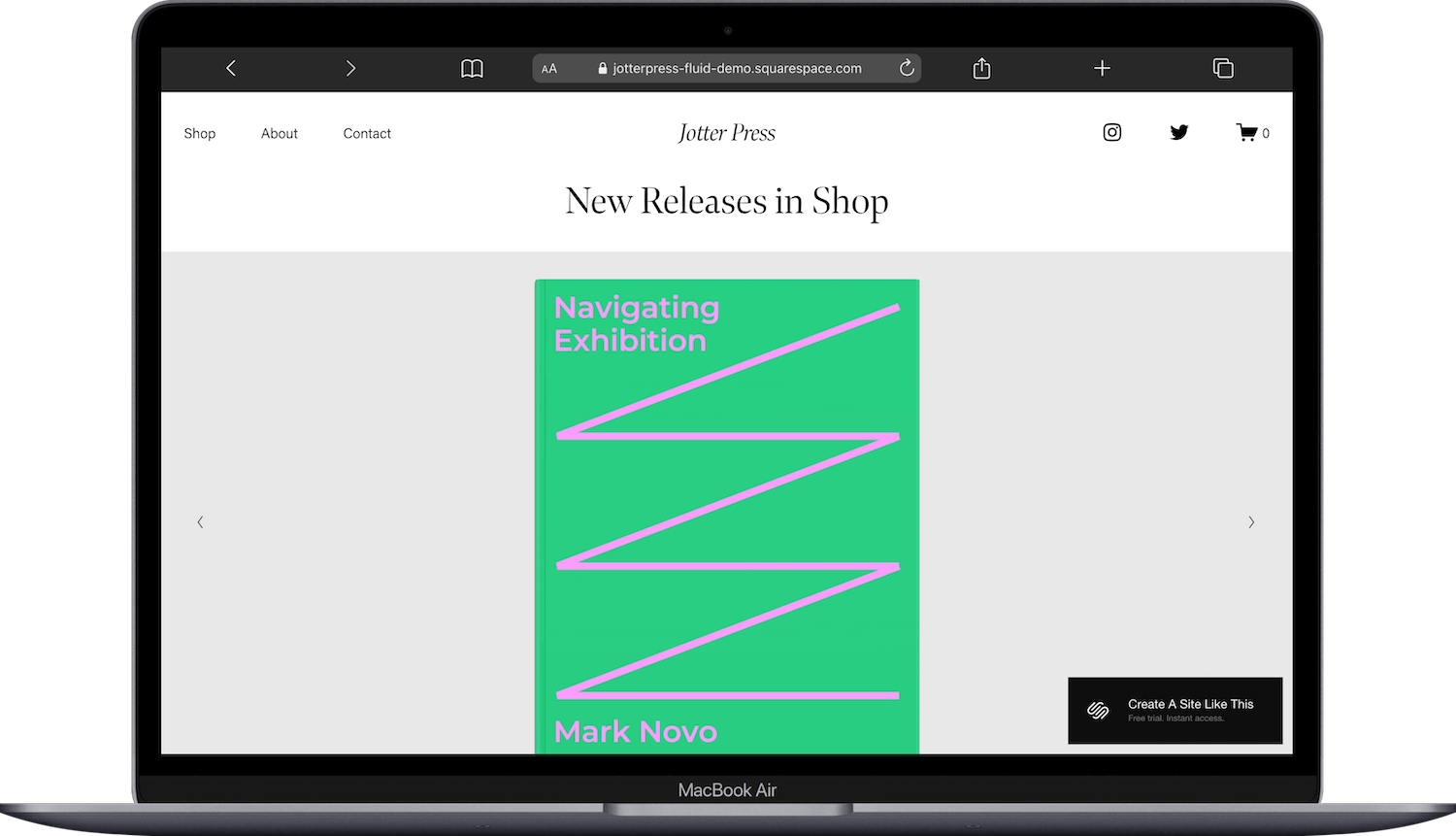
Jotterpress is Squarespace’s book and magazine shop template. It comes with six pages out of the box: Home, Shop, About, Contact, FAQ, and Legal. The shop infrastructure is already there. You’re not building it from scratch.
Jotterpress is optimized for authors who want to sell directly from their site: signed editions, bundles, limited print runs, digital downloads. The FAQ and Legal pages are pre-included too, which is genuinely useful when you’re handling direct orders and need return policies and terms somewhere visible.
Jotterpress could work really well if selling directly to readers is a core part of your website strategy.
3. Amal Squarespace Template
Best for: Author-speakers, writers who teach workshops, authors with a speaking career
Amal is a speaker template that adapts well for authors who have a speaking component to their work. It comes with three pages: Home, Speaking Events, and Contact Me. If you do keynotes, panels, workshops, or conference appearances alongside your writing, the events structure is ready to go.
The thing to know upfront: there’s no built-in Books page. If you want to showcase your publications, you’re adding that page yourself. Amal is built around the speaking and events side of an author’s work, not the book catalog side. So if your brand is more “thought leader who also writes books” than “novelist with a backlist,” this fits.
The Contact Me page works nicely for event booking inquiries. The Speaking Events page can list upcoming appearances, past talks, or the topics you cover. It’s a clean setup for that specific use case.
Amal is a good pick if speaking and events are central to what you do, and you don’t mind adding a Books page yourself.
Amal would be a great starting point for you if you're an author who also speaks at conferences, teaches writing workshops, or has a platform that extends beyond your books. (You can read my full Amal template review here for more details.)

4. Stanton Squarespace Template
Best for: Authors who blog regularly, writers building an audience through content
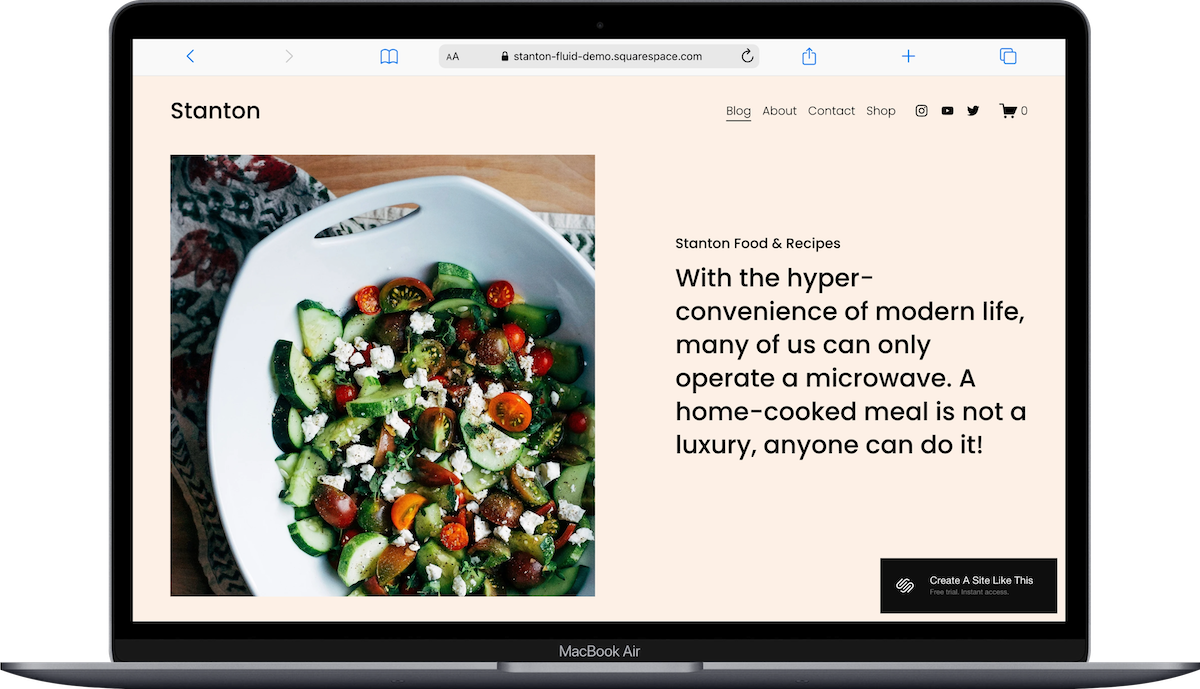
Stanton is a blog-focused template, with the homepage doing double duty as the blog feed. Beyond that, it comes with About, Contact, and Shop pages. So you’ve got the content structure and a shop for selling books, all in one starting point.
The blog setup is genuinely good for authors who publish content and write articles between launches. Writing advice, behind-the-scenes posts, essays, genre discussions. Anything that keeps readers coming back and builds your audience while your next book is in progress.
If you don’t plan to blog, Stanton probably isn’t the right fit. The whole template is built around the content feed. But if your strategy involves writing regularly online and then selling to that audience, this gives you the structure for it.
Stanton could be a fabulous choice for an author who’s into publishing content as well as publishing books.
5. Sketchbook Squarespace Template
Best for: Writers building an audience through a newsletter, authors focused on email list growth, essayists and columnists who publish regularly
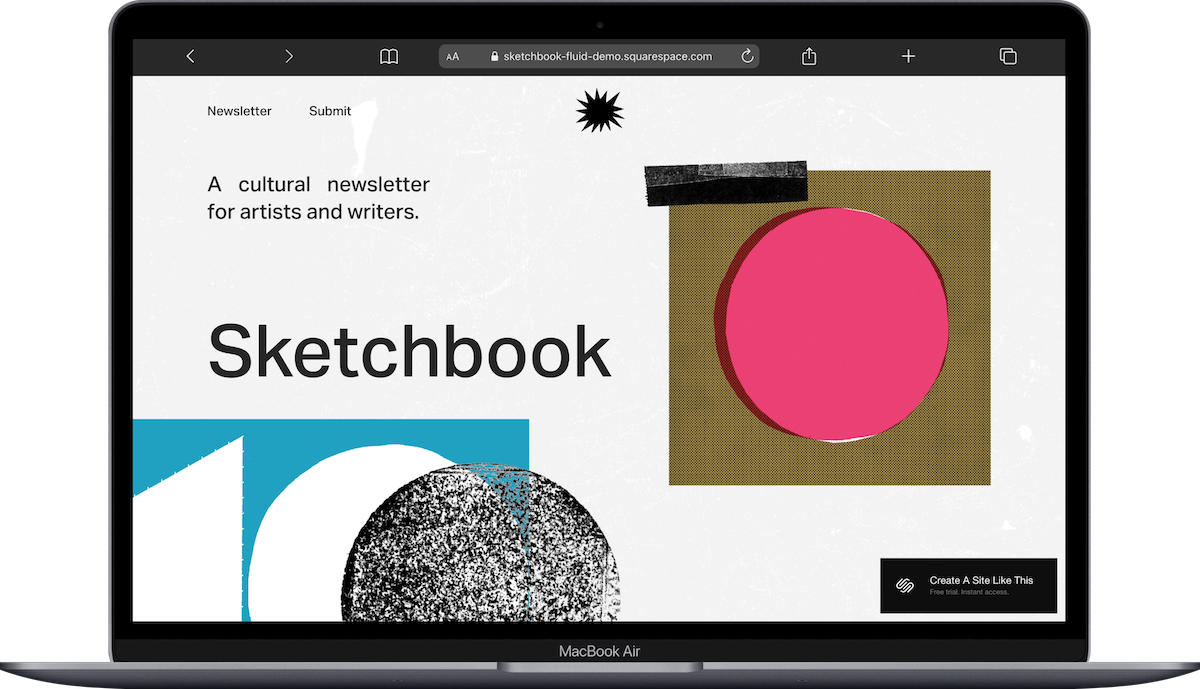
Sketchbook is a Squarespace template designed for writers who prioritize their newsletter. The template includes pages for Home, Newsletter, and Submit. The homepage features a hero section introducing your newsletter with a tagline and prominent email signup form, a section for recent posts or essays, and a brief author bio with a photo. The Archive page displays your full collection of published pieces in a clean list format with dates and titles.
What makes Sketchbook different is the newsletter focus. The homepage is built to convert visitors into subscribers. The layout is minimal and text-forward, which works well for essayists, columnists, or writers who publish primarily through email. There's no built-in Books page in the template, but you can easily add one if you also have published books.
Sketchbook would be a great starting point for you if you're a writer building an audience through a newsletter, an essayist publishing regularly, or an author who wants email list growth to be the primary goal of your website.
6. Suhama Squarespace Template
Best for: Freelance writers, copywriters, ghostwriters, writers offering services rather than selling books
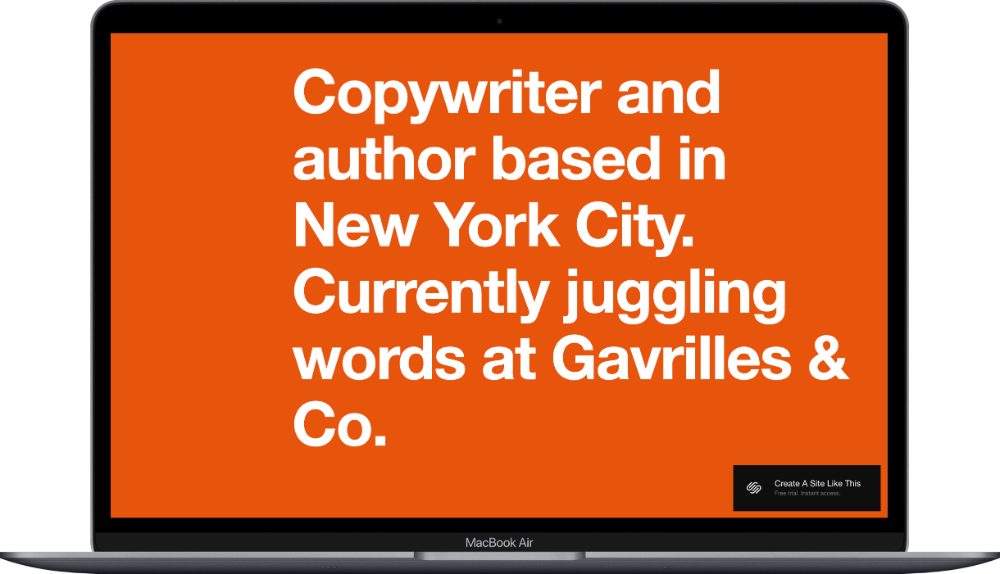
Suhama is a one-page template built for copywriters and freelance writers. Like Manual, everything lives on one scrollable page. There are no separate Services, Portfolio, About, or Contact sections in the navigation. Your pitch, your samples, and your call to action all stack vertically on a single page.
If you’d rather have a multi-page setup with a dedicated portfolio, individual service pages, and a standalone About page, you’d either add those yourself or start from a different template. Suhama’s one-page format is what it is. But for a clean, focused freelance site, it does the job.
If you're a freelance writer, copywriter, ghostwriter, or content writer who wants a simple yet impactful website, Suhama is a fabulous template to start with.
Bonus: Archer Squarespace Template
Best for: Authors announcing a debut book before it's released, writers building anticipation for an upcoming launch
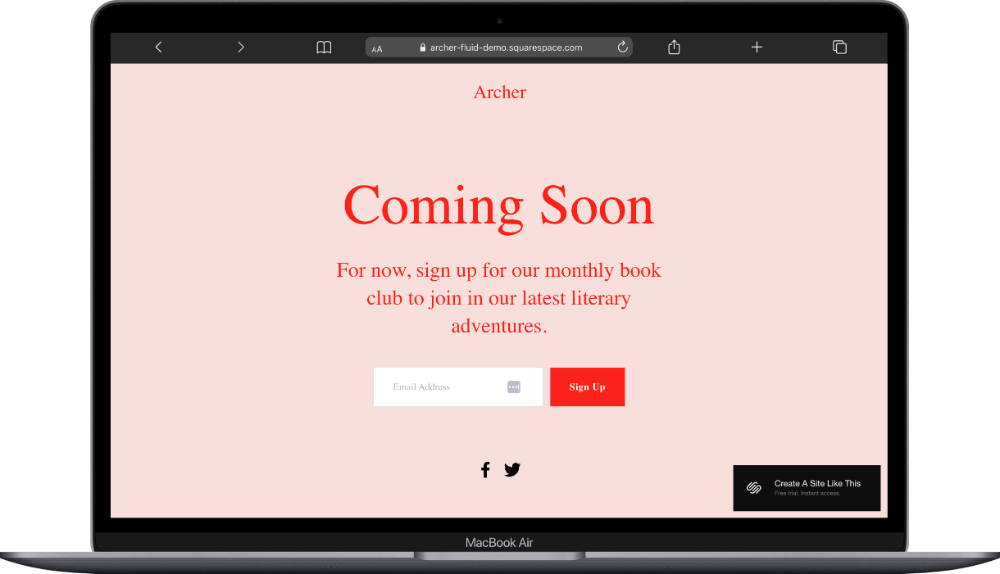
Archer is a Squarespace template designed as a simple coming-soon page for authors. The template includes a single homepage with space for your book cover, title, tagline, release date, and an email signup form to notify readers when the book launches. There's a section for a short author bio and links to your social media.
Archer works well if you're announcing a debut book several months before release and want a simple landing page to start building your email list. Once the book launches, you could build out the template with more pages.








How to Choose the Right Squarespace Template for Your Author Website
Think about what kind of author you are, and what you want your website to do before picking a template.
Focused single-book launch, nothing extra: Manual or Archer (pre-launch)
Selling books directly from your site: Jotterpress has the shop and policies built in
Speaking and events are a big part of your work: Amal has a Speaking Events page ready to go
Publishing content regularly is part of your strategy: Stanton is built around the blog feed
Your newsletter is your main platform: Sketchbook keeps it minimal and funnels toward subscribing
Freelance writer looking to attract clients: Suhama’s one-page format is built for that
Remember, these templates are all starting points. You can customize colors, fonts, images, and layouts to match your book genre and personal style. Pick the structure that's closest to what you need, then make it your own.
Should You Use a Squarespace Built-In Template or a Third-Party Template?
All Squarespace built-in templates are free with any subscription. That's a huge advantage. But they're also kinda "generic" by definition; thousands of authors are using the same starting point.
If you want something more custom and brand-differentiated, third-party template shops are worth considering. Kseniia Design has author-specific templates with more unique layouts. Applet Studio has clean, editorial-style templates that work well for novelists and literary writers. Big Cat Creative has bold, modern templates for genre fiction authors who want something distinctive. And Christy Price has two very specific Squarespace templates built specifically for authors: Idyll and Scribe.
Third-party templates cost $150-$400 one-time, but you get a more custom starting point and fewer sites that look like yours.
What Pages Should an Author Website Include?
Most author websites need these core pages:
Homepage: Introduce yourself, showcase your latest book, and prompt visitors to either buy your book or join your email list.
About/Bio: Full author bio, writing background, past publications, awards, and a professional photo.
Books: Showcase your published books with cover images, descriptions, purchase links, and reader reviews.
Blog/News: Share writing updates, behind-the-scenes stories, book announcements, or articles related to your genre.
Events/Appearances: Upcoming book signings, speaking engagements, virtual launches, or workshop dates.
Contact: Email address or contact form for media inquiries, event bookings, or reader messages.
Media Kit/Press (optional): High-res author photo, book covers, bio, press releases, and past media coverage for journalists and bloggers.
You don't need ALL of these pages to start. Begin with Homepage, About, Books, and Contact. You can add the others as your platform grows.
Can You Sell Books Directly on Squarespace?
Yes. All Squarespace plans include e-commerce functionality. You can sell physical books (paperbacks, hardcovers), digital downloads (ebooks, audiobooks), or both directly from your website.
Here's how it works: You add products (your books) to your site using Squarespace's product blocks. Visitors can purchase through your site, and you handle fulfillment (shipping physical books or delivering digital files). Squarespace charges transaction fees depending on your plan: Basic plan has a 2% transaction fee, Core, Plus, and Advanced plans have 0% fees
If you're selling a few copies directly to readers or offering signed editions, this works well. If you're selling hundreds of copies monthly, you might want to link out to Amazon, IngramSpark, or your publisher's site instead.
How Much Does a Squarespace Author Website Cost?
Squarespace has four pricing plans (billed annually):
Basic: $19/month (includes custom domain, unlimited pages, blog, basic e-commerce with 2% transaction fee)
Core: $29/month (includes everything in Basic, 0% transaction fee, unlimited contributors, custom code)
Plus: $49/month (includes everything in Core, 0% transaction fee, lower processing rates, more video storage)
Advanced: $99/month (includes everything in Plus, lowest processing rates at 2.5% + $0.30, 0% digital product fee, and unlimited video storage)
Most authors start with Basic or Core. If you're selling books directly through your site and want to avoid transaction fees, Core is all you need. Plus only makes sense if you're also selling digital products like ebooks at volume, since it drops that fee from 5% to 1%
All plans include a 14-day free trial so you can test templates and features before committing.
Tips for Setting Up Your Author Website
Optimize your book cover images. Large image files slow down your site. Resize your book covers to 1500 pixels on the longest side and keep the file size under 500KB. This keeps your site loading quickly without making your covers look blurry.
Use your homepage strategically. Don't try to fit everything on your homepage. Focus on one primary goal: get visitors to buy your latest book, join your email list, or learn more about you. Read my guide on what to put on your homepage for more details.
Set up your email list from day one. Even if your book isn't out yet, start collecting emails. Use a newsletter signup form on your homepage and offer something in exchange (first chapter, exclusive short story, updates on the book launch). Kit works well for authors and integrates directly with Squarespace.
Add a media kit page if you're pitching podcasts or bloggers. Include a high-res author photo, book covers, short and long bios, past media features, and contact info. This makes it easy for journalists, podcasters, and bloggers to feature you.
Frequently Asked Questions
What is the best Squarespace template for authors?
Manual is the best Squarespace template for most authors, especially if you're launching a single book or debut novel. It puts your book front and center with a large hero section featuring your cover, title, and buy button. The layout is simple and focused, which works well for book launch campaigns. If you have multiple published books, Jotterpress is a better starting point because it's built to showcase a full catalog.
Is Squarespace good for authors?
Yes, Squarespace works well for authors. It includes everything you need for an author website: book showcase pages, blog integration, e-commerce for selling books directly, and email list integration. The drag-and-drop editor makes it easy to update your site when you release new books or announce events. All plans start at $16/month and include a custom domain, unlimited pages, and basic e-commerce. It's not as flexible as WordPress, but it's significantly easier to manage if you're not tech-savvy.
What pages does an author website need?
Most author websites need these core pages: Homepage (introduce yourself and showcase your latest book), About (full author bio and writing background), Books (showcase published titles with covers and purchase links), Blog or News (share updates and writing-related content), Events (upcoming book signings or speaking engagements), and Contact (email or form for media and readers). You can also add a Media Kit page if you're pitching podcasts or doing press outreach. Start with Homepage, About, Books, and Contact, then add other pages as your platform grows.
How much does a Squarespace author website cost?
Squarespace plans for authors range from $16 to $99 per month (billed annually). Most authors start with the Basic plan ($16/month) or Core plan ($23/month), which include a custom domain, unlimited pages, blog, and basic e-commerce. If you're selling books directly through your site and want to avoid transaction fees, the Plus plan ($39/month) removes those fees. The Advanced plan ($99/month) is overkill unless you're running a full shop with subscriptions or advanced shipping. All plans include a 14-day free trial.
Can you sell books on Squarespace?
Yes, you can sell both physical and digital books directly on Squarespace. All plans include e-commerce functionality. You add your books as products, set prices, and visitors can purchase through your site. You handle fulfillment (shipping physical books or delivering digital files). Squarespace charges a 2% transaction fee on Basic; Core, Plus, and Advanced plans have 0% fees. If you're selling a small volume or offering signed editions, selling directly works well. If you're moving hundreds of copies monthly, linking to Amazon or your publisher might be easier.

