This post contains affiliate links. If you purchase through them, I may receive a small commission at no extra cost to you.
Table of Contents Show
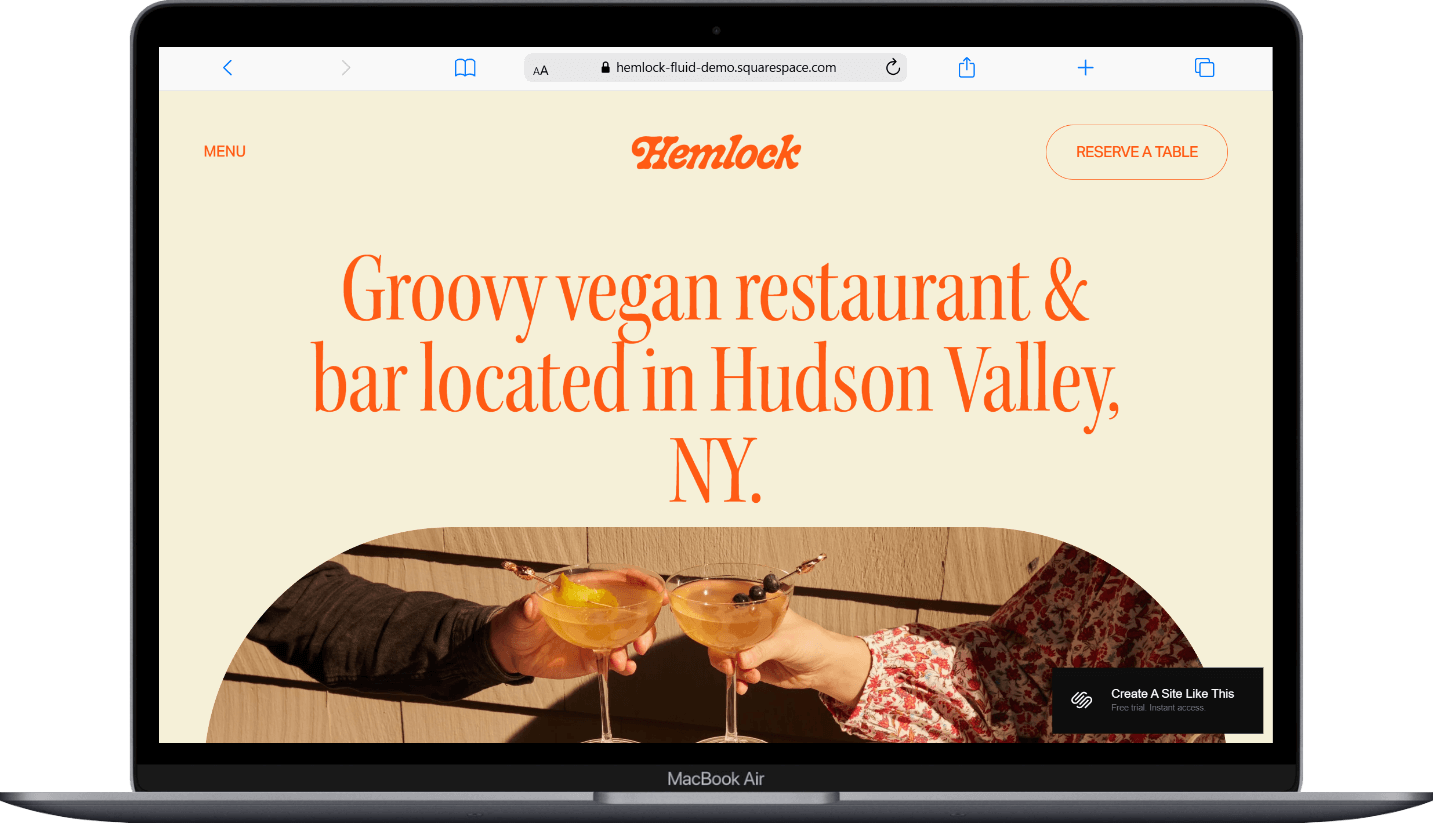
Hemlock is a Squarespace template designed for casual & cozy restaurants, cafes, and food businesses.
With its soft color palette, vintage-inspired design, and simple layout, it works particularly well for vegan restaurants, farm-to-table eateries, and casual dining spots. If you're a restaurant owner, Hemlock probably caught your eye for good reason.
This review covers what Hemlock includes, pros and cons, where it shines, and where you might hit some speed bumps.
The goal: Help you figure out if this free restaurant website template is the right fit for your business or if you should keep looking.
Who the Hemlock Template Works Best For
Hemlock works best for restaurant and cafe owners who want a humble yet sophisticated website. The template's warm, groovy aesthetic and uncomplicated structure make it easy for visitors to find what they need.
Vegan and plant-based restaurants
Farm-to-table establishments
Casual cafes and bistros
Small neighborhood restaurants
Best Use Cases
1. Vegan or Vegetarian Restaurant If you run a vegan restaurant and want a website that reflects your commitment to delicious, ethical, plant-based food, Hemlock's aesthetic aligns perfectly. The warm, organic design pairs well with colorful vegetable-forward dishes, and the simple layout lets your food photography shine.
2. Farm-to-Table Cafe or Bistro The template's rustic charm and emphasis on authenticity make it great for restaurants that source locally and want their website to communicate that same down-to-earth approach.
3. Neighborhood Restaurant with Limited Menu If you're running a small, casual spot with a focused menu (maybe 15 or so items plus bevs) Hemlock provides exactly the right amount of space. The menu page handles this scope well without feeling sparse or overcrowded.
4. Coffee Shop or Brunch Spot Hemlock would work particularly well for cafes that serve breakfast and lunch. The laid-back vibe fits the brunch crowd, and the simple structure covers everything a coffee shop needs: menu, location, hours, and maybe a newsletter signup for regular customers.
5. Restaurant Launching or Testing a Concept If you're opening your first location or testing a new restaurant concept, Hemlock could get you online quickly with all the essentials. You can launch without overthinking, then expand your site later as your business grows.
What You Get with the Hemlock Template
Homepage
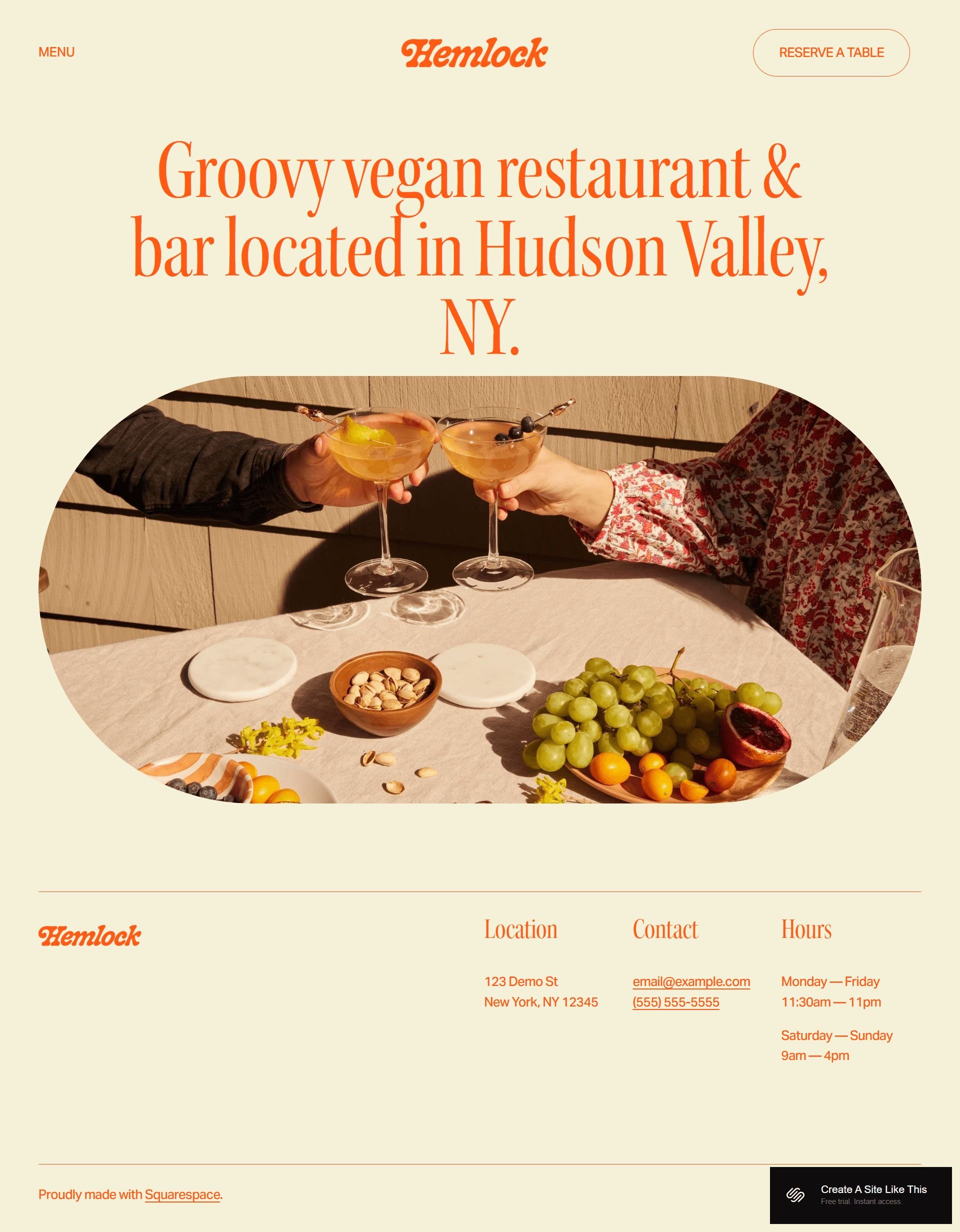
The homepage opens with location details, hours, and a welcoming introduction to your restaurant. It includes sections for featured images, a brief description of your concept, and prominently displayed contact information.
Menu Page
A simple menu page with categorization for food and drinks. The layout keeps things organized without taking up excessive space, making it easy for visitors to browse your offerings.
Reservation Section
Built-in space for reservation functionality, designed to work with third-party booking tools like Tock or OpenTable. The demo includes a clear call-to-action for booking.
Contact Information
Footer sections across all pages display your location, contact details, and business hours, so visitors can always find how to reach you.
Extras
Mobile-responsive design that looks clean on phones and tablets
Integration capabilities with reservation systems (Tock, OpenTable, Resy)
Space for high-quality food photography throughout
Social media link sections
Newsletter signup options
Squarespace's standard menu section layouts
What the Hemlock Template Is Not Best For
The Hemlock template might not be the best fit if you:
Run a fine dining establishment that needs an elegant, sophisticated aesthetic; Hemlock's casual, groovy vibe won't match the upscale experience you're providing
Have multiple locations and need to manage distinct pages, menus, or booking systems for each one; the simple structure could become limiting fast
Need extensive event management features for private dining, cooking classes, or regular special events; you'll want a template with more robust event page structures
Operate a complex business with catering services, multiple revenue streams, or franchise locations that require detailed service pages
Pros & Cons of the Hemlock Squarespace Template
Pros
Warm, approachable aesthetic that works particularly well for casual dining, vegan restaurants, and farm-to-table concepts
Strong foundation for food photography with layouts that showcase dishes without visual clutter competing for attention
Quick to customize with minimal pages to set up, making it practical for restaurant owners who need to get online without spending weeks on their website
Cons
Simple design may not be a great fit all concepts; fine dining, upscale restaurants, or trendy cocktail bars might need something more sophisticated
Basic page structure doesn't include built-in templates for private events, press pages, or detailed chef/team bios if storytelling is central to your brand
Lacks built-in SEO hierarchical structure like all Squarespace templates, so you'll need to manually optimize heading hierarchy for search engines
Getting Started with the Hemlock Template is Easy:
Once you pick Hemlock in the Squarespace 7.1 template library and you're ready to build, here's what to do:
Replace the homepage hero content. Update the demo text and images with your restaurant's name, tagline, and a high-quality photo that represents your vibe. This sets the tone for everything else.
Add your actual location and hours. The demo includes placeholder contact information in the homepage and footer: update this with your real address, phone number, and operating hours.
Build out your menu page. Delete the demo menu items and add your actual food and drink offerings. Include descriptions and prices, and consider adding photos of your most popular dishes to make the menu more enticing.
Check your heading hierarchy. Squarespace templates don't always include proper heading structure by default, so make sure your main headline is an H1 and subheadings follow logical order (H2, H3, H4) for better SEO.
Set up reservation integration. If you're using Tock, OpenTable, or another booking system, connect it to the reservation section. If you're handling reservations manually, add a contact form or clear instructions for calling or emailing.
Customize your colors and fonts in Site Styles. Navigate to Design > Site Styles to adjust the color palette and typography to match your brand. Hemlock's warm tones work great, but you can modify them to fit your specific aesthetic.
Update footer information across all pages. Make sure your location, hours, and contact details appear consistently in the footer so visitors can find this info from anywhere on your site.
Add any additional pages you need. Consider whether you want an About page, Gallery, or Events page. Keep it simple; only add pages that serve a clear purpose for your customers.
Replace all demo images with your own food photography. Never use demo content on your live site. Invest in good photos of your space and dishes, or use your own smartphone photos if they're high quality.
Double check everything, connect your domain and choose your Squarespace plan, and go live. Preview your site on mobile to make sure everything looks good, test any forms or booking integrations, then launch.
Hemlock Squarespace Template FAQs
Is the Hemlock template good for SEO?
Yes. You'll need to manually structure your headings and optimize your page titles, meta descriptions, and image alt text. But the foundations are all built in. Make sure to claim your Google Business Profile and keep your location information consistent across your site. Here’s how to audit your Google Business Profile.
Can I use the Hemlock template on mobile?
Yes, Hemlock is fully mobile-responsive and looks clean on phones and tablets. This matters a lot for restaurants since most potential customers will browse your menu and check your hours on their phones while they're out deciding where to eat. The template's simple navigation and easy layout translate well to smaller screens.
Can I change fonts and colors on the Hemlock template?
Yep, Squarespace 7.1 templates let you customize fonts, colors, and other design elements through Site Styles. You can adjust the color palette to match your brand and choose from Squarespace's font library or upload your own custom fonts.
Does Hemlock include a blog section?
The template doesn't emphasize blogging in its demo setup, but you can add a blog to any Squarespace site. If you want to share recipes, tell sourcing stories, or announce special events, you can create a blog page. Just keep in mind that Hemlock is structured primarily around restaurant essentials, so a blog would be a secondary feature rather than a central part of the design.
Can I use Hemlock for multiple restaurant locations?
You can technically build pages for multiple locations, but Hemlock's simple structure isn't optimized for this. If you have two or three locations and they share the same menu, you could make it work with location-specific contact pages. But if you're managing a restaurant group with distinct concepts, different menus, or several locations, you'll probably find the template limiting. You'd be better off with a template designed to handle multi-location businesses or considering separate sites for each location.
Does the Squarespace Hemlock template work with reservation systems?
Yes, Hemlock is designed to integrate with third-party reservation systems like Tock, OpenTable, and Resy. You'll need to connect your booking platform through Squarespace's integration options or by embedding booking widgets. The template includes space for reservation call-to-action buttons, but the actual booking functionality comes from your chosen reservation system, not from Squarespace itself.
How many pages should I include with the Hemlock template?
Start with the essentials: Homepage, Menu, and Contact. If your restaurant has a compelling story or you want to showcase your chef or team, add an About page. If you host regular events or have private dining options, consider an Events page. The key is keeping navigation simple; restaurant customers want to find your menu, location, and hours quickly. Every page you add should serve a clear purpose for your visitors.
Can I add an online ordering system to Hemlock?
Yes, you can integrate online ordering through services like ChowNow, Square, or other third-party platforms. Squarespace doesn't have native restaurant ordering functionality, so you'll need to connect an external service. You can add ordering buttons or embedded ordering widgets to your site. Just note that Hemlock's design doesn't specifically showcase online ordering as a primary feature, so you'll need to make sure your ordering integration is prominently displayed if that's a key part of your business.
Is Hemlock a good choice for a bakery or coffee shop?
Potentially. Hemlock could work well for bakeries and coffee shops, especially if you have a cozy, neighborhood vibe. The warm aesthetic and simple menu layout suit these types of businesses. You can showcase your pastries, drinks, and specialty items through the menu page and use the photography-friendly layout to highlight your products. Just make sure your coffee shop or bakery doesn't need extensive e-commerce functionality for online orders, as you'd need to add that separately.