Arthur Squarespace Template Review
This post contains affiliate links. If you purchase through them, I may receive a small commission at no extra cost to you.
Table of Contents Show
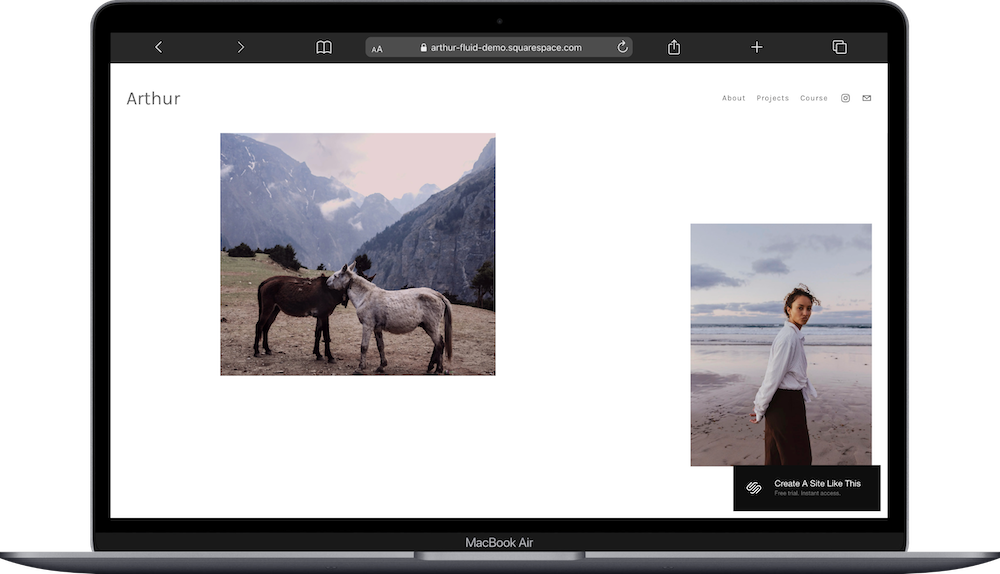
Arthur is a free Squarespace template for photographers that’s also set up for you to sell a course.
The demo shows a photography portfolio with project galleries, but the standout feature is the Course page where you can sell photography education (or anything). Arthur lets you showcase your work while building a secondary income stream through courses, workshops, or memberships. f you're a photographer looking to diversify beyond client work or teach what you know, Arthur probably caught your eye for good reason.
This review covers what Arthur includes, where it shines, and where you might hit limitations.
The goal: help you figure out if this Squarespace template is the right fit for your photography business, or if you should keep looking.
Who the Arthur Template Works Best For
Arthur works well if you're an experienced photographer who wants to monetize your expertise.
Photographers Building Education Businesses
If you've been shooting professionally and want to teach workshops, online courses, or sell educational content, Arthur gives you both portfolio and course infrastructure in one easy (and free) template.
Commercial or Editorial Photographers
The project-based portfolio structure works great for photographers with distinct bodies of work —fashion editorials, commercial campaigns, documentary projects. Each project gets its own page.
Photographers Diversifying Income Streams
If client work is unpredictable and you want passive income through courses or memberships, Arthur lets you showcase your credibility (portfolio) while selling education.
Content Creators Who Teach Photography
If you're building a YouTube channel or Instagram following around photography education, Arthur gives you a professional hub to sell courses to your audience.
Established Photographers Ready to Scale
If you're booked solid with client work but want to scale beyond trading time for money, teaching courses is a natural next step. Arthur supports that transition.
Who the Arthur Template Is Not Best For
The Arthur template probably isn't the best fit if you:
Just want a simple portfolio without educational offerings
Need robust e-commerce for prints or products
Want bold, colorful, or heavily designed portfolio layouts (Arthur is minimal and understated)
Shoot weddings or events requiring extensive galleries with hundreds of photos (the project structure works better for curated editorial work)
Don't plan to create educational content or courses (the Course page would sit empty or you’d just delete it)
What You Get with the Arthur Template
Arthur comes with portfolio and course pages:
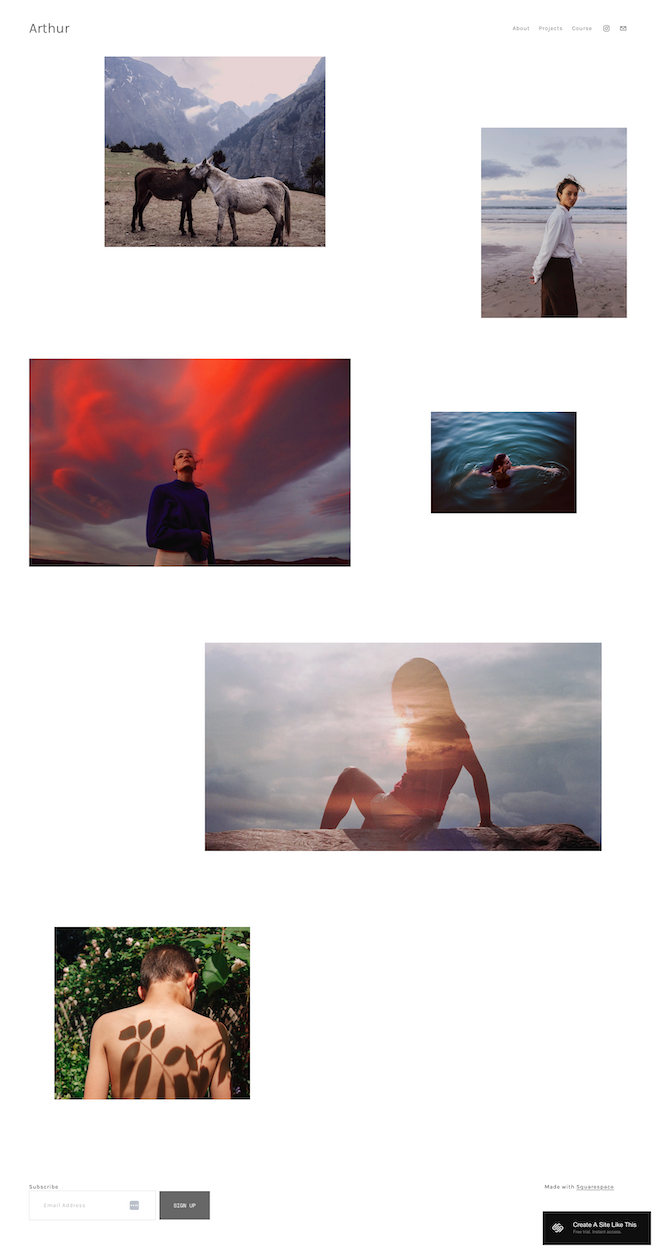
Home Page (Portfolio Grid)
The homepage displays your photography in a minimal grid:
Image gallery - Clean grid layout showcasing your best work. Various image sizes create visual interest without being busy. White background keeps focus on photography.
Simple navigation - About, Projects (dropdown), Course in the header. Minimal and clear.
Newsletter signup - Email capture form at the bottom.
About Page
Standard about page for your bio, background, and approach.
Projects Page (with 4 Sub-pages)
The Projects section works as a folder with individual project pages:
Yoked - First project page with its own gallery
Louisa - Second project page
Red Zone - Third project page
Saltwater - Fourth project page
Each project page displays curated images from that specific body of work. Good for organizing different types of photography (editorial, commercial, personal projects).
Course Page
This is what makes Arthur different from the other photography templates. The Course page includes:
Hero/intro section - "Get innovative with your photography" headline with "start course" button. Explains the course value proposition.
What You'll Learn section - Three-column breakdown:
How to Play
How to Compose
How to Edit
Select Your Path (Pricing tiers) - Two membership options:
INTRODUCTION (Free Course) - "Four video lessons to take on your time. New items added every month." Free tier to capture leads.
MASTERED ($40/month) - "Anytime access to our growing collection of classes, workshops, exclusive content, and more." Paid membership tier.
Each tier has a "GET STARTED" or "Sign Up" button linking to Squarespace's member areas.
Extras:
Minimal, photography-focused design
Project folder organization
Course/membership functionality
Two-tier pricing (free and paid)
Member areas integration
Newsletter signup
Mobile-responsive
Clean, distraction-free layouts
Pros & Cons of the Arthur Template
Pros
You can monetize your expertise, not just your time. Most photographers hit a ceiling with client work—there are only so many hours in a week. Teaching courses creates passive income that scales. Arthur gives you the infrastructure to do both: showcase work to attract clients, sell courses to your audience.
The free course tier is good for lead generation. Offering four free lessons captures emails and builds trust before asking for money. Once people get value from free content, they're more likely to pay for the full membership. This is proven course marketing strategy baked into the template.
It positions you as an educator, which elevates authority. When you teach, you're not just a photographer; you're a trusted expert. Having a course on your site signals to potential clients that you're established enough to teach others. This can justify higher rates for client work.
Cons
You need to actually create that course content. The template gives you the structure, but you're responsible for filming lessons, writing curricula, and producing valuable educational content. If you hate teaching or don't have expertise to share, this feature is useless.
The portfolio is very minimal, which won't work for everyone. If your brand has strong personality, uses bold colors, or has distinctive visual identity, Arthur's clean white aesthetic might feel too generic.
It's designed for curated editorial work. If you shoot 500 photos per wedding or other project, and need to deliver full galleries to clients, Arthur's project-based structure isn't built for that volume.
Getting Started with the Arthur Template is Easy:
Once you pick Arthur in the Squarespace 7.1 template library, here's what to do:
Upload your best portfolio work to the homepage. Select your strongest images that represent your range and style. Use high-resolution files.
Create your project pages. Replace the demo projects with your actual bodies of work. Name each project clearly. Upload images for each project.
Write your About page. Include your background, approach, and what makes your photography distinctive. Add a professional photo of yourself, and mention any notable clients, publications, or achievements.
Decide on your course strategy. This is the big one. What will you teach? Photography basics? Advanced editing? Business of photography? Outline your free course (4 lessons) and your paid membership content. Film or plan your first few lessons before launching.
Set up your member areas. Go to Squarespace's Member Areas settings. Create your two membership tiers (Free Introduction and Paid Mastered). Upload your course videos or content. Configure access levels so free members see intro content and paid members see everything.
Write your course page copy. Replace "Get innovative with your photography" with your actual course value proposition. Explain what students will learn and why it matters. Make the benefits clear, don't just list topics, but also explain outcomes.
Customize Site Styles. Go to Design > Site Styles and adjust typography if needed. The minimal aesthetic works for most photographers, so you might not need major changes. Just make sure it feels like you.
Add a pricing strategy. $40/month is just an example. Research what other photography educators charge. Consider your content volume, your audience, and your goals. Price appropriately.
Double-check everything, connect your domain, choose your plan, and go live. Preview on mobile and desktop, test the course signup and member login process, make sure all project galleries load properly, then publish.
Arthur Squarespace Template FAQs
Is Arthur only for photographers who want to teach courses?
Not only, but that's its strength. You could use it as a regular photography portfolio and ignore the Course page. But then you're not using one of the template's main features. If you don't plan to teach, pick a different template designed purely for portfolios.
Can I add more than two membership tiers?
Yes. The demo shows two (Free and $40/month), but you can add more tiers through Squarespace's member area settings. Just customize the Course page layout to display additional options.
Do I need to create video content, or can courses be text-based?
You can use videos, text lessons, PDFs, or any combination. Squarespace's member areas support various content types. Video tends to convert better for photography education, but you can teach however you want.
Is the Arthur template good for SEO?
Yes, Arthur is great for basic SEO. You can optimize page titles, meta descriptions, and image alt text. But there's no blog built in, which limits content marketing SEO. If you rely heavily on organic search, consider adding a blog for photography tips and tutorials.
Can I sell photography prints or products with Arthur?
Technically yes, Squarespace supports e-commerce on all templates. But Arthur isn't optimized for product sales. It's designed for courses and memberships. If selling prints is your main income, pick a different photography based e-commerce-focused template.
How do I deliver course content to members?
Through Squarespace's member areas. You create locked pages or sections that only paid members can access. Upload your videos, lessons, or resources there. Members log in to access content. It's all built into Squarespace.
Can I offer one-time course purchases instead of monthly memberships?
Yes, but you'll need to work around the template structure. Squarespace supports one-time digital product sales. You'd sell the course as a digital product and manually grant access. Monthly memberships are easier with this template's setup.
What if I'm not ready to launch courses yet?
That’s totally fine. Use Arthur as a portfolio now, build the course later. Hide the Course page from your navigation until you have content ready. Focus on attracting clients with your portfolio, then add educational offerings when you're prepared to teach.