Camdez Squarespace Template Review
This post contains affiliate links. If you purchase through them, I may receive a small commission at no extra cost to you.
Table of Contents Show
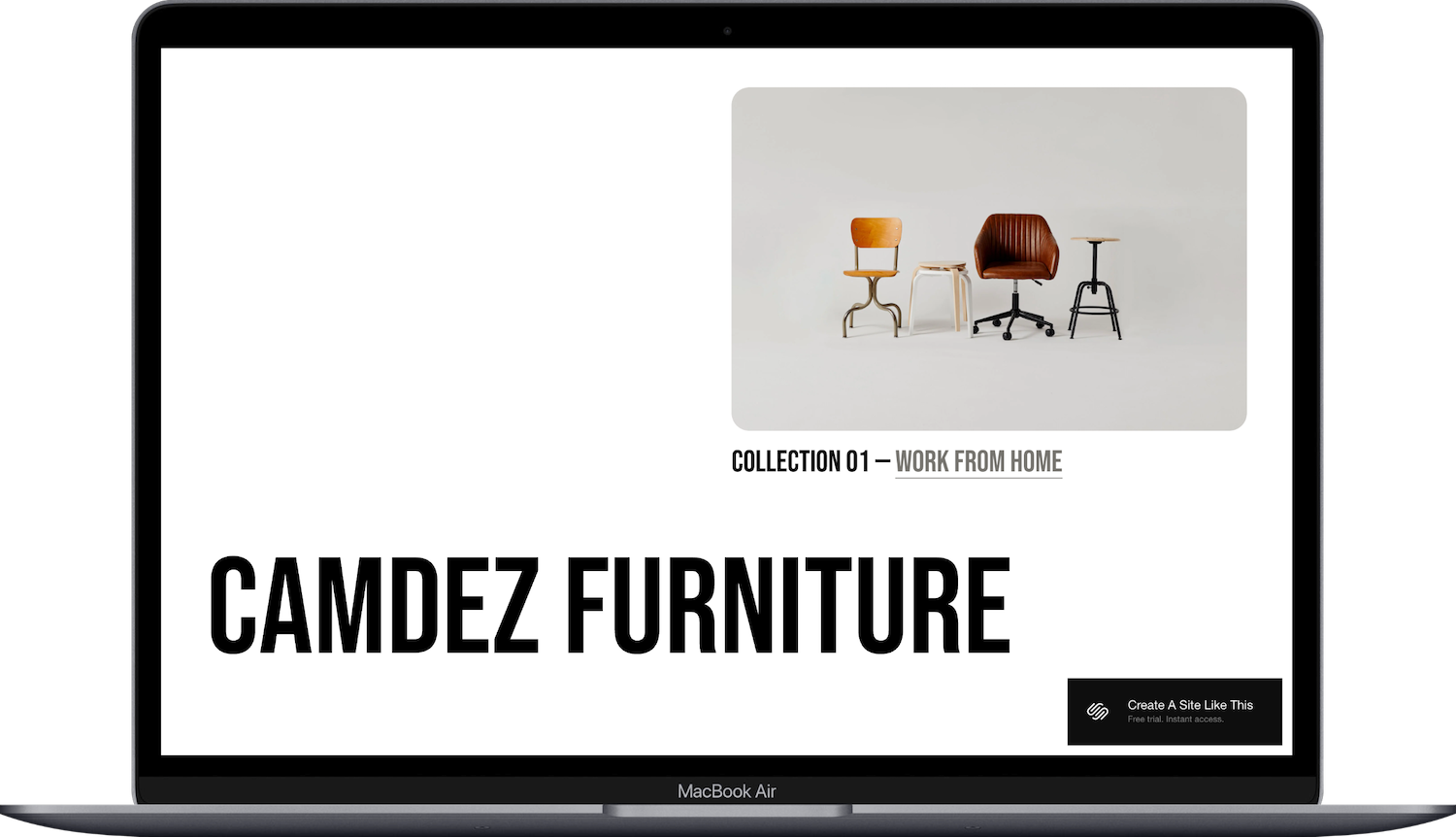
Camdez is a Squarespace product template built for furniture stores and home decor brands.
The demo shows a modern furniture collection with simple product displays, lots of white space, and bold typography. If you're selling furniture, lighting, or home goods and want a sophisticated shop that feels like walking through a curated showroom, Camdez probably caught your eye for good reason.
This review covers what Camdez includes, where it shines, and where you may hit limitations.
The goal: help you figure out if this Squarespace template is the right fit for your business, or if you should keep looking.
Who the Camdez Template Works Best For
Camdez works well if you're selling furniture or home decor and want each product to feel special and considered.
Modern Furniture Brands
If you sell chairs, tables, desks, or lighting with a modern or mid-century aesthetic, Camdez's minimal design gives your pieces room to shine without competing with busy layouts or decorative elements.
Boutique Home Decor Shops
The template works great for smaller, curated collections where you want each item to feel intentional. If you sell 20 to 50 carefully chosen pieces instead of 500 random products, this layout supports that vibe.
Interior Designers Selling Products
If you're an interior designer who also sells furniture or decor, Camdez lets you showcase products while maintaining a professional, gallery-like feel that matches your design aesthetic.
Brands with Strong Product Photography
The large image displays and white backgrounds mean your product photography needs to be good. If you've invested in clean, professional photos, Camdez shows them off beautifully.
Minimalist or Scandinavian-Inspired Brands
The clean lines, generous white space, and simple typography work perfectly for brands with a minimal, Scandinavian, or Japanese-inspired aesthetic.
Who the Camdez Template Is Not Best For
The Camdez template probably isn't the best fit if you:
Sell hundreds of products across many categories (the simple layout works best with focused, curated collections)
Run a vintage or maximalist brand with bold colors and busy patterns (Camdez isn’t a loud shop template, it’s more quiet and minimal)
Want an energetic, playful vibe (the design is sophisticated and calm)
Sell products that need lots of specs or comparison charts (product pages are simple and image-focused)
What You Get with the Camdez Template
Camdez comes with these pages for a classic online shop:
Home Page
The main landing page with several sections:
Large hero image with collection callout
Bold brand name display
Product grid showing featured items with images and prices
Full-width image section
Our Story section with image and text
Featured product spotlight (Kenmore Chair in the demo)
Newsletter signup
Footer with social media links
Shop Page
Clean product grid with category filtering (Seating, Table, Lighting, All in the demo). Products display with image, name, and price.
About Page
Simple layout with space for your brand story and philosophy.
Contact Page
Contact form for customer inquiries.
FAQ Page
Pre-built FAQ section for common customer questions.
Cart Page
Shopping cart functionality for checkout.
Extras:
Category filtering in shop
Mobile-responsive design
Product zoom functionality
Newsletter signup form
Social media integration
Clean typography with bold headlines

Pros & Cons of the Camdez Template
Pros
Your products get treated like art pieces. The generous white space and large images make each item feel important and considered. If you sell quality furniture, this presentation style supports premium pricing.
The bold typography creates instant brand recognition. The large, strong typeface for your brand name makes an impression. It's memorable without being fussy.
Simple navigation keeps shopping focused. With just Shop, About, Contact, and FAQ in the nav, people aren't overwhelmed by choices. They can browse products without getting lost in complicated menus.
The design ages well. Minimal, clean layouts don't go out of style the way trendy designs do. Your site will still look current in three years.
It loads fast. Clean code and minimal decorative elements mean quick page loads, which matters for both user experience and SEO.
Cons
You need really good product photography. The minimal design means your photos carry all the weight. Mediocre images on plain white backgrounds look cheap. You'll need professional or near-professional product shots.
The aesthetic is pretty specific. If your furniture style is ornate, traditional, rustic, or bohemian, Camdez's modern minimal vibe will clash with your products. The template works for one look.
Limited space for storytelling on product pages. The focus is on images and basic info. If you want to explain the craftsmanship, materials sourcing, or design inspiration for each piece, you'll be working against the template's simplicity.
No built-in lookbook or lifestyle imagery sections. You get product shots, but if you want to show furniture in styled rooms or create lifestyle galleries, you'll need to build those sections yourself.
The shop layout can feel sparse with few products. If you only have 8 items total, the grid might look empty rather than curated. You need enough products to make the layout feel intentional.
Getting Started with the Camdez Template
Getting started with the Camdez template is easy. Once you pick Camdez in the Squarespace 7.1 template library, here's what to do:
Replace the hero section and brand name. Update the large image with your hero product or collection shot, and change the bold brand name to yours. Choose an image that sets the tone for your whole shop.
Add your products to the shop. Upload clean product photos, write descriptions, set prices, and organize into categories. Make sure your images are consistent in style, lighting, and background.
Set up your product categories. Update the category filters (Seating, Table, Lighting) to match what you actually sell. If you only have two categories, that's fine. If you have six, the simple nav might not accommodate them well.
Customize the homepage sections. Update the featured products grid, the full-width image section, and the product spotlight. Delete any sections that don't serve your brand.
Write your About page. Tell your actual story. Why did you start selling furniture? What's your design philosophy? Keep it real and specific, not generic.
Fill in real FAQs. Replace demo questions with actual customer questions about shipping, returns, assembly, materials, customization options, or lead times.
Update colors and fonts in Site Styles. Go to Design > Site Styles and adjust if needed. Camdez's neutral palette and bold typography work for most furniture brands, but tweak to match your vibe.
Check your heading hierarchy. Make sure your main headline is an H1 and subheadings follow logical order (H2, H3, etc.) for better SEO.
Set up commerce settings. Configure shipping rates (furniture shipping can be complex), tax collection, and payment processing. Decide if you're offering local pickup or delivery.
Double-check everything, connect your domain, choose your Squarespace plan, and go live. Preview on mobile and desktop, test the checkout process, make sure product images look sharp, then launch.
Camdez Squarespace Template FAQs
Can I sell furniture on the Camdez template?
Yes. Camdez is designed specifically for furniture and home decor e-commerce. The clean product displays work great for chairs, tables, lighting, and accessories. Just know that if you sell large items with complex shipping, you'll need to set up shipping carefully in your Squarespace commerce settings.
Is the Camdez template good for SEO?
Yep, Camdez has the same SEO capabilities as all Squarespace templates. You can optimize page titles, meta descriptions, headings, product descriptions, and image alt text. The clean code and fast loading help with search rankings. But SEO success depends on your strategy (good product descriptions, content marketing, backlinks), not just the template.
Is the Camdez template good for mobile?
Yes. Camdez is fully mobile-responsive. The product grid stacks nicely on smaller screens, images resize well, and the simple navigation works smoothly on phones. The minimal design actually translates better to mobile than busier templates. Just make sure your product photos look good at smaller sizes.
Can I change fonts and colors on the Camdez template?
Absolutely. You can customize fonts, colors, and spacing through Site Styles. The template uses bold typography and a neutral palette, but you can adjust both. Since the bold headlines are part of what makes Camdez distinctive, if you don’t have a brand font, feel free to keep this one;
Does Camdez work with Squarespace commerce features?
Yes. Camdez supports all standard Squarespace commerce features including inventory management, discount codes, abandoned cart recovery (on higher plans), customer accounts, and gift cards. You can also set up local pickup, which is useful for furniture.
What if I need to show product variations like different finishes?
Squarespace supports product variants (different wood finishes, fabric colors, sizes). You can set these up for each product. The product pages will show dropdown menus for customers to select their options. This works fine with Camdez.
Can I add assembly instructions or care guides?
Yes. You can include this information in product descriptions, create a dedicated Care & Assembly page, or add downloadable PDFs to product pages. The template doesn't have these built in, but you can add them.
How many products can I sell with Camdez?
Technically unlimited. Squarespace doesn't cap your product count. But Camdez's minimal grid layout works best with fewer than 100 products. More than that and you'll want better filtering and organization than the simple category system provides.
Is Camdez good for a brand just launching?
Yes. If you're launching with a small, curated collection, Camdez's clean layout makes even 15 products look intentional rather than sparse. Just make sure your product photography is strong since the minimal design puts all the focus on your images.