This post contains affiliate links. If you purchase through them, I may receive a small commission at no extra cost to you.
Table of Contents Show
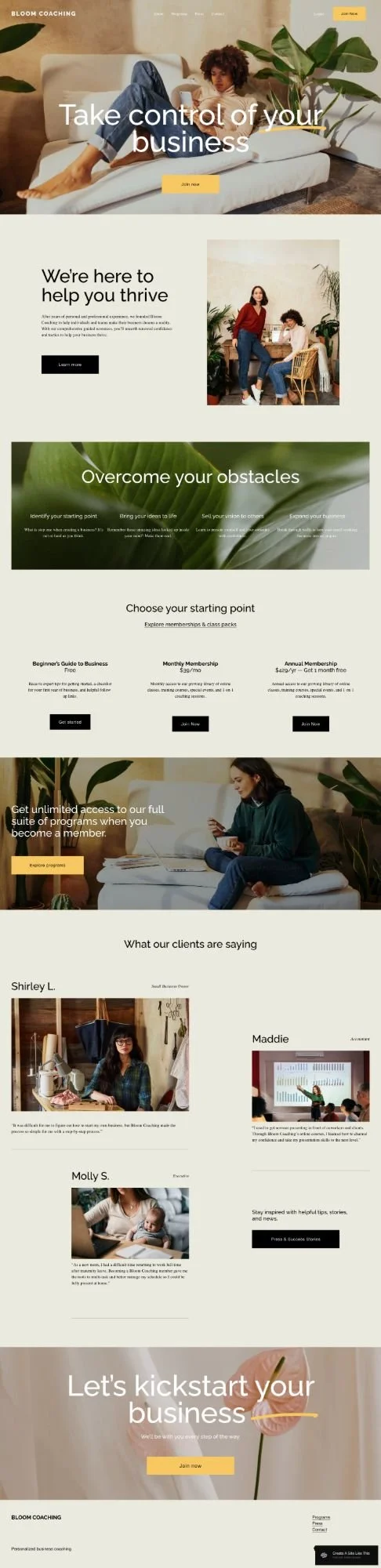
Bloom is a free Squarespace website template that’s built for coaches and consultants selling memberships, courses, and coaching packages.
It's a robust template. The demo shows membership pricing tiers, service sections, and testimonials. If you're a coach or consultant with multiple offerings, the Bloom template is a solid free starting point.
This review covers what Bloom includes, what works well, and where you might hit limitations.
The goal: help you decide if this template fits your business, or if you should keep looking.

Who The Bloom Squarespace Template Works Best For
This template works especially well for:
Business Coaches
Consultants
Online Educators
Life Coaches & Wellness Coaches
Course Creators with Memberships
Service Providers Building Communities
Who The Bloom Squarespace Template Is Not Best For
Honestly? Bloom is robust and pretty flexible for coaches and consultants. You can customize it however you need.
The main thing though is that it's designed for multiple offerings or tiered pricing. If you offer just one service (like just 1:1 coaching), the structure might feel like more than you need. You'd be removing features (like the pricing section) that make it useful in the first place.
The main limitation is that it's a basic free template. Like all free Squarespace templates, it has some constraints - fewer customization options, and unless you really dig in and customize fonts, colors, and layouts, your site will look like a lot of other Squarespace sites. If you're looking for something highly customized or truly unique right out of the gate, check out premium templates from designers like Big Cat Creative or Applet Studio (usually $150-$450), or work with a Squarespace designer who specializes in coaching sites.
What Pages You Get With the Bloom Template
Home Page
Hero section with headline and call-to-action
Service or methodology sections
Membership pricing table (three tiers)
Client testimonials
Newsletter signup
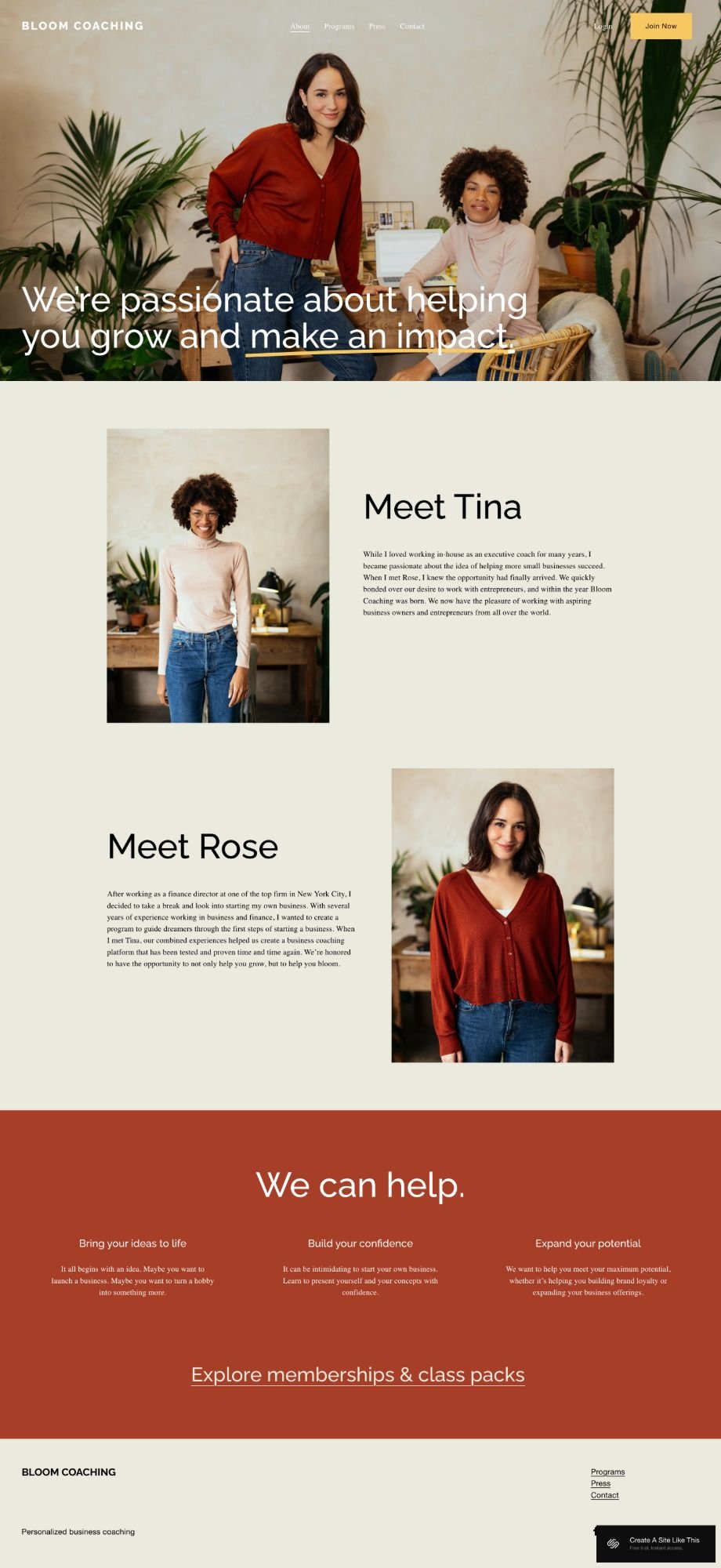
About Page
Your story, credentials, and background.
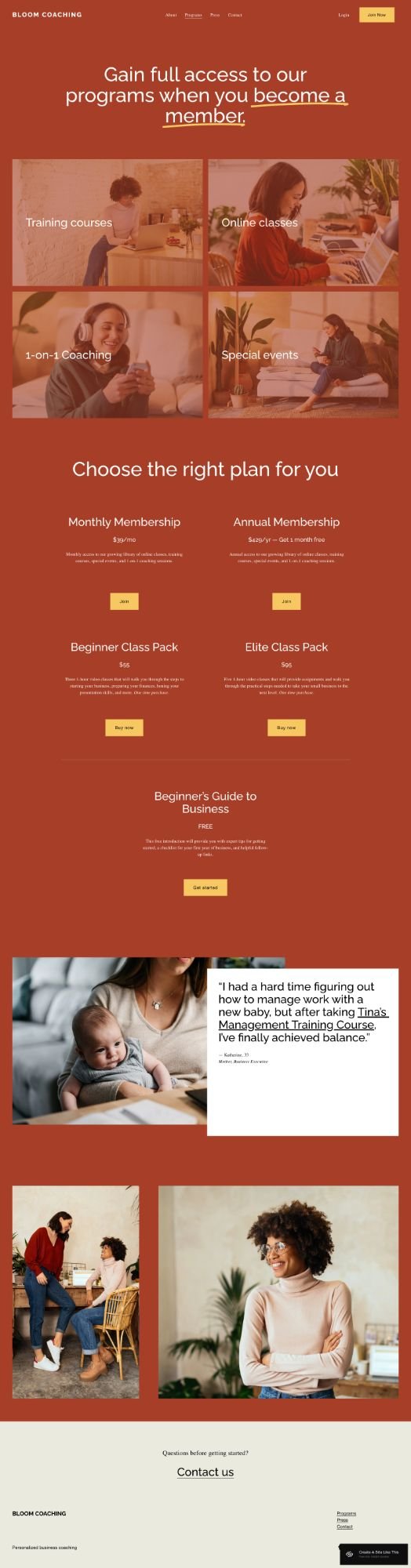
Programs Page
Showcase your different offerings - courses, coaching packages, memberships, or group programs.
Press Page
Media features, podcast appearances, or publications for building credibility.
Contact Page
With a contact form.
Like all Squarespace 7.1 templates, you can add or remove pages and customize the structure.
Getting Started with the Bloom Squarespace template is easy:
Once you pick Bloom in the Squarespace 7.1 template library, here's what to do:
Replace the demo content. Start with the homepage hero section. Add your own headline, tagline, and CTA text. Then work through each section and replace all the placeholder content with your actual information.
Update your service sections. The demo has four service sections ("Identify your starting point," etc.). Replace these with your own services, process steps, or offering types. Add your own images & descriptions.
Set up your membership pricing. Replace the three pricing tiers with your offers. If you don't have three tiers, you can delete one. If you don't do memberships at all, you can remove this section entirely.
Add your testimonials. Replace the demo testimonials with real client quotes. Include names and what they do if possible. If you don't have testimonials yet, delete this section for now and add it back later.
Customize your CTAs. Go through and make sure all the buttons say what you want them to say ("Join Now," "Book a Call," "Get Started," whatever fits) and link to the right places.
Fix your heading hierarchy. Squarespace templates don't set up H1 tags correctly by default. Make sure your main headline is an H1 and your subheadings follow in order (H2, H3). This matters for SEO.
Adjust colors and fonts. Click the paintbrush icon in the upper right to open Site Styles. Change your brand colors and fonts to match your actual brand.
Add more pages if you need them. The demo shows mostly homepage content, but you'll probably want to add an About page, Services page, Contact page, maybe a blog. Add pages through the Pages panel.
Set up your newsletter. Connect your email provider (Squarespace Campaigns, Mailchimp, Flodesk, Kit, whatever you use) in the newsletter block so you can collect email addresses.
Double check everything and go live. Look at your site on mobile, check all your links and buttons, make sure your pricing info is accurate, then hit publish.
Bloom Squarespace Template FAQs
What is Bloom Squarespace template used for?
Bloom works well for coaches and consultants selling memberships, courses, or multiple coaching packages. The layout helps you explain your offerings, show your pricing, build trust with testimonials, and guide people to sign up. This includes business coaches, life coaches, wellness coaches, consultants, and online course creators with memberships.
Can I sell products on the Bloom website template?
Yep. Squarespace lets you add a shop page to any site. But Bloom's layout is more focused on coaching and memberships than selling products. If your site will mostly be a store, try a template designed for e-commerce. If you just want to sell a workbook or two alongside your services, you can easily add a shop.
Is the Bloom template good for SEO?
It's mobile-friendly and loads quickly, which helps. But like all Squarespace templates, Bloom doesn't set up heading hierarchy correctly by default. You'll need to manually fix your H1, H2, and H3 tags. Squarespace itself has solid SEO features that you’ll need to fill in (custom page titles, meta descriptions, clean URLs), and the template won't do the heading structure for you.
Can I change fonts and colors on the Bloom template?
Yes. Bloom is built on Squarespace 7.1 fluid engine, so you can customize fonts, colors, buttons, and more through Site Styles. No code needed.
Can I add a blog to the Bloom template?
Yes you can add a blog to Bloom. Adding a blog is simple - just click to add one through the Pages panel. If you need help, check out this post on how to add pages to your Squarespace template.
Is Bloom good for coaches who don't do memberships?
It can work, but you'd be removing a major feature. The pricing section is a big part of what makes Bloom useful. If you're just doing 1:1 coaching without memberships or tiered offerings, you might find a simpler template for a better option.
Can I remove the pricing section if I don't need it?
Yes. You can delete any section you don't need. If you don't do memberships, just remove the pricing section entirely.
Does Bloom work with Squarespace's member areas?
Bloom is just the front-end template; it doesn't automatically connect to Squarespace's member areas feature. But you can use Bloom to promote your membership and then set up member areas separately through Squarespace. You'd just link your membership CTAs to your member area pages.
How many service sections can I include?
The demo shows four, but you can add more by duplicating sections. That said, if you have 10+ services, your homepage might start feeling cluttered. You might want to show 3-4 main offerings on the homepage and link to a full services page.
Can I use Bloom if I'm just starting out and don't have testimonials yet?
Absolutely. Just delete the testimonial section for now and add it back once you collect some client feedback. The template still works fine without it.