Hales Squarespace Template Review
This post contains affiliate links. If you purchase through them, I may receive a small commission at no extra cost to you.
Table of Contents Show
Hales is a Squarespace template for florists and product-based businesses with strong photography and a soft & elegant brand aesthetic.
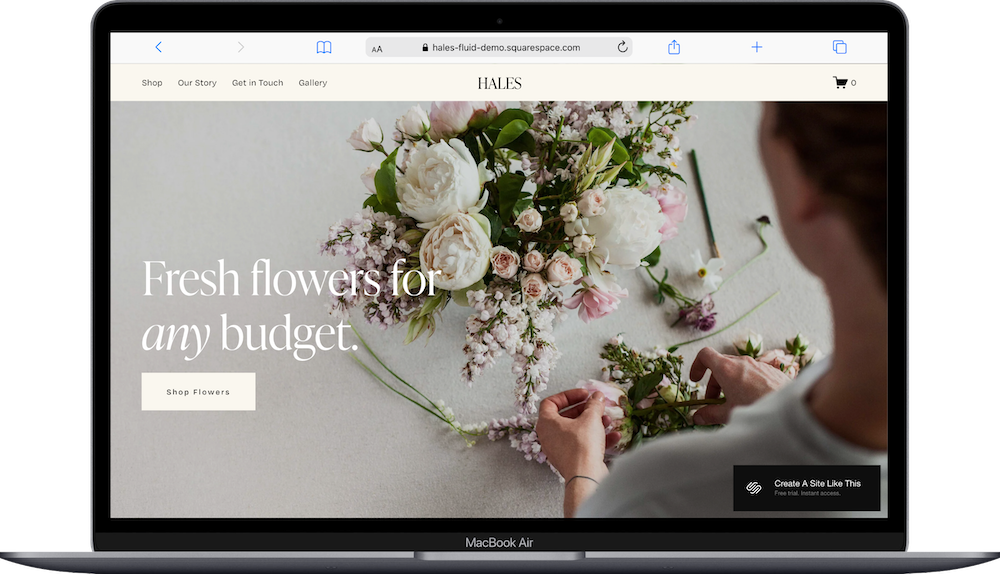
The demo shows a flower shop with a cream and olive color scheme, serif typography, and large images of floral arrangements. If you're a florist, artisan maker, or small shop owner who wants a refined, feminine look for your website, Hales probably caught your eye for good reason.
This review covers what Hales includes, where it shines, and where you'll hit limitations.
The goal: help you figure out if this Squarespace template is the right fit for your business, or if you should keep looking.
Who the Hales Template Works Best For
Hales works best if you sell products that photograph beautifully and your brand feels elegant, floral, or feminine.
Florists and Flower Shops
The demo is a flower shop. So this is literally perfect. If you sell arrangements, wedding florals, or seasonal bouquets, the template is already set up for what you do.
Artisan Product Makers
Soap makers, candle creators, ceramicists, small-batch skincare brands - if you make things and photograph them well, Hales gives you clean space to show your products without a complicated shop structure.
Service Providers Who Also Sell Products
If you're a florist offering wedding design, a ceramicist teaching workshops, or a calligrapher selling prints, Hales lets you explain your services and sell products in the same site.
Brands with Soft, Refined Aesthetics
The cream and olive palette with serif fonts works if your brand is floral-elegant or soft-feminine. Think refined but approachable, not stark minimalist or bright and playful.
Who the Hales Template Is Not Best For
The Hales template probably isn't the best fit if you:
Sell hundreds of products. The simple shop layout works for smaller catalogs. If you have a large inventory, customers will scroll forever and get frustrated. Plus Squarespace just isn’t built for very robust product shops (that’s Shopify’s zone of genius).
Need portfolio project pages with detailed case studies. The gallery shows your work, but there's no structure for individual project pages with process details or before-and-afters.
Have a bold, modern, or highly colorful brand. Hales is soft and refined. If your aesthetic is black-and-white minimalist or bright and energetic, the template probably isn’t the best bet for you.
What You Get with the Hales Template
Home Page
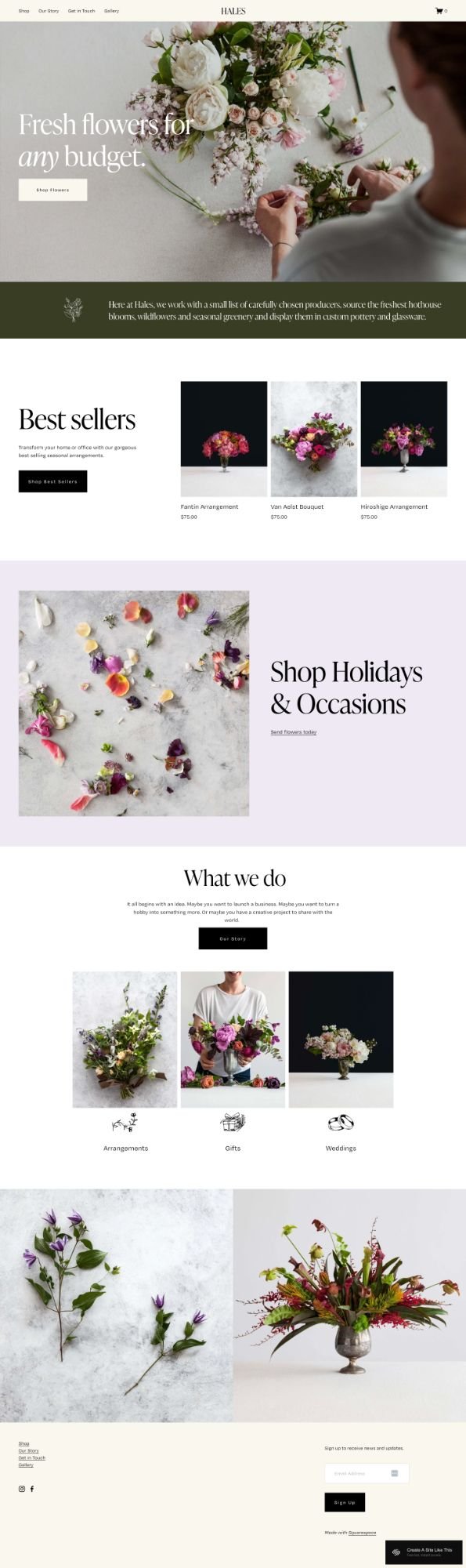
Large hero section with an image of someone arranging flowers, headline text ("Fresh flowers for any budget"), and a "Shop Flowers" call-to-action button. Below that: an olive green brand statement section explaining sourcing and approach, a "Best Sellers" grid showing three products with photos and prices, a "Shop Holidays & Occasions" promo pairing a large image with text and a link, a "What We Do" section with three service categories shown with photos and line-drawn icons, and an image gallery displaying work. Footer includes newsletter signup, navigation, social icons, and contact information.
Shop Page
Product page where you list what you sell. The demo shows flower arrangements with product names, photos, and prices. Cart and checkout are built in through Squarespace e-commerce.
Our Story
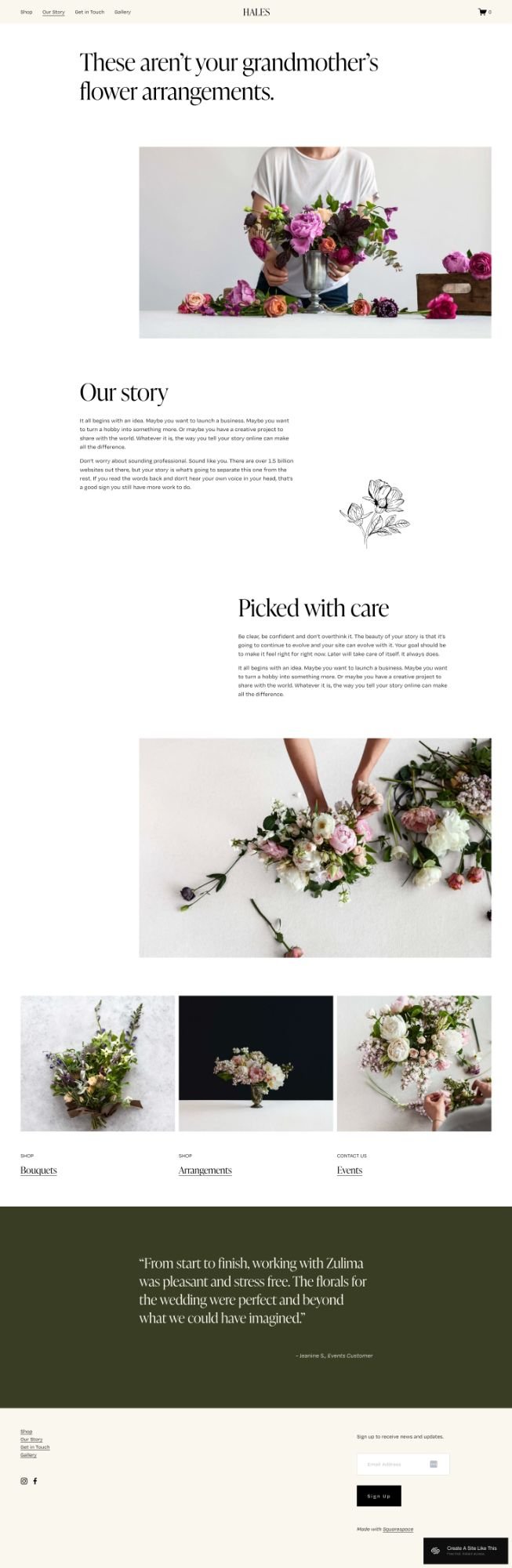
About page with a bold headline, sections explaining your story and approach, a subsection about your process, images of your work, links to service categories, and a testimonial section on a dark olive background.
Get In Touch
Contact page (included in navigation but not shown in screenshots).
Gallery
A page to display more photos of your work or seasonal collections.
Extras
Built-in e-commerce with cart in header
Newsletter signup form in footer
Social media integration (Instagram, Facebook)
Testimonial section already designed on Our Story page
Service category icons and descriptions
Mobile responsive design
Squarespace 7.1 Fluid Engine
Pros & Cons of the Hales Template
What Works Well
The color palette. Cream, white, and olive are neutral enough to last. If you don't want to redesign your site constantly, this helps.
Large images get room to work. The hero section, product grids, and gallery all give photos space. If you invest in good photography, the template shows it off.
The Our Story page walks people through your brand first. The layout starts with your story, explains your process, then shows testimonials. This works well when people need to connect with your brand before buying.
Service categories are set up on the homepage. If you do three things, the "What We Do" section creates clear paths without making the page feel crowded.
You don't have to figure out where to put testimonials. The dark olive section on the Our Story page is already there - you just add the quote.
What Doesn’t Work So Well
The soft aesthetic is hard to change dramatically. If your brand is bold, bright, or ultra-minimal, the cream and olive tones won't work. You can adjust colors, but you're fighting the template.
There's no service page structure. The homepage shows services, but if you need pages explaining packages, pricing, or timelines, you build those yourself.
The shop is simple. Clean grid, basic sorting. If you have hundreds of products, people will scroll a lot without category filters or advanced search.
Getting Started with the Hales Template is Easy
Once you pick Hales in the Squarespace 7.1 template library, here's what to do:
Swap the hero image for your best photo. Use a high-resolution, optimized image showing your product or someone using it. For florists, someone arranging flowers works. For other makers, show your product being made or styled.
Change the headline to your actual offer. Replace "Fresh flowers for any budget" with what you actually sell. Then rewrite the section with your real approach or sourcing info.
Delete demo products and add yours. Remove the placeholder items from the "Best Sellers" section and shop page.
Update or remove the "What We Do" section. If you offer three services, replace the demo text and images with yours. If you only sell products, you can delete this section.
Write your Our Story page. Replace the demo text with your actual story. Be specific - "we work with two local farms" beats "we source quality flowers." Fill in the "Picked with Care" section with real process details.
Add a real testimonial. Replace the demo quote with what an actual customer said.
Fill in contact information. Update the Get In Touch page with your email, phone, or contact form. Change the footer social links to your accounts.
Adjust colors and fonts. Click the paintbrush icon to open Site Styles. Change colors if cream and olive don't fit your brand, but stick with two or three colors. You can change the serif font, but avoid script or decorative fonts.
Fix your heading hierarchy. Make sure your main headline is an H1 and subheadings follow order (H2, H3, H4).
Test the shop. Add a product to cart and go through checkout to make sure payment, shipping, and confirmation emails work.
Double check everything, connect your domain, choose your Squarespace plan, and go live. Preview on mobile and desktop, test links and forms, fix typos, then launch.
Hales Squarespace Template FAQs
Can I sell products on the Hales website template?
Absolutely. Hales has a shop page and cart built in. You connect Stripe or PayPal for payments, set up shipping, and manage inventory through Squarespace. The template works best with less than a few dozen products. More than that and the basic shop layout will get overwhelming.
Is the Hales template good for SEO?
Yes. Hales has the same SEO tools as all Squarespace templates - custom page titles, meta descriptions, URLs, image alt text, clean code, and mobile responsiveness. But you'll need to fix the heading hierarchy yourself since Squarespace typically doesn't set up Header tags correctly by default.
Is the Hales template good for mobile?
Yes. Hales is designed to work well on phones and tablets. Images scale down, navigation collapses into a menu, and the layout stays clean. Test your actual content on mobile after adding it; long headlines or dense text might not look as good as the demo.
Can I change fonts and colors on the Hales template?
Yes. Squarespace 7.1 lets you change fonts, colors, spacing, and buttons through Site Styles. You can replace the cream and olive palette and swap the serif font. Just know that big changes might make the template have a different vibe.
Does Hales work for businesses other than florists?
Yes. The demo is a flower shop, but Hales works for any product business with good photography and a refined brand. Ceramicists, candle makers, skincare, artisan food, jewelry, or boutiques could all use it. You need quality photos and a brand that fits the soft, elegant look.
Does Hales include booking or scheduling?
No. You'll need to add Acuity Scheduling (owned by Squarespace) or another booking tool if you need clients to schedule consultations or appointments. Or handle it manually through the contact form.
How many products can I sell with Hales?
No technical limit, but the layout works best with a small selection. More than 50 or so and the shop page gets long and hard to browse without filters. If you're selling 100+ items, Squarespace isn’t a great choice; you’ll want to check out Shopify.