Best Squarespace Templates for Tutors and Online Teachers
This post contains affiliate links. If you purchase through them, I may receive a small commission at no extra cost to you.
Table of Contents Show
What are the best Squarespace templates for tutors and online teachers?
Quick Answer: The best Squarespace templates for tutors are Minoru (personal tutors with 1:1 sessions), Comet (course creators and online teachers), Bloom (independent tutors focused on services), Clove (private tutors who want testimonials front and center), and Forma (tutors offering both courses and coaching). All are free with any Squarespace plan and work great with Squarespace's built-in scheduling and course features.
KEY FACTS:
All Squarespace templates are free with any plan and work on Squarespace 7.1
Squarespace Courses is available on all plans; transaction fees vary from 7% (Basic) to 0% (Advanced)
Acuity Scheduling integrates directly with Squarespace for session booking
Plans start at $16/month (Basic) when paid annually, $25/month if paid monthly
Basic plan limits to 2 contributors and doesn't support custom code
Third-party premium template shops (Applet Studio, Big Cat Creative) offer more distinctive designs if you want something custom
Squarespace is a good platform for tutors because it handles scheduling (through Acuity), online courses (through Squarespace Courses), and basic ecommerce (if you're selling worksheets or study guides). But with almost 200 templates to choose from, figuring out which one actually works for tutoring can feel overwhelming.
So I went through Squarespace's template library and pulled the ones that work best specifically for tutors and online teachers. These templates have the structure you need: service pages, testimonial sections, about pages that build trust, and layouts that make booking or enrolling feel easy.
What Tutors Typically Need in a Website Template
Before we get into the templates, here's what makes a website template work for tutoring:
Scheduling integration
Service pages or subject pages
Testimonials
About page that builds trust
Course pages (if you're selling courses)
Not every tutor needs all of these. If you're a language tutor doing only private sessions, you might lean heavily on scheduling and testimonials. If you're a test prep teacher selling a recorded SAT course, you'll probably care more about course pages and checkout flow.
1. Minoru Squarespace Template
Best for: Independent tutors offering 1:1 sessions, language tutors, subject-specific tutors who want a personal and approachable site
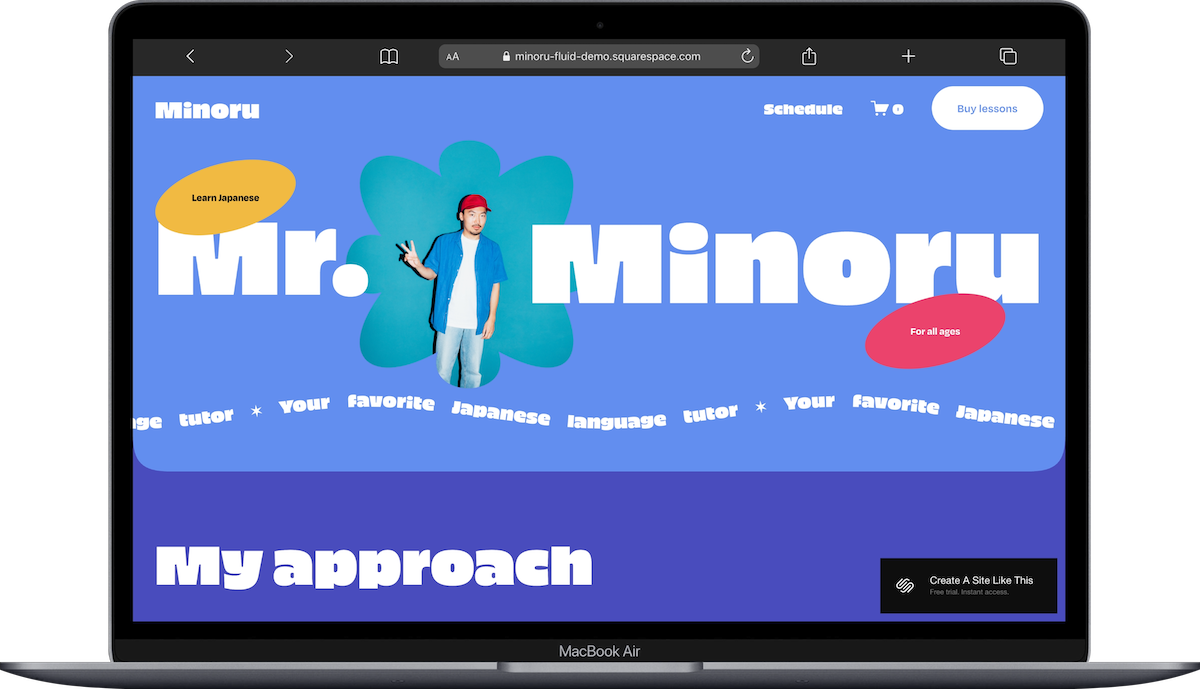
Minoru is a Squarespace template designed for coaches and teachers who work one-on-one with clients. The homepage features a hero image with a tagline and call-to-action button (perfect for "Book a Session"), a services section that explains what you offer, and testimonial blocks that let you showcase student or parent reviews. The About page has space for your teaching philosophy, qualifications, and a personal photo.
What makes Minoru work well for tutors is the fun, personal design. It doesn't feel corporate or academic; it feels like a real person who's here to help. The services section is structured so you can list different subjects or session types (e.g., "High School Math Tutoring," "College Essay Coaching," "Spanish Conversation Practice"). The testimonial layout gives each review enough space to feel genuine and specific.
If you're an independent tutor building trust with parents or students and want a site that feels approachable and professional, Minoru is a fabulous template to start with.
2. Comet Squarespace Template
Best for: Tutors selling online courses, teachers creating recorded lessons or group programs, educators who want a course platform built in
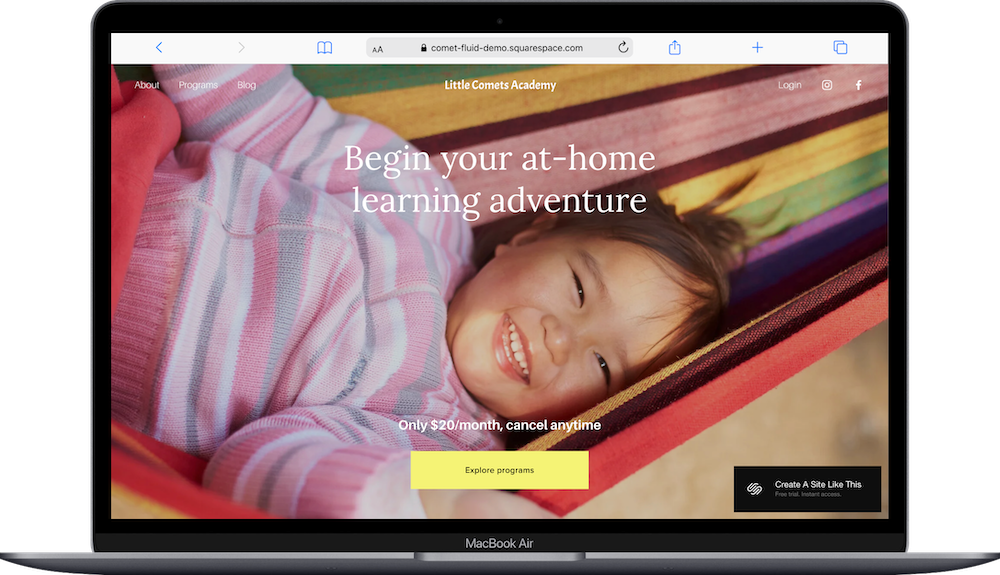
Comet is a Squarespace template built specifically for courses, education, and online academies. The template includes pages for Courses, About, Blog, and Contact. The homepage promotes your flagship course with a "Start Learning" button, displays a grid of available courses with descriptions and pricing, and includes a section for student testimonials. The course pages are designed to show course outlines, preview lessons, and instructor bios.
Comet works seamlessly with Squarespace Courses, which means you can create and sell video-based courses directly through the site. This template is ideal for tutors who've moved from 1:1 sessions into recorded content, group programs, or membership-style learning. The course grid layout makes it easy to offer multiple subjects or skill levels (e.g., "Beginner Spanish," "Intermediate Spanish," "Advanced Conversation").
If you're an online teacher who wants to sell courses and build a library of learning content, Comet is a surprisingly great choice.
3. Bloom Squarespace Template
Best for: Independent tutors focused on services and session booking, tutors who want a clean and warm design, educators offering coaching-style tutoring
Bloom is a Squarespace template designed for life coaches, but the structure works perfectly for tutors. The template includes pages for Services, About, and Contact. The homepage features a hero section with your photo and tagline, a services section that explains what you offer, and a call-to-action for booking. The About page has space for your story, teaching approach, and qualifications. The design is clean, warm, and focused on building trust.
What makes Bloom work for tutors is the service-first layout. The services section is set up so you can explain different tutoring options (e.g., "One-on-One Math Tutoring," "Small Group Sessions," "Test Prep Packages"). The design feels personal without being overly casual, which works well for tutors working with high school students, college students, or adult learners.
If you're a tutor who wants a modern, professional site that focuses on what you offer and how people can work with you, Bloom would be a great starting point for you.

4. Clove Squarespace Template
Best for: Private tutors, educators offering consultation-style services
Clove is a Squarespace template designed for therapists, coaches, and consultants. While not perfect for tutors, I think it could work well. The template includes pages for Services, About, Team, Blog, and Contact.
The services section works well for explaining different tutoring subjects or age groups. And if you run a small tutoring business, this template is set up for that from the beginning. If you're a tutor or run a small tutoring business whose business depends on word-of-mouth and parent referrals, Clove is a good option to start with.

5. Forma Squarespace Template
Best for: Tutors offering both courses and 1:1 coaching, educators building a larger teaching business, tutors with multiple revenue streams
Forma is a one-page Squarespace template designed for coaches, entrepreneurs, and course creators. The template includes sections for Courses, Services, About, and Contact. Forma is built for tutors who are scaling beyond just sessions. If you offer both private tutoring and a recorded course, or if you're moving into group programs and workshops, Forma gives you the flexibility to present both. The design feels professional and aspirational (and a little bro-y, to be honest, but you can customize) without being too corporate.
If you're a tutor who's building a teaching business with multiple offerings, Forma is a fabulous template to start with.

6. Almar Squarespace Template
Best for: Tutors who want a minimal, professional design, freelance educators offering consulting or curriculum design, tutors working with adult learners or professionals
Almar is a Squarespace template designed for coaches, consultants, and freelancers. The homepage features a clean hero section, a services overview, and space for testimonials or case studies. The design is minimal and professional, which works well for tutors who want to look polished without too much visual flair.
Almar works well for tutors whose audience skews older, or more professional. If you're a writing tutor working with graduate students, a business tutor helping professionals prep for certifications, or a tutor offering curriculum consulting, Almar's design matches that well.
If you're a tutor who wants a site that feels professional and straightforward, Almar would be a great starting point for you.

How to Choose the Right Tutoring Squarespace Template
Think about what your tutoring business includes before picking a template.
If you're doing mostly 1:1 sessions and booking is your main goal, something like Minoru or Bloom works well. Both are built to highlight services and make it easy for people to contact you or book a session.
If you're selling courses or moving into group programs, Comet or Forma are better fits. They're designed to showcase multiple courses and handle digital products.
If you're working with parents and younger students, Clove's testimonial-heavy layout builds trust quickly.
If you're working with adult learners or professionals, Almar's clean, minimal design feels more appropriate.
You can also mix and match. Maybe you start with Minoru for 1:1 sessions and add a course page later using Squarespace Courses. Maybe you pick Forma and only use the services section for now. These templates are starting points, not locked-in decisions.
What About Premium Templates?
Squarespace's built-in templates are great for getting started, and they’re also free with any plan, but they’re also kinda generic by definition. Thousands of tutors and coaches are probably using the same starting points. If you want something more distinctive and on-brand, third-party template shops are worth looking at.
Applet Studio, Big Cat Creative, and Kseniia Design all make premium Squarespace templates designed for coaches, consultants, and educators. They cost more (usually $150-$350), but you get something that doesn't look like everyone else's site. If you're building a tutoring business and want your website to feel custom and polished, that's a reasonable investment.
Setting Up Scheduling and Courses
Once you've picked a template, you'll want to connect the tools that make a tutoring website work well.
For scheduling, Squarespace integrates with Acuity Scheduling. Acuity is a separate subscription (which starts around $16/month when billed annually, or $20/month when billed monthly), but it lets students or parents book sessions directly on your site, handles time zones, sends reminders, and syncs with your calendar. You can embed the booking calendar on any page. If you're doing mostly 1:1 sessions, this is the tool that makes your site functional.
For courses, Squarespace Courses is available on all plans. Transaction fees on course sales are 7% on Basic, 5% on Core, 1% on Plus, and 0% on Advanced; so if you're selling courses regularly, upgrading to Core or Plus saves you money quickly. You can upload video lessons, create lesson plans, set pricing, and sell access directly through your site. If you're recording lessons or building a course library, this feature is already there. You don't need Teachable or Kajabi unless you're building something more complex.
How Much Does a Squarespace Tutoring Website Cost?
Squarespace plans start at $16/month (Basic plan) when billed annually, or $25/month if you're paying monthly. For most tutors, the Core plan ($23/month annually) is the sweet spot: it drops the digital product fee from 7% to 5%, removes commerce transaction fees, and adds unlimited contributors and custom code. If you're doing meaningful course sales volume, Plus ($39/month) drops the digital fee further to 1%. If you're just doing 1:1 sessions and don't need courses, Basic works fine.
The Basic plan has some limitations: it only allows 2 contributors (so if you ever hire someone to help with your site, you'll need to upgrade), and it doesn't support custom code. Core removes those limits and adds better analytics.
If you're using Acuity Scheduling, that's an additional $20/month for the basic tier. So budget roughly $40-50/month total if you're using both Squarespace and Acuity.
All the templates are free with any plan. You're not paying extra for Minoru vs Comet vs Bloom. The plan determines what features you get; the template is just the starting design.
You can start with a free trial to test everything out before committing.
Frequently Asked Questions
Does Squarespace have templates for tutors?
Squarespace doesn't have templates labeled "for tutors," but several templates are designed for coaches, consultants, and educators and work perfectly for tutoring businesses. Minoru, Comet, Bloom, Clove, and Forma are all strong fits depending on whether you're focused on 1:1 sessions, courses, or both.
How do I create a tutoring website on Squarespace?
Start by choosing a template that fits your tutoring model (1:1 sessions vs courses). Customize the homepage with your photo, services, and testimonials. Add pages for About, Services, and Contact. If you're offering 1:1 sessions, integrate Acuity Scheduling for booking. If you're selling courses, use Squarespace Courses to upload lessons and set pricing. Publish your site and connect a custom domain.
Can you sell online courses on Squarespace?
Yes. Squarespace Courses is available on all plans, including Basic. Transaction fees on course sales vary by plan: 7% on Basic, 5% on Core, 1% on Plus, and 0% on Advanced. You can create video-based courses, organize lessons into chapters, set pricing (one-time or subscription), and sell access directly through your site. It's not as feature-rich as dedicated course platforms like Teachable, but it works well for tutors selling a few courses alongside other services.
Does Squarespace have a booking system for tutoring sessions?
Squarespace integrates with Acuity Scheduling, which is a professional booking system that handles appointments, time zones, reminders, and calendar syncing. Acuity is a separate subscription (around $16/month billed annually), but it embeds directly into your Squarespace site. If you're doing 1:1 tutoring sessions, Acuity is the tool that makes booking easy for students and parents.

