Ultimate TidyCal Review 2026
A note on pricing: all prices mentioned in this post are accurate as of the date this article was written, but can change at any time. This includes Squarespace plans, third-party tools, plugins, templates, and any other services referenced. Always check directly with the provider for the most current pricing before committing.
This post contains affiliate links. If you purchase through them, I may receive a small commission at no extra cost to you.
Table of Contents Show
Is TidyCal worth it in 2026?
TidyCal is a booking and scheduling tool from AppSumo (more on that below).
The Individual Lifetime plan is $29 one time and sold through AppSumo. And the free plan is surprisingly robust: paid bookings through Stripe and PayPal, package bookings, recurring bookings, subscriptions, discount codes, date polls, client reviews, and a built-in landing page builder are all included at $0. So if you're a solo service provider who needs a booking page without another monthly bill or at a low one-time cost, TidyCal is a fantastic choice, IMO. If you run a bigger business or need HIPAA compliance you may want to look elsewhere.
KEY FACTS
The TidyCal free plan includes unlimited booking types, paid bookings through Stripe and PayPal, package bookings, recurring bookings, subscriptions, discount codes, date polls, ratings and reviews, and a website builder
Individual Lifetime is $29 one time (this is what I have) and Agency Lifetime is $79 one time, both sold via AppSumo
Pro is a subscription at $12/month or $99/year, sold directly on TidyCal, with no free trial
Pro and Agency unlock the same team feature set; Pro removes all booking page branding, Agency reduces it
What Is TidyCal?
TidyCal is a booking page tool built by AppSumo. You can connect your calendar, set your availability, create booking types for the different things people can book with you, and share a link or embed it on your site. When a client books, it lands on your calendar, and you both get a confirmation.
That's the same job most scheduling tools do. The difference is the billing. TidyCal gives you the choice: pay once through AppSumo and keep it, or subscribe monthly if you want the extras. Most of their competitors only offer the subscription these days.
I bought the $29 version recently and have been using it and loving it since, so this review comes from me actually working in it.
Janessa, you may be asking, what is AppSumo?
If you haven't run into AppSumo before, it's a marketplace that sells software to small businesses and solo operators, and it's best known for lifetime deals: you pay once instead of subscribing, and you keep access. Plenty of the tools listed there are made by other companies, but AppSumo also builds its own, which they call AppSumo Originals. TidyCal is one of those.
Why this is good to know:
Where you buy: TidyCal's $29 and $79 lifetime plans are sold on AppSumo, not on TidyCal's own site, so that's where you'd go for those. The Pro subscription is the opposite and is sold directly by TidyCal.
AppSumo purchases come with a 60-day refund window, which is a (much) longer runway than most software trials give you.
TidyCal Pricing
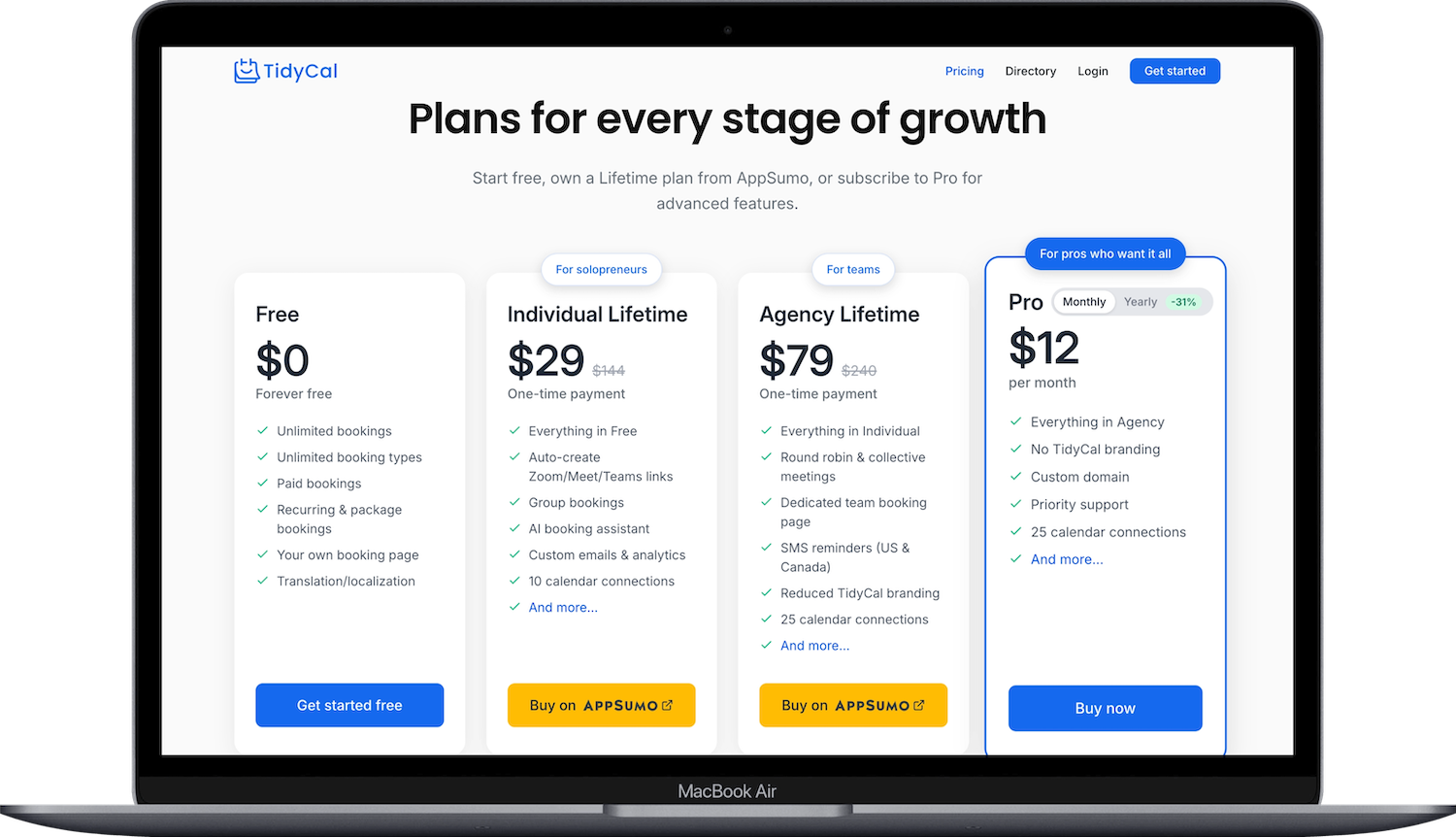
Free ($0 forever)
Unlimited booking types, paid bookings through Stripe and PayPal, embedding on any site, package bookings, recurring bookings, subscriptions, discount codes, date polls, ratings and reviews, automated emails, the website builder, and 1 calendar connection. TidyCal branding.
Individual Lifetime ($29 one time, sold via AppSumo)
Everything in Free, plus Zoom, Meet, and Teams links, group bookings, booking limits, AI features, custom emails, Google Analytics and GTM, custom redirect URLs, API access, CSV export, and 10 calendar connections. Reduced branding. Custom domain is legacy only on this tier. (This is the tier I have and love.)
Agency Lifetime ($79 one time, sold via AppSumo)
Everything in Individual, plus teams and round robin, collective meetings, a dedicated team booking page, SMS reminders for US and Canada, custom reply-to email, and 25 calendar connections. Reduced branding. TidyCal's help docs list a custom domain on this tier but the pricing page doesn't, so confirm before buying Agency for that reason.
Pro ($12/month or $99/year, sold directly on TidyCal)
Everything’s the same as Agency Lifetime, plus you get priority support AND no TidyCal branding at all on your booking pages. No free trial.
Quick tip: If you’re looking for a fully unbranded booking page: Agency Lifetime reduces TidyCal branding but doesn't remove it. Removing it completely requires the Pro subscription at $12/month, which means paying $79 once and then $12 every month after that. If clean branding is the whole reason you're buying, Pro on its own is the more honest option than Agency.
Two other things you should know: Free plan users can start a 30-day Agency trial from the Teams page, so you can test round robin and team booking before paying.
The free tier is more complete than most of its competitors. Package bookings, subscriptions, discount codes, and review collection at $0 is not normal, believe me!
What TidyCal Does Well
A lot of the TidyCal reviews online were written before 2026, and they’ve added a bunch of new features since then.
Package bookings, subscriptions, and recurring appointments
You can sell a 5-pack or 10-pack of sessions and the client books each one out of that package as they go. You can run subscriptions where clients pay recurring and get booking credits. And as of 2026 you can set a booking type to repeat daily, weekly, monthly, or yearly, where the person booking picks their start date and how long the series runs and TidyCal charges per session as it goes. Each session syncs to your calendar and you can cancel the whole series from the dashboard. TidyCal called this one of their most-requested features.
And yep, all of it works on the free plan.
This is one of my favorite things about TidyCal so far. Someone can book several appointments in one go, or buy a package and work through it on their own schedule. Easy-peasy. For coaches, tutors, and consultants selling blocks of time, that back and forth can be so tedious, so handing the client the ability to book against what they already bought removes some of the slog of scheduling.
Client ratings and reviews
After a completed booking, TidyCal can email your client asking for a 1 to 5 star rating plus written feedback, up to 1,000 characters. Reviews display on your public booking page with a star summary in the header, and only the reviewer's first name shows publicly. You can respond once per review and delete reviews if you need to.
This is on every plan, free included, which is another thing I've been loving about TidyCal. And I love that the reviews land on the booking page itself, so the social proof is sitting right where someone is deciding whether to book you, instead of on a testimonials page they'd have to go looking for.
Something to know: the review request email is not on by default, so you have to switch on the "How did your booking go?" automated email. And you can share direct review links, either a general profile link or one tied to a specific booking type, so past clients who never booked through TidyCal can still leave feedback.
Paid bookings on the free plan
Stripe and PayPal both work on the free tier. Stripe covers cards, Apple Pay, Google Pay, and bank transfers. PayPal covers direct account payments and guest checkout. You can connect both and pick one processor per booking type.
Discount codes are on the free plan too, and you can now choose to charge (or not) when someone cancels late or doesn't show up. For someone testing whether paid discovery calls will work at all, that's a real starting point instead of a trial countdown.
A landing page mode for your booking page
Under Booking page in the sidebar you can switch from Classic, which is just a list of your booking types, to Website, which builds out a full landing page with 10 sections: Name, Hero, Authority Stats, Bio, Booking Types, Testimonials, FAQ, Quote, Closer CTA, and Social Links. Four themes to start from (Rio, Cairo, Zurich, New York) with your own colors and fonts. On every plan, though the free version carries a prominent "Make your website with TidyCal" footer.
If you don't have a website yet and mostly need somewhere for people to read about you and book, this is an easy option to hold you over well.
Booking questions and scheduling controls
Booking questions can be set required or optional, with text fields, radio buttons, or multiple-choice checkboxes. Booking type descriptions support rich text, so you can bold, italicize, underline, strike through, change size and color, and set alignment, instead of sending people a wall of plain text.
On the scheduling side you can set minimum advance notice so nobody books you for twenty minutes from now, buffer time between appointments, daily booking caps, rescheduling cutoff windows, and custom permalinks per booking type. Time zones are detected and adjusted automatically for whoever is booking. You can also turn on an approval workflow so requests come to you to accept or reject instead of confirming automatically, which helps if you screen people before giving up the time.
The 2026 addition worth knowing here is centralized availability. You create named schedules like "Work Hours" or "Coaching Availability" and assign them to as many booking types as you want. Before this you set availability per booking type, so changing your hours meant editing every one. Individual booking types can still override the shared schedule.
A digital storefront
You can now sell digital products, not just appointments! PDFs, ebooks, templates, anything you can put in a PDF, EPUB, or ZIP up to 64MB. TidyCal makes you a public store page, checkout runs through Stripe, and there's a 1% TidyCal fee added to the buyer's total instead of coming out of your revenue (Stripe's own fees still come out of your end).
You can also attach up to 3 products as optional add-ons at checkout on Stripe booking types, so someone booking a session can grab your workbook on the way through. Every plan, free included.
An MCP server
Great for small business owners who work with AI on the reg. You can connect an AI assistant like Claude or ChatGPT to your TidyCal account and ask things like what bookings you have this week or when you're free Friday. It's read-only, so the assistant can view your bookings, booking types, availability, teams, and locations but cannot create, change, or cancel anything. You authorize through OAuth (not pasting an API key). Available on any paid plan.
And a few smaller things
Date polls got their own management page, so people can vote on times that work, with a calendar-based editor in Week, Month, and List views plus busy time overlays from your connected calendars. TidyCal also refreshed the interface in 2026: the booking type editor opens in a drawer so you can edit without leaving the page, the dashboard uses cards, and it works better on a phone.
Also shipped somewhat recently: booking limits with daily, weekly, and monthly caps, reCAPTCHA bot protection, a public TidyCal Directory listing, CC addresses on booking notifications, creating a booking on someone's behalf, and emailing your booking link to your contacts.
Where TidyCal Falls Short
No native mobile app
There isn't a mobile app, which is a deal-breaker for some people. The site is responsive so you can manage bookings from a mobile browser, but if you're used to a dedicated app for rescheduling on the go, this could be a daily annoyance. I don’t personally mind, but I’m someone who does ‘work’ things on my computer, not my phone, so it’s not a big deal to me.
No HIPAA compliance
TidyCal doesn't advertise a BAA or HIPAA compliance anywhere in its documentation. If you're a therapist, a medical provider, or anyone handling protected health information, this rules TidyCal out. You can use some of the higher plans on Acuity if you need.
Microsoft Exchange isn't supported
Calendar connections cover Google Calendar and Microsoft Outlook and Office 365 through OAuth with two-way sync, and Apple Calendar through CalDAV using an app-specific password. Exchange is not on the list.
Intake depth stops short of practice management
Booking questions cover required and optional fields with text, radio button, and checkbox formats, which handles most service businesses fine. What you don't get is conditional logic, client profiles, or appointment history attached to a person. If intake is the core of your workflow, a dedicated practice management platform will likely be a better choice.
The free plan holds back some things you might expect
I’m getting nitpicky here, ‘cuz the free plan is truly great. But video conferencing links for Zoom, Meet, and Teams are paid only, so on the free plan you're adding meeting links by hand. Booking limits, AI features, Google Analytics and GTM, custom redirect URLs, API access, and CSV export are also paid. And the MCP server needs a paid plan.
Branding and custom domains
The free plan carries normal TidyCal branding. Individual and Agency reduce it. Removing it entirely takes the Pro subscription at $12/month, which cuts against the one-time-payment appeal if a fully unbranded page is important to you.
Custom domains map your own domain to your booking pages with SSL generated automatically, and they come with Pro. On Individual it's legacy only, so newer Individual buyers don't get it, and TidyCal's own help docs and pricing page disagree about whether Agency includes it. Check before buying Agency specifically for that.
What Other TidyCal Users Say
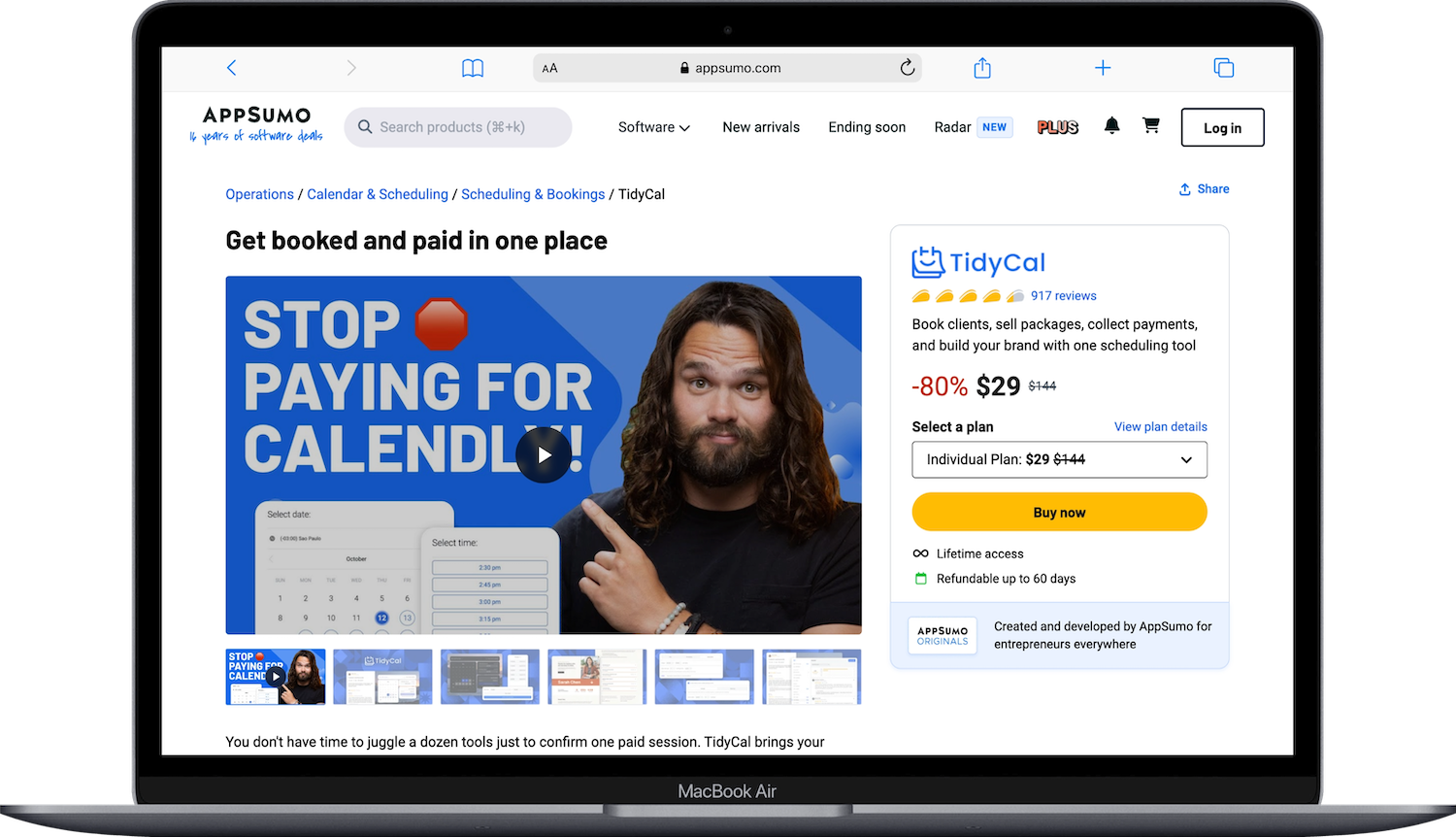
If you've been searching TidyCal on Reddit or scrolling AppSumo reviews trying to work out whether it will actually work for you the pattern is fairly consistent. TidyCal sits at 4.35 stars across 917 AppSumo reviews, with 629 of those being five stars, and the praise clusters on the same few things: it's quick to set up, the one-time payment removes the subscription, and selling packages and taking payments works without much fuss.
The complaints cluster too. Calendar syncing hiccups come up more than once, plenty of people want a mobile app, and the booking page branding on the cheaper plans bothers some users enough to mention it.
That lines up with my own read and experience. It's a well-built tool for straightforward booking, and the people who end up frustrated are usually the ones who needed something heavier than it was built to be. For me personally, eliminating an ongoing subscription and paying a one-time is well-worth the ‘faults’ of TidyCal.
Who TidyCal Is For
Solo service providers, coaches, and consultants booking discovery and client calls
Anyone selling session packages, subscriptions, or recurring appointments
Freelancers who want paid bookings without a monthly software bill
Anyone who wants client reviews displayed on their booking page
People who don't have a website yet and could use the built-in landing page builder
Small teams needing round robin
Who Should Probably Skip It
Therapists, medical providers, and anyone needing HIPAA compliance
Anyone who manages their schedule primarily from a phone app
Businesses needing conditional intake logic or client records and appointment history
People who need a fully unbranded booking page but don't want a subscription
Larger teams running complex multi-staff, multi-location scheduling
How to Get Started With TidyCal
Create a free account at tidycal.com. You don't need to pay anything to find out whether the booking flow fits how you work.
Connect your calendar from Integrations in the sidebar. Google and Microsoft use OAuth; Apple needs an app-specific password.
Set up a named availability schedule before you build booking types. It saves redoing it later.
Create your first booking type. Set the length, buffer time, cost (if charging) and how far out people can book.
Turn on the "How did your booking go?" automated email if you want reviews collected after appointments.
Connect Stripe or PayPal if you're charging. It's one processor per booking type, though you can connect both.
Test it yourself. Book your own link from a different browser and check the confirmation email, the calendar event, and any payment.
Pro Tip: set up a separate booking type for each thing you offer instead of one generic "Book a Call." Different lengths, different prices, different availability. It takes ten extra minutes and stops people from booking a 15-minute intro slot when they wanted a full session.
The Bottom Line: Is TidyCal Worth It?
I got TidyCal recently and I love it. The package and multiple-appointment bookings and the review collection are the two things I keep coming back to, and neither is something I expected to find at this price.
It isn't the most powerful scheduling tool available, but it’s still surprisingly robust, the customer service is great, and did I mention no ongoing subscription? The relief!
The free plan is usable on its own, and $29 once for group bookings, video links, AI features, and API access on top of an already-loaded free tier is a lot of tool for the money.
Frequently Asked Questions
What is TidyCal used for?
TidyCal is used for letting people book time with you without emailing back and forth about times. You connect your calendar, set your availability, and share a booking link or embed it on your site. Beyond basic appointments, entrepreneurs and coaches use it to take paid bookings through Stripe and PayPal, sell session packages and subscriptions, run group bookings for webinars or classes, collect client reviews, and run date polls when a group needs to vote on a time.
Is TidyCal better than Calendly?
Hmmmm. Better depends on what you need. TidyCal can be bought once through AppSumo instead of subscribed to monthly, doesn't charge per user, and includes client reviews and session packages, plus a much fuller landing page than Calendly's profile page. Calendly has a mobile app, deeper workflow automation, and a much larger integration library. If you're a solo service provider or small team who wants booking handled without a recurring bill, TidyCal covers it. If you're on a bigger team running heavy automation, Calendly is the more developed tool.
Who owns TidyCal?
AppSumo. TidyCal is an AppSumo original product, which is why the Individual and Agency lifetime plans are sold through AppSumo and not on TidyCal's own site. The Pro subscription is sold directly by TidyCal.
What is AppSumo?
AppSumo is a marketplace that sells software to small businesses, freelancers, and solo operators, best known for lifetime deals where you pay once instead of subscribing. I’ve purchased several things here, some duds, and some amazing. Most listings are tools built by other companies, but AppSumo also makes its own products under the AppSumo Originals label, and TidyCal is one of them. Purchases come with a 60-day refund window.
What is the best calendar organizing app?
There isn't one best app, because scheduling tools and calendar apps do different jobs. For the calendar itself, most people are already on Google Calendar, Outlook, or Apple Calendar, and those work fine. What you'd add on top is a booking tool that reads your calendar and lets other people claim your open time. TidyCal, Calendly, Acuity, and Cal.com all do that. TidyCal is worth a look if you want to avoid a monthly subscription; Acuity if you need detailed client records; Cal.com if you want open source and self-hosting.
Is TidyCal really a one-time payment?
Yep! The Individual ($29) and Agency ($79) lifetime plans are one-time purchases sold through AppSumo, with no recurring fees, and they're refundable up to 60 days. TidyCal also sells a Pro subscription at $12/month or $99/year directly, for people who want priority support and fully removed branding. The free plan is free forever.
Is TidyCal free?
Yes, and it's surprisingly robust. Unlimited booking types, paid bookings through Stripe and PayPal, package bookings, recurring bookings, subscriptions, discount codes, date polls, ratings and reviews, automated emails, and the website builder are all included. The main limits are only one calendar connection, normal TidyCal branding, and no video conferencing links, AI features, or API access.
Can I collect payments with TidyCal for free?
Yesssss. Stripe and PayPal are both on the free plan, which is unusual; most scheduling tools put payment collection behind a paid tier. You can connect both processors but use only one per booking type.
Can clients leave reviews on TidyCal?
Yes, on all plans including free. TidyCal emails clients after a completed booking asking for a 1 to 5 star rating and written feedback, and reviews display on your public booking page. You have to switch the review request email on; it isn't automatic. You can also send direct review links to people who never booked through TidyCal.
Does TidyCal have an app?
Nope. The site is mobile responsive, so you can manage bookings from a phone browser, and your bookings sync to whatever calendar app you already use on your phone.
What's the difference between TidyCal Pro and Agency?
They unlock the same team and feature set: round robin, collective meetings, team booking pages, SMS reminders, and custom domain. The differences are billing and branding. Agency is $79 once through AppSumo and keeps reduced TidyCal branding. Pro is $12/month or $99/year sold directly, removes all branding, and adds priority support. Agency owners can subscribe to Pro on top to remove branding while keeping the lifetime plan.
Can I connect TidyCal to ChatGPT or Claude?
Heck yes (on any paid plan). TidyCal has an MCP server you connect through OAuth, giving the assistant read-only access to your bookings, booking types, availability, teams, and locations. It can answer questions about your schedule but cannot create, edit, or cancel anything.
Is TidyCal legit?
Haha, yes. TidyCal is an AppSumo original product, so it's built and run by an established company. It sits at 4.35 stars across 917 AppSumo reviews, payments run through Stripe and PayPal and not anything weird or untrustworthy, and the lifetime plans are refundable up to 60 days. Buy through AppSumo.
How do I log in to TidyCal?
Go to tidycal.com and use the login option there. TidyCal accounts are separate from your AppSumo account even though the lifetime plans are purchased through AppSumo, so if you bought a lifetime plan, make sure you're signing in with the email tied to your TidyCal account. If you're locked out, use the password reset on the login page before emailing support.
Does TidyCal have an API?
Yes, on any paid plan. API access isn't included on the free plan. Documentation lives at tidycal.com/developer/docs. You can also connect through Zapier on paid plans, and there's the MCP server if you want an AI assistant reading your schedule.
What calendars does TidyCal work with?
TidyCal works with Google Calendar and Microsoft Outlook and Office 365 through OAuth with two-way sync, plus Apple Calendar through CalDAV with an app-specific password. Microsoft Exchange is not supported. Connection limits are 1 on Free, 10 on Individual, and 25 on Pro and Agency.
Is TidyCal down?
If your booking page won't load, check it in a different browser or on your phone data first, since a lot of "is TidyCal down" moments turn out to be a cached page or a browser extension. If it's still unreachable, email support@tidycal.com.
How do I contact TidyCal support?
Email support@tidycal.com. TidyCal states a typical 8-hour response time across all plans, and Pro subscribers get priority support with faster responses. There's no phone line, and live chat isn't offered on the standard plans. The help documentation at help.tidycal.com covers most setup questions if you'd rather not wait. (They’ve been very responsive with me.)

