Anise Squarespace Template Review
This post contains affiliate links. If you purchase through them, I may receive a small commission at no extra cost to you.
Table of Contents Show
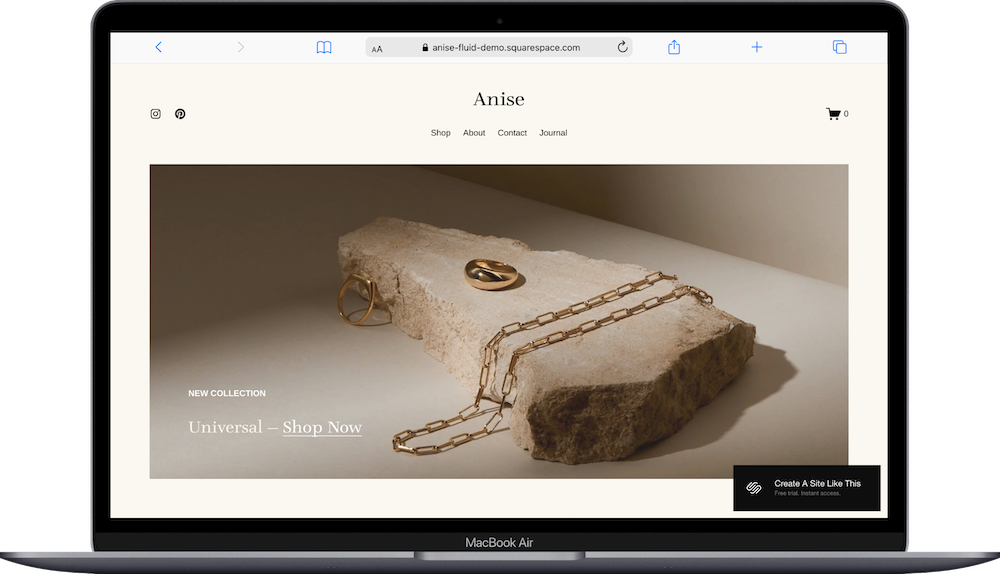
Anise is a Squarespace template for jewelry brands, luxury boutiques, and high-end product businesses.
The demo shows a modern jewelry brand with soft neutral colors and clean product photography. This is an elevated template; it makes whatever you're selling look expensive and considered. It's also robust and highly customizable, making it a great choice if you need a full-featured online store that doesn't sacrifice aesthetics for functionality. If you sell jewelry, artisan products, or anything that benefits from looking luxurious, Anise probably caught your eye for good reason.
This review covers what Anise includes, where it shines, and where you'll hit limitations.
The goal: help you figure out if this Squarespace template is the right fit for your business, or if you should keep looking.
Who the Anise Template Works Best For
Anise works well if you sell products that need to feel premium and you want your site to reflect that quality.
Jewelry Designers and Brands
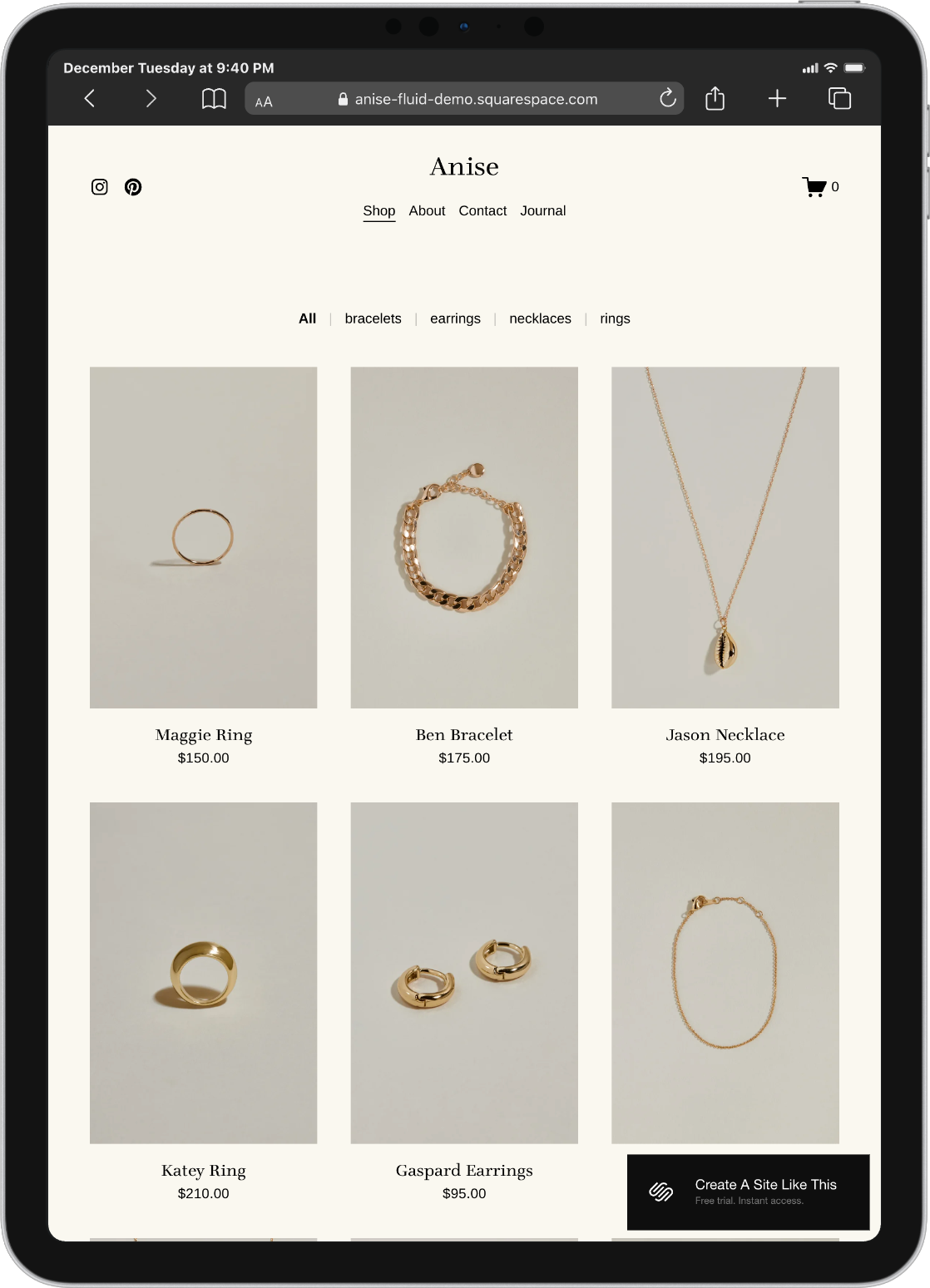
The demo literally sells jewelry, and it's perfect for that. The clean product displays, category filtering (Bracelets, Earrings, Necklaces, Rings), and neutral palette let gold and silver pieces shine without competing with busy design.
Luxury or High-End Boutiques
If you sell curated collections of premium goods (like artisan homeware or high-end accessories) Anise gives your products the gallery treatment. The white space and elegant layout signal quality.
Artisans and Craftspeople
People who make handmade or small-batch goods (ceramics, textiles, woodwork, fine paper goods) benefit from Anise's approach. It treats your work like art, not mass-produced items.
Fashion Designers with Small Collections
If you design limited-run clothing, accessories, or bags and want an elevated presentation, Anise works beautifully. It's built for brands that prioritize quality over quantity.
Anyone Building a Lifestyle Brand Around Sustainability or Ethics
The demo mentions timeless designs, local production, and responsibly sourced materials. If your brand story involves craftsmanship, sustainability, or ethical production, Anise's aesthetic matches that positioning.
Who the Anise Template Is Not Best For
The Anise template probably isn't the best fit if you:
Sell hundreds of products across tons of categories (this works better for curated collections; Shopify is worth checking out if you have hundreds or thousands of items)
Need bold, colorful, energetic design (Anise is calm, neutral, and understated, perfect unless it's not your brand)
Run a discount or fast-fashion business (the elevated aesthetic doesn't match bargain pricing or trend-chasing)
Don't have good product photography (the minimal design means your photos carry all the visual weight; bad, unclear or missing photos could hurt your business)
What You Get with the Anise Template
Anise comes with seven main pages focused on e-commerce:
Home Page (Shop)
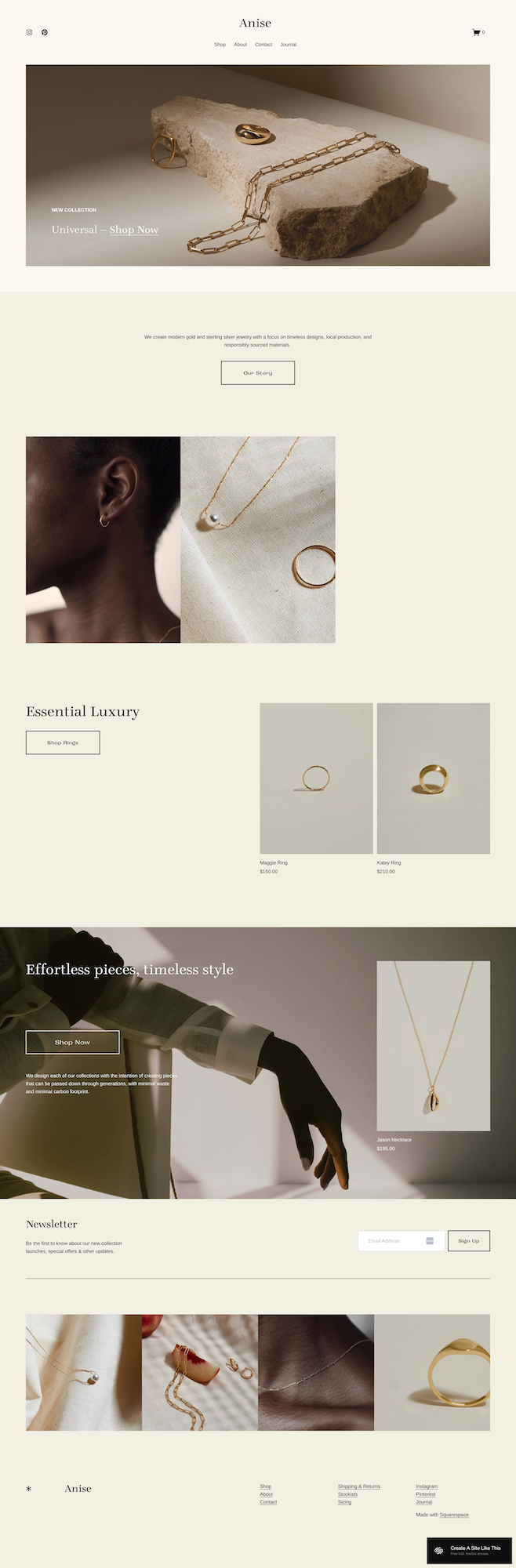
The homepage is a sophisticated storefront:
Hero section with featured product - Large hero image showcasing a featured product or collection with minimal text overlay. It’s clean and elegant.
Brand story section - Text explaining your philosophy, materials, or approach. The demo talks about modern gold and silver jewelry with timeless designs and responsible sourcing.
Product imagery sections - Multiple image sections showing products in lifestyle contexts: jewelry being worn, styled shots, detail photography. Helps customers visualize ownership.
"Essential Luxury" product feature - Dedicated section highlighting specific products with large images, names, prices, and "Shop Now" buttons.
Full-width lifestyle section - "Effortless pieces, timeless style" section with background imagery and text explaining your design philosophy.
Newsletter signup - Clean email capture form at the bottom ("Be the first to know about our new collection launches, special offers & other updates").
Image gallery grid - Four-image grid at the bottom showcasing product details or lifestyle shots.
Shop Page
Full product catalog with:
Clean product grid layout
Category filtering (Bracelets, Earrings, Necklaces, Rings in demo)
Product images, names, and prices
High-quality product photography on neutral backgrounds
Individual Product Pages
Each product gets a detailed page with:
Large product image (or image slider for multiple photos)
Product name and price
Description and details
Add to Cart button
Related/suggested products section
Full e-commerce checkout integration
Account Page
Customer account portal where shoppers can:
Create accounts
Save carts
Track orders
Manage shipping addresses
Check order history
Journal (Blog)
Built-in blog for:
Product stories and collection launches
Behind-the-scenes content
Care instructions or styling tips
Brand updates
Shipping and Returns Page
Dedicated page for policies on shipping, returns, and exchanges. Important for building customer trust.
Stockists Page
Page listing where customers can find your products in physical retail locations if you do wholesale.
Sizing Page
Information about product sizing, measurements, or fit guidance.
Extras:
Subtle scroll animations
Neutral color palette (creams, beiges, warm whites)
Ample white space throughout
Category filtering in shop
Customer account functionality
Newsletter signup integration
Related products display
Mobile-responsive design
Gallery-style product presentation
Pros & Cons of the Anise Template
Pros
Everything looks expensive without trying too hard. The neutral palette, generous white space, and elegant typography create a luxury feel automatically.
The product photography gets proper treatment. Large images, clean backgrounds, space to breathe. Your products are treated like gallery pieces, not just inventory. If you invest in good photography, Anise showcases it beautifully. If you shoot your own products well, the template elevates them.
It's a complete e-commerce solution: customer accounts, category filtering, related products, shipping info, sizing guides; all the functional stuff you need is built in. You're not sacrificing features for aesthetics.
The lifestyle photography sections tell your brand story. Beyond just showing products, you can explain your philosophy, materials, production process, and values. The demo emphasizes timeless design and responsible sourcing, which resonates if that's your angle.
Subtle animations add polish without distraction. As you scroll, elements fade in smoothly. It feels refined and contemporary without being gimmicky. The animation enhances the luxury feel rather than competing with your products.
Cons
The neutral palette might be too quiet for some brands. If your jewelry or products are bold, colorful, or playful, Anise's soft beiges and creams might not match your vibe. You can adjust colors, but the fundamental elegance is baked into the structure.
You absolutely need good product photography. The minimal design means your photos do all the work. Blurry images, inconsistent lighting, or busy backgrounds will expose weaknesses immediately. If your photography isn't strong, this template will make that obvious.
It's built for smaller, curated collections. The navigation and layout work great for 30-80 products across a handful of categories. If you have 300 SKUs across 20 categories, the simple filtering won't cut it. You'll need robust search and filtering that Anise doesn't provide.
There's no built-in way to show product variations visually. If you sell the same ring in four different metals, you'll need to work around the template's structure. It's designed for straightforward product pages, not complex variant displays with multiple images per variation.
Getting Started with the Anise Template is Easy:
Once you pick Anise in the Squarespace 7.1 template library, here's what to do:
Get your product photography sorted first. Make sure you have high-quality product photos with consistent lighting, clean backgrounds, and multiple angles. Anise showcases photography, so this is non-negotiable.
Add all your products. Go to Commerce and add each item with photos, descriptions, prices, and categories. Upload multiple photos per product so customers can see details. Write descriptions that match the elevated tone of the template.
Set up product categories. Create categories that make sense for your inventory (Bracelets, Earrings, Necklaces in the demo). These become your filter options in the shop, so think about how customers naturally browse your collection.
Write your brand story. Replace the demo text with your actual philosophy; what you make, how you make it, what materials you use, why it matters. This is where you differentiate yourself from Amazon.
Fill in Shipping and Returns, Sizing, and Stockists pages. If these pages are relevant to your business, add the information. If not, delete them.
Customize Site Styles. Go to Design > Site Styles and adjust colors, fonts, and spacing if needed. The demo's neutral palette works for most luxury brands, but you can tweak it. Just keep the elegant, uncluttered approach.
Set up your shipping and payment processing. Configure shipping zones, rates, and checkout in Commerce settings. Connect Stripe or PayPal. Test the entire purchase flow to make sure everything works smoothly.
Start your blog with product stories. Don't launch with an empty Journal. Write a few posts about your collections, materials, or process. This helps with SEO and gives customers more reasons to care about your brand.
Double-check everything, connect your domain, choose your plan, and go live. Preview on mobile and desktop, test the full shopping and checkout experience, make sure images load properly, then publish.
Anise Squarespace Template FAQs
Is Anise only for jewelry?
No. The demo shows jewelry, but this template works beautifully for any luxury or artisan product. Handmade ceramics, premium candles, artisan textiles, high-end home goods; anything that benefits from an elevated presentation. Just change the products and copy.
Can I use Anise if I don't have professional product photos?
Technically yes, but you'll struggle. The minimal design puts all the focus on your photography. If you're shooting products yourself, invest time in learning proper lighting, backgrounds, and composition. Clean, well-lit photos on neutral backgrounds are essential. Busy or poorly lit photos will hurt your sales.
Does Anise work for larger product catalogs?
It can. But in my opinion, it works best for curated collections of 20-100 products. The simple category filtering (Bracelets, Earrings, etc.) handles that range well. Beyond 100 products or if you have many categories, you'll need more robust filtering and search functionality that Anise doesn't provide out of the box.
Is the Anise template good for SEO?
Yes, for e-commerce SEO. You can optimize product titles, descriptions, and image alt text. The blog helps you create content around your products and brand story. Clean code loads fast. But like all online stores, SEO requires work, make sure to write detailed product descriptions, use relevant keywords, and build backlinks.
Can I change the neutral color palette?
Yes. You can change colors in Site Styles. But the neutral, elegant aesthetic is fundamental to Anise's luxury feel. If you swap in bright colors or busy patterns, you'll lose some of what makes the template work. Small adjustments (warmer whites, different neutrals) work better than complete overhauls.
Does Anise support customer accounts?
Yes. The Account page is built in. Customers can create accounts, save items, track orders, and check out faster. This is great for repeat customers and helps build loyalty.
Can I add a lookbook or additional galleries?
Yes. You can add pages and sections using Squarespace's page builder. Want a seasonal lookbook showing styled collections? Build a gallery page. Want to show your workshop or process? Add an About page with images. The template is customizable.
What if I wholesale my products to stores?
The Stockists page is perfect for this. List retail locations where customers can find your products in person. This is great for brands doing both direct-to-consumer and wholesale. If you don't wholesale, just delete this page.
Do I need to offer sizing information?
The Sizing page is there if your products need it. If you sell items that don't require sizing (home goods, candles, art), delete this page. It's optional based on what you sell.