Arcade Squarespace Template Review
This post contains affiliate links. If you purchase through them, I may receive a small commission at no extra cost to you.
Table of Contents Show
Arcade is a Squarespace template built for esports teams, gaming organizations, and streaming content creators.
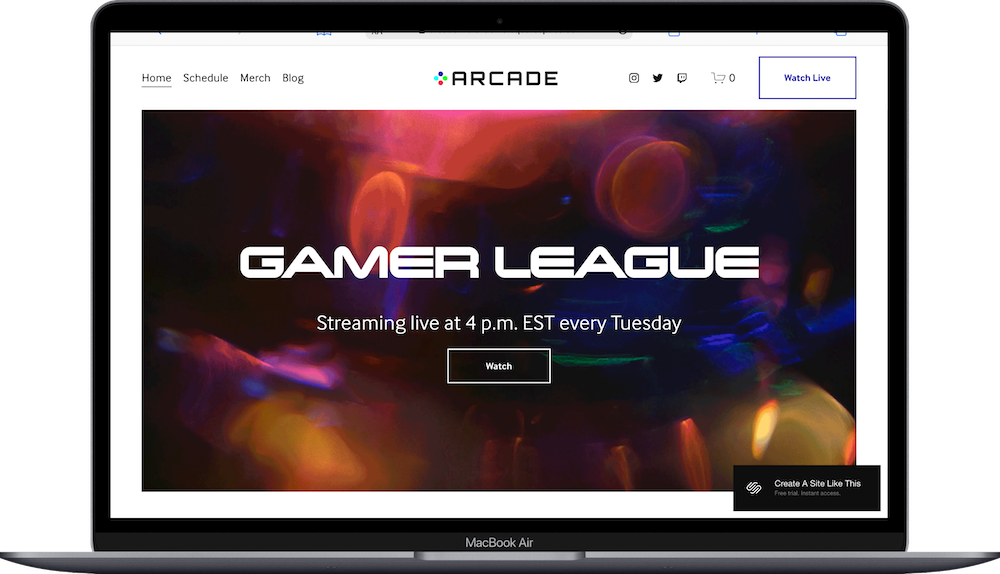
The demo shows an esports team (Team Arcade) with bold graphics, vibrant colors, team member profiles, streaming schedules, and merch sales. This one isn't like most Squarespace templates; it's designed for a specific niche with specific needs. The hero section features a dynamic "GAMER LEAGUE" headline with streaming info, the typography is bold and tech-forward, and there's a direct Twitch integration for live streaming. If you run an esports team, gaming clan, streaming organization, or gaming content brand, Arcade probably caught your eye for good reason.
This review covers what Arcade includes, where it shines, and where you'll hit limitations.
The goal: help you figure out if this Squarespace template is the right fit for your gaming project or business, or if you should keep looking.
Who the Arcade Esports Template Works Best For
Arcade works perfectly if you're building a brand around competitive gaming, streaming, or esports.
Esports Teams and Organizations
If you run a competitive gaming team (League of Legends, Valorant, CS:GO, Overwatch), Arcade is built specifically for this. The team roster section, streaming schedule, and partner logos all support the esports team structure.
Gaming Content Creators and Streamers
If you stream on Twitch or YouTube Gaming and want a professional hub for your brand, Arcade gives you space to showcase schedules, sell merch, and direct fans to your stream.
Gaming Clans and Communities
If you manage a gaming clan or community and need a central website for members, schedules, merch, and updates, Arcade provides the structure.
Gaming Brands Selling Merchandise
The template includes a built-in merch section. If you sell gaming apparel, accessories, or branded products to your community, Arcade makes that easy.
Tournament Organizers or Gaming Event Companies
If you run gaming tournaments or esports events, you can use Arcade to showcase schedules, team rosters, sponsors, and event information.
Who the Arcade Esports Template Is Not Best For
The Arcade esports template probably isn't the best fit if you:
Are someone who runs a traditional business unrelated to gaming
Need a portfolio-heavy site for game development or design work (this is for teams and streaming, not showcasing game projects)
Want minimal, understated design (Arcade is bold, colorful, and unapologetically gaming-focused)
Don't have a team or community structure (the template assumes team rosters, schedules, and fans)
Sell products outside gaming/esports (the merch section is designed for gaming apparel, not general e-commerce)
What You Get with the Arcade Esports Template
Arcade comes with five main pages focused on esports and gaming:
Home Page
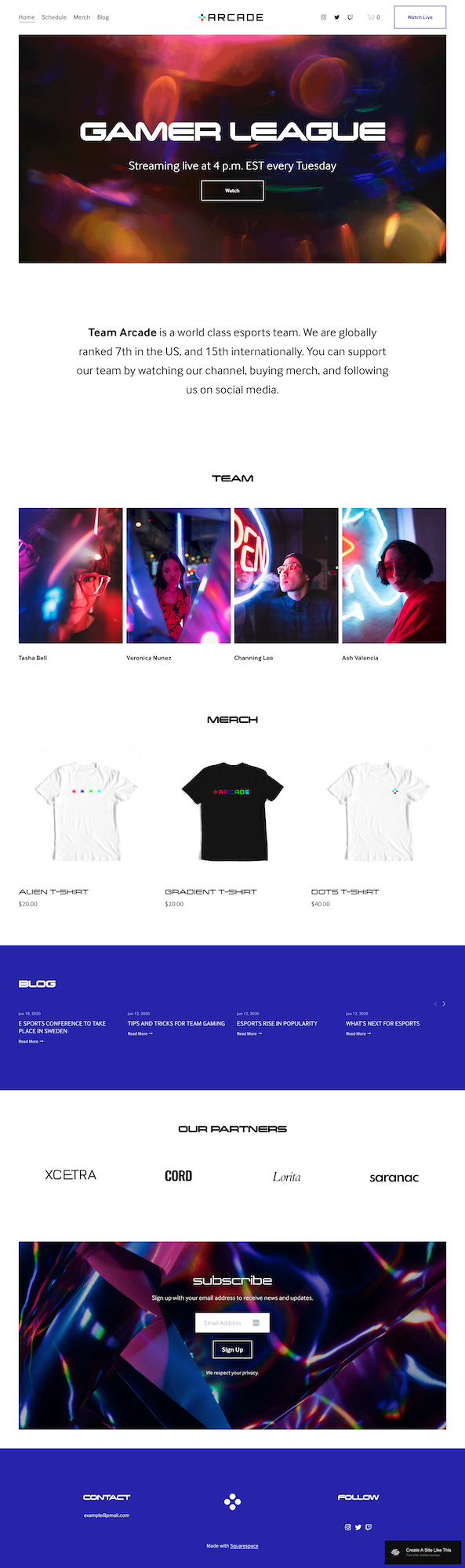
The homepage includes several gaming-specific sections:
Hero section with streaming info - Large "GAMER LEAGUE" headline with streaming schedule and Watch button. Bold graphics with vibrant colors (reds, purples, blues) create an energetic & lively gaming atmosphere.
Team introduction - Text explaining your esports team, rankings, and how fans can support you.
Team roster section - Grid displaying team members with photos and names.
Merch section - Product display for gaming merchandise with images, names, and prices.
Blog preview section - Recent blog posts displayed with dates and headlines.
Partners section - Logo display for sponsors and partners.
Newsletter signup - Email capture section with bold heading and signup form
Contact section - Simple contact information display with email and social media links.
Schedule Page
Calendar or listing of upcoming matches, streams, tournaments, or events. Essential for esports teams with regular gaming schedules.
Merch Page (Shop)
Full e-commerce section for selling:
Gaming apparel (team jerseys, t-shirts, hoodies)
Accessories (hats, bags, mousepads)
Branded merchandise specific to your team or brand
Blog
Standard blog for:
Tournament recaps and match results
Gaming tips and strategies
Team announcements and roster changes
Industry news and esports updates
Watch Live (Twitch Link)
Direct link to your Twitch channel or live stream. When fans click "Watch Live," they're taken directly to your streaming platform.
Extras:
Bold, tech-forward typography
Vibrant color scheme (purples, blues, reds)
Team roster display
Sponsor/partner logo section
E-commerce integration for merch
Blog functionality
Newsletter signup
Twitch/streaming integration
Mobile-responsive design
Social media integration
Pros & Cons of the Arcade Esports Template
Pros
The Arcade template is built specifically for gaming.
The team roster section gives players proper showcase. In esports, individual players build followings and create value for the team. Arcade displays each player with dramatic photos and names, treating them like the athletes they are.
Direct Twitch integration makes monetizing your audience easier. The "Watch Live" button sends people straight to your stream. When you're live, fans find you immediately. Great for streaming revenue.
The merch section turns your brand into revenue. Selling team jerseys, branded apparel, and accessories is how gaming organizations make money beyond sponsorships. Arcade builds this functionality in, making it even easier to include a shop.
Cons
The bold gaming aesthetic limits versatility. If your gaming brand evolves beyond esports (maybe you pivot to game development or gaming education), Arcade's specific design might not grow with you.
There's no built-in tournament bracket or match schedule functionality. If you run tournaments or need to display match results, scores, or brackets, you'll be adding that manually or using third-party integrations. The template gives you the space, but not specialized functionality.
The team roster is static, not dynamic. If your roster changes frequently (which is common in esports), you're manually updating photos and names. There's no player profile system with stats, achievements, or individual pages for each team member.
It's designed for established teams with structure. If you're a solo streamer just starting out, Arcade's team-focused layout might feel excessive. The partner logos, team roster, and schedule sections assume you have a full organization.
Getting Started with the Arcade Template is Easy:
Once you pick Arcade in the Squarespace 7.1 template library, here's what to do:
Replace the hero section with your team info. Change "GAMER LEAGUE" to your team or brand name. Update the streaming schedule with your actual streaming times. Make sure the Watch button links to your Twitch, YouTube Gaming, or streaming platform.
Add your team roster. Upload professional photos of each player. Use consistent photography style; dramatic lighting works well for esports. Include player names and consider adding roles or game specialties if relevant to your game.
Fill in your team description. Replace the demo text with your actual story: games you compete in, tournaments you've won, rankings, and how fans can support you. Be specific about achievements and competitive standing.
Set up your merch shop. Add your products in the Commerce section: team jerseys, t-shirts, hoodies, accessories. Use high-quality product photos. Write descriptions that appeal to fans. Set up shipping and payment processing. If you don’t have any merch yet, just delete or disable this move and move it to the Unlinked section.
Add your streaming schedule. Update the Schedule page with your regular streaming times, upcoming tournaments, or match schedules.
Upload partner and sponsor logos. If you have sponsors or partners, add their logos to the Partners section. If you don't have sponsors yet, you can remove this section or use it to display gaming brands you're affiliated with.
Customize Site Styles. Go to Design > Site Styles and adjust colors if needed. The demo uses bold purples and blues, but you can match your team colors. Keep the bold, energetic feel though, it really is core to the template.
Start your blog with gaming content. Write a few posts about recent matches, gaming tips, or team updates. This helps with SEO and gives fans reasons to visit beyond checking your stream schedule.
Double-check everything, connect your domain, choose your plan, and go live. Preview on mobile and desktop, test the merch shop and checkout process, make sure your Twitch link works, then publish.
Arcade Squarespace Template FAQs
Is the Arcade template only for esports teams?
No, but it IS designed specifically for esports. You could adapt it for gaming content creators, streaming organizations, gaming clans, or gaming brands. The structure works best when you have team members, streaming schedules, and gaming merchandise. Solo streamers might find it excessive.
Can I use Arcade for game development or indie game studios?
Not really. Arcade is built for competitive gaming teams and streaming, not showcasing game projects or development portfolios. If you're making games, you need a template with strong portfolio features. Arcade focuses on teams, streams, and merch.
Does Arcade integrate with Twitch or YouTube Gaming?
The Watch Live button can link directly to your Twitch channel, YouTube Gaming page, or any streaming platform. It's a simple link, not a fancy integration, but it gets fans to your stream quickly.
Can I add tournament brackets or match schedules?
Not automatically. The Schedule page gives you space to add information, but Arcade doesn't have built-in bracket displays or automated match scheduling. You'd need to add that manually using Squarespace's page builder or integrate a third-party tool.
Is the Arcade esports template good for SEO?
Yes, for basic SEO. You can optimize page titles, meta descriptions, and headings. The blog helps you create content around gaming topics, team news, and esports strategy, which can drive search traffic. But SEO requires ongoing work: write quality content, use gaming keywords, build backlinks.
Can I sell merch beyond t-shirts?
Absolutely. The demo shows t-shirts, but you can sell jerseys, hoodies, hats, mousepads, gaming peripherals, stickers, whatever you want. Squarespace's e-commerce tools support any physical or digital products.
How do I attract sponsors with this template?
The Partner section is your key tool. Once you have one or two sponsors, display their logos prominently. This social proof makes other brands more likely to sponsor you. Include sponsor benefits in your contact section or create a dedicated sponsorship info page.
Can I customize the team roster section?
Yes. You can add or remove team members, change the layout, or adjust the photography style. If your roster changes frequently, just swap photos and names as needed. Consider keeping consistent photo styling for a professional look.
What games work best with the Arcade template?
Any competitive multiplayer games: League of Legends, Valorant, CS:GO, Dota 2, Overwatch, Rocket League, Call of Duty, Fortnite, Apex Legends. The template is game-agnostic; it's about the esports team structure rather than a specific game.