Best Squarespace Templates for Camps & Youth Programs: Bennie vs Little Legends
This post contains affiliate links. If you purchase through them, I may receive a small commission at no extra cost to you.
Table of Contents Show
Bennie vs. Little Legends: Which Squarespace Template Fits Your Camp?
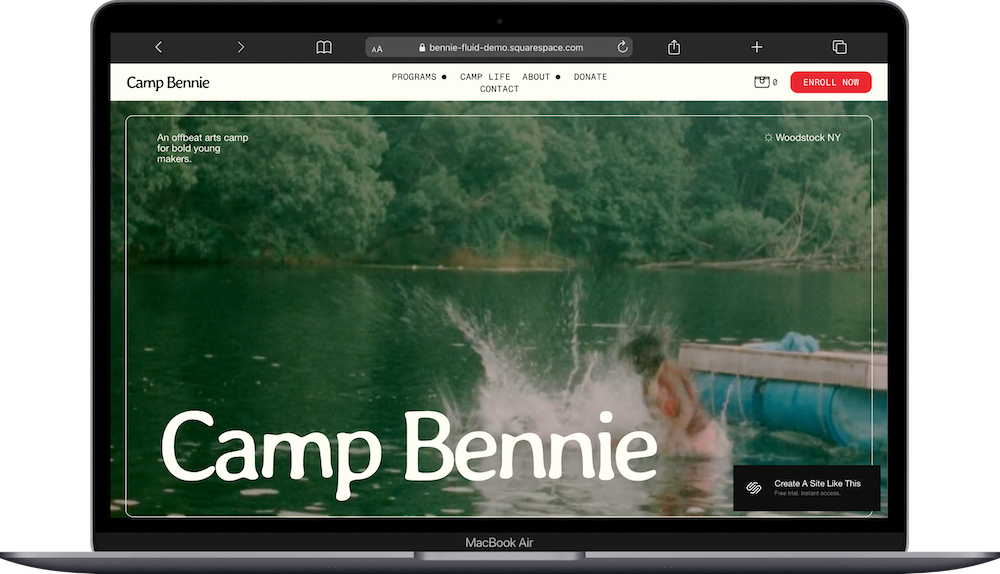
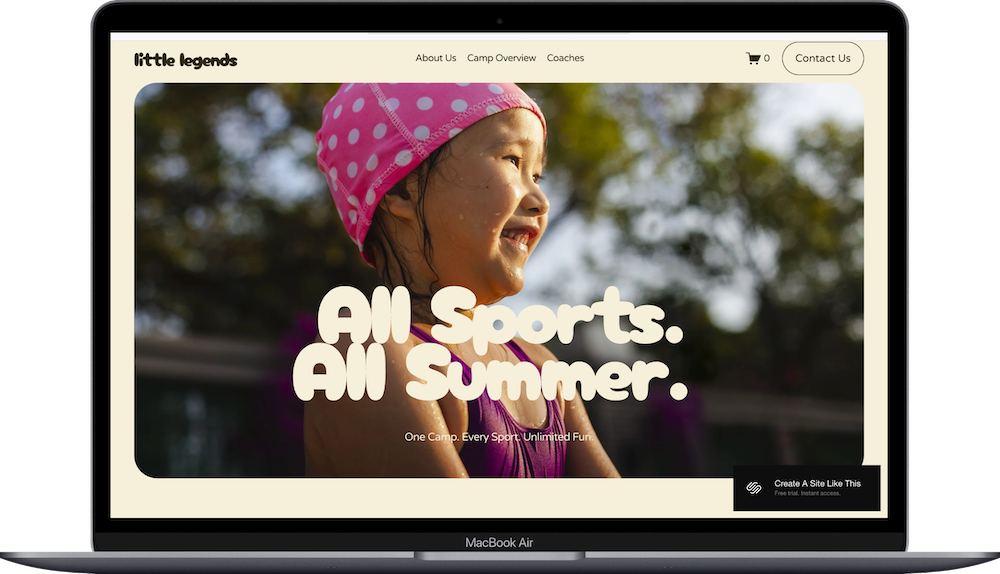
Both Bennie and Little Legends are Squarespace 7.1 templates designed for camps, programs, & multi-offer businesses – think summer camps, art studios, music workshops, coding bootcamps, or yoga retreats.
They're both part of Squarespace's Fluid Engine system, which means they use the same customization tools and modern editor – but they ARE structured differently.
Bennie has 10 pages out of the box including product listings with variant selectors, a Donate page, Rates & Financial Aid page, Campus page, and Faculty & Staff page. It's a more robust template built for organizations with more administrative infrastructure.
Little Legends has 7 pages with a more simple vibe & navigation structure. The homepage includes testimonials, FAQs, and feature lists. It's built for smaller, less complex, businesses and programs.
Both work for camps, retreats, workshops, and program-based businesses. The question is which structure matches what you're building, because that determines how much setup work you'll do before your launch.
Let's break down the actual differences.
Quick Look: Bennie vs. Little Legends
Choose Bennie if you're running:
Multiple distinct programs (like soccer, basketball, swim – not just beginner/intermediate/advanced of one thing)
Nonprofit camps with scholarships, financial aid, or donation needs
Operations that need more organizational pages built in (campus info, faculty bios, facilities details)
Choose Little Legends if you're running:
Boutique programs (weekend art workshops, pottery classes, small music camps)
Operations that don't need tons of pages – simpler structure, fewer administrative details
ONE program with tiered skill levels (tennis with Beginner/Intermediate/Advanced, coding with Level 1/2/3)
Price: Both free with any Squarespace plan
If you're running something really large (like with 50+ programs, complex registration systems, major institutional infrastructure), you might want to start with Bennie and hire someone to customize it – or skip free templates entirely and look at premium options or custom design.
→ View Bennie Demo | View Little Legends Demo | Start Free Trial
What Each Template Looks Like
Bennie's Structure
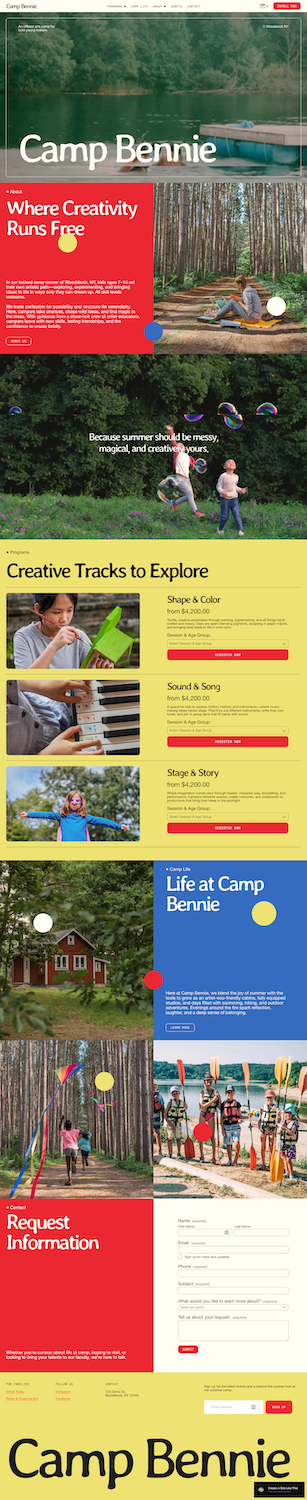
Bennie's homepage shows three program cards with pricing, dropdown selectors (for session length & age group), and "Register Now" buttons that go straight to checkout.
What you get:
10 pages total: Home, 3 program pages, Camp Life, Our Story, Campus, Faculty & Staff, Rates & Financial Aid, Donate, Contact
Programs page with 3 sub-pages (you can add more)
About page with 4 sub-pages: Our Story, Campus, Faculty & Staff, Rates & Financial Aid
Product listings already configured with working checkout
Standalone pages for Camp Life, Donate, Contact
Who this works for: Community art centers with scholarship programs, youth sports academies with multiple age divisions, STEM camps with different session lengths, nonprofit enrichment programs with financial aid needs.
Little Legends' Structure
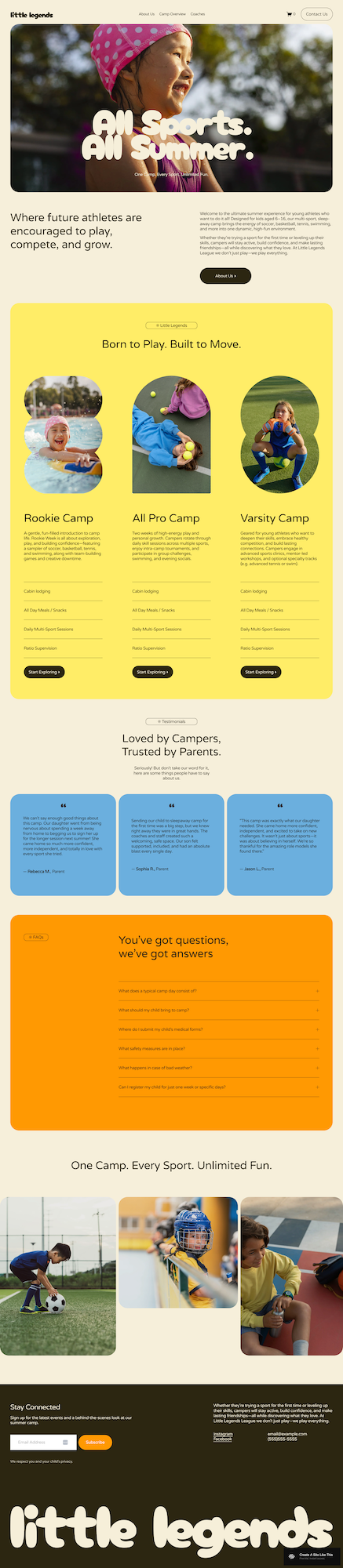
Little Legends' homepage shows three camp cards that link to individual pages (not products). Each page has details, feature lists, and a "Start Exploring" button.
What you get:
7 pages total: Home, 3 camp pages, About Us, Coaches, Contact Us
Camp Overview folder with 3 sub-pages (you can add more)
Standalone pages for About Us, Coaches, Contact Us
Testimonial carousel on homepage (3 rotating reviews)
FAQ accordion on homepage (6 questions)
Cart icon in nav (but you’ll set up products yourself)
Who this works for: Boutique music camps, small art workshops, weekend coding programs, yoga retreats, creative summer camps run by just a few people, and wellness programs.
What Each Template Gives You Out of the Box
Pages & Organization
Bennie gives you solid bones for:
Campus/facilities information (helpful for sleepaway camps or programs at specific locations)
Faculty & staff credentials (important for educational programs, sports academies, specialized training)
Financial aid details (critical for nonprofits, scholarship programs, sliding-scale pricing)
Donation capabilities (built-in Donate page)
Little Legends keeps it simpler:
Coaches page (not Faculty & Staff – which implies smaller, more personal operation)
About Us (just one single page)
No built-in pages for campus info or financial aid (add them if you need them, but the template assumes you don't)
What this means: If you're running a nonprofit youth theater program with scholarships, campus tours, and staff bios, Bennie's structure makes sense. If you're running a small pottery workshop with 2 instructors, Little Legends' simpler structure fits better.
Shop Setup
Bennie: Has product listings with variants. If you offer something like a "4-week session for ages 6-8" at $1,200 and "8-week session for ages 9-12", parents can select their option from dropdowns and checkout. The infrastructure is built in, so you’d just need to update the specifics.
Little Legends: Cart icon exists for a shop, but products aren't set up. You’ll either need to build the ecommerce yourself, delete the cart icon from the nav, OR use contact forms for inquiries/applications instead.
What this means: If you're selling sessions online with different pricing structures, Bennie saves you setup time and is a good choice. If you're taking applications first, Little Legends is a simpler set up.
Navigation
Bennie: Two page folders (Programs + About). More organized for complex information, but this does mean it requires more clicks to reach specific pages.
Little Legends: One folder (Camp Overview). Fewer layers, and faster access to information.
What this means: If parents are trying to quickly find answers to questions like "How much does this cost?" , Little Legends' simpler nav gets them there faster. If you have tons of organizational info to communicate (safety protocols, campus maps, staff certifications, financial aid applications), Bennie's more complicated structure helps keeps it organized.
Bennie Template Works Great For:
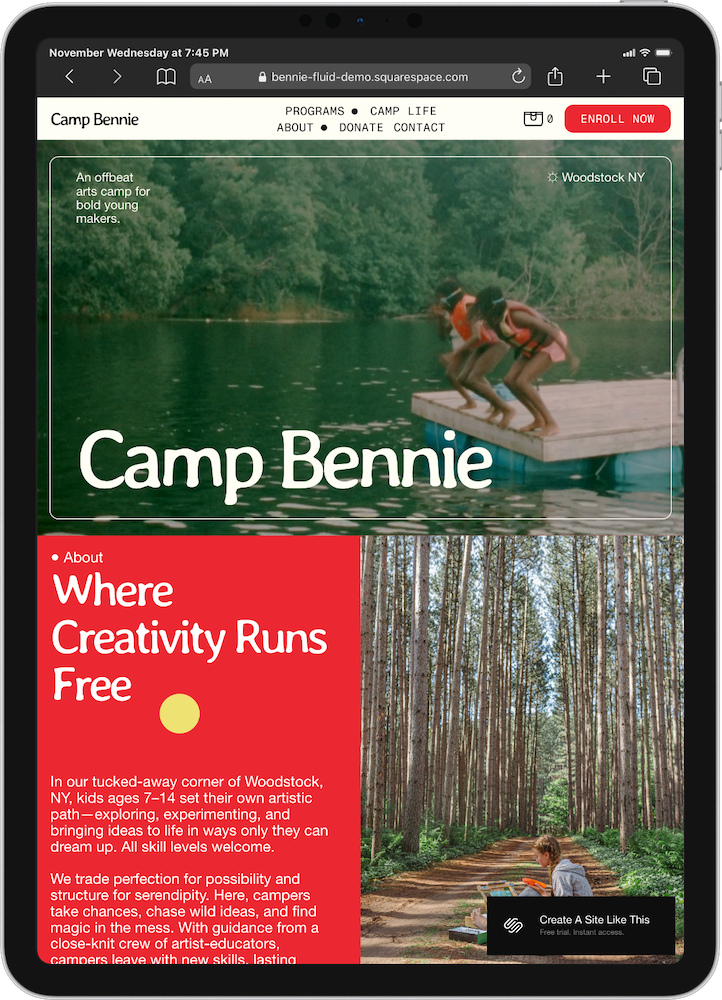
Organizations with multiple programs. Running soccer camp, basketball camp, AND swim camp – each with different age groups and session lengths? Bennie's product variant system is built to handle this kind of set up. Parents can select their sport, their kid's age, and their preferred session. Done.
Mid-sized nonprofit camps with scholarships. The Donate page and Rates & Financial Aid page are built in. Perfect for community organizations, youth development programs, arts enrichment camps, or any operation offering financial assistance.
Programs where parents want to see staff qualifications and facility details. If parents or clients need to know about your facilities, see staff certifications, or understand your campus setup (think: STEM academies, sports training centers, educational enrichment programs), Bennie's built-in pages are great for this.
Little Legends Template Works Great For:
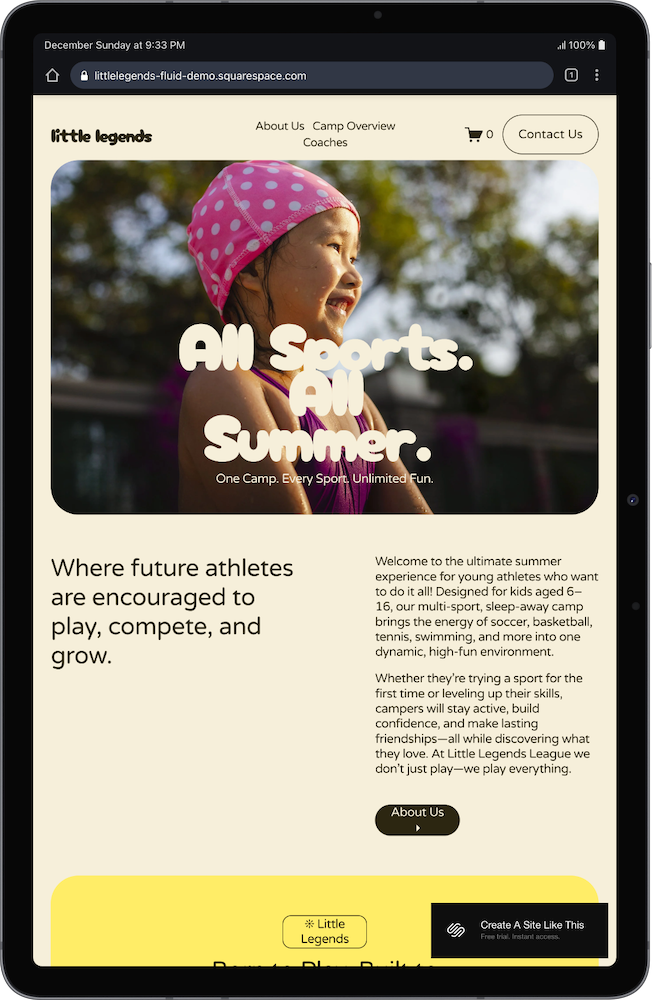
Boutique camps & small programs. You're running a focused offering, maybe solo or with a small team. You don't need pages for campus facilities or faculty credentials. Think: weekend art intensives, small music camps, creative writing workshops.
New camps building credibility. You're just starting out. The homepage testimonials & FAQs help parents feel confident without requiring tons of organizational depth.
Programs with tiered skill levels. You're not running separate "products" – you're running ONE program with beginner, intermediate, and advanced levels. Or one camp with age-based groups. Little Legends' structure treats these as levels within one offering, not separate programs.
What You Can & Can’t Change With Each Template:
Both templates are Squarespace 7.1, which means you can:
Add pages, delete pages, enable/disable pages, and rearrange pages
Rebuild navigation however you want
Add or nuke the shop functionality
Drop in sections, move sections around, save sections, or delete sections
Change colors & fonts through Site Styles
But you're not just picking aesthetics. You're picking a foundation.
If you choose Little Legends but actually need 10 organizational pages, you'll spend time building all that infrastructure. If you choose Bennie but you're running a simple, smaller, operation, you'll spend time deleting pages you don't need.
So try to pick the bones that match your complexity level, and you'll spend less time working with the structure.
Not sure if a free template is right for you? Read this updated guide on free vs. premium templates vs custom design.
Here’s how to get started, no matter which template you pick:
Replace all homepage and other pages of text – swap in your camp name, tagline, intro copy.
Upload high-quality images of your camp, campers, activities, facilities. Optimize those file sizes (under 500KB each) so your site loads fast.
Organize your programs into the existing 3-camp structure OR add more pages if you've got additional sessions to showcase.
Update all the pages – About, Contact, Coaches/Staff, Camp Life, Rates – with your real info. Delete or disable any pages you're not using.
Check your heading hierarchy – every page needs ONE H1 (usually the page title), then H2s for main sections, H3s for subsections. This matters for both SEO & accessibility.
Adjust colors & fonts in Site Styles – pick your brand colors and fonts and update your site.
Add your favicon (that tiny icon in browser tabs) and set a social share image so when people share your site, it maintains its on-brand vibes.
Test your registration process – if you're using Bennie's commerce, run a test transaction. If you're using contact forms, submit a test to make sure it actually sends.
Check mobile – pull up your site on your phone. Make sure everything displays right, buttons are tappable, text is readable without zooming.
Go live 🎉 – final proofread, test all links, connect your domain, pick your Squarespace plan, hit publish.
Still Not Sure Which Template to Pick?
Traditional sleepaway camp? Bennie (you'll need campus info, staff credentials, etc)
Nonprofit camp with scholarships? Bennie (Donate & Financial Aid pages already built)
Small weekend workshop or boutique program? Little Legends (simpler, fewer pages)
New camp just getting started? Little Legends if you're keeping it simple, Bennie if you're launching with multiple programs
Coding/tech camp? Depends on size: small workshop = Little Legends, established academy = Bennie
Soccer/sports camp with multiple age divisions? Bennie (variant selectors for age groups & session lengths)
Tinkering/maker camp? Bennie if established with multiple programs, Little Legends if it's a small weekend thing or a one-off event
When in doubt: Look at the demos. If you'd be deleting half of Bennie's pages, pick Little Legends. If you'd be adding 5+ pages to Little Legends, pick Bennie.
FAQs: Bennie vs. Little Legends Templates
What's the best Squarespace template for a summer camp website?
Depends on your camp. If you're running something more robust, like multiple programs and need room for detailed info (financial aid, campus details, faculty bios), Bennie is a great choice. If you're running a simpler camp setup, Little Legends works great.
What do the Bennie and Little Legends templates cost?
Both Bennie and Little Legends are free with any Squarespace plan. Plans run: Basic ($16/month if you pay annually), Core ($23/month annually), Plus ($39/month annually), and Advanced ($99/month annually). If you pay annually (which I recommend; you’ll save more $$), you’ll get a free custom domain for year one.
Are the Bennie and Little Legends templates good for SEO?
Kinda. Like ALL Squarespace templates, Bennie and Little Legends don’t come optimized with heading hierarchy, you'll need to double-check and handle that yourself. But you CAN optimize page titles, meta descriptions, and image alt text just fine. The SEO capabilities are identical across all 7.1 templates.
Can I change fonts and colors on the Bennie and Little Legends templates?
Yep, through Site Styles. Both are 7.1 templates, so you can update your own brand colors, fonts, spacing, button styles.
Do the Bennie or little legends templates have ecommerce built in?
Bennie's demo comes with product listings and checkout already configured. Little Legends has cart integration but no products set up in the demo. Both can easily handle ecommerce – it's just a matter of whether it's already built or you need to add it.
Can I add testimonials to the Bennie or little legends templates?
Sure can. You can add any section type to any template. But you'll build that testimonial section yourself – pick a layout, format the content, add images. Little Legends on the other hand gives you a working testimonial carousel to just edit.
Which template is better for a nonprofit camp?
Bennie includes a Donate page AND a Rates & Financial Aid page right out of the gate, which saves you time. But Little Legends works fine for nonprofits too – you'll just add those pages yourself.
Can the Little Legends template have more than 3 programs?
Yes!! Add as many pages as you need. The demo shows 3 because it's a starting point, not a limit. Duplicate pages or create new ones whenever. Same goes for Bennie.
Does the Bennie template work with Acuity Scheduling?
Yep, both Bennie and Little Legends integrate with Acuity if you want to use a booking system instead of (or alongside) ecommerce checkout. You'll need an Acuity account and a Squarespace plan that supports integrations.