Amal Squarespace Template Review
This post contains affiliate links. If you purchase through them, I may receive a small commission at no extra cost to you.
Table of Contents Show
Amal is a modern Squarespace template for coaches, consultants, speakers, and freelancers.
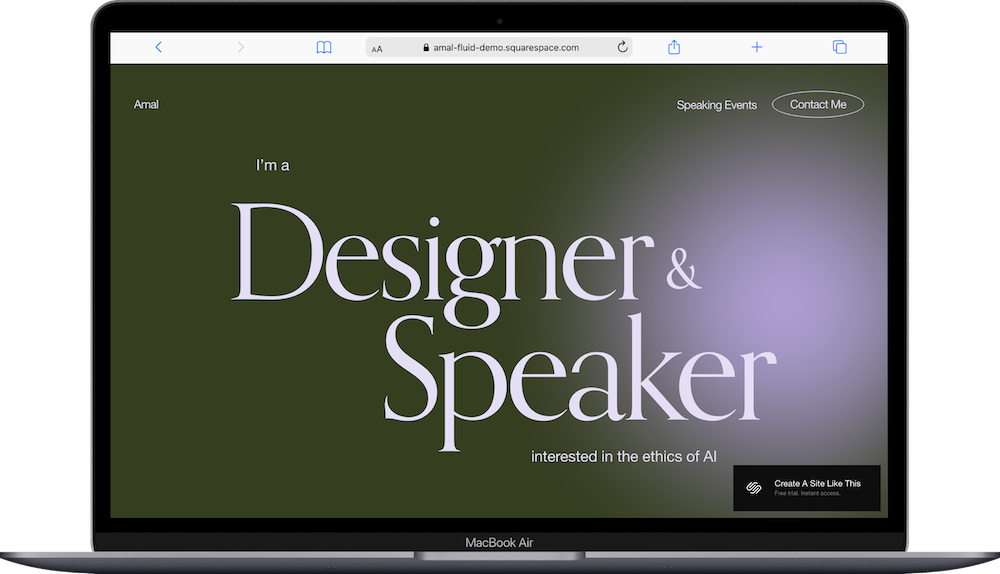
The demo shows a designer and speaker focused on AI ethics, and the first thing you notice is the animated glowing orb that moves across the background. Squarespace releases new templates regularly (they had around 150 in early 2025, now there are 194 at last count in early 2026), and Amal feels like one of the newer additions with its design and content. If you're a speaker, coach, consultant, or creative professional building your personal brand, Amal probably caught your eye for good reason.
This review covers what Amal includes, where it shines, and where you might hit limitations.
The goal: help you figure out if this Squarespace template is the right fit for your business, or if you should keep looking.
Who the Amal Template Works Best For
Amal works well if you're building a personal brand around your expertise and want your site to feel modern and dynamic.
Speakers and Thought Leaders
If you give talks, keynotes, or presentations, Amal has a dedicated Speaking Events section that displays upcoming engagements with dates and locations. Perfect for promoting your speaking calendar.
Coaches and Consultants
The template works great for showcasing your specialties through the accordion menu, making it easy to list different services without overwhelming visitors. Good for career coaches, business consultants, life coaches, or any advisory work.
Tech Professionals and Creatives
The demo features an AI ethics speaker, but this template adapts well for UX designers, developers, strategists, or anyone in tech who needs a modern CV-style site. The animated background gives it a cutting-edge feel.
Freelancers Building a Personal Brand
If you're a writer, designer, strategist, or creative professional who needs to showcase expertise and attract clients, Amal's clean structure and bold typography help you look established.
Anyone Who Writes and Speaks
The combination of blog functionality and speaking events section works perfectly if you build authority through both content and public speaking.
Who the Amal Template Is Not Best For
The Amal template probably isn't the best fit if you:
Need a portfolio-heavy site with lots of visual work (this is more text and credentials-focused than project showcase)
Run a product-based business (it's built for services and personal branding, not e-commerce)
Want colorful, vibrant, energetic design (the demo uses dark olive green with subtle animation—it's sophisticated, not loud)
Need team pages or multiple staff bios (this is built for solo professionals, not agencies or firms)
Prefer traditional, conservative design (the animated orb and modern typography won't work for law firms or traditional industries)
What You Get with the Amal Template
Amal comes with six pages:
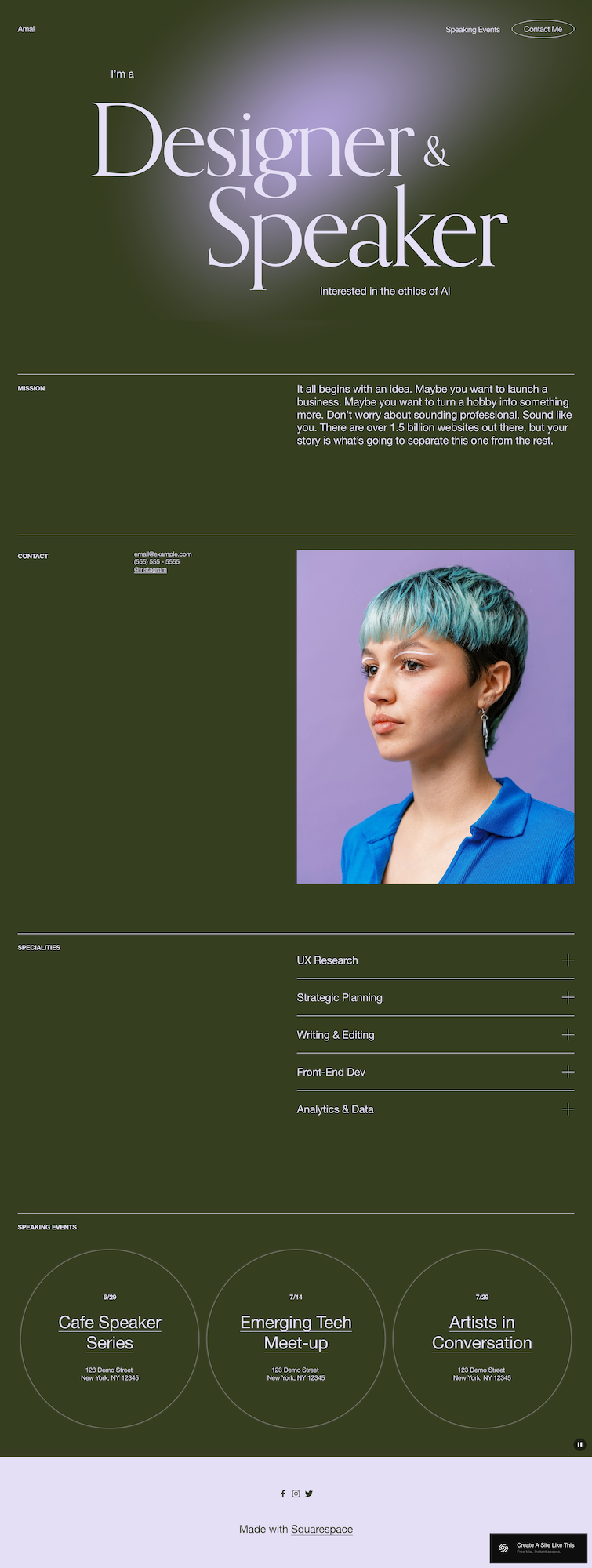
Home Page (You)
The main landing page includes:
Hero with animated background - Bold typography showing your role ("Designer & Speaker" in demo). The glowing orb effect moves across a dark background; a dynamic newer style in Squarespace.
Mission section - Text area for your purpose or philosophy.
Contact section - Email, phone, and location display.
Professional photo - Large portrait section.
Specialties accordion - Expandable menu listing expertise areas. Click to expand for details.
Speaking Events - Three circular frames showing upcoming talks with dates and locations.
Footer - Minimal with social media links.
Blog
Standard blog for articles and content. Clean, text-focused design.
About
Dedicated page for your backstory and credentials.
Contact
Simple contact form.
Login
Member portal for gated content if needed.
Get Started
Call-to-action page for next steps.
Extras:
Animated background effect (glowing orb)
Bold typography
Accordion specialty navigation
Speaking events display
Blog functionality
Member login capability
Floating header
Mobile-responsive
Pros & Cons of the Amal Template
Pros
The design, including the animated background, sets you apart immediately. The glowing orb moving across the page makes your site memorable, even if you change up the colors and fonts.
Amal is built specifically for personal brands. The structure guides visitors through who you are, what you do, and how to work with you. There isn’t wasted pages or confusing navigation. Just a clear path from "I found you" to "I want to hire you."
The speaking events section makes promoting talks easy. If you do conferences, workshops, or panels, you have a dedicated spot to showcase your calendar. People can see you're active in your field, which builds credibility.
Cons
The animated background might be too much for some brands. If your work is serious or traditional, a glowing orb might feel gimmicky. You can turn off the animation though if it’s too much.
It's text-heavy without much portfolio space. If you need to showcase visual work, like design projects, photography, case studies, Amal doesn't give you robust portfolio layouts. It's more about explaining what you do than showing what you've done.
There's no team or staff section. If you're growing beyond solo work or have collaborators, there's no built-in structure for team bios or multiple profiles. This is a personal brand template, not an agency template.
Getting Started with the Amal Template is Easy:
Once you pick Amal in the Squarespace 7.1 template library, here's what to do:
Replace the hero section. Change "Designer & Speaker" to your actual roles or expertise.
Write your mission statement. Replace the demo text with your actual philosophy or approach. This should explain why you do what you do and what makes your perspective different.
Add your contact information. Update email, phone number, and location (or remove location if you work remotely).
Upload a professional photo. Get a high-quality headshot that shows your personality. The template gives it prominent placement, so invest in a good photo if you don't have one.
Fill in the specialties accordion. List your actual services or areas of expertise. Write specific descriptions for each one; what it involves, who it's for, what results you deliver. Delete the demo specialties and add your own.
Add your speaking engagements. If you speak publicly, add your upcoming events with dates, names, and locations. If you don't have speaking gigs yet, you can delete this section or use it for workshops, webinars, or other public appearances.
Customize Site Styles. Go to Design > Site Styles and adjust colors and fonts. The demo uses dark olive green, but you can change it to match your brand. Keep the bold typography though—it's part of what makes this template work.
Check heading hierarchy. Make sure your main headline is H1 and subheadings follow proper order for SEO (and accessibility).
Start your blog with a few posts. Don't launch with an empty blog. Write 3-5 articles about topics your audience cares about. This helps with SEO and shows you're active.
Double-check everything, connect your domain, choose your plan, and go live. Preview on mobile and desktop, test all links and forms, then publish when ready.
Amal Squarespace Template FAQs
Is Amal only for speakers or AI Scholars?
No. The demo shows an AI speaker, but this works for any coach, consultant, freelancer, or professional building a personal brand. You can delete the speaking events section if you don't give talks.
Can I add a portfolio to Amal?
Yes, but you'll build it yourself. The template doesn't include portfolio galleries by default. You can add project pages or a portfolio section using Squarespace's page builder.
Is the Amal template good for SEO?
Yes. You can optimize pages, headings, and meta descriptions. The blog helps create content for search traffic. Clean code loads fast. But SEO requires ongoing work; write quality content, use keywords strategically and get your site set up accurately with meta descriptions and keywords.
Can I change colors & fonts on Amal?
Absolutely. You can change colors, fonts, and spacing in Site Styles. The demo's olive green isn't mandatory by any means; use your own brand colors.
What's the accordion menu good for?
The accordion keeps your services or specialties organized without overwhelming your design or you visitors. They can explore what interests them by clicking to expand sections. It's good for consultants or coaches with multiple service offerings.
Do I need to offer memberships to use the Login page?
No. The Login page is there if you want to offer gated content, but you can delete it if you don't. Many speakers, coaches and consultants won't use this feature.
Can I use Amal if I'm not in tech?
Absolutely. The demo shows an AI ethics speaker, but you can adapt this for any industry. Career coaches, business consultants, wellness coaches, creative professionals; it works across industries. Just change the copy and images.
Does Amal work for agency websites?
Not really. It's built for solo professionals with personal brands. If you have a team or want to showcase multiple staff members, you'll need to customize heavily or pick a different template designed for agencies.