Troutman Squarespace Template Review
This post contains affiliate links. If you purchase through them, I may receive a small commission at no extra cost to you.
Table of Contents Show
The Troutman template is a Squarespace design specifically for upscale dining establishments like restaurants, cafes, and bistros.
It's a VERY simple, minimal experience that has a landing page instead of a home page, and then a page each for your menu and reservations. If you run a fine dining restaurant, cafe or bistro, or event space that host private dining, Troutman probably caught your eye for good reason.
This review covers what Troutman includes, pros and cons, FAQs, where it shines, and where you might hit limitations.
The goal: help you figure out if this free Squarespace template is the right fit for your restaurant, or if you should keep looking.
Who the Troutman Template Works Best For
Troutman is best for smaller, quality-focused restaurants that want to look polished, minimal and upscale without needing a ton of content or complexity. If your restaurant's pitch is "intimate, high-quality, and thoughtfully presented," Troutman matches that energy to a T.
Small, upscale restaurants
Think of a 30-seat French bistro where the chef creates a tasting menu, or a farm-to-table spot that sources everything locally and serves intimate dinners. Places like neighborhood wine bars with carefully curated small plates would fit perfectly in this template.
Restaurants with rotating/seasonal menus
A restaurant that changes its menu every month based on what's available at the farmers market. Or a seafood restaurant that updates daily based on the catch. Maybe a chef's table experience where the menu is different every week based on inspiration and ingredients.
New restaurants getting started online
You just opened a modern Italian trattoria and need a website before your grand opening. Or you're launching a ramen shop and want something professional online so people can find your hours and location.
Pop-ups or limited-service concepts
A weekend-only vegan supper club that operates out of a shared kitchen space. A traveling PNW farm to table pop-up that sets up in different locations. Or a restaurant that only does dinner service Thursday through Sunday and doesn't need a massive online presence.
Restaurants prioritizing online reservations
A date-night spot with limited seating where bookings fill up fast and you need people to reserve easily online. Or a brunch place that gets slammed on weekends and wants to manage the crowd by encouraging advance reservations through the website.
What You Get With the Troutman Template
Home Page
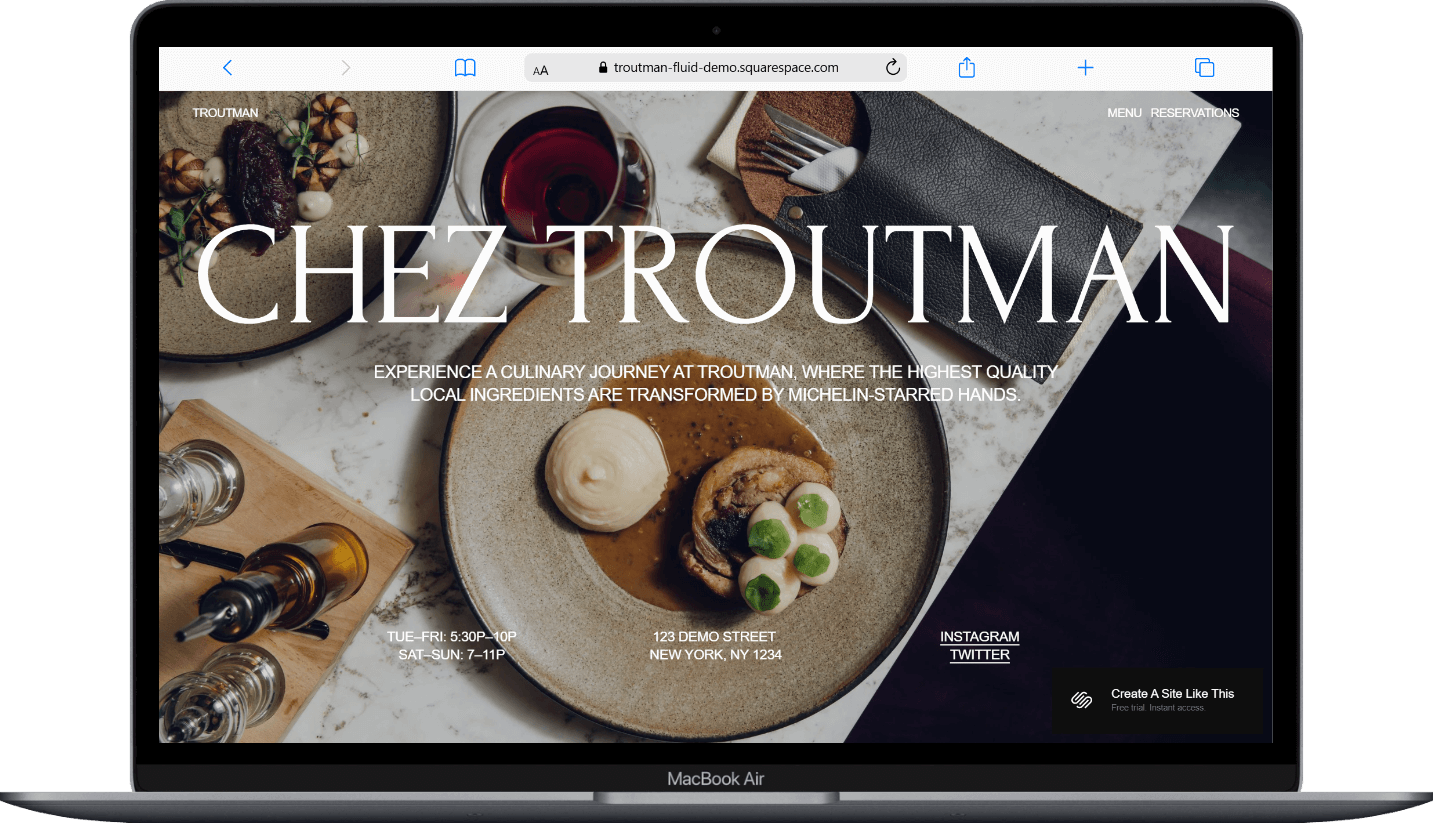
The homepage features a bold image, headline section, business hours, location and contact info, links to Menu and Reservation pages, newsletter signup form, and social media links.
Menu Page
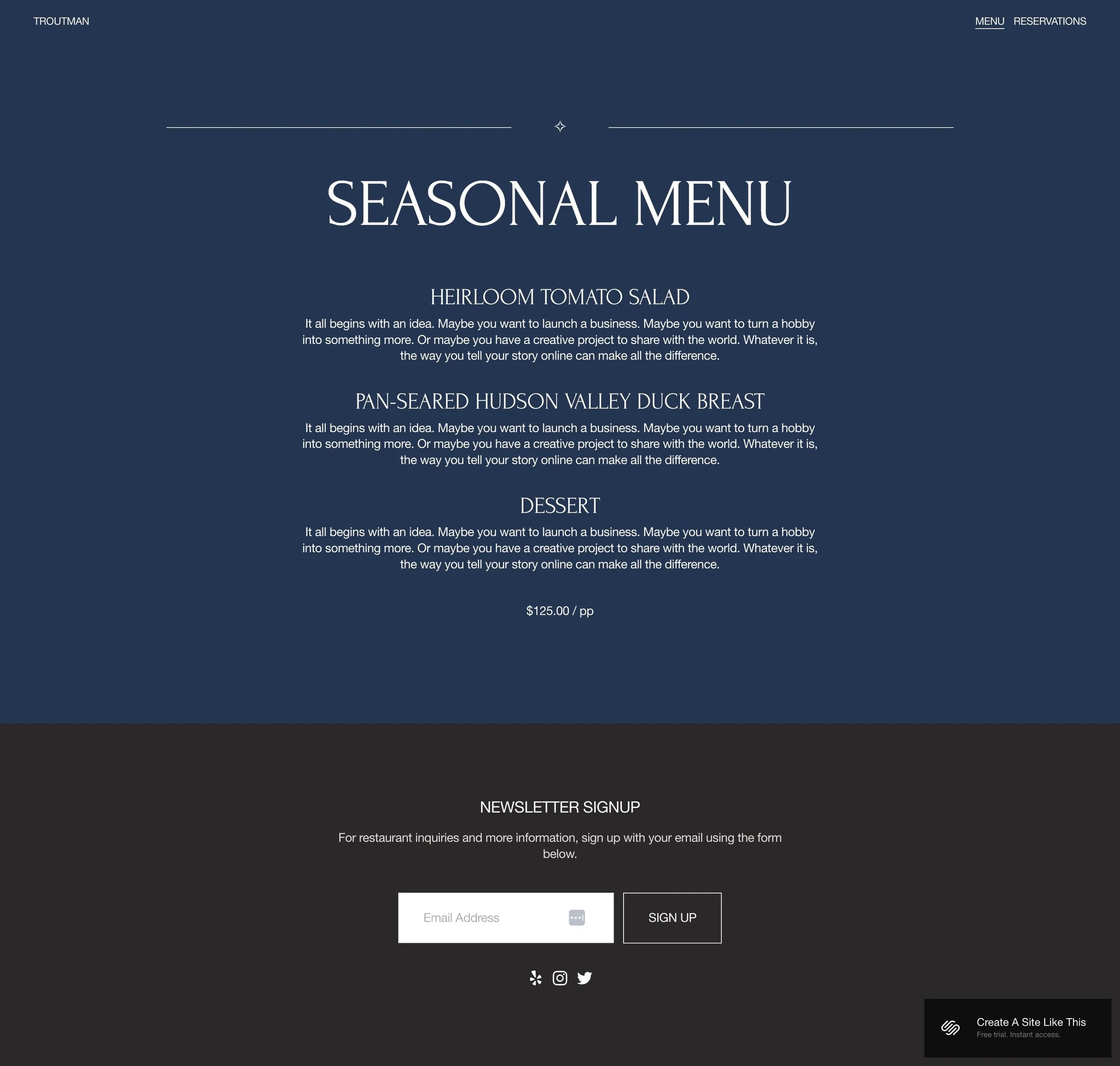
Space for dish names, descriptions, and pricing organized by category.
Reservation Page
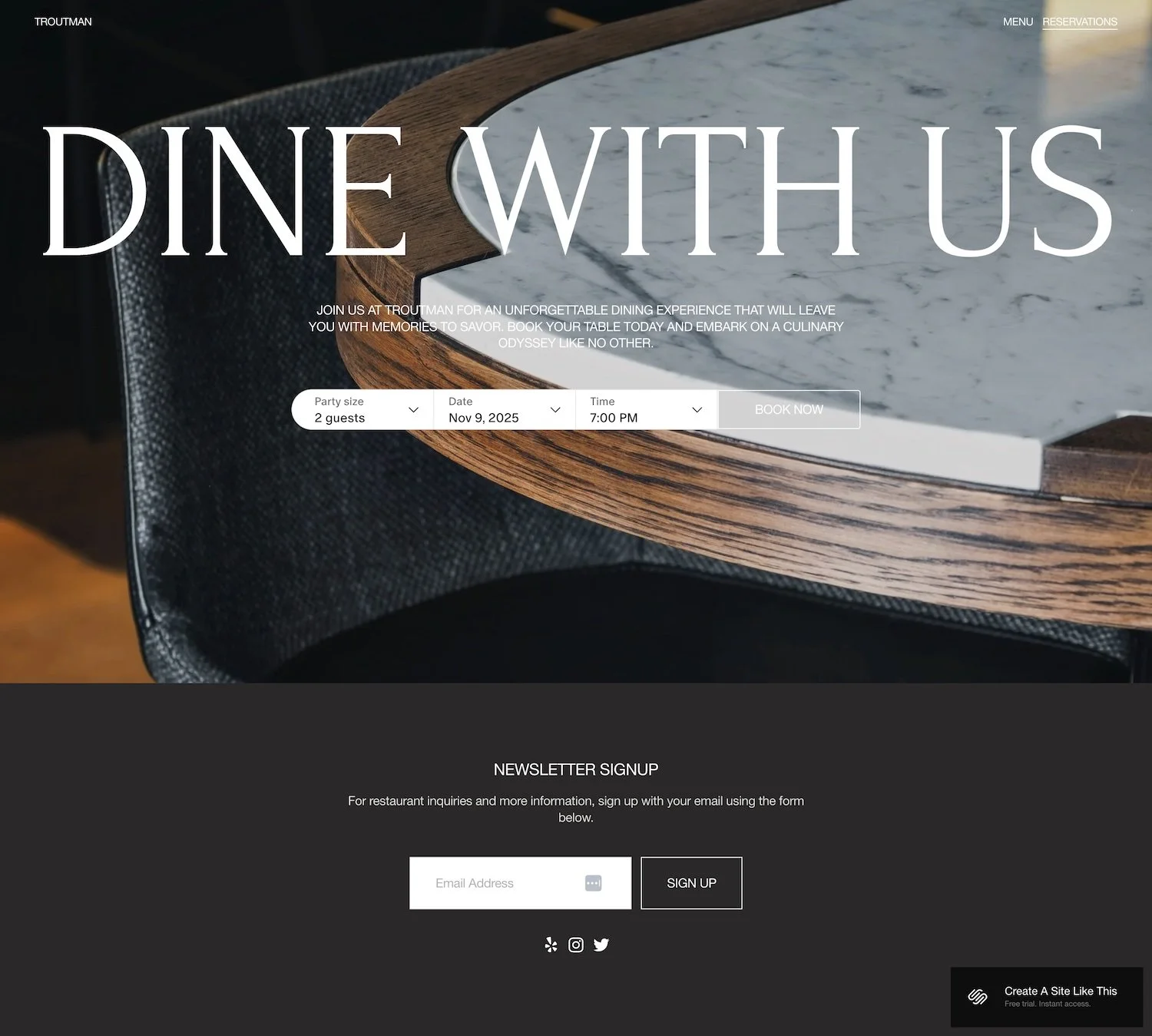
A simple page with a form or link to your reservation system.
Extras
Newsletter integration for building your email list
Social media link integration
Mobile-responsive design
Bold typography and dark color scheme as default
Minimal structure that loads quickly
Support for background images to add atmosphere
Key Strengths of the Troutman Template
Designed for Quick Decision-Making Troutman gets visitors to where they need to go fast. If your primary goal is getting people to view your menu or book a table, this minimal template works well.
Perfect for Limited Content Not every restaurant website needs five pages of content and a ton of info about your philosophy, your team, blog pages, or you background. If you're just starting out, or keeping things simple, Troutman gives you what you need, without forcing you to fill pages you don't want.
Bold Visuals The typography makes a statement. With Forum used for the bold headlines and the classic Helvetica Neue as the body, this font combination conveys elegance. Combined with high-quality background imagery, you can create a memorable brand impression with this template.
Built-In Lead Capture The newsletter signup form on the homepage is positioned where people will see it, making it easy to grow your email list.
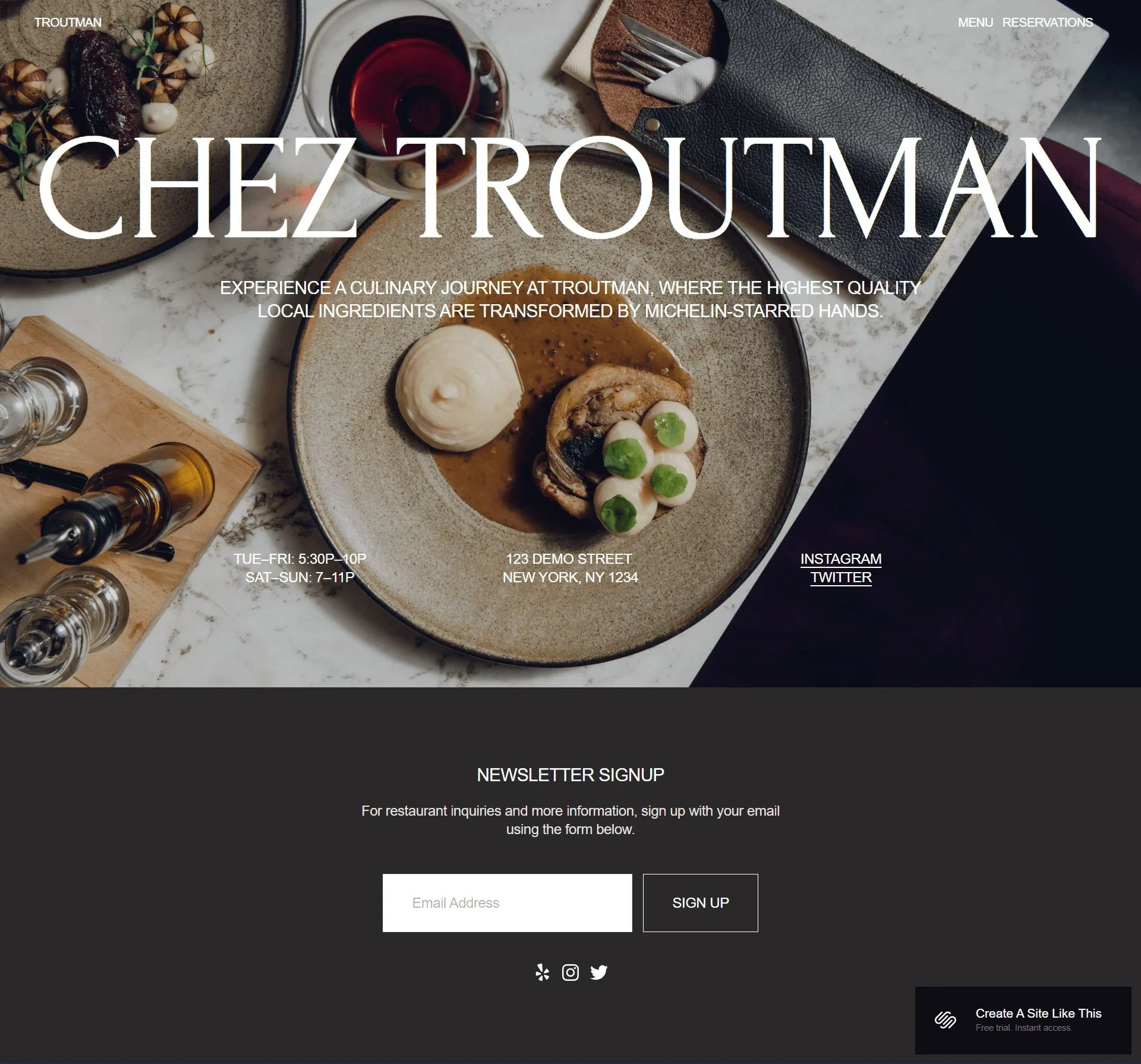
this is the entire homepage
What the Troutman Template Is Not Best For
The Troutman template may NOT be the best fit for:
Non-restaurant businesses: This template is really built for restaurants with its menu displays and reservation booking. If you're running a bakery that doesn't do sit-down dining, a coffee roastery, a catering-only business, or anything that's not a restaurant, this probably isn't your best template choice.
Casual or fun dining spots: Troutman has an elegant, upscale feel. So if you're running a taco truck, pizza place, a dive bar, a retro diner, or anywhere with a playful personality, this template might feel too fancy and serious for your vibe.
If you want to tell a big story: Troutman is intentionally simple and minimal. If you want to write extensively about your farm-to-table philosophy, share tons of chef stories, post regular blog updates, or have massive photo galleries, you'll probably feel constrained by how ‘basic’ this template is.
If you want something bold and eye-catching: The clean, minimal design won't work if you're looking for something dramatic with lots of movement, wild colors, or an unconventional layout that really grabs attention.
Basically, Troutman is perfect for upscale, straightforward restaurant websites. But if your brand is more casual, storytelling-focused, or just not food-related, you'd be better off looking at other Squarespace templates, like Auburn (more narrative focused), Vance (more statement-making) or Heron (more dramatic with movement).
Pros & Cons of the Troutman Template
Pros
Easy to set up - It's a very simple template, so you won't spend weeks trying to figure out what content goes where. Great if you want to get your site up quickly.
Perfect for upscale restaurants - The elegant, sophisticated look automatically makes your restaurant feel more high-end without you having to work too hard at it.
Built-in restaurant features - The reservation form, menu section, and newsletter signup are already there. You don't have to add these from scratch or figure out workarounds.
Clean and professional - The minimalist design keeps the focus on your food photos and won't look cluttered or dated.
Low maintenance - Since it's designed to be simple, you won't need to constantly update tons of content to keep it looking good.
Cons
VERY simple - If you want to share your restaurant's story, write blog posts regularly, or have other extensive content like videos, this template will feel limiting.
Might be too formal - If your restaurant has a fun, casual, or quirky personality, the elegant vibe might not match your brand at all.
Less unique - The minimalist approach means it might look similar to other restaurant sites. If you want to really stand out visually, this won't do it, unless you customize like crazy.
Limited for complex needs - If you have multiple locations, franchise information, extensive catering menus, or other complicated business needs, the simple structure might not accommodate everything well.
Lacks built-in SEO hierarchical structure - Like all Squarespace templates, Troutman doesn't automatically include proper heading hierarchy, which means you'll need to manually optimize for search engines.
Getting started with the Troutman template is easy:
Once you pick Troutman in the Squarespace 7.1 template library and you're ready to build, here's what to do:
Replace the headline and intro text. Write your restaurant's core message: what you do and why it matters.
Update your business hours.
Add your location and contact information. Include full address, phone number, and directions if needed.
Set up your Menu page. Replace demo content with your actual dishes, descriptions, and pricing organized by category.
Configure your Reservation page. Connect your reservation system (OpenTable, Resy, Tock) or create a custom form.
Connect your newsletter signup form. Link to your email platform and test that signups work properly.
Add your social media links. Connect Instagram, Facebook, or other actively maintained accounts.
Adjust colors and fonts in Site Styles. Match the template to your brand through Squarespace's customization options.
Check your heading hierarchy. Squarespace templates don't always include proper heading structure by default, so make sure your main headline is an H1 and subheadings follow logical order for better SEO.
Test the mobile experience. Make sure everything is readable and buttons are tappable on phones.
Double check everything, connect your domain and choose your Squarespace plan, and go live. Review all links, forms, and information before launching.
Troutman Squarespace Template FAQs
Is the Troutman template good for SEO?
Yes. Like all Squarespace 7.1 templates, Troutman includes the platform's SEO tools. You can customize page titles, meta descriptions, URL slugs, and image alt text. The template doesn't automatically include proper heading hierarchy though; you'll need to check and adjust your H1, H2, H3, and H4 structure manually.
Is the Troutman template good for mobile design?
Yes. All Squarespace templates, including Troutman, automatically adjust to fit whatever device someone is using. So if someone pulls up your restaurant website on their phone, it'll rearrange everything to fit that smaller screen without you having to do anything.
This is actually perfect for restaurants because so many people are searching for places to eat while they're already out. They can quickly check your menu, see your hours, and book a table right from their phone.
The best part is you don't have to create two versions of your website or know any coding. It just works. And since Troutman has that simple, clean design, it loads fast on phones and everything stays easy to read and click on; your photos, menu, and reservation button all look good whether someone's on their laptop or scrolling on their phone.
Can I change fonts and colors on the Troutman template?
Yes! You can change fonts and colors easily in Troutman. Squarespace has a built-in Style Editor where you can customize all of this. You just go into your site's Design panel, click on "Site Styles," and you'll see options to change your color palette and fonts. You can adjust things like your heading fonts, body text, background colors, and accent colors.
It's all point-and-click, so you can play around with different looks until you find what matches your restaurant's vibe. Want to switch from that elegant look to something warmer or bolder? Just swap out the colors and fonts. Everything updates across your whole site automatically, so you don't have to go page by page changing things.
This is one of the nice things about Squarespace templates: they give you a professional starting point, but you're not stuck with exactly how they look in the demo. You can make it feel like your own brand pretty easily.
Do I need to keep the layout, or can I add more pages?
You can definitely add more pages if you want! Troutman comes with a certain number of demo pages already set up (home, menu & reservations), but you can add as many additional pages as you want. Need a private events page? An about us page? A page for catering? Just add them.
You can also duplicate existing pages if you want to create similar layouts, or build completely new pages from scratch using Squarespace's drag-and-drop builder.
As for the layout itself, you can rearrange things, add or remove sections, and customize what appears on each page. So if the demo homepage doesn't quite work for you, you can move things around, add new image sections, change the order of content blocks, whatever makes sense for your restaurant.
The template is really more like a helpful foundation that shows you what's possible. But once you start working with it, you can shape it however you need to tell your restaurant's story and give customers the information they're looking for.
If you find yourself wanting to add four or five additional pages though, you might want to start with a different template.
Does Troutman integrate with reservation systems?
Yes. You can connect popular reservation platforms like OpenTable, Resy, or Tock through the Reservation page. Squarespace also lets you create custom booking forms if you prefer to manage reservations internally. The key is making sure whatever system you use integrates smoothly; test the booking flow from start to finish to avoid losing customers to technical glitches.
Can I use Troutman for a restaurant with multiple locations?
Not really. Troutman's single-page structure isn't built for multi-location businesses. If you have two or three locations, you'd need separate pages for each with different addresses, hours, and possibly menus. At that point, the template's simplicity becomes a limitation rather than a benefit. You'd want something with more robust navigation and content organization capabilities.
Is Troutman good if i have a large, detailed menu?
Not particularly. The template gives you space for menu basics — dish names, descriptions and prices — but it's not designed for huge menus. If you're running a diner with 10 pages of breakfast, lunch, and dinner options, or an Indian restaurant with extensive appetizers, curries, breads, and desserts all with detailed descriptions, Troutman might not give you enough room to display everything comfortably.
How often can I update the content on Troutman?
As often as you want! There's no limit.
You can log into your Squarespace site anytime and update whatever you need, whether that's daily specials, changing your menu, updating your hours, adding new photos, or posting about upcoming events. You could literally update it multiple times a day if you wanted to.
This is actually one of the nice things about having your own website instead of relying only on social media or third-party platforms. You're in complete control. The updates happen in real-time too, so as soon as you save your changes, they're live on your site for customers to see.
This makes Troutman (and really any Squarespace site) pretty flexible for restaurants that like to keep things fresh, whether you're updating seasonal menus, promoting special events, or just tweaking things as your business evolves. You're never stuck waiting for someone else to make changes for you.