Alignflow Squarespace Template Review
This post contains affiliate links. If you purchase through them, I may receive a small commission at no extra cost to you.
Table of Contents Show
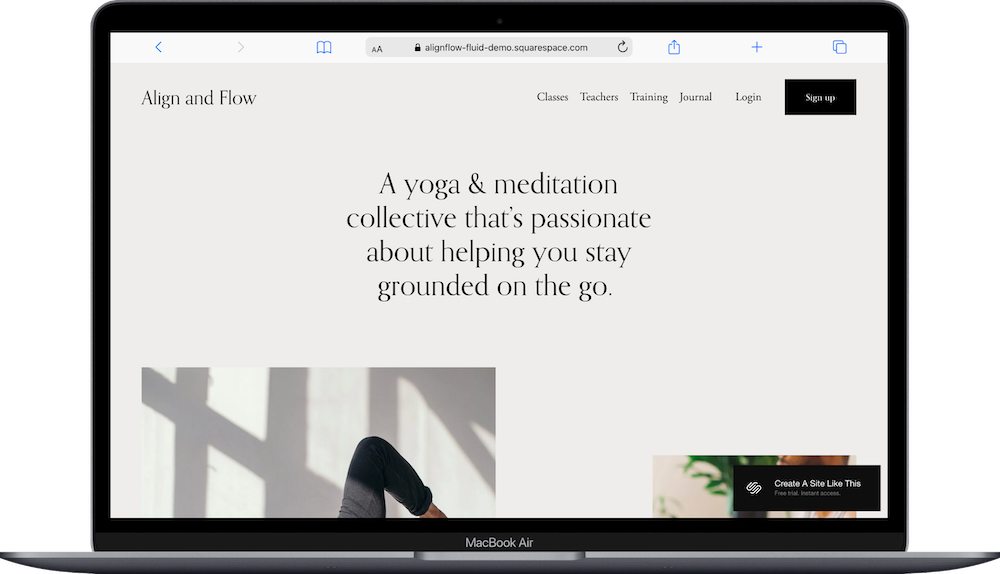
Alignflow (or Align and Flow) is a Squarespace template built for yoga studios, wellness coaches, and fitness professionals.
The demo shows a yoga collective with membership pricing tiers, class schedules, teacher bios, and a journal (blog). It's one of the more popular Squarespace templates, and for good reason: it's robust, highly customizable, and works well across a wide variety of wellness industries. Whether you teach yoga, run a meditation studio, offer wellness coaching, or provide fitness classes, Alignflow probably caught your eye for good reason.
This review covers what Alignflow includes, where it shines, and where you might hit limitations.
The goal: help you figure out if this Squarespace template is the right fit for your wellness or coaching business, or if you should keep looking.
Who the Alignflow Template Works Best For
Alignflow works well if you offer classes, memberships, or training programs.
Yoga Studios
If you run a yoga studio with multiple teachers, class schedules, and membership options, Alignflow is built for exactly that. The demo showcases different yoga styles, teacher bios, and pricing tiers.
Wellness Coaches and Meditation Teachers
The template works great for coaches offering online programs, guided meditations, or video libraries. The membership area lets you gate content for paying clients.
Fitness Instructors with Multiple Offerings
If you teach different types of classes (cardio flows, restorative yoga, meditation) and offer various membership levels, Alignflow organizes everything clearly.
Teacher Training Programs
The demo includes a 200-hour teacher training program option. If you offer certification programs or intensive courses, this template is a great choice.
Any Solopreneur Building a Content Library
The membership area works great if you're creating a library of on-demand classes, tutorials, or educational content that people pay to access.
Who the Alignflow Template Is Not Best For
The Alignflow template probably isn't the best fit if you:
Run a small personal training business with just a few services (this is built for multiple offerings and might feel like overkill)
Need a simple one-page wellness site (Alignflow has lots of pages and structure, which is great if you need it, but might feel excessive if you don't - read my roundup of all one-page website templates here if you’re looking for a one-pager)
Don't offer memberships or gated content (the membership functionality is a key feature, so if you're not using it, that’s fine, but there might be a better template out there for you)
Want bold, energetic, high-contrast design (this is calm and minimal with soft colors and lots of white space)
Sell physical products as your main business (Alignflow is built for services and digital content, not specifically e-commerce)
What You Get with the Alignflow Template
Alignflow comes with seven pages:
Home Page
Multiple sections including hero, schedule finder, brand messaging, teacher intro, pricing tiers, class variety, blog preview, and newsletter signup.
Classes Page
Showcase class offerings and schedules.
Teachers Page
Teacher bios, photos, and credentials.
Training Page
Details about intensive programs like teacher training or workshops.
Journal (Blog)
Built-in blog for wellness tips and content.
Login & Signup Pages
Member portals for accessing gated content.
Extras:
Membership area functionality
Floating header
Pricing tier display
Clean minimal design
Mobile-responsive

Pros & Cons of the Alignflow Template
Pros
Alignflow handles complexity well; it doesn’t feel overwhelming. If you offer three membership levels, five types of classes, and have four teachers, Alignflow organizes all of that supremely well. The structure keeps everything accessible without turning your site into a chaotic mess.
The membership area is a big deal if you're monetizing content. You can offer free intro videos, paid unlimited access, or premium training programs all from one site. The Login and Signup pages are already built, so you're not starting from scratch.
The pricing tier layout makes decision-making easy for your visitors. Three columns, clear pricing, simple descriptions. People can compare options at a glance and pick what fits.
It works across different wellness industries. The demo shows yoga, but this template really adapts well for meditation studios, Pilates instructors, wellness coaches, or fitness professionals.
The blog helps you attract visitors through content. Writing about wellness topics, practice tips, or answering common questions brings people to your site through search engines.
Cons
It's a lot of template if you don't need it all. If you teach three private yoga sessions a week and don't offer memberships, Alignflow has way more structure than you need. You might end up deleting pages instead of using everything that’s there.
The calm, minimal aesthetic won't work for everyone. If your brand is bold, energetic, or uses bright colors and strong graphics, Alignflow's soft neutrals and quiet design might feel wrong.
That’s really it. I think Alignflow is a great template if youre in the wellness/yoga industry. You can delete the pages you don’t need and have a good foundational starting point.
Getting Started with the Alignflow Template is Easy
Once you pick Alignflow in the Squarespace 7.1 template library, here's what to do:
Map out your offerings first. Before touching the template, list your membership tiers, class types, and teacher information. Knowing what you're offering makes filling in the template much faster.
Update the pricing tiers on the homepage. Change the three-column section to reflect your actual membership options with accurate pricing and descriptions. And if you only offer two tiers, for example, delete the third column.
Fill in your Classes page. Describe each type of class you offer: style, duration, difficulty level, what people can expect. Be specific to make it easier for visitors can self-select into the right class.
Add teacher bios and photos. If you have multiple instructors, write bios highlighting their training, specialties, and teaching style. Include professional photos. If you're solo, you can delete this page or turn it into an expanded About page.
Set up your membership area. Go to Squarespace's Member Areas settings and configure your gated content. Upload classes, videos, or resources for members. Test the login and signup flow.
Customize Site Styles. Go to Design > Site Styles and adjust colors, fonts, and spacing to match your brand. The demo uses soft neutrals, but you can adapt it to your brand.
Check your heading hierarchy. Make sure your main headline is H1 and subheadings follow proper order (H2, H3, H4) for SEO. This matters for both getting found in search and for accessibility.
Start your blog with 3-5 posts. If you’re blogging. Don't launch with an empty blog. Write a few articles about common questions, practice tips, or wellness topics your audience cares about.
Double-check everything, connect your domain, choose your plan, and go live. Preview on mobile and desktop, test the membership login and signup process, make sure all pages load correctly, then publish.
Alignflow Squarespace Template FAQs
Is Alignflow only for yoga studios?
Nope. The demo shows yoga, but this works for meditation studios, Pilates, wellness coaching, fitness classes, etc. It's flexible across wellness industries.
Do I need to offer memberships to use this template?
No…. but memberships are a major feature. If you're not using member areas, you're missing one of the template's strengths. You can still use it for classes and services though, without memberships.
Can I add class scheduling and booking?
Yes, but you'll integrate a third-party tool like Acuity Scheduling. The template doesn't have built-in scheduling by default (like all Squarespace templates).
Is the Alignflow template good for SEO?
Yes. You can optimize pages and headings. The blog helps create content for search traffic. Clean code loads fast. But SEO requires work: write quality content, and use keywords.
Can I use Alignflow for both live classes and on-demand content?
Yes. Use Alignflow's Classes page for your live class schedule and booking. Use the member area for on-demand video library. Many yoga studios use Alignflow this way: live classes for local students, video library for virtual, remote or off-hours practices.
Can I sell workshops or retreats with the Alignflow template?
Absolutely. Alignflow works with Squarespace's e-commerce features, so you can sell workshops, weekend intensives, teacher trainings, or retreats. Add these as products or create event pages. Link to booking from your Training page or create a dedicated Events section.
Is Alignflow good for yoga teacher training programs?
Yes. Alignflow includes a Training page specifically designed for intensive programs like 200-hour or 300-hour yoga teacher training. You can detail curriculum, pricing, dates, and requirements. The membership area works well for delivering training materials.
How do I grow my yoga studio membership with Alignflow?
Use Alignflow's free membership tier to offer limited content and build your email list. Create blog content about yoga, wellness, and practice tips for SEO. Share class previews on social media. Email subscribers regularly with class updates. The Alignflow template provides the membership infrastructure, but you have to handle the marketing.