Alameda Squarespace Template Review
This post contains affiliate links. If you purchase through them, I may receive a small commission at no extra cost to you.
Table of Contents Show
Alameda is a Squarespace shop template for selling clothes (though is easily customizable to sell other products too).
It's basically a ready-to-go shop page that’s set as your homepage. The demo sells clothing, but this works for any product-based business that wants an uncomplicated but easy to set up shop. If you need a simple, plug-and-play online store with built-in category sorting, Alameda probably caught your eye for good reason.
This review covers what Alameda includes, where it shines, and where you may hit limitations.
The goal: help you figure out if this Squarespace template is the right fit for your product-based business, or if you should keep looking.
Who the Alameda Template Works For
Alameda works if you want your homepage to BE the shop and probably own a clothing or other product-based shop.
Clothing boutiques selling curated collections.
Any product-based business. The demo shows clothing, but this works for jewelry, home goods, beauty products, accessories; anything you can photograph and sell.
Small collections (probably up to 100 or so products). The simple navigation works great for focused product lines.
Brands with strong product photography. The hover feature shows second images on mouseover. If you shoot multiple angles, this template shows them off.
Anyone who wants plug-and-play. You get a functional shop out of the box. Add products, set categories, adjust colors. Done.
Who Alameda Doesn't Work For
Skip Alameda if you:
Sell hundreds of products across many categories. The simple navigation works for small collections, not massive catalogs that need robust filtering and search.
Want bold, colorful, graphic-heavy design. This is a minimal and clean template.
Sell products needing extensive explanation. The layout prioritizes images over long descriptions.
What You Get
Alameda includes five pages, but the shop page is the star.
Shop Page (Homepage)
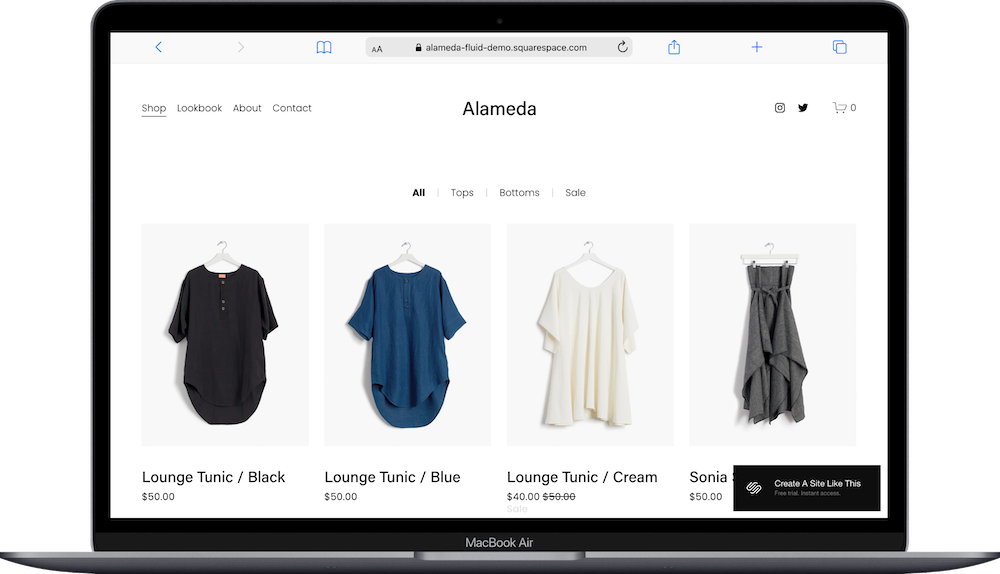
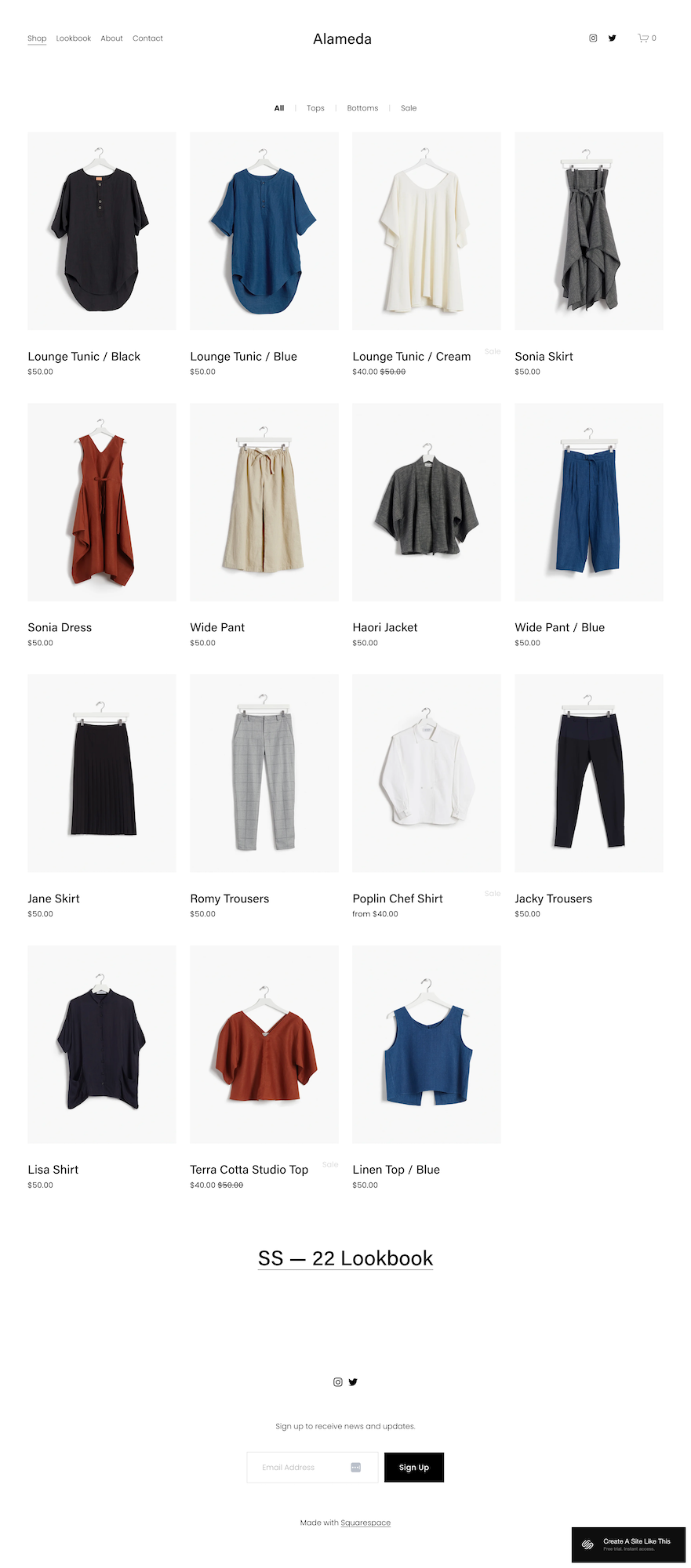
Header - Store name centered, navigation (Shop, Lookbook, About, Contact), social icons, cart.
Category tabs - Filter products at the top. Click All, Tops, Bottoms, or Sale. See those products.
Product grid - Four columns. Each product shows image, name, price. Hover reveals a second photo.
Sale indicators - Sale items show both prices with strikethrough on the original.
Lazy loading - Products load as you scroll.
Newsletter signup - Email form at the bottom.
Product Pages
Large image (or slider), description, size/variant selector, Add to Cart button, related products.
Lookbook Page
Space for lifestyle photos showing products in use.
About Page
Tell your brand story. Add photos and text.
Contact Page
Simple contact form.
Extras
Hover-to-reveal second image
Category filtering
Mobile-responsive
Full cart and checkout
Sale price display
Related products
Pros & Cons of the Alameda Shop Template
Pros
The shop-first homepage is exactly what some businesses need. Visitors land on your site and they're already shopping. There are category tabs built in, making easy to just plug and play.
The hover feature is useful. Move your mouse over a product, see a second angle. Front view, back view, done. Keeps people browsing.
The minimal design is flexible. The demo sells $50 t-shirts, but you could adapt this for jewelry, home goods, beauty products, whatever. Just change colors and fonts and it fits your brand.
Setup is simple. Upload photos, add products, organize categories, adjust colors.
Cons
Simple navigation doesn't scale. If you sell 200 products across tons of categories, basic tabs won't cut it. You need better filtering and search.
The minimal design might be too plain for bold brands. If your vibe is loud colors or strong graphics, this won't match.
Product pages are basic. Image, description, buy button. If you need detailed size charts or extensive product info, you're adding that yourself.
The lookbook is just space for images. If you want shoppable tags or interactive features, you may need to customize.
Getting Started with Alameda is Easy:
Once you pick Alameda in the Squarespace 7.1 template library, here's what to do:
Add your products. Go to Commerce and add each item with photos, name, price, description. Upload at least two photos per product for the hover feature.
Set up categories. Create categories like Tops, Bottoms, Sale, whatever categories make sense for your brand. Assign each product to a category, then these become your filter tabs.
Customize your lookbook. Upload lifestyle or styled photos showing products in use.
Fill in your About page. Write your brand story and add photos.
Update Site Styles. Go to Design > Site Styles and adjust colors, fonts, buttons to match your brand.
Set up shipping and payments. Configure shipping in Commerce settings. Connect Stripe or PayPal. Test a purchase.
Check heading hierarchy. Make sure your main headline is H1 and subheadings follow proper order for SEO.
Double-check everything and go live. Preview on mobile and desktop, test checkout, connect your domain, choose your plan, publish.
Alameda Squarespace Template FAQs
Is the Alameda squarespace template good for selling clothes?
Yes. The hover-to-show-second-image feature works great for clothing where people need front and back views. Category filtering helps customers browse by type without getting lost. The clean layout puts your products front and center instead of competing with design elements. It's one of the better Squarespace templates for fashion.
Can I add a blog to Alameda?
Yep, definitely. The demo doesn't include a blog page, but you can add blog functionality through Squarespace's page settings and create a blog section from scratch. It's doable, just not plug-and-play like the shop and lookbook pages.
Is Alameda good for SEO?
Yes, for e-commerce SEO basics. You can optimize product titles, descriptions, and image alt text. Each product gets its own page. But you still need to put in some work: write good product descriptions with relevant keywords, optimize images, build backlinks. The template gives you a solid foundation to start with, not automatic rankings.
Can I change the colors and fonts on Alameda?
Absolutely. Change colors, fonts, button styles, and spacing through Site Styles. The demo uses black text on white with minimal color accents, but you can add your brand colors and pick different fonts.
How many products can I add to Alameda?
Technically unlimited, but realistically it works best with up to 100 products. Beyond that, simple category navigation feels inadequate. If you have hundreds of products, you might want to explore Shopify as an alternative.Can I customize the lookbook page?
Can I add sale or discount codes to Alameda?
Yes. Squarespace's e-commerce tools include full discount code functionality. Create percentage discounts, dollar-off promotions, free shipping codes, buy-one-get-one deals, whatever you need. The template automatically displays sale prices with the original price struck through.
Bottom Line
Buy Alameda if you want a shop-first homepage with clean, minimal design and you sell 20-100 products with strong photography. Skip it if you need robust filtering for hundreds of products, want bold colorful design, or need a blog as part of your core strategy.