Passero Squarespace Template Review
This post contains affiliate links. If you purchase through them, I may receive a small commission at no extra cost to you.
Table of Contents Show
Passero is a Squarespace template for online course creators, membership sites, and educators who teach through video content.
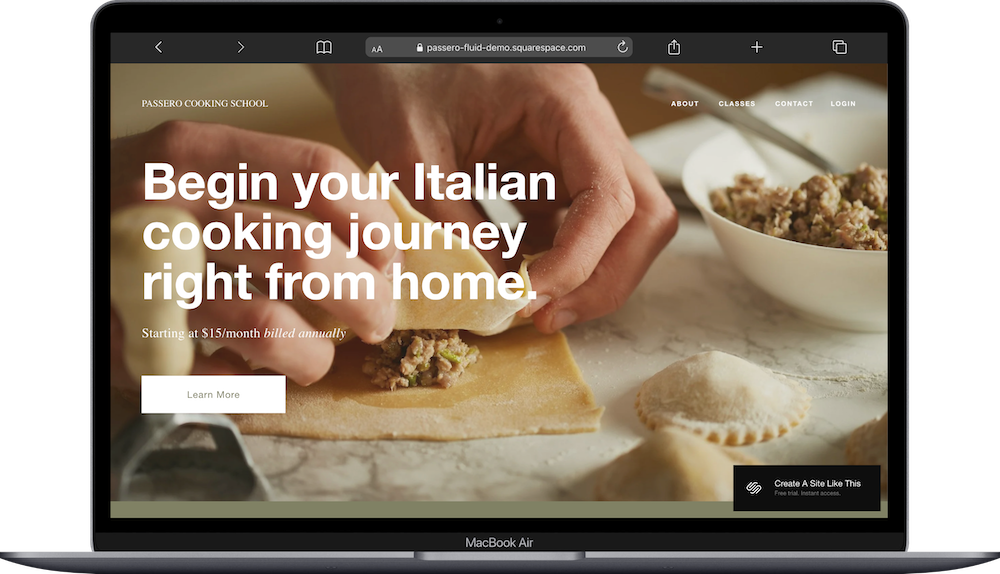
The demo shows an Italian cooking school offering monthly subscriptions for video lessons, but the template works for any type of online learning. If you teach courses, run a membership community, or offer educational content through subscriptions, Passero probably caught your eye for good reason.
This review covers what Passero includes, where it shines, and where you might hit limitations.
The goal: help you figure out if this Squarespace template is the right fit for your business, or if you should keep looking.
Who the Passero Template Works Best For
Passero works best if you're teaching something through video lessons or gated content that people pay to access.
Online Cooking Instructors
The demo is a cooking school. If you teach cooking techniques, recipes, or culinary skills through video, Passero's layout already matches what you do and is a great fit.
Fitness Coaches and Trainers
Yoga instructors, personal trainers, or fitness coaches offering workout videos, programs, or monthly memberships can use Passero's membership structure.
Creative Educators
Teaching painting, photography, knitting, woodworking, or any creative skill? Passero handles video lessons and member-only content.
Language Teachers
If you teach language lessons through video courses or offer subscription access to learning materials, Passero's membership setup works.
Professional Development Coaches
Business coaches, career coaches, or consultants offering courses, workshops, or ongoing training programs can use Passero for member access.
Who the Passero Template Is Not Best For
The Passero template probably isn't the best fit if you:
Sell one-time courses instead of memberships. Passero is built around recurring subscriptions. If you sell individual courses for one-time payments, the structure doesn't match.
Don't have video content. The template emphasizes video instruction. If you teach through text, PDFs, or audio only, Passero's layout won't work as well.
Need complex course structures with modules and progress tracking. Passero handles membership content, but if you need detailed course organization with completion tracking, you'll want a dedicated course platform.
Offer in-person classes only. Passero is designed for online learning. If you run physical classes without digital content, this isn't the right template.
Want to sell products alongside courses. The template is built for membership content, not e-commerce. Adding a shop is possible but not included in the template.
What You Get with the Passero Template
Home
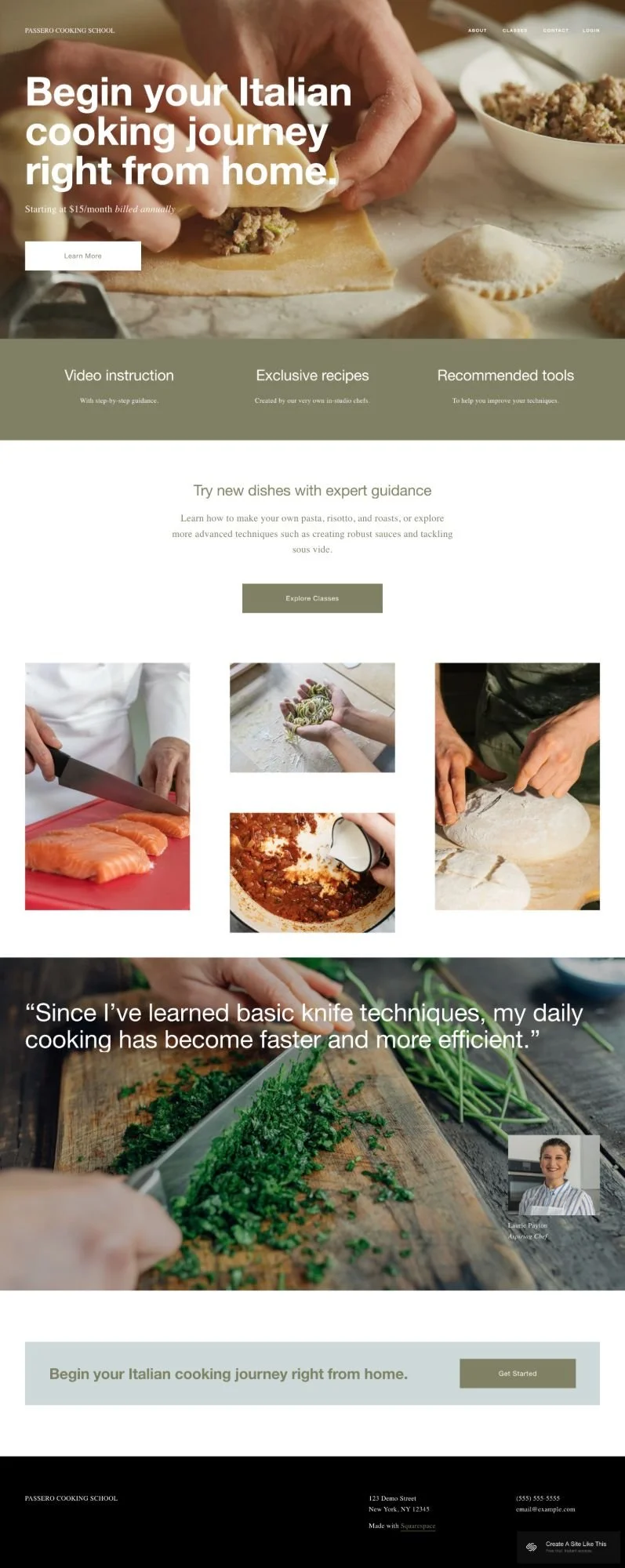
Hero section with large image and headline, pricing information, call-to-action button, three benefit sections explaining what's included (Video instruction, Exclusive recipes, Recommended tools), description section with course details and "Explore Classes" button, image gallery showing course content or techniques, testimonial section with student quote and photo, and bottom CTA section with signup button.
About
Page for your story, teaching philosophy, or instructor background.
Classes
Course or lesson catalog where members can browse available content.
Schedule
Page showing upcoming classes, live sessions, or content release schedule.
Login
Member login page for accessing gated content.
Built-in Features
Member area functionality for gated content
Testimonial section with photo
Image gallery for course previews
Multiple CTAs for conversion
Clean, professional design
Mobile responsive
Squarespace 7.1 Fluid Engine
Pros & Cons of the Passero Template
What Works Well
The member area is built in. You don't need to figure out how to gate content or anything- Passero includes member login and restricted pages out of the box.
Pricing is front and center. The homepage shows your monthly cost right away, so people know what they're signing up for without hunting for information.
Multiple CTAs guide people toward signup. "Learn More," "Explore Classes," and "Get Started" buttons throughout the page push visitors toward becoming members.
The warm, professional aesthetic builds trust. The neutral colors and clean layout make you look established and credible.
The testimonial section adds social proof. Student quotes with photos help convince new visitors that your courses deliver results.
What Doesn’t Work Well (Or Just Things To Be Aware Of)
The template assumes recurring memberships. If you sell courses individually or offer one-time purchases, the membership structure and pricing display don't fit as well.
Limited course organization on the homepage. You get a general description and gallery, but not detailed breakdowns of what's in each course or module.
The professional aesthetic might feel too formal. If your teaching style is casual, fun, or quirky, Passero's clean design might feel stiff.
Getting Started with the Passero Template is Easy
Once you pick Passero in the Squarespace 7.1 template library, here's what to do:
Replace the hero image and headline. Swap the pasta-making photo with an image representing what you teach. Change the headline to match your actual offer.
Update the pricing. Change "$15/month billed annually" to your real pricing structure. Be clear about what people get for that price.
Customize the three benefit sections. Replace "Video instruction," "Exclusive recipes," and "Recommended tools" with the benefits of your membership or course.
Write your course description. Update the "Try new dishes with expert guidance" section to explain what students will learn and what topics you cover.
Add your course preview images. Replace the demo cooking photos with screenshots, images, or graphics from your actual lessons or courses.
Adjust Site Styles. Customize the template with your own brand colors and fonts through Design > Site Styles.
Set up your member area. Create member-only pages for your video content, lessons, or resources. Configure who can access what based on membership level.
Fill in your About page. Write your teaching background, credentials, or story. Help people understand why they should learn from you.
Build out your Classes page. Add your course catalog, lesson descriptions, or content library so members know what's available.
Double check everything, connect your domain, choose your Squarespace plan, and go live. Test the member login, make sure content is properly gated, preview on mobile, then launch.
Passero Squarespace Template FAQs
Can I sell courses on the Passero template?
Yes, that is literally what Passero is built for. Passero is designed for membership sites where people pay for access to content. You can charge monthly or annual subscriptions through Squarespace's member areas feature. If you want to sell individual courses for one-time payments instead of recurring memberships, Passero's structure won't fit as naturally.
Is the Passero template good for SEO?
Yes. Like all Squarespace templates, Passero has standard SEO capabilities like custom page titles, meta descriptions, and image alt text. (You’ll need to add these in yourself, but Squarespace makes it easy.) But something to be aware of: since most of your content lives behind the member login, search engines can't index it. Your public pages (home, about, maybe some free preview content) are what will rank in search results.
Can I change fonts and colors on the Passero template?
Yes. You can customize colors, fonts, and spacing through Site Styles. The warm neutral palette works for most teaching businesses, but you can easily adjust it to match your brand.
Does Passero require Squarespace member areas?
Yes. The template is built around gating content for paying members. You'll need a Squarespace plan that includes member areas functionality (not available on the cheapest ‘Basic’ plan. See my review of Squarespace’s plans and prices here).
Can I offer different membership tiers?
Yes. Squarespace member areas support multiple membership levels, so you can offer basic and premium tiers with different content access and pricing.
What's the Schedule page for?
The Schedule page is for showing upcoming live classes, content release dates, or when new lessons drop. If you're not running live sessions or releasing content on a schedule, you can delete this page or repurpose it for FAQs or resources.
Can I add downloadable resources for members?
Yes. You can upload PDFs, worksheets, or other files to member-only pages. Members can download and access these alongside your video content.
Does Passero work without video content?
Yes, but not as well. The template really was build for video content. It emphasizes video instruction in the benefits section and overall layout. If you teach through text, audio, or other formats, you'd need to rewrite sections to match what you actually offer.
Can I collect email addresses before people join?
Yes. You can add an email signup form to collect leads before they're ready to become paying members. Then nurture those leads with free content until they convert to membership.