Best Squarespace Templates for Lawyers and Law Firms in 2026
This post contains affiliate links. If you purchase through them, I may receive a small commission at no extra cost to you.
Table of Contents Show
What are the best Squarespace templates for lawyers?
Quick Answer: The best Squarespace templates for lawyers are Corrigan (the only one built specifically for law firms), Clarkson (clean corporate layout for multi-attorney practices), and Cedar (trust-forward design with a finance/professional feel). All are free with any Squarespace plan, starting at $16/month, and you can test them during a 14-day free trial.
KEY SQUARESPACE TEMPLATE FOR LAWYER FACTS:
Squarespace has one template explicitly tagged for law/legal: Corrigan
I’ve found five additional built-in templates that also work well for law firms: Clarkson, Cedar, Bailard, Agaro, and Nolan
Squarespace plans for 2026: Basic, Core, Plus, Advanced
All plans include a 14-day free trial with full template access
Squarespace 7.1 uses the Fluid Engine editor; all templates are built on it
Squarespace navigation supports one sub-level only, which can be limiting for firms with many practice areas
Third-party template shops offer more law-specific designs starting around $99-$450
What a Law Firm Website Needs to Do (Before You Pick a Template)
Templates are just starting points. Before you scroll through previews and pick the one that looks the nicest, it helps to know what a law firm website needs to accomplish. Because a lawyer's site has different priorities than, say, a photographer's or a restaurant's.
Here's what most attorneys and lawyers find helpful on a website:
Practice area pages. If you handle family law, estate planning, and personal injury, each of those could have its own dedicated page. You can have sections too, but separate pages is reccomended for SEO, UX, and ease of client experience. Individual pages are easier to rank in search, explain your approach, and give potential clients enough information to feel confident reaching out.
Attorney bios. People hire human lawyers, not law firms. Your bio pages need to do more than list where you went to law school. They need a professional photo, your areas of focus, and a sense of who you are as a person someone would trust with their problem.
Trust signals. Bar association memberships, case results (where ethically permitted), client testimonials, awards, media mentions. Law is a trust-heavy industry. Your website should show credibility.
A clear consultation CTA. Every page should make it obvious how to take the next step. That "Schedule a Consultation" button is doing the heavy lifting on a law firm site; it's the equivalent of a "Book Now" button for a service business.
Professional, clean design. This sounds obvious, but it's worth saying: a law firm website that looks trendy or overly creative can undermine trust. You want polished and authoritative, not edgy (unless that’s your specific curated vibe).
Keep all of that in mind as we look at templates.
The 6 Best Built-In Squarespace Templates for Lawyers
Every template in Squarespace 7.1 uses the same Fluid Engine editor, so you can customize any of them pretty extensively. But starting with a layout that already matches your needs saves you a lot of rearranging. These six are the best picks for a law firm website.
1. Corrigan Squarespace Template (The Only One Actually Built for Law)

Corrigan is the single Squarespace template explicitly designed for lawyers, and it shows. The demo site features a law firm with practice area sections, attorney profiles, and a consultation-focused layout.
What works: The homepage structure leads with credibility (headline, tagline, key practice areas) and moves toward a contact CTA without a lot of filler. The color palette is muted and professional. There's a built-in layout for team member profiles, which is exactly what you need for attorney bios.
What to watch for: Because Corrigan is the *only* law-tagged template, a lot of lawyers start with it. That means your site could look similar to other Squarespace law firm or paralegal websites if you don't customize the fonts, colors, and imagery. It's a solid foundation; just make it yours.
Best for: Solo attorneys and small firms who want the most straightforward path to a professional law firm website.
2. Clarkson Squarespace Template (Clean Corporate for Multi-Attorney Firms)

Clarkson is tagged for nonprofits, foundations, and businesses, but its clean corporate layout translates perfectly to a law firm. The demo has a structured, information-forward feel that prioritizes clarity over flash.
What works: Clarkson handles multiple sections of content well, which I think makes it a strong choice for firms with several practice areas and multiple attorneys. The navigation is clean, the typography is professional, and the overall vibe says "established organization." It also has good built-in layouts for team pages and service descriptions.
What to watch for: The demo leans toward a nonprofit/foundation aesthetic, so you'll want to swap out imagery and adjust the color palette to feel more legal. But the bones are excellent.
Best for: Mid-size firms with multiple attorneys and practice areas who need a structured, corporate-feeling site.
3. Cedar Squarespace Template (Finance/Business Trust-Forward Design)

Cedar comes from the finance and business world, and I think that works because financial services and law both share the same design priority: trust. Cedar's layout is built around establishing credibility quickly and guiding visitors toward a clear action.
What works: The homepage structure emphasizes authority; there's space for stats, credentials, and service descriptions right at the top. The design feels polished without being cold. And the page layouts work well for the kind of detailed content that practice area pages need.
What to watch for: Cedar's demo is styled for finance, so the imagery will need a complete swap. The layout itself, though, adapts to legal services with minimal effort.
Best for: Solo practitioners and boutique firms in areas like corporate law, estate planning, or business litigation where that finance-adjacent credibility matters.
4. Bailard Squarespace Template (Professional and Established)
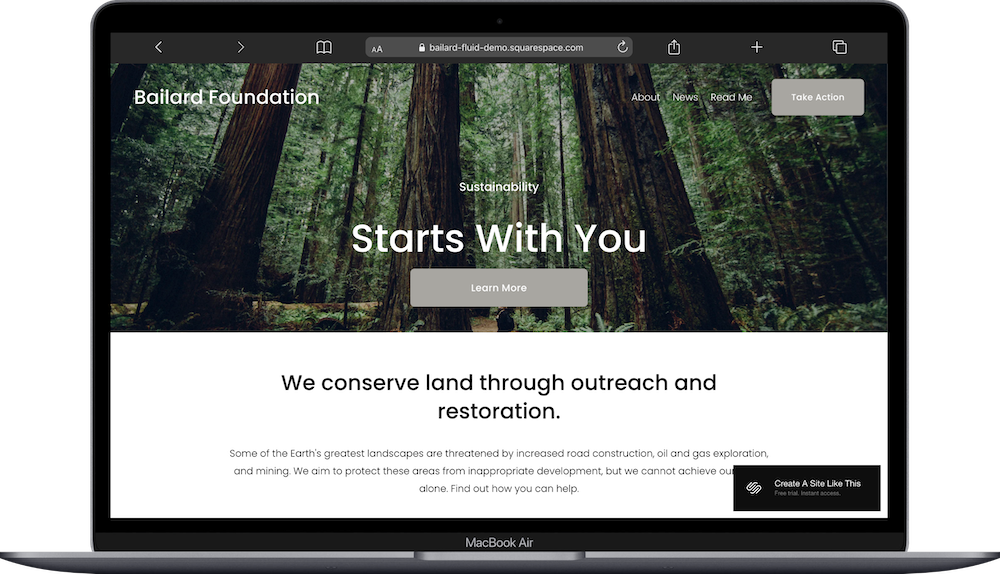
I've written a full review of Bailard before, and it keeps coming up as a strong pick for professional services. Tagged for business and foundation sites, Bailard has a confident, established feel that works well for law firms that want to look like they've been around (even if you just passed the bar last year).
What works: Strong visual hierarchy, good use of whitespace, and a layout that balances imagery with text-heavy content. The homepage flows naturally from introduction to services to contact, which is exactly the journey you want a potential client to take.
What to watch for: Bailard can feel a bit broad if you don't customize it with law-specific content and imagery. The structure is great; you just need to fill it with substance.
Best for: Established firms or solo attorneys who want their site to feel authoritative and buttoned-up.
5. Agaro Squarespace Template (Agency-Style for Larger Firms)

Agaro is designed for agencies and marketing firms, which gives it a slightly more dynamic feel than the others on this list. If your firm is larger, has multiple departments, or wants a more modern look, Agaro is worth considering. (I've done a detailed review of Agaro if you want the full breakdown.)
What works: The layout handles complex content well; multiple service areas, team sections, case studies, and CTAs all have natural places to live. The design is professional but has a bit more energy than a purely corporate template, which can help a firm stand out.
What to watch for: The agency styling might feel *too* modern for more traditional practice areas (think probate or elder law). But for litigation firms, IP law, or tech-adjacent practices, it fits.
Best for: Larger firms or practices in modern/tech-adjacent legal areas that want a more dynamic web presence.
6. Nolan Squarespace Template (Modern and Adaptable)

Nolan is tagged for agencies and products, but its clean, modern design adapts well to professional services. It has a slightly different personality than the other templates here; a bit sleeker, a bit more minimal.
What works: Nolan's strength is its simplicity. The layouts are uncluttered, the typography is modern, and there's plenty of room for the kind of content-heavy pages a law firm needs without things feeling cramped. The homepage layout moves visitors through a clear narrative.
What to watch for: Nolan's product-oriented demo will need more reworking to look like a law firm than, say, Corrigan or Clarkson. You're paying in setup time for a more distinctive end result.
Best for: Solo attorneys or boutique firms who want a minimal, contemporary look that feels different from the typical law firm website.
Squarespace Templates for Lawyers: A Quick Comparison
And When a Third-Party Premium Template Is Worth It
All six templates above are free with any Squarespace plan, and they're solid starting points. But let me be clear about what "built-in template" means: thousands of other people (including other attorneys) have access to the same starting layouts. And since Corrigan is the only law-specific option, there's a good chance your site will look familiar to anyone who's browsed Squarespace law firm websites.
If you want something more distinctive; something that already has law-specific page structures, consultation funnels, and a design that feels tailored to legal services; a third-party template shop is the move.
A few shops I'd recommend checking out:
Applet Studio makes templates that are consistently well-designed and customizable. They have options that work particularly well for professional services.
Big Cat Creative has a range of Squarespace templates with strong layout variety.
Kseniia Design focuses on clean, elegant designs that suit service-based businesses.
Studio Mesa offers polished templates with a modern professional feel.
Third-party templates typically run $100 to $400 and come with more built-out page structures, so you spend less time customizing and more time getting your site live. For a law firm where your website directly generates client inquiries, that investment can pay for itself with a single consultation.
What Squarespace Plan Does a Law Firm Need?
Nobody else seems to cover this in their template reviews, and it's one of the first things you'll need to decide. So here's the breakdown for legal professionals specifically, whether you start a free template, premium template, or custom design:
Basic gets you a fully functional website with all templates, SSL security, and basic analytics. If you're a solo attorney who just needs an online presence with your practice areas, bio, and a contact form, Basic covers it.
Core is the sweet spot for most law firms; it adds unlimited contributors, custom code, and third-party integrations. If you want consultation booking, you'll add Acuity Scheduling on top of any plan. The combination of Core + Acuity is a strong setup for a consultation-driven firm.
Plus and Advanced add features like advanced analytics, more contributor accounts, and marketing tools. Most small to mid-size law firms won't need these unless you have a large team or want advanced site analytics.
My recommendation for most lawyers and attorneys: start with Core. The scheduling feature is too useful for a consultation-driven business to skip.
You can start a free 14-day trial on any plan to test things out before committing.
Tips for Building Your Squarespace Law Firm Website
Once you've picked a template and a plan, here are a few things that'll make your law firm site stronger:
Create individual practice area pages. Don't lump everything onto one "Services" page. Each practice area should have its own page with detailed content. This helps with SEO (people search for "family law attorney in [city]," not "attorney who does many things") and gives potential clients the depth they need to feel confident.
Invest in professional photography. Stock photos of gavels and law books are... not great. A professional headshot and a few photos of your office go a long way toward building trust. If you need quality stock photography as a bridge, HauteStock has professional lifestyle images that work well for service businesses.
Add a consultation booking button to every page. Squarespace makes this easy with button blocks. Every page on your site should have a clear path to scheduling a consultation. Don't make people hunt for it.
Set up your contact form thoughtfully. Squarespace's built-in form blocks let you create intake-style forms with custom fields. You can ask for case type, brief description of the issue, and preferred contact method right in the form. It's not a full legal intake system, but it's a solid first touchpoint.
Don't skip your legal pages. Yes, even lawyers need proper privacy policies and terms on their websites. Termageddon generates and auto-updates legal policies for your site, which is especially relevant if you're collecting client information through forms.
Think about SEO from the start. Local search matters enormously for law firms. Make sure your practice area pages include your location, and get your Google Business Profile set up. For Squarespace-specific SEO, SEOSpace is a plugin that gives you actionable optimization guidance right inside the Squarespace editor. I also have a quick-start Squarespace SEO guide if you want a broader overview.
One Limitation to Know About
Squarespace navigation only natively supports one level of sub-navigation. That means you can have a "Practice Areas" dropdown with items listed underneath, but you can't nest further without plugins and code (like having sub-categories within a practice area).
For a solo attorney or small firm with 4-6 practice areas, this is completely fine. For a large firm with dozens of practice areas organized into departments, it gets limiting. You can work around it with strategic page linking and a well-organized footer, but it's something to be aware of before you commit.
If your firm is large enough that deep navigation is a concern, you might genuinely be at the point where a custom-built site (or at least a third-party template with more complex navigation structures) is worth the investment.
Frequently Asked Questions
Is Squarespace good for law firm websites?
Squarespace is a strong option for solo attorneys and small to mid-size law firms who want a professional website without the cost of hiring a developer or the complexity of WordPress. It offers polished template designs and easy building, seamless integration with Acuity Scheduling for consultation booking (a separate add-on starting at $16/month), SSL security, and reliable hosting. The main limitation is its flat navigation structure, which can be restrictive for large firms with many practice areas.
Does Squarespace have a template for lawyers?
Squarespace has one template explicitly designed for law firms: Corrigan. However, several other built-in templates work well for legal professionals, including Clarkson (corporate), Cedar (finance/business), and Bailard (professional services). For more law-specific designs, third-party template shops like Applet Studio offer additional options.
What is the best website builder for lawyers?
The best website builder depends on your budget and technical comfort. Squarespace is the strongest option for lawyers who want professional design quality with manageable DIY effort, starting at $16/month. WordPress offers more flexibility but requires significantly more technical setup and maintenance. Hiring a designer gives you the most custom result but costs thousands. For most solo attorneys and small firms, Squarespace hits the right balance of quality, control, and cost.
How much does a Squarespace website cost for a law firm?
A Squarespace law firm website costs between $19 and $99 per month depending on your plan. Most law firms do best on the Core plan. If you add a third-party template ($99-$250 one-time) and a custom domain ($12-$20/year), your total first-year cost is roughly $325-$550; significantly less than hiring a web designer. If you want to hire a web designer, most charge between $2500 - $5500 for a simple but strategic well built site.
What pages should a law firm website have?
A law firm website should include a homepage, individual practice area pages (one per area of law you handle), an attorney bio page (or team page for multi-attorney firms), an about page, a contact page with a consultation CTA, and standard legal pages like a privacy policy and disclaimer. Blog pages for legal insights can also help with SEO and establishing expertise.
Can I add a client intake form to my Squarespace law firm website?
Squarespace's built-in form blocks let you create custom contact forms with fields for case type, issue description, and preferred contact method, which works well as a preliminary intake form. For full legal intake functionality with document uploads and conditional logic, you'd want to integrate a third-party tool like TidyCal or a dedicated legal CRM. Acuity Scheduling (a Squarespace integrated add-on) also lets you build intake questions into the consultation booking flow.

