Acuity Scheduling Review 2026
A note on pricing: all prices mentioned in this post are accurate as of the date this article was written, but can change at any time. This includes Squarespace plans, third-party tools, plugins, templates, and any other services referenced. Always check directly with the provider for the most current pricing before committing.
This post contains affiliate links. for Acuity Scheduling and Squarespace. If you purchase through them, I may receive a small commission at no extra cost to you.
This article was researched and fact-checked for all information provided from primary sources (Squarespace, Acuity, Calendly, TidyCal, AppSumo, and HoneyBook) and is up to date as of July 2026.
Table of Contents Show
Is Acuity Scheduling Worth It For Squarespace Users in 2026?
Quick Answer: Acuity Scheduling is a powerful, full-featured appointment booking tool owned by Squarespace. But it's a separate paid add-on starting at $16/month; it is not included in any Squarespace plan. For service providers who book a high volume of appointments and need features like intake forms, packages, memberships, and automated reminders, Acuity is excellent and the Squarespace integration is seamless.
If you only need basic scheduling, alternatives like Calendly's free tier or a one-time purchase like TidyCal could save you a lot of money. Whether Acuity is worth it for you depends ultimately on how important booking is to your business.
KEY ACUITY SCHEDULING FACTS:
Acuity Scheduling is a scheduling tool that is a separate paid product (not included with any Squarespace website plan)
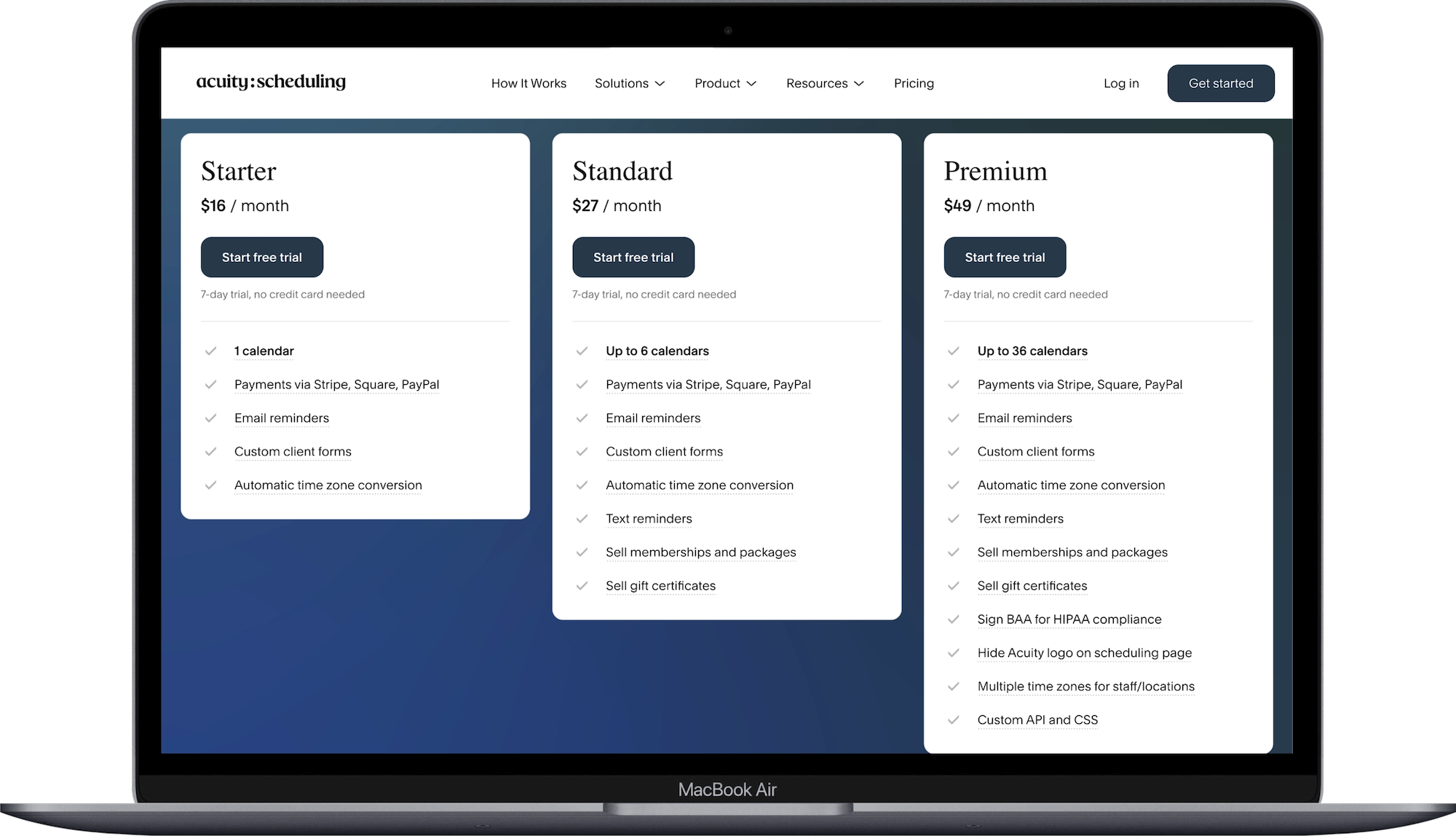
Three pricing tiers (billed annually): Starter $16/mo, Standard $27/mo, Premium $49/mo
All plans include unlimited services/appointment types, intake forms, and automated email reminders
Starter plan: 1 calendar; Standard: up to 6 calendars; Premium: up to 36 calendars
Text (SMS) reminders require the Standard plan or higher
Squarespace integration lets you embed Acuity directly into any page on your site
Alternatives at similar or lower price points: Calendly (free-$10/mo), TidyCal ($29 one-time), HoneyBook (starts at $29/mo but includes CRM, invoicing, and contracts)
What Exactly Is Acuity Scheduling?
Acuity Scheduling is an online appointment booking tool that lets clients self-schedule with you 24/7. You set your availability, define your services, and share a booking link (or embed it on your website). Clients pick a time, fill out any intake forms you've set up, and can even pay upfront. You both get confirmation emails. Done.
Squarespace acquired Acuity back in 2019, so the two products work nicely together. You can embed your Acuity scheduler directly into your Squarespace site so it feels like a native part of your website rather than some third-party widget bolted on. That integration is one of the strongest reasons to consider Acuity if you're already on Squarespace.
But here's what I see some clients still get confused about: Acuity is NOT included with your Squarespace subscription. It used to be, and a lot of blog posts are still floating around from a few years ago when that was the case. But it's now a completely separate purchase with its own pricing tiers. Squarespace owns both products, and they integrate well, but you are paying for two separate subscriptions.
Get started with a free 7 day trial to see if Acuity is a good fit for your business

Acuity Scheduling Pricing in 2026
All three plans are billed annually:
Starter: $16/month1 calendar
Payments via Stripe, Square, PayPal
Email reminders
Custom client forms
Automatic time zone conversion
Standard $27/monthUp to 6 calendars
Payments via Stripe, Square, PayPal
Email reminders
Custom client forms
Automatic time zone conversion
Text reminders
Sell memberships and packages
Sell gift certificates
Premium: $49/monthUp to 36 calendars
Payments via Stripe, Square, PayPal
Email reminders
Custom client forms
Automatic time zone conversion
Text reminders
Sell memberships and packages
Sell gift certificates
Sign BAA for HIPAA compliance
Hide Acuity logo on scheduling page
Multiple time zones for staff/locations
Custom API and CSS
There's a 7-day free trial on all plans, so you can test things out before committing.
What Acuity Does Really Well
The Squarespace Integration Is (Obviously) Seamless
If you're on Squarespace, this is honestly the biggest selling point. You can embed your full Acuity scheduler directly into any page using a simple embed block. It inherits enough of your site's styling that it doesn't look like a jarring third-party tool. Clients can book without ever leaving your website; way better than sending people to an external booking page and hoping they don't bounce.
You can also add a scheduling button to your navigation, drop it into your contact page, or embed specific appointment types on different service pages. It's flexible.
Intake Forms Are Useful
This is where Acuity goes beyond basic scheduling. You can create custom intake forms that clients fill out when they book, so by the time you show up to the appointment, you already have all the info you need. For service providers like photographers (shot list preferences), consultants (project scope), wellness practitioners (health history), or coaches (goals for the session); this alone can save a ton of back-and-forth emails.
Packages, Memberships, and Gift Certificates
Starting on the Standard plan, you can sell packages (like a bundle of 5 sessions at a discounted rate), set up recurring memberships, and even offer gift certificates. If your business model involves ongoing client relationships rather than one-off appointments, these features are a big deal. Some basic scheduling tools don't handle this at all.
Automated Reminders
Email reminders come with all plans, and they're customizable. You can set how far in advance they go out, customize the wording, and add specific details for each appointment type. On the Standard plan and up, you get SMS/text reminders too; and those have a much higher open rate than email. If no-shows are something you deal with, text reminders make a real difference.
Payment Collection Upfront
All plans let you require payment at the time of booking through Stripe, Square, or PayPal. You can charge the full amount, require a deposit, or leave payment optional. For anyone who's ever had a client no-show on a paid consultation, collecting payment upfront is huge.
Where I Think Acuity Falls Short
The Price Adds Up Fast
So let's talk about this. If you're already paying for a Squarespace website, adding Acuity's Starter plan doubles your monthly cost. And if you need SMS reminders or packages, you're looking at the Standard plan at $27/month, bringing your total Squarespace + Acuity bill to $43-$66/month before any other tools.
That's not outrageous for a business that books a high volume of appointments. But for someone who books a handful of clients per month… it could be more tool than you need.
The Starter Plan Is Pretty Limited
One calendar, no SMS reminders, no packages or gift certificates, and Acuity branding stays on your scheduler. The Starter plan is fine for a solo provider who books one type of appointment and just needs basic scheduling. But the moment you want to sell session packages, offer memberships, or get rid of the Acuity logo, you're bumping up to $27/month.
The Interface Is Functional, Not Pretty
Acuity has been around since 2006 (way before the Squarespace acquisition), and parts of the admin interface still feel like it. The backend dashboard works; it's just not as clean or intuitive as newer tools. The client-facing booking page looks good, especially when embedded in Squarespace, but the admin side where you manage everything has a learning curve. Not bad, just takes some clicking around before things feel natural.
No Built-In CRM
Acuity handles scheduling and payments, but it doesn't manage client relationships beyond that. There's no place to track client history, send proposals, manage contracts, or handle invoicing for non-appointment work. If you need that kind of all-in-one functionality, a tool like HoneyBook could be a better fit (more on that below).
How Acuity Compares to Alternatives
Acuity isn't the only scheduling tool out there, and depending on what you need, you might be overpaying or not working with the right fit.
Acuity vs. Calendly
Calendly is probably Acuity's most direct competitor. Here's how they stack up:
Calendly's free plan gives you one event type, one calendar connection, and unlimited bookings. If you only offer one type of appointment (like a free consultation call), this could be all you need. And it's free.
Calendly's Standard plan ($12/month billed monthly, $10 when billed yearly) gives you unlimited event types, multiple calendar connections, automated reminders, and integrations. That's less than Acuity's Starter plan and includes some features Acuity locks behind the Standard tier.
Where Acuity wins: intake forms, packages/memberships, deeper payment options, and the native Squarespace embed. Calendly's embedding works fine on Squarespace, but it doesn't feel as seamless.
Where Calendly wins: the free tier is usable, the interface is cleaner, and the team scheduling features (round-robin, collective events) are strong if you have a group.
Bottom line: If you're on Squarespace and need intake forms, packages, or a clean embed, Acuity is the better fit. If you mostly need a simple booking link for calls and meetings, Calendly could save you money.
Acuity vs. TidyCal
TidyCal is the budget option, and it's a compelling one. This one is popular with a lot of web designers and solopreneurs.
$29 one-time payment through the website itself or AppSumo (lifetime deal).
Includes unlimited booking pages, unlimited appointments, calendar syncing, Stripe/PayPal payments, and custom intake questions.
You can embed it on a Squarespace site using a code block.
They just added (July 2026) packages, products, and cancelation functionality.
Where Acuity wins: Memberships, gift certificates, SMS reminders, deeper customization, and the polished Squarespace integration.
Where TidyCal wins: It costs $29 once. That's hard to beat. For solo service providers who need basic scheduling and don't need packages or memberships, the math is hard to argue with. Plus they keep adding more functionality, making it a better and better option for freelancers and solopreneurs just getting started.
Acuity vs. HoneyBook
This isn't a direct comparison since HoneyBook is a full client management platform, not just a scheduler. But a lot of service providers end up comparing them because HoneyBook's Starter plan ($29/month, billed annually) includes a CRM, invoicing, contracts, proposals, and payment processing. Note that scheduling is only available on the Essentials plan ($36.75/month, billed annually), so if you need both scheduling and client management, that's the plan to look at.
Where Acuity wins: More granular scheduling control, better intake form customization, packages/memberships, and a tighter Squarespace embed.
Where HoneyBook wins: If you need scheduling PLUS client management, proposals, contracts, and invoicing, HoneyBook is more expensive, but handles all of that in one place. You would not need Acuity at all.
Bottom line: If scheduling is your main need and you handle everything else separately, Acuity is the stronger scheduling tool. If you want one platform to manage your entire client workflow from inquiry to final invoice, HoneyBook could be a better investment overall.
Who Acuity Scheduling Works Well For
Acuity makes the most sense for:
Service providers who book a high volume of appointments - coaches, consultants, photographers, wellness practitioners, tutors, salons. If your business runs on booked sessions, Acuity's depth is worth the cost.
Businesses that sell packages or memberships - if clients buy bundles of sessions, recurring memberships, or gift certificates, Acuity handles all of this starting on the Standard plan. Most alternatives don't.
Squarespace users who want a polished, integrated experience - the embed is smooth. If your whole brand lives on Squarespace and you want scheduling to feel native to your site, this is the easiest path.
Health and wellness providers who need HIPAA compliance - this requires the Premium plan ($49/month), but if you need a BAA, your options are limited. Acuity is one of the few scheduling tools that offers this.
Who Should Probably Skip Acuity
If you book fewer than a handful of appointments per month, a free Calendly plan or a one-time TidyCal purchase makes way more sense financially.
If you need a full client management system (contracts, proposals, invoicing), HoneyBook gives you scheduling plus all of that for a similar starting price.
If you're on a tight budget and don't need packages or memberships, Acuity's Starter plan is fairly basic for $16/month. The features that really differentiate Acuity kick in at the Standard tier.
If you're not on Squarespace, the native integration is one of Acuity's biggest advantages. On other platforms, that advantage disappears, and Calendly's interface could be a better experience.
How to Add Acuity Scheduling to Your Squarespace Site
If you do decide Acuity is the right fit, here's the quick version of getting it set up:
Sign up for Acuity at acuityscheduling.com (you can start the 7-day free trial)
Set up your availability - define your working hours, time zone, and any blocked-off times
Create your appointment types - name them, set durations, add descriptions and pricing, build your intake forms
Connect a payment processor - Stripe, Square, or PayPal
Embed on your Squarespace site - In your Squarespace editor, add a Code Block or use the Acuity Scheduling block (if available on your plan), paste your embed code, and you're live
For the detailed version, check out the in-depth article:

Pro Tip: Create a dedicated "Book Now" page on your Squarespace site rather than only putting the scheduler on your contact page. Then add it to your main navigation. The easier you make it for people to find and book, the more bookings you'll get. I've set this up on soooo many client sites and it's one of those small things that makes a surprisingly big difference; don't bury your booking link three clicks deep in your site.
The Acuity Verdict
Acuity Scheduling is a great tool for what it does. The scheduling features are deep, the Squarespace integration is the best of any booking tool out there, and features like packages, memberships, and intake forms set it apart from simpler alternatives.
But "great tool" and "worth it for you" are two different things.
If your business runs on appointments and you need features beyond basic scheduling, Acuity on the Standard plan ($27/month) is worth the investment. If you're a solo provider who books a handful of calls per month, you're probably paying for more than you need.
The 7-day free trial is super useful here. Set it up, embed it on your site, book a test appointment, and see if the features match what your business requires. That'll tell you more than any review can.
Frequently Asked Questions
Is Acuity Scheduling included with Squarespace?
Nope. This is one of the most common misconceptions out there. Even though Squarespace owns Acuity, it's a completely separate product with its own subscription and pricing. You pay for your Squarespace website plan, and then you pay separately for Acuity if you want to use it. The Starter plan starts at $16/month billed annually, and goes up to $49/month for the Premium plan. There is no Squarespace website plan at any price tier that includes Acuity. They integrate beautifully together, but they're two separate bills.
Can I use Acuity Scheduling on a website that's not on Squarespace?
For sure. Acuity works with any website, not just Squarespace. You can embed the scheduler on WordPress, Wix, Shopify, or really any platform that lets you add an embed code or iframe. You can also just share your Acuity booking link directly (via email, social media, or a link-in-bio tool) without embedding it at all. That said, the Squarespace integration is noticeably smoother than embedding on other platforms; it tends to look more native and requires less fiddling. If you're on a different platform, Acuity still works great; you just lose that seamless visual integration.
Did Acuity Scheduling's plan names change?
Yes. Acuity's plans were previously called Emerging, Growing, and Powerhouse. They're now called Starter, Standard, and Premium. The pricing and features have also been updated, so if you're reading older reviews or tutorials that reference the old plan names, double-check the current pricing page before making a decision.
What's the difference between Acuity Scheduling and Squarespace's built-in scheduling features?
Squarespace doesn't have built-in scheduling functionality, so you'll need a separate tool regardless. The question is which one. For simple booking needs, a free Calendly link could be enough. But if scheduling is a core part of how your business operates; especially if you sell packages, need intake forms, or have multiple team members; Acuity is the stronger choice. It gives you custom intake forms per appointment type, package and membership sales, automated email and SMS reminders, multi-staff calendar management, gift certificates, and detailed payment options including deposits.
Is Acuity Scheduling HIPAA compliant?
Only on the Premium plan ($49/month billed annually). The Premium tier includes the ability to sign a BAA (Business Associate Agreement), which is what you need for HIPAA compliance. The Starter and Standard plans do NOT meet HIPAA requirements, so if you're a healthcare provider, therapist, or anyone who handles protected health information, you specifically need the Premium plan. This is one of the things that sets Acuity apart from most competitors; not all scheduling tools at this price point offer HIPAA compliance. If this is a requirement for your practice, make sure you're on the right tier from the start.
How does Acuity Scheduling compare to Calendly?
They're two of the most popular scheduling tools, and each has clear strengths. Calendly has a useful free plan (one event type, unlimited bookings, one calendar connection) that works great if you just need simple appointment scheduling. Calendly's paid Standard plan is $12/month and includes unlimited event types, automated reminders, and team scheduling features like round-robin. Acuity starts at $16/month and doesn't have a free tier, but it offers intake forms, packages and memberships, gift certificates, and a much tighter Squarespace embed. If your scheduling needs are straightforward (booking calls and meetings), Calendly is likely the better value. If you need clients to fill out detailed intake forms, buy session packages, or if a native Squarespace embed is important to you, Acuity is the stronger choice.
Can I accept payments through Acuity Scheduling?
On all three plans, yep. Acuity integrates with Stripe, Square, and PayPal for payment processing. You can require full payment at the time of booking, require a deposit with the balance due later, or make payment optional. This is available even on the Starter plan ($16/month), which is nice since some competing tools lock payment features behind higher tiers. If no-shows have been a problem for your business, requiring a deposit or full payment upfront can make a real difference. Just connect your payment processor in Acuity's settings, set your prices for each appointment type, and choose whether payment is required or optional.
What's better than Acuity Scheduling?
Depends on what you actually need. If you just need a simple booking link, Calendly's free plan is genuinely good and costs nothing. If you want a one-time purchase, TidyCal's $29 lifetime deal is hard to argue with for solo service providers. If you need scheduling AND client management (invoicing, contracts, proposals), HoneyBook's Essentials plan bundles all of that together. Acuity is the better choice when intake forms, packages, memberships, or a seamless Squarespace embed matter to your business.
Is Acuity Scheduling trustworthy?
Yep. It's been around since 2006 and Squarespace acquired it in 2019, so it's backed by a well-established company. It's not some fly-by-night tool.
Is Calendly or Acuity better?
For simple booking, Calendly. The free plan works great for one appointment type, and the Standard plan is $10/month billed yearly, which is less than Acuity's entry price. But if you need intake forms, packages, memberships, or a polished Squarespace embed, Acuity is the stronger tool. Mostly booking calls and meetings? Calendly is probably enough. Running a service business where clients need to fill out forms and buy session bundles? Acuity.
Is Acuity better than Square?
They're not really the same thing. Square is a payment and point-of-sale platform with a scheduling add-on. Acuity is a dedicated scheduling tool that happens to accept payments through Stripe, Square, or PayPal. If scheduling is central to your business, Acuity is more full-featured. If you're already using Square for in-person payments and just need basic appointment booking on top of that, Square Appointments might be worth a look.


