Zorayda Squarespace Template Review
This post contains affiliate links. If you purchase through them, I may receive a small commission at no extra cost to you.
Table of Contents Show
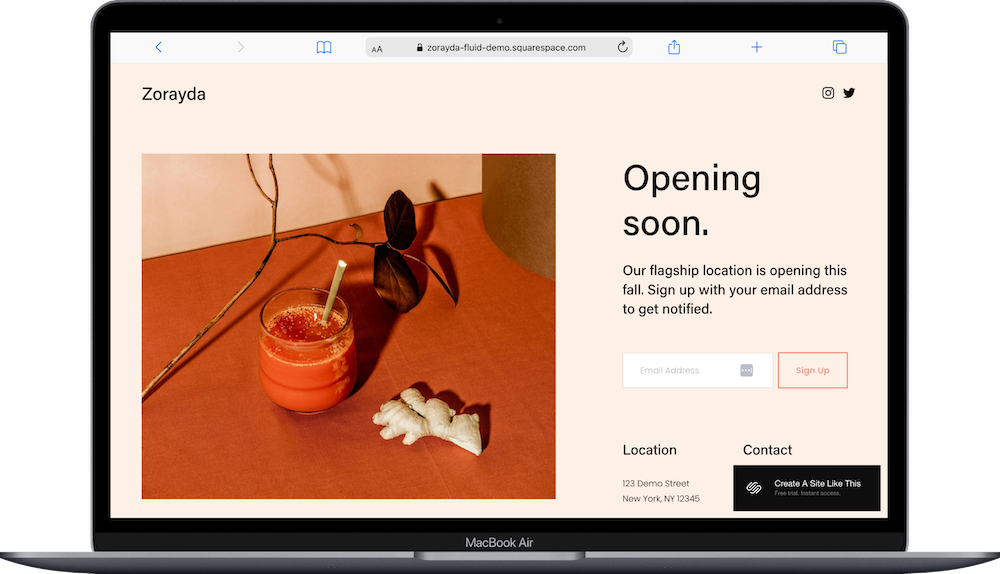
Zorayda is a one-page “Coming Soon” free Squarespace template for businesses that are getting ready to launch, and want to collect emails & share basic information in the meantime.
The demo shows "Opening soon" with an image, short message, email signup, and contact details. If you're opening a store, launching a business, or building your site and need a placeholder page while you get ready, Zorayda probably caught your eye for good reason.
This review covers what Zorayda includes, where it shines, and where you'll hit limitations.
The goal: help you figure out if this Squarespace template is the right fit for your situation, or if you should keep looking.
Who the Zorayda Template Works Best For
Zorayda works for any business that needs a temporary placeholder while preparing to launch.
Retail Stores Opening Soon
Announce your opening date and location while collecting emails from potential customers.
Restaurants or Cafes Pre-Launch
Share when you're opening and where while you're in buildout or finalizing your menu.
Service Businesses Getting Started
Launching a salon, studio, or consulting business? Zorayda gives you an online presence while you prepare.
Product or Course Launches
Building a waitlist for a product, course, or service? Zorayda collects emails while you finish development.
Websites Under Construction
If you're building your real site and need something live so your domain isn't blank, Zorayda fills the gap.
Who the Zorayda Template Is Not Best For
The Zorayda template probably isn't the best fit if you:
Already have a functioning business. Zorayda is literally just a placeholder. If you're open now, you need a real live website.
Need to share detailed information. This placeholder template gives you a headline, short message, and contact info. That's it.
Want something permanent. This is temporary while you build your actual site. Using it long-term will look unfinished.
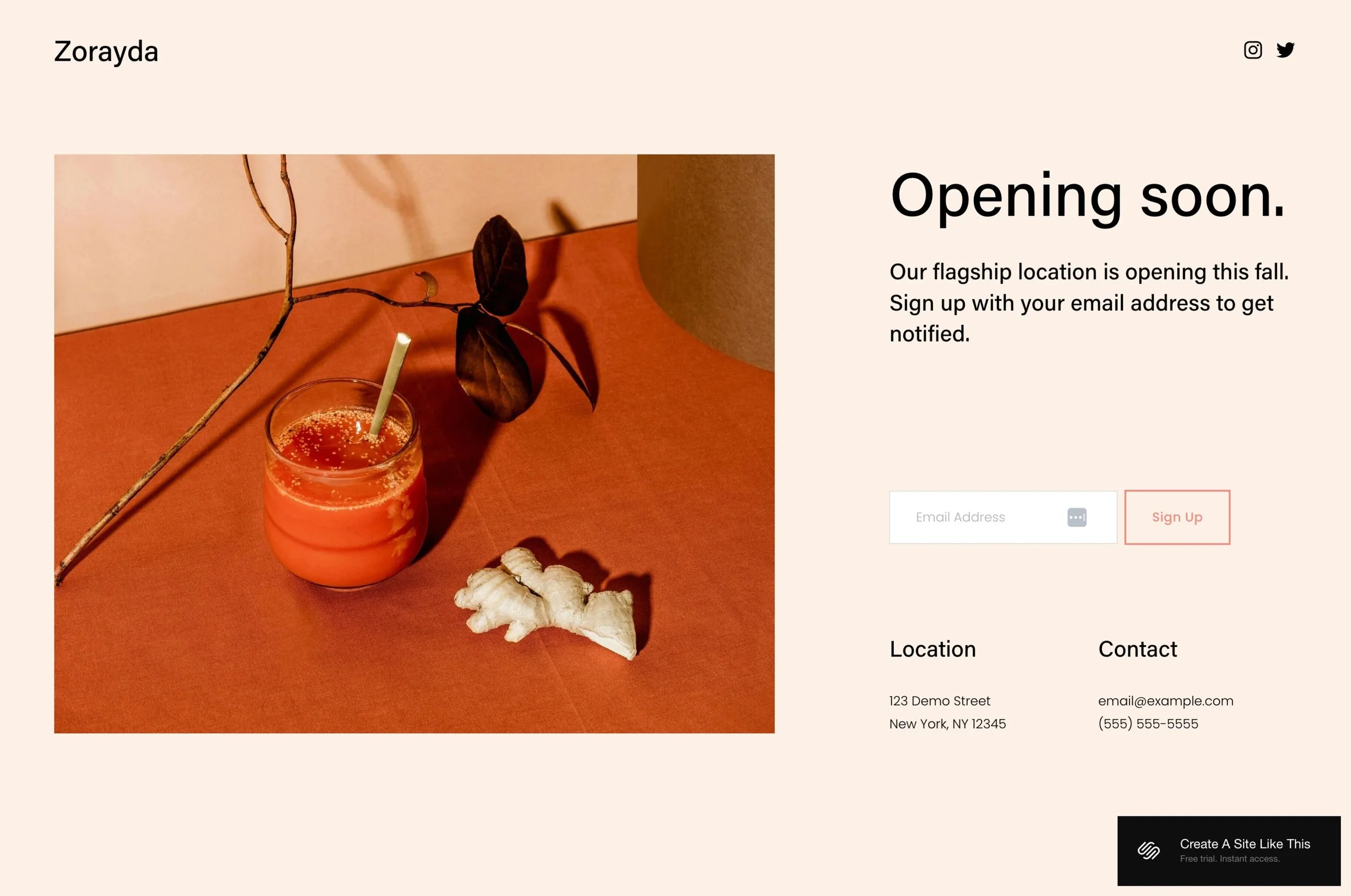
This is it, this is the whole Zorayda template.
What You Get with the Zorayda Template
Zorayda is a single page with minimal content:
Main Content
An image, headline ("Opening soon"), short description, email signup form with "Sign Up" button, location section with your address, and contact info (email and phone).
Header
Business name and social media icons (Instagram, Twitter).
Built-in Features
Email collection form
Social media links
Mobile responsive
Clean, minimal design
Color and font customization
Squarespace 7.1 Fluid Engine
Pros & Cons of the Zorayda Template
What Works Well
Setup takes 15 minutes. Swap the image, update text, add your info, connect email, done.
Email collection is built in. Connect to Squarespace Campaigns or your email platform of choice (I personally use Kit) and start building your list.
Clean design works for any business. No specific aesthetic means it fits any industry.
Looks more polished than a blank page. Better than having nothing while you build your real site.
What Doesn’t Work Well (Or Just Things To Be Aware Of)
Only useful temporarily. Once you launch, replace this with your real website.
Very limited information. If people want to know more, they wait.
No way to preview your work. You can't share photos, explain services, or show what's coming.
Here’s How to Get Started with the Zorayda Template:
Replace the demo image. Upload an image representing your business - at least 1500px wide.
Update the headline and message. Change "Opening soon" to your timeline and add a sentence about what's coming.
Add your contact information. Replace the demo address, email, and phone with yours. Delete the location if you're online-only.
Update social media links. Connect the icons to your accounts or remove them if you don't use social media yet.
Connect your email service. Link the signup form to your email platform.
Test the email signup. Submit the form to make sure it works.
Connect your domain and go live. Preview on mobile, then publish.
Zorayda Squarespace Template FAQs
How long should I use the Zorayda coming soon template?
Use Zorayda for a few weeks while you build your real site or prepare to open. If you're using it longer than three to four months, it starts looking like you're never actually launching. Most businesses use coming soon pages for 4-12 weeks.
Is the Zorayda template good for SEO?
Not really, but that's fine for its purpose. Zorayda is a temporary placeholder page you'll share directly with people who ask about your business or find you on social media. You're not trying to rank it in Google search results. Once you launch your real website, that's when SEO matters.
Can I change fonts and colors on the Zorayda template?
Yes. Click the paintbrush icon to open Site Styles where you can customize colors, fonts, and button styles to match your brand. Even if your real website isn't ready, matching your brand colors and fonts makes the coming soon page feel more professional and on-brand.
Can I add more pages to Zorayda?
You can add pages through the Squarespace editor, but if you need multiple pages, you're better off just building your actual website instead of adding to a coming soon template. Zorayda is designed to be a single landing page.
Where do email signups from Zorayda go?
Email signups go to whichever email marketing platform you connect - Squarespace Email Campaigns, Mailchimp, Kit (formerly ConvertKit), or another service. If you’re using Forms, you can also view all form submissions in your Squarespace dashboard under Forms.
Can I use Zorayda for a product waitlist?
Yes. Zorayda works well for collecting emails for product launches, course waitlists, or any "coming soon" offering. Just update the headline to something like "Launching March 2026" and adjust the description to explain what you're building.
What size image should I use for Zorayda?
Upload an image at least 1500-2000 pixels wide for crisp display on desktop screens. Make sure it’s optimized so it’s not huge and takes forever to load. The image appears prominently on the page, so use something high-quality that represents your brand - your product, your space, or a styled shot that matches your vibe.
Should I use Zorayda or just wait until my real site is ready?
Use Zorayda if you want to start collecting emails now, if you've already secured your domain and want something live, or if people are already asking about your business. Skip it if your real site will be ready in the next two to three weeks - at that point, just launch the real thing.
Can I collect more information than just email addresses on Zorayda?
Yes. You can customize the signup form to ask for names, phone numbers, location, or any other information you want. Go to the form settings in the Squarespace editor and add or modify form fields to collect what you need.