This post contains affiliate links. If you purchase through them, I may receive a small commission at no extra cost to you.
Table of Contents Show
Laurie is a free Squarespace website template for wedding planners, event planners, and creative professionals.
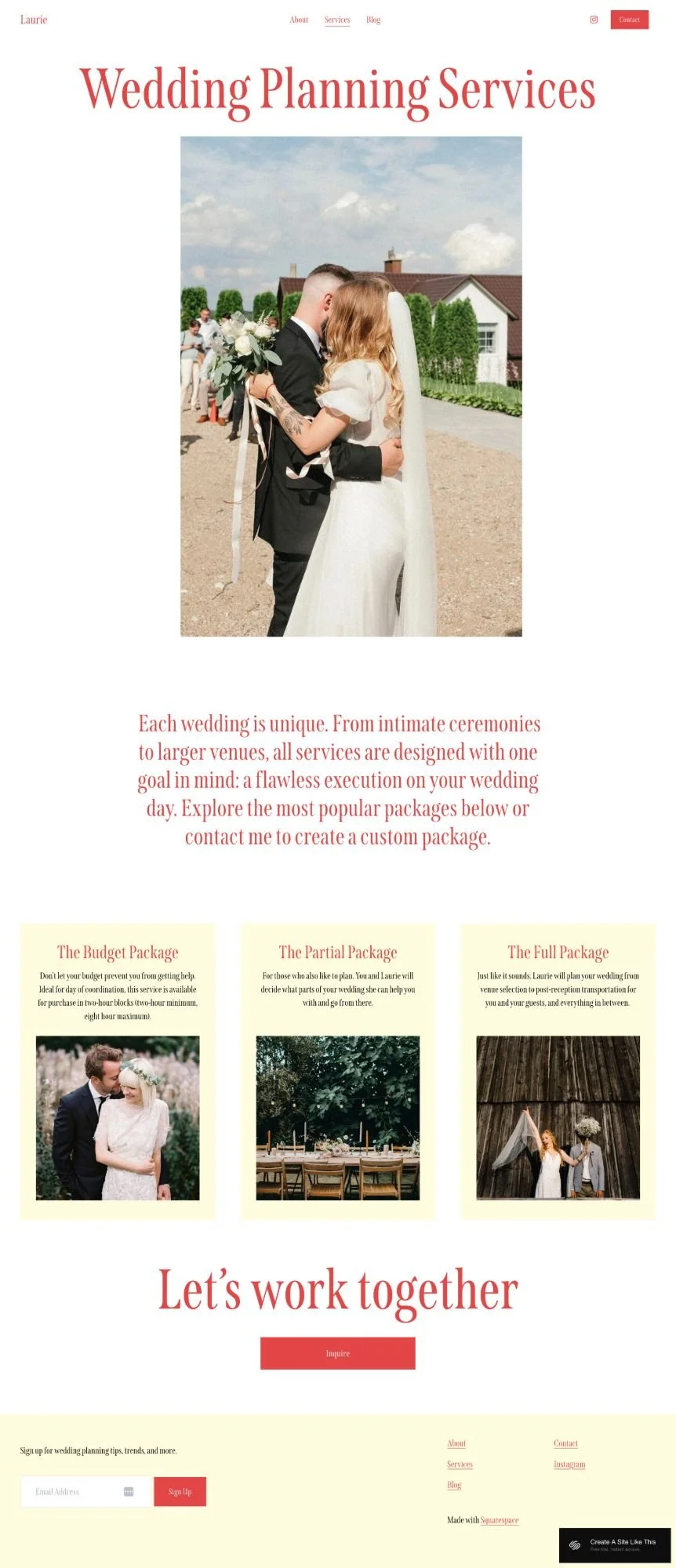
The template includes a services page with three package options displayed as cards (Budget, Partial, Full), an about page with your story and background, and a blog for sharing weddings or planning tips. The whole vibe is soft, romantic, and very wedding-focused.
But here's the question: Does the wedding planner aesthetic match your business, or will you spend time restyling everything?
Let's figure it out.

What's Included in Laurie
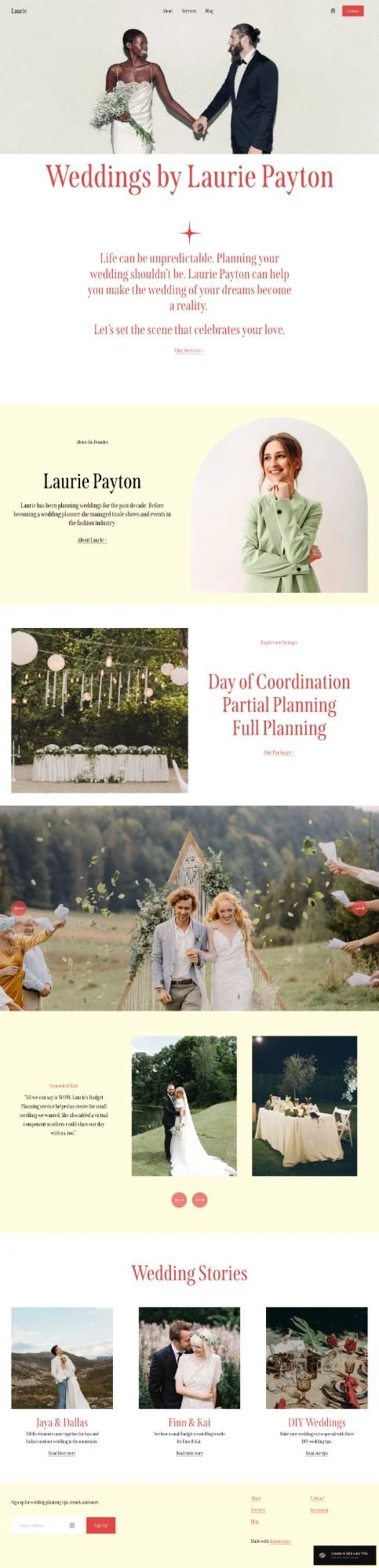
Homepage
Hero section with image and tagline
Introduction text
About the founder section with photo and bio
Featured blog posts or wedding stories
Newsletter signup
Call-to-action
Services Page
Package cards (demo shows three packages)
Description sections
Inquiry button
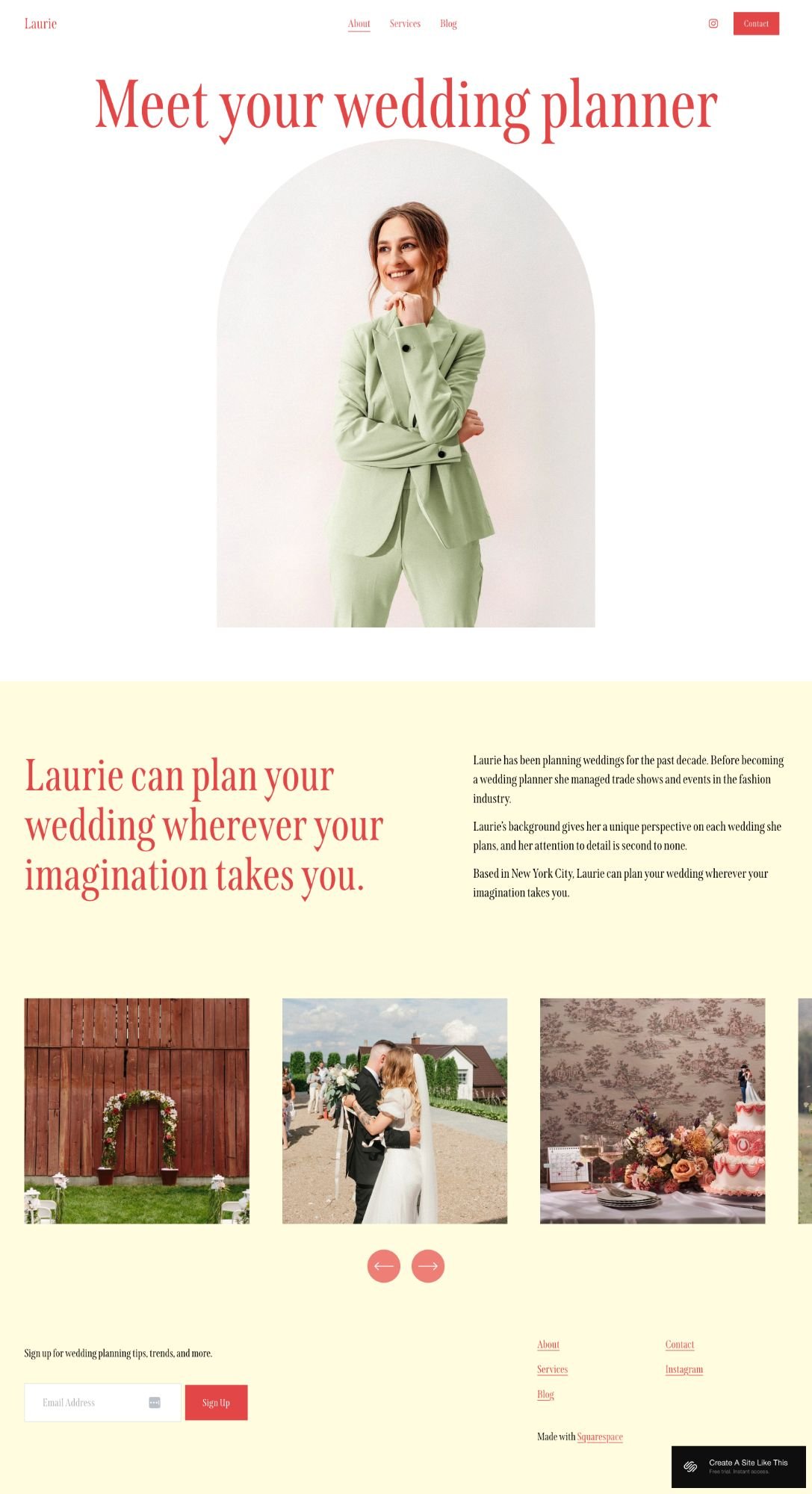
About Page
Bio section with photo
Background and credentials
Image gallery
Blog
Blog layout for sharing real weddings, planning tips, or portfolio projects.
Like all Squarespace 7.1 templates, you can add or remove pages and customize the structure.
Note: the aesthetic is VERY wedding-focused. Soft pinks and creams, romantic typography, elegant imagery. If you're a wedding planner, it's perfect. If you're not, you'll be restyling everything.
Who The Laurie Template Is For
Laurie works best if you're:
A wedding planner offering tiered packages (the services page literally shows Budget/Partial/Full packages)
An event planner who primarily does weddings and romantic events
A wedding coordinator who wants to blog about real weddings for SEO and portfolio purposes
Laurie MIGHT work if you're willing to completely restyle:
An event planner doing non-wedding events (but you'll change all the imagery and language)
A wedding photographer (though the services page is built for planning packages, not photography)
Laurie is NOT for you if:
You're not in the wedding planning industry and don't want to restyle the romantic aesthetic
You need detailed pricing tables or complex package comparisons (the package cards are simple)
You offer services beyond wedding planning and need more flexible service layouts
You're selling products (it's built for service providers, not e-commerce)Pros & Cons of the Laurie Template
And like all free Squarespace templates, it does has some built-in constraints: fewer customization options, and unless you really customize fonts, colors, and layouts, your site will look like other Squarespace sites. So if you're looking for something more customized right out of the gate, check out premium templates from designer studios like Big Cat Creative or Applet Studio. Or work with a Squarespace web designer who specializes in wedding or event planning sites.
Bottom Line
Laurie is perfect if you're a wedding planner offering tiered packages (Budget/Partial/Full or something similar) who wants to blog about real weddings and share your story.
The services page structure matches exactly what wedding planners need, the about page builds credibility, and the blog supports content marketing.
But if you're not a wedding planner, this template will require significant restyling. The romantic aesthetic, pink color palette, and wedding-focused language are throughout the entire design.
My take: If you're a wedding planner offering 2-3 package tiers, Laurie is basically plug-and-play. If you're in any other industry — even wedding photography or event planning — you'll be fighting against the wedding planner aesthetic.

Once you pick Laurie in the Squarespace 7.1 template library, here's what to do:
Update content on all pages - Replace demo text with your business information, services, and story.
Replace images throughout the site - Upload your own photos from events you've planned (make sure they're optimized for web!).
Delete any unused pages or sections - Or move pages to "Not Linked" section, disable them, and turn off SEO so they're not accessible until you're ready.
Add your favicon and social share image - Don’t forget this part! This is the little black box in the browser tab (favicon) and what people see when they share your site (social share image).
Set up SEO - Add meta descriptions and alt text for images. Fix heading hierarchy (make sure your main headline is H1, subheadings follow in order). Squarespace AI can help with meta descriptions, which makes this a lot easier than it used to be.
Customize Site Styles - Change colors, fonts, and buttons to match your brand. The demo has a soft, romantic feel, but you can adjust it like we talked about above.
Set up your newsletter - Connect your email provider (Squarespace Campaigns, Mailchimp, Flodesk, Kit, whatever you use) to the newsletter signup blocks.
Create individual project or wedding pages - Add portfolio pages showing your work with photo galleries and project details.
Test all forms, buttons, and links - Double and triple check to make sure everything works.
Connect your domain and choose your Squarespace plan, then publish your site 🎉
Laurie Squarespace Template FAQs
Can I sell products on the Laurie website template?
Yep. Squarespace lets you add a shop page to any site. But Laurie's layout is more focused on showcasing services and portfolios than selling products. If your site will mostly be a store, try a template designed for e-commerce. If you just want to sell a few things (like prints or a planning guide), you can easily add a shop.
Is the Laurie template good for SEO?
Yes. It's mobile-friendly and loads quickly, which helps. But like all Squarespace templates, Laurie doesn't set up heading hierarchy correctly by default. You'll need to manually fix your Header tags. Squarespace itself has solid SEO features that you’ll need to update (custom page titles, meta descriptions, clean URLs).
Can I use the Laurie template on mobile?
Absolutely. Like all free native Squarespace templates, the Laurie template is fully responsive and adjusts to look good on phones and tablets.
Can I change fonts and colors on the Laurie template?
Yes. Laurie is built on Squarespace 7.1, so you can customize fonts, colors, buttons, and more through Site Styles. No code needed. The demo has a soft, romantic vibe, but you can adjust it to fit your brand.
Can I add a blog to the Laurie template?
Yes. The "Wedding Stories" section in the demo is actually a blog. You can keep it as-is and add blog posts, or you can rename it and use it however you want. Just know that the template is optimized for portfolio/project showcases, not heavy blogging.
Is Laurie good for non-wedding businesses?
It can work, but you'd need to adjust the vibe. The demo is very wedding-focused with the romantic imagery and language. If you're in a different industry, you'd need to change the photos and copy to match your business. It's possible, but you might save time with a more versatile template.
How many portfolio projects can I showcase?
As many as you want. The demo shows three in the "Wedding Stories" section, but you can add more by adding more blog posts or collection items. Just keep in mind that too many might make your homepage feel cluttered.
Can I add a services page?
Yes. The demo doesn't include a services page, but you can easily add one through the Pages panel. Create a new layout page and add sections to describe your services, packages, and pricing.
Does Laurie work with Acuity Scheduling?
Yes. Laurie doesn't include built-in scheduling sections, but you can integrate Squarespace's Scheduling feature through Acuity Scheduling (which Squarespace owns). You'd add this separately. If you want clients to book consultations, you can link to your scheduling page from your contact section.
Is Laurie good for photographers?
It can be. The image-heavy layout is perfect for photographers who want to showcase their work. Wedding photographers especially will love the romantic, elegant vibe. You can use the portfolio section to feature different weddings or sessions.