Brixen Squarespace Template Review
This post contains affiliate links. If you purchase through them, I may receive a small commission at no extra cost to you.
Table of Contents Show
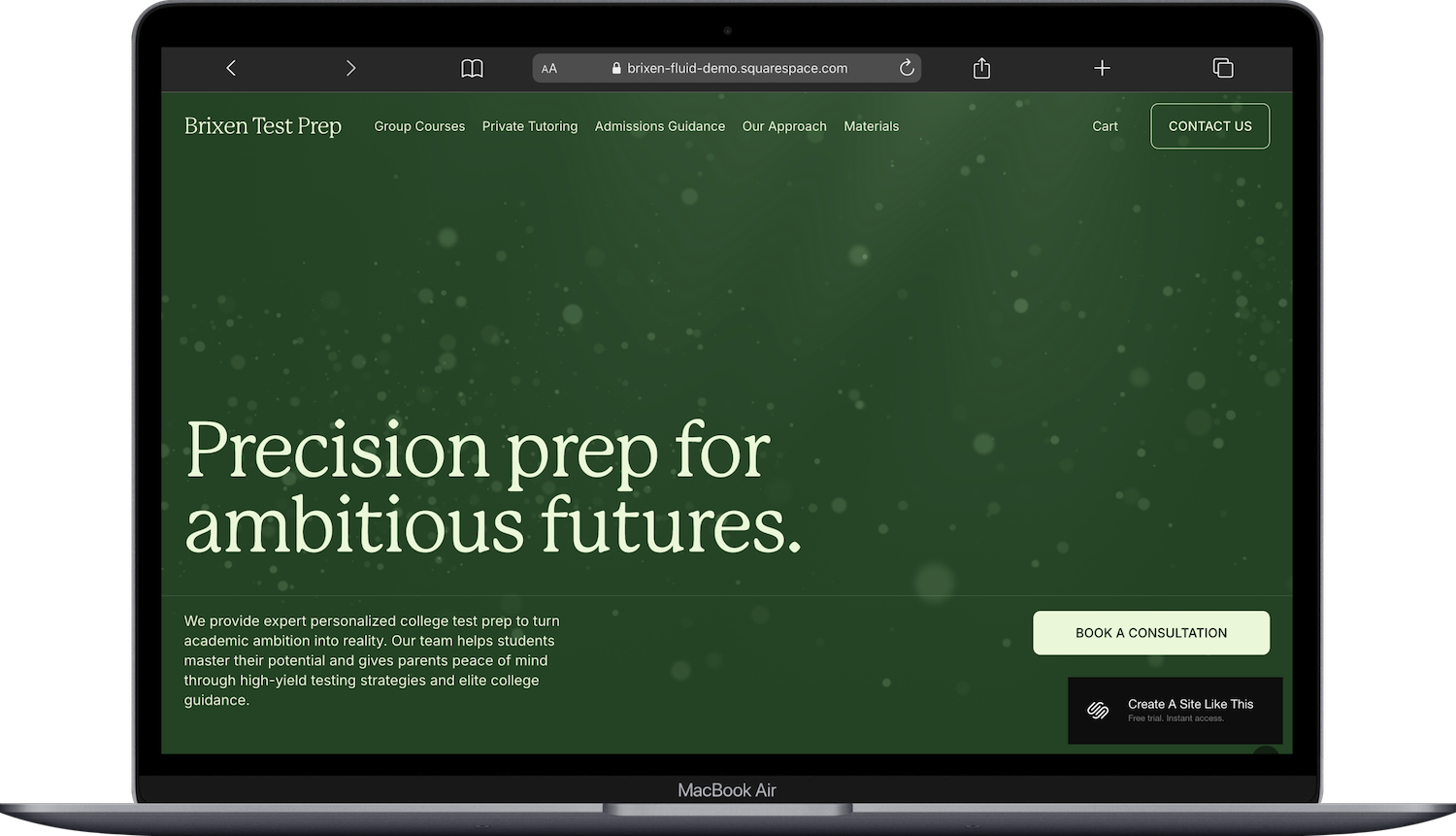
Brixen is one of the newest Squarespace built-in templates. It showed up in Squarespace’s template library in Feb 2026 and it’s one of the more interesting additions in a while. The demo is styled for a test prep and tutoring business, but the page structure underneath is a lot more versatile than that.
This review covers what you get, who it works for, who should probably skip it, and how to make it yours if you decide to go with it.
Who the Brixen Template Works Best For
Brixen is built for businesses that sell multiple services and want each one to have its own full page. Not a bullet point on a Services list. Its own page, with its own layout, testimonials, and call to action.
That makes it a great fit for:
Tutoring and test prep businesses
Coaches who run group programs alongside 1:1 work
Consultants and professional service firms
Wellness practices with multiple service types.
Businesses that sell resources alongside services
Multi-person teams
Who the Brixen Template Is Not Best For
Brixen is probably not your best starting point if you:
Only offer one service. Eight pages is a lot of template for a solo service provider. There are simpler options that won’t leave you hiding half the navigation.
Need a portfolio. There’s no gallery or portfolio structure here. If you’re a photographer, designer, or any kind of visual creative, this isn’t the one.
Run a restaurant, retail shop, or product-first business. Brixen is structured around explaining services, not showcasing products or menus.
Rely on blogging for SEO. There’s no blog page in the navigation. You can add one (it’s easy), but it’s worth knowing it’s not here out of the box.
Don’t have much content yet. Brixen is content-heavy: team bios, testimonials, detailed service descriptions, a methodology statement. If you’re still figuring out your copy, some sections are going to look thin until you fill them in. Not a dealbreaker, just something to plan for.
What You Get with the Brixen Squarespace Template
Home Page
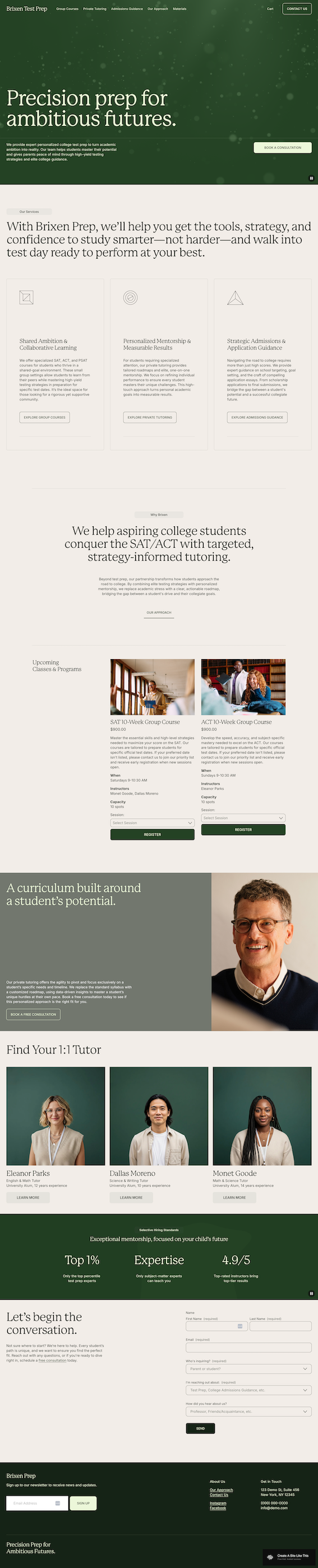
The homepage leads with an animated hero (a floating particle effect, not a static image), which is pretty uncommon in Squarespace’s free template library. Below that: a services overview with individual cards linking to each service page, a course grid with Squarespace’s native scheduling UI (so visitors can browse sessions and register right from the homepage), a team section, a stats block with animated counters that tick up on scroll, and a contact form at the bottom.
The contact form is worth mentioning on its own. It includes dropdown fields for things like “Who’s inquiring?” and “How did you hear about us?” Those qualifying questions are the kind of thing most people end up adding manually; here they’re already wired in.
Group Courses
This is a full standalone sales page for your group offering. It has its own hero, a stats section, an accordion-style feature breakdown, course product cards with session selectors and Register buttons, and a testimonials section. If you’re selling group programs, workshops, or cohort-based anything, this page is doing serious work right out of the box.
Private Tutoring
A separate page for your 1:1 service. It has a slightly different visual feel from the Group Courses page, which helps visitors understand these are distinct offerings without you having to spell it out. Includes its own feature breakdown and a testimonial pull quote.
Admissions Guidance
A third service page. In the demo this is admissions consulting, but it could be any specialty or premium-tier service that needs more explanation than the other two. It includes a credentials callout section and an FAQ accordion. Rename it to whatever fits your third offering.
Our Approach
This is the trust-building page, and it’s one of the best parts of the template. A centered philosophy statement, a principles card grid, and individual team profiles with photos and full bios. A lot of multi-practitioner businesses end up needing a page like this and have to build it from scratch. Having it pre-built with a good layout saves real time.
Materials Page
A product shop page running on Squarespace’s native store. The demo sells PDF practice packets, but you can sell whatever makes sense: digital downloads, workbooks, templates, physical products. Rename it to Resources, Shop, Downloads, or whatever fits. If you don’t have anything to sell yet, you can hide this page from the nav and bring it back later.
Cart and Contact Us
Standard cart page (in the main navigation from day one, which is nice) and a contact form. The contact page uses the same qualifying dropdown structure as the homepage form.
Getting Started on Squarespace with Brixen
Rename your service pages. Before you do anything else, go into page settings and change Group Courses, Private Tutoring, and Admissions Guidance to whatever fits your business. This immediately makes the template feel like yours instead of someone else’s demo.
Set up your course or session scheduling. If you’re selling group programs or scheduled sessions, configure the scheduling UI on the Group Courses page with your dates, pricing, and capacity. The layout is already built; you’re just filling in the details.
Write your Our Approach page for real. This page does a lot of trust-building. Write a philosophy statement that sounds like you, fill in the principles section, and add team bios with good headshots. Don’t leave placeholder text here.
Stock your Materials page (or hide it). If you sell digital resources, set them up as products. If you don’t have any yet, hide the page from the nav and bring it back when you’re ready.
Customize the contact form dropdowns. The qualifying fields on the contact page and homepage form are editable. Update them to match your services and the questions you want answered before someone reaches out.
Update your site styles. Fonts, colors, all of it. Do this after you’ve got your content in place so you can see how your choices look with your words and images, not placeholder text.
Add a blog page if you need one. It’s not in the nav by default. If blogging for SEO is part of your strategy, add the page before you launch.
Check it on mobile. Brixen has animated elements and a lot of content sections. Give the mobile version a thorough look before you publish.
Brixen Template FAQs
Is Brixen only for tutoring and test prep businesses?
No. The demo is education-focused, but the page structure works for any multi-service business: coaching practices, consulting firms, wellness providers, professional services with a team. You’d rename the service pages to match your offerings, which takes about five minutes in page settings.
Can I use Brixen if I don’t sell courses or group programs?
You can, but you’d be underusing the template a bit. The Group Courses page with its built-in scheduling is one of Brixen’s standout features. If your business is entirely 1:1, there are simpler templates that won’t have as many pages to manage. That said, you can always hide the Group Courses page and use the rest.
What Squarespace plan do I need for the shop and scheduling features?
The Materials shop works on all plans, but the Basic plan charges a 2% transaction fee on sales. Core ($23/month) removes that fee and is the better option if you’re selling products or resources. Squarespace's courses functionality is available on all plans. The difference is the digital product fee: Basic charges 7%, Core drops it to 5%, and Plus drops it to 1%
Can I add a blog to Brixen?
Yes. There’s no blog in the demo navigation, but you can add a blog page through your pages panel in Squarespace. It’ll inherit your site styles. If blogging is part of your content strategy, add the page before you go live.
Is the animated hero something I have to create myself?
No. The particle animation on the homepage hero is a built-in effect. You don’t upload anything for it. The Group Courses page has a video background in the hero, and that one you’d swap with your own footage or replace with a static image.
How does Brixen compare to Clove?
Both are solid for service businesses, but they solve different problems. Clove is a better starting point for solo practitioners or small practices: it has one Services page, a Blog, a Team section, and a warm, approachable feel. Brixen is built for more complexity. Multiple service pages, each with their own layout. A methodology page. A resource shop. If you need that level of structure, Brixen has it. If you don’t, Clove is the simpler (and probably faster) path.
Can I use Brixen as a solo practitioner without a team?
Yes. The team section on the Our Approach page works fine with just one person. The individual profile layout is set up for a full bio and photo, so it reads well even as a single entry. You’d scale down the grid to just you rather than removing the section entirely, since the bio and credentials do trust-building work regardless of team size.

