Bennie Squarespace Template Review
This post contains affiliate links. If you purchase through them, I may receive a small commission at no extra cost to you.
Table of Contents Show
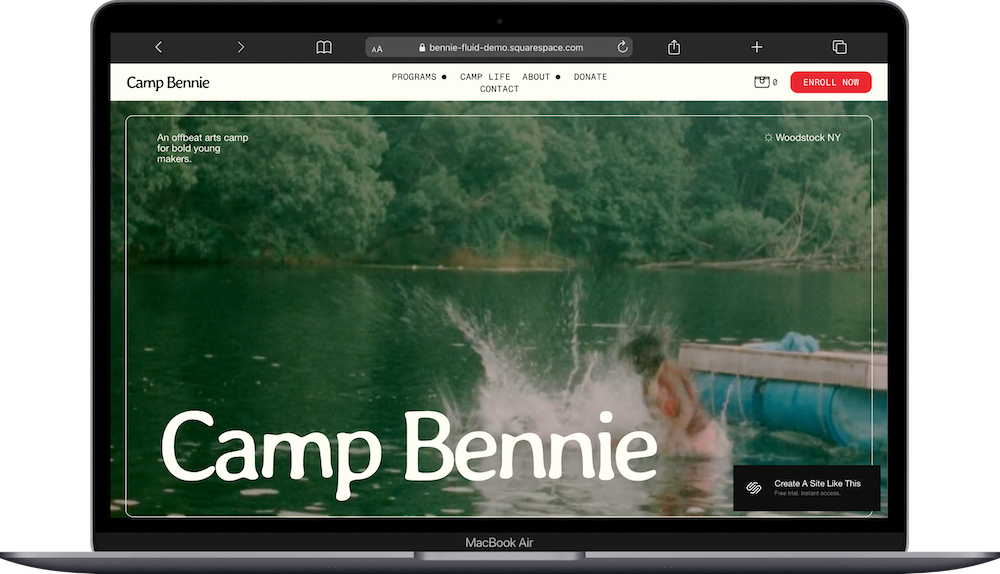
Bennie is a Squarespace template that works for camps, creative programs, schools, and businesses.
The bold color blocking, full-width imagery, and playful vibe make it feel energetic and welcoming. It's one of my favorite templates for businesses that want to show personality while staying organized. If you're running a summer camp, creative workshop series, or kids' program with different tracks or options, Bennie probably caught your eye for good reason.
This review covers what Bennie includes, where it shines, and where you may hit limitations.
The goal: help you figure out if this Squarespace template is the right fit for your nonprofit or creative business, or if you should keep looking.
Who the Bennie Template Works Best For
Bennie works best if you offer multiple programs, services, or experiences and need a fun way to showcase them.
Summer Camps & Kids' Programs
If you run a summer camp with different activity tracks (like arts, music, and outdoor adventures), Bennie's demo setup is basically built for you. The template shows each program with pricing, descriptions, and colorful sections that make browsing easy.
Creative Studios & Workshop Spaces
Art studios, music schools, or maker spaces with multiple class types can use Bennie to organize offerings by category. Each "track" gets its own section with photos and details.
Family-Friendly Businesses
Daycares, after-school programs, or family activity centers benefit from Bennie's approachable, colorful design. The template feels welcoming without being overly cutesy.
Multi-Service Wellness Businesses
Yoga studios, community centers, or wellness spaces that offer classes, workshops, and events can adapt Bennie's structure to organize different program types.
Event-Based Businesses
If you run seasonal programs, workshops, or rotating experiences, Bennie's layout makes it simple to highlight what's coming up and let people request information.
Who the Bennie Template Is Not Best For
The Bennie template probably isn't the best fit if you:
Sell lots of individual products. If you have 50+ items in an online shop, this template's structure won't work well. It's built for programs and services, not browsing product catalogs.
Need a minimal, subtle brand. Bennie's bold colors and full-width sections are part of its personality. If your brand is quiet, elegant, or understated, this template will feel too loud.
Run a serious, corporate business. The playful vibe works for camps and creative programs, but it's not right for law firms, financial advisors, or B2B consulting.
That said, you can add e-commerce functionality to this template. Squarespace lets you add a shop to any site. But because Bennie is built for showcasing programs and services, not product sales, it's not the best starting point if selling products is your main business model.
What You Get with the Bennie Template
Home
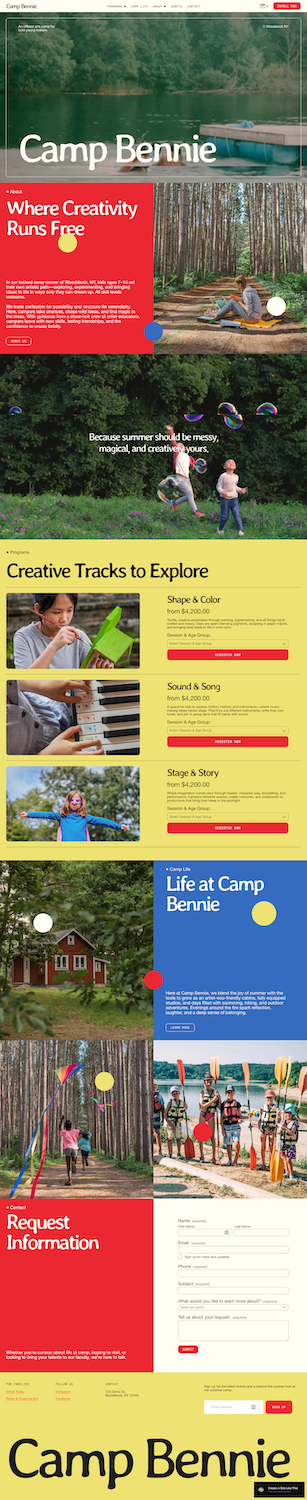
The homepage starts with a full-width hero image and large site title overlaid on top. Below that, you get a bright red section with a headline, paragraph text, and a call-to-action button. Further down, there's another full-width image with overlay text, followed by colorful sections that introduce your main offerings or programs. Each program section includes an image, headline, description, pricing, and a button.
About
A full-width image header with overlay text sits at the top. Below that, you get a blue section with body text and circular accent graphics. Two more full-width images with text create visual breaks, showing activities or lifestyle moments.
Programs/Services
This page features yellow sections for each program or service offering. Each section includes a side-by-side layout with an image on the left and text on the right (headline, description, pricing, button). The layout alternates for visual interest.
Contact/Request Information
A bold red section contains a contact form with fields for name, email, phone, preferred session, message, and opt-in checkbox. Below the form, there's a yellow footer section with newsletter signup.
Extras
Built-in contact form with customizable fields
Newsletter signup integration
Full-width image sections throughout
Bold color blocking (red, blue, yellow, green) built into the demo
Mobile-responsive design
Can add additional pages (blog, FAQ, etc.)
Can integrate with Squarespace Scheduling for bookings
Can add e-commerce functionality if needed
Pros & Cons of the Bennie Template
Pros
The color blocking makes organization easy. Each program or service gets its own colored section, which helps visitors understand what you offer without getting overwhelmed. You can easily spot where one thing ends and another begins.
It's designed for businesses with multiple options. If you have 3-6 different programs, class types, or service tiers, this template handles it naturally. You're not forcing a portfolio layout or blog structure to do something it wasn't meant for.
The request form is already set up. You get a detailed contact form right in the demo that includes fields for selecting which program someone's interested in. This saves you time setting up forms from scratch.
Full-width images create visual impact. The large hero sections and full-bleed photos give your site energy. If you have good lifestyle photography from your programs or events, this template shows it off well.
The layout works for seasonal businesses. If you run summer camps or rotating workshops, you can easily update the homepage sections when offerings change. The structure stays clear even when content shifts.
Cons
Bold colors might clash with your brand. The demo uses bright red, blue, and yellow. While you can change these in Site Styles, the template's whole vibe is built around bold color blocking. If your brand uses soft pastels or neutrals, you'll need to consider whether your brand colors work.
Limited space for detailed explanations. Each program section gives you room for a headline, short description, and price. If you need to explain eligibility requirements, detailed schedules, or multiple pricing tiers, you'll run out of space quickly.
The energetic style has a narrow target audience. This template works great for kids' programs and creative spaces, but that same playful energy limits where else you can use it. It may be harder to adapt for serious professional services.
Getting Started with the Bennie Template is Easy:
Once you pick Bennie in the Squarespace 7.1 template library, here's what to do:
1. Replace the hero image and site title. Upload your own main image and update the site name to match your business.
2. Update the color palette in Site Styles. Go to Site Styles and adjust the bright red, blue, and yellow to match your brand colors. The template uses these colors for section backgrounds, so pick colors that work well at full width.
3. Customize each program or service section. Replace the demo images and text with your actual offerings. Include clear headlines, short descriptions, pricing, and what makes each option different. Keep descriptions under 100 words so they're scannable.
4. Edit the contact form fields. Update the dropdown menu to reflect your actual programs or services. Add or remove fields based on what information you need from people reaching out.
5. Add your About page content. Replace the demo text with your story. Include information about your team, your approach, and what makes your programs special. Keep paragraphs short.
6. Set up the footer and newsletter signup. Add your business information, social media links, and connect an email marketing tool if you want to collect newsletter signups.
7. Create additional pages if needed. Add a blog, FAQ page, or detailed schedule page depending on your business. Use the same visual style (full-width images, color blocking) to keep things consistent.
8. Upload all your photos. Make sure you have enough high-quality images to fill the template.
9. Check your heading hierarchy. Squarespace templates don't always include proper heading structure by default, so make sure your main headline is an H1 and subheadings follow logical order (H2, H3, H4) for better SEO.
10. Double-check everything, connect your domain and choose your Squarespace plan, and go live. Review every page, test the contact form, and make sure all links work before publishing.
Bennie Squarespace Template FAQs
Can I sell products on the Bennie website template?
Yes, you can add e-commerce functionality to Bennie. Squarespace lets you add a shop to any template. However, Bennie is designed for showcasing programs and services, not browsing product catalogs. If selling physical products is your main business, you'd be better off starting with a template built for e-commerce like Skye or Burke.
Is the Bennie template good for SEO?
Yes. All Squarespace 7.1 templates have the same SEO capabilities, including clean code, mobile responsiveness, automatic sitemaps, and SSL security. What matters more for SEO is your content strategy, heading structure, image alt text, and page load speed. Make sure you set up proper H1/H2/H3 tags and write clear page titles and descriptions.
Is the Bennie template good for mobile?
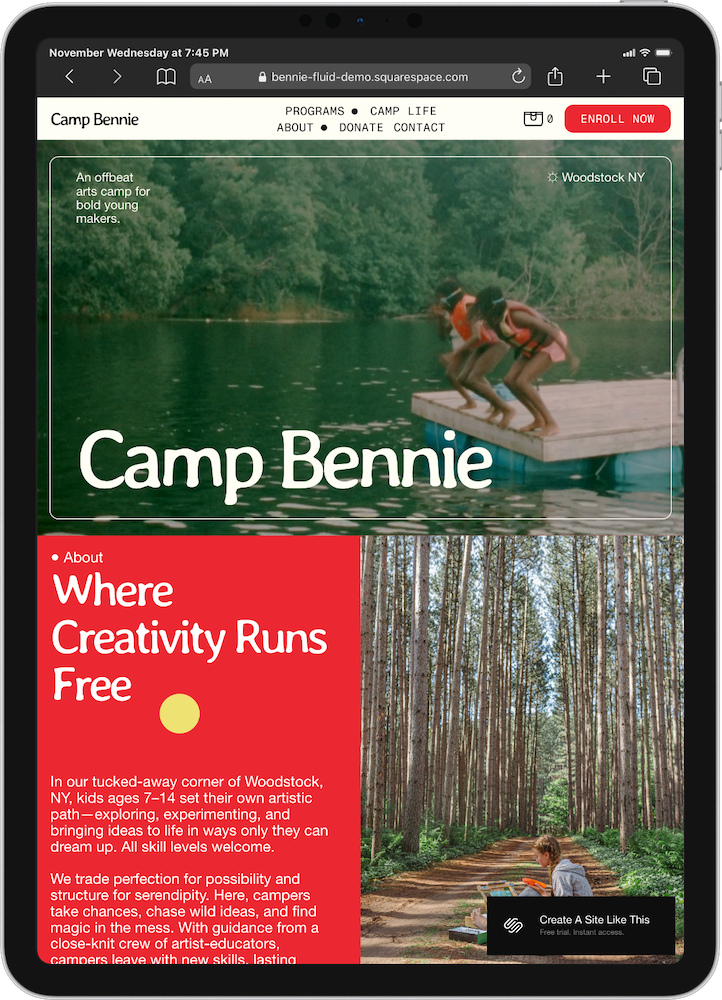
Yes. Bennie is fully responsive and automatically adjusts for mobile devices. The full-width sections, bold colors, and stacked layouts actually work really well on phones. Just make sure your images look good when cropped to mobile dimensions.
Can I change fonts and colors on the Bennie template?
Yes. You can customize fonts, colors, button styles, and spacing through Site Styles. The bold color blocking is part of the design, so you'll need to pick brand colors that work well as full-width section backgrounds. You're not limited to the demo's bright palette.
Does Bennie include a booking or scheduling system?
No, Bennie doesn't have built-in scheduling. The template includes a contact form with a dropdown for selecting programs, but it doesn't handle bookings directly. You can integrate Squarespace Scheduling (formerly Acuity) or another booking tool if you need people to book specific time slots.
Can I add a blog to the Bennie template?
Yes. You can add a blog page to any Squarespace template. Bennie doesn't include a blog in the demo, but you can create one through the Pages panel. Choose a blog layout that matches the template's visual style.
How many programs or services can I feature on the homepage?
The demo shows three main programs in colorful sections. You can add more, but after about five or six, the homepage starts feeling long. If you have more than six offerings, consider creating a separate Programs page and keeping the homepage focused on your top three to four options.
Does the template work for adult programs or just kids?
Bennie's demo focuses on a kids' camp, but the structure works for any multi-program business. The playful colors and energy fit family-friendly businesses best, but you could adapt it for adult workshops, creative classes, or wellness programs by changing the color palette and imagery to something more sophisticated.
Can I remove the color blocking?
Technically yes, but it's a lot of work. The color blocking is central to Bennie's design. If you want a template without bold colored sections, you'd be better off choosing a different template from the start rather than fighting against Bennie's structure.
Is Bennie good for nonprofits or community programs?
Yes, if your nonprofit offers multiple programs or services. The structure works well for showing different initiatives, explaining what you do, and collecting contact information. Just make sure the energetic, colorful vibe matches your organization's brand.