Rotate Squarespace Template Review
This post contains affiliate links. If you purchase through them, I may receive a small commission at no extra cost to you.
Table of Contents Show
Rotate is a free Squarespace website template built for dance studios, fitness centers, and movement-based businesses that offer group classes.
Rotate is built for dance studios and fitness centers with a bold, inclusive aesthetic.
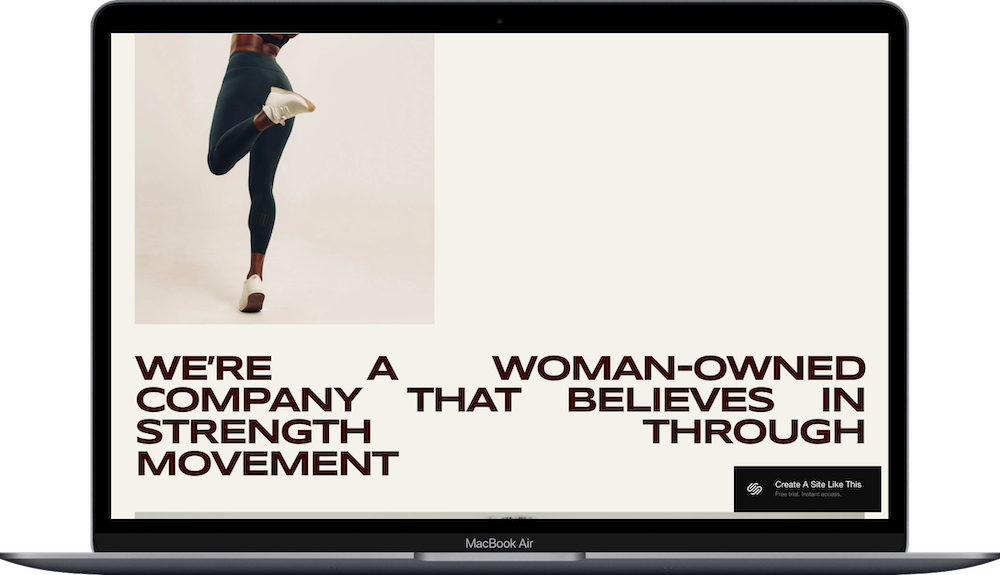
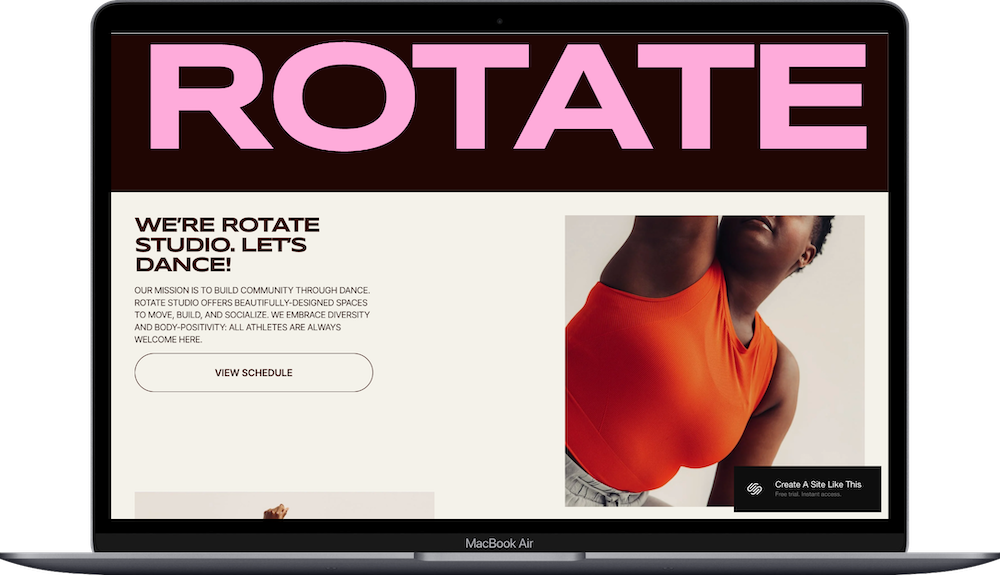
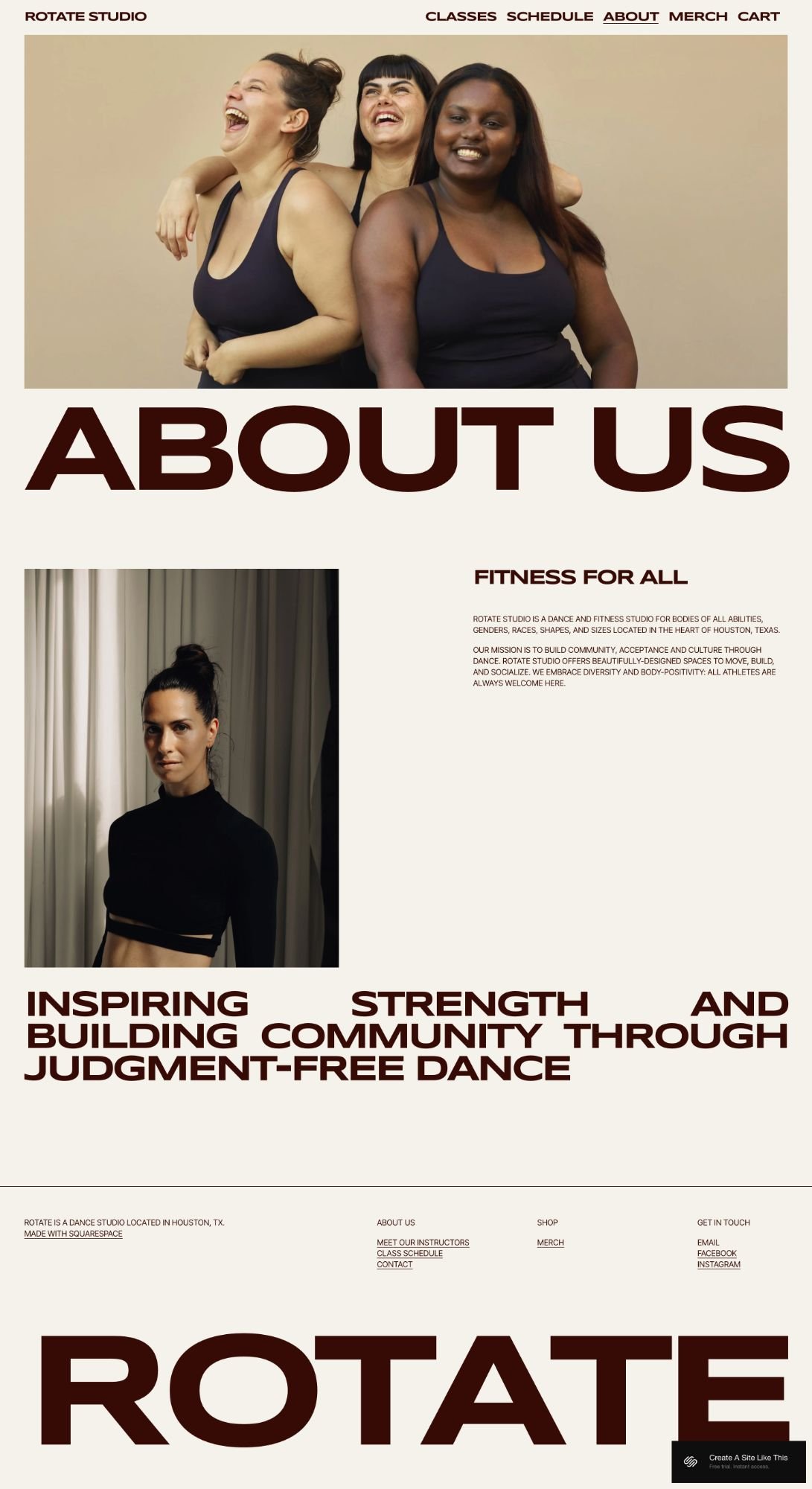
The demo has huge typography, a pink and brown color scheme, and imagery showing body diversity. The whole vibe is energetic, community-focused, and unapologetically loud about inclusivity.
If you're running a dance studio or fitness space that welcomes all bodies and abilities, Rotate's design matches that energy.
But here's the question: Does the bold, high-contrast aesthetic match your brand, or should you keep looking for something more suited for you?
Let's figure it out.
Who The Rotate Template Works Best For
This template is designed for fitness and movement businesses that center around group classes or sessions. The whole setup is built to show multiple class types, handle booking, and give your community a place to learn about what you offer.
This template works especially well for:
Dance Studios: The demo is literally a dance studio. If you teach hip hop, contemporary, barre, or any other dance style, this template is built for you.
Fitness Studios: Boxing gyms, HIIT studios, bootcamp instructors; if you run group fitness classes, Rotate's layout makes it easy to list everything and let people book.
Yoga or Pilates Instructors: The structure works well for showing your class schedule, explaining your teaching style, and integrating booking tools like Acuity.
Personal Trainers: If you offer both group sessions and one-on-one training, you can use the Classes page for groups and connect scheduling for private appointments.
Martial Arts Studios: The bold design fits the energy of martial arts, and you can list different disciplines, introduce instructors, and handle class signups.
What’s Included in the Rotate Template
Homepage
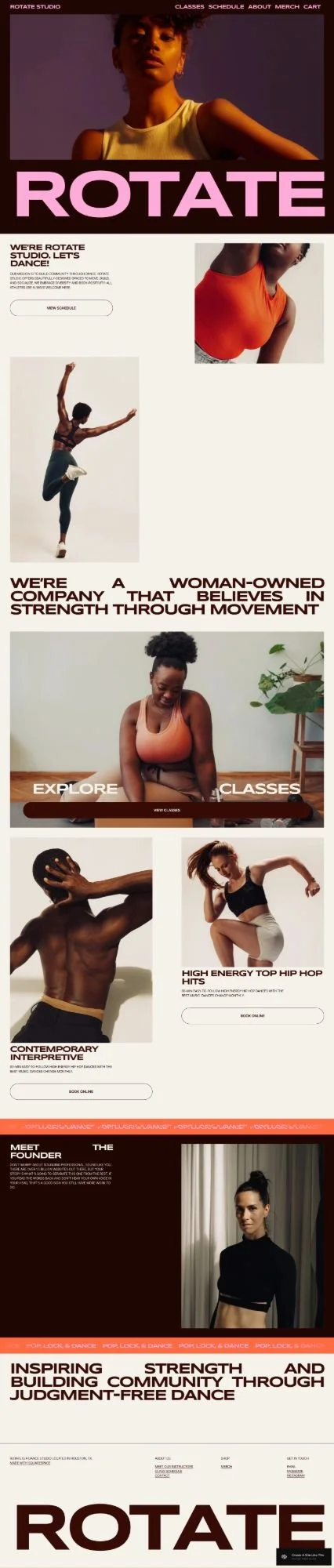
Big hero section with your main image and headline. The demo shows sections for your mission, a preview of classes with a button to explore more, and a "Meet the Founder" section. The whole page is built around community vibes; things like "we embrace diversity" and "strength through movement."
Classes
Your main page for listing all your class types. The demo shows five different classes: High Energy Top Hip Hop Hits, Contemporary Interpretive, Body Barre Signature, Jazz Funk HIIT, and 20 Minute Sculpt Workout. Each one gets a title and description. Clean layout with lots of breathing room.
Schedule
This page is where you'd connect your booking calendar. It's built to work with Acuity Scheduling or Squarespace's scheduling tool, so people can see when classes happen and book their spot.
About
Your story page. The demo talks about being a studio for all bodies, all abilities, all genders — basically the inclusivity and community angle. You can swap this for whatever your studio stands for.
Merch
A shop page for selling branded items. The demo shows hoodies and apparel with prices and "Add to Cart" buttons. Built-in e-commerce so you don't need to add anything extra.
The aesthetic is bold and unapologetic. Pink accents, dark backgrounds, cream/beige tones, huge typography. Body-diverse imagery. High-energy, community-focused vibe. Perfect for inclusive fitness spaces. Won't work for traditional or minimal brands.
Who The Rotate Template Is For
Rotate works best if you're:
A dance studio emphasizing inclusivity and body positivity
A fitness center with community and welcoming all bodies as core values
A woman-owned movement space
A studio teaching multiple dance or fitness styles
A "judgment-free" fitness space
Rotate is probably NOT for you if:
You run a traditional fitness brand without emphasis on community/inclusivity
You want a minimal or calm aesthetic (this is LOUD)
You offer mostly one-on-one training without group classes
You need a blog-focused site
Pros and Cons of the Rotate Fitness Studio Template
What Works Well
Bold, energetic design. Huge typography, high contrast, pink accents. Matches the energy of dance and fitness classes.
Body-diverse imagery. The demo shows people of different body types and skin tones. Clear message about who's welcome.
Built for class-based businesses. Classes page, schedule page for booking, merch shop for studio gear.
Community-focused aesthetic. The entire design supports building inclusive movement spaces.
Where It Falls Short
Very specific vibe. If your brand is traditional fitness, minimal, or calm, you're fighting against the template's bold energy.
Not flexible design-wise. The huge typography and high contrast are core to the template. Hard to tone down.
Like most built-in free Squarespace templates, SEO needs manual work. You'll fix heading tags yourself.
Bottom Line
Rotate is perfect if you're running an inclusive dance or fitness studio with bold branding that emphasizes community and welcoming all bodies.
The huge typography, pink and brown palette, and body-diverse imagery all support that vibe. If that's your studio, Rotate matches your energy.
But if you run a traditional fitness brand or want a minimal aesthetic, Rotate's boldness won't fit. You'd be restyling everything.
My take: If you're building an energetic, inclusive movement space, Rotate works. If you're in fitness and more traditional or minimal, consider looking for a calmer template.
Getting Started with the Rotate Squarespace template is easy:
Once you pick Rotate in the Squarespace 7.1 template library, here's what to do:
Replace the demo content. Start with the homepage. Swap in your own hero image (a photo of your studio or people in class works well), update the headline, and change the class descriptions to match what you actually teach.
Set up your Classes page. Delete the placeholder classes and add your real ones. Include class names, how long they are, what level they're for, and what people can expect. Be specific about whether it's beginner-friendly or intense.
Connect your booking calendar. Set up Acuity Scheduling or Squarespace Scheduling and add it to the Schedule page. Make sure your class times and instructor names are right before you go live.
Update your About page. Tell your story. Explain what your studio believes in, what makes you different, and why someone should try a class. Add photos of your instructors or your actual studio.
Add products to the Merch page (or delete it). If you sell stuff, upload product photos, write descriptions, set prices, and turn on shipping options. If you're not selling anything, just delete the whole page.
Check your heading tags. Squarespace templates don't set these up right by default. Make sure your main headline is an H1 and your subheadings follow in order (H2, H3, H4). This helps with both accessibility and SEO.
Change colors and fonts. Click the paintbrush icon in the upper left to open Site Styles. Update your colors and fonts to match your brand.
Build out your footer. Add links to your important pages, your contact info, and social media icons. Consider adding a newsletter signup if you send class updates or promotions.
Test on mobile. Open your site on your phone and tablet to make sure everything looks good. Adjust image positions if things look weird on smaller screens.
Set up your newsletter. Connect your email tool (Squarespace Campaigns, Mailchimp, Kit, whatever you use) in the newsletter block so you can collect emails.
Double check everything and go live. Read through everything for typos, make sure all your buttons work, test your booking flow, then hit publish.
Rotate Squarespace Template FAQs
Can I sell products on the Rotate website template?
Yep. Rotate includes a Merch page with built-in e-commerce, so you can sell physical stuff like hoodies, equipment, or fitness accessories. You can also sell digital products like class passes or workshop tickets. The template works well for a smaller catalog… think 5-20 items. If you're planning to sell 50+ products with detailed categories and filters, you'll probably want a template more focused on retail.
Is the Rotate template good for SEO?
Yes, but… Like most built-in free Squarespace templates, Rotate doesn't set up heading tags correctly by default, so you'll need to manually fix your header tags for better SEO. Besides that, Squarespace gives you good SEO tools like custom page titles, meta descriptions, clean URLs, automatic sitemaps, and mobile-friendly design.
Can I use the Rotate template on mobile?
Yes. Rotate is full responsive (like all Squarespace templates) and works on phones and tablets automatically. The template keeps its bold text and clean layout on mobile. You should still preview your actual content on your phone to make sure images and text look good, but the template handles responsive design for you.
Can I change fonts and colors on the Rotate template?
Yes. Like all Squarespace 7.1 templates, Rotate lets you change fonts, colors, and spacing through Site Styles. You can update your main colors, button styles, fonts, and background colors. The template's bold look works best with high-contrast colors, but you can tone it down with softer colors if that fits your brand better.
Can I add a blog to the Rotate template?
Yes. You can add a blog page to Rotate like any Squarespace template. But the template is really built for showing classes and handling bookings, not publishing content. If blogging is a big part of your marketing plan, you might like templates designed for content better. But if you just need a blog for occasional updates or news, Rotate can handle it.
Does Rotate work with Acuity Scheduling?
Yes. Rotate is designed to work with scheduling tools including Acuity Scheduling and Squarespace's own scheduling feature. The Schedule page gives you a place for your booking calendar. You'll need to set up the connection yourself, but the template makes it easy to show your availability.
Can I remove the Merch page if I'm not selling products?
Yep. If you don't want to sell anything, just delete the Merch page. All Squarespace templates let you add or remove pages. You're not stuck with the demo structure.
How many classes can I list on the Classes page?
As many as you want. The demo shows five, but there's no limit. If you have 15+ different class types, you might want to organize them with categories or split them across pages so it's not overwhelming.
Can I use Rotate for virtual classes or online workshops?
Yes. The demo is set up for a physical studio, but Rotate works for virtual stuff too. You can connect the scheduling tool to Zoom or your video platform, describe online classes on the Classes page, and remove any location stuff from the About page.
Is Rotate customizable beyond the demo layout?
Yes. Rotate gives you a specific starting point, but Squarespace 7.1 templates are fully customizable. You can add, remove, or rearrange sections, change layouts, and adjust the design. The template is a starting point, not locked in. That said, if you want to completely change the bold text and energetic vibe, you're working against what the template does best.