Maca Squarespace Template Review
This post contains affiliate links. If you purchase through them, I may receive a small commission at no extra cost to you.
Table of Contents Show
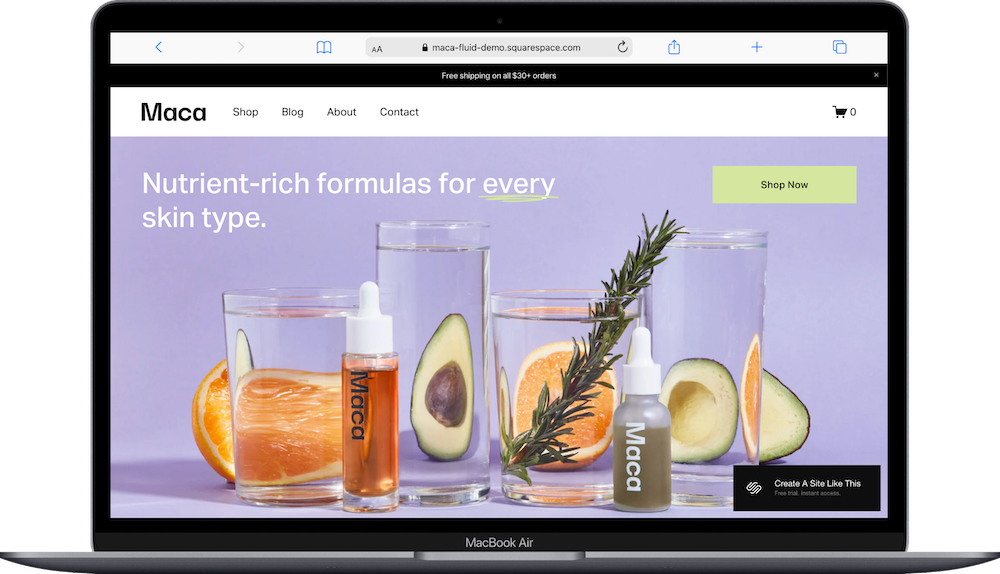
Maca is a Squarespace template built for beauty & skincare brands that sell products online.
This is one of my personal favorite Squarespace shop templates; it’s really robust AND easy to customize. The demo shows a clean skincare line with product photography on pastel backgrounds, organized shop pages, and educational content about ingredients and routines. If you're launching a skincare line, natural beauty brand, or wellness product business, Maca probably caught your eye for good reason.
This review covers what Maca includes, where it shines, and where you might hit limitations.
The goal: help you figure out if this Squarespace template is the right fit for your product-based business, or if you should keep looking.
Who the Maca Template Works Best For
Maca works well if you're selling beauty or wellness products and want a site that feels modern, clean, and trustworthy.
Skincare and Beauty Brands
If you're selling serums, moisturizers, cleansers, or other skincare products, Maca's clean product displays and ingredient-focused sections let you showcase what's in your formulas and why people should trust them.
Natural and Clean Beauty Lines
The soft color palette and emphasis on ingredients work perfectly for brands that highlight natural, organic, or clean formulations. The template supports the "we care what goes in our products" messaging.
Small Batch or Indie Beauty Brands
If you're a small beauty brand with 10 to 30 products, Maca gives you enough structure to organize everything without feeling overwhelming. The demo shows body care and face care categories that make sense.
Wellness Product Sellers
The template works for wellness products like supplements, essential oils, or holistic health items where education matters as much as the sale.
Brands That Blog About Their Products
With a built-in blog and sections for skincare education, Maca works if you want to create content about routines, ingredient benefits, or how to use your products.
Who the Maca Template Is Not Best For
Maca is VERY flexible for beauty and skincare brands. You can customize it however you need. If you’re selling products and are looking for a free Squarespace template, this one is a top tier choice, IMO.
But like all free built-in Squarespace templates, Maca does has some constraints. Fewer customization options, and unless you really customize fonts, colors, and layouts, your site will look like all the other Squarespace sites that started with this template.
If you're looking for something highly customized right out of the gate, check out premium shop templates from designers like Big Cat Creative or Applet Studio, or work with a Squarespace designer who specializes in product-based businesses.
And of course, if you sell services instead of products, Maca won't be a good fit since it's literally built for e-commerce.
What You Get with the Maca Template
Maca comes with multiple pages designed for e-commerce:
Home Page
The main landing page with A LOT of sections:
Announcement bar for promotions
Hero section with product imagery and call-to-action
Category panels
Best sellers product grid
Educational content sections
Brand values section
Featured product or collection callouts
Skincare education sections
Newsletter signup
Shop Page
Product grid layout showing all items with images, names, and prices.
About Page
Space to tell your brand story, mission, and what makes your products different.
Blog Page
Standard blog layout for sharing skincare tips, ingredient spotlights, or how-to content.
Contact Page
Contact form for customer questions and inquiries.
Ingredients Page
Dedicated page to explain what's in your products and why it matters.
Stockists Page
List of where customers can buy your products in person, if applicable.
FAQs Page
Pre-built FAQ section for common customer questions.
Shipping and Returns Page
Policy page for shipping details and return information.
Terms of Use and Privacy Policy Pages
Standard legal pages for e-commerce compliance
Like all Squarespace 7.1 templates, you can add or remove pages and customize the structure.

Getting Started with the Maca Template is Easy:
Once you pick Maca in the Squarespace 7.1 template library, here's what to do:
Replace the hero section and announcement bar. Update the headline, swap in your product photography, and add your promotion or free shipping message at the top. Keep the announcement bar short and clear.
Add your actual products to the shop. Upload product photos, write descriptions, set prices, and organize into categories. Make sure images are consistent in style and quality.
Customize the homepage sections. Update the category panels (Sale, Shop Body, Shop Face), best sellers, and educational content sections with your real products and information. Delete sections you don't need.
Fill in your brand story and values. Update the About page with your actual story and change the brand values section (Safe Formulas, Highly Effective, Ethically Sourced) to match what your brand actually stands for.
Set up supporting pages. Write real FAQs, add shipping and return policies, and decide whether to keep or delete the Ingredients and Stockists pages based on your business.
Add blog content (if you're blogging. Otherwise, disable or delete the blog page). Try to write at least 3 to 5 posts before launching. Focus on helpful topics your customers actually search for.
Update colors and fonts in Site Styles. Go to Design > Site Styles and adjust the color palette to match your brand.
Check your heading hierarchy. Make sure your main headline is an H1 and subheadings follow logical order (H2, H3, etc.) for better SEO.
Set up commerce settings. Configure shipping rates, tax collection, and payment processing in your Squarespace Commerce settings. Test a purchase to make sure checkout works.
Double-check everything, connect your domain, choose your Squarespace plan, and go live. Preview on mobile and desktop, test the checkout process, make sure all links work, then launch.
Maca Squarespace Template FAQs
Is Maca good for selling beauty products?
Yes. Maca is designed specifically for products and works great for beauty and skincare brands. The product displays are clean, the shop page is easy to navigate, and you get all the pages you need for a beauty brand (ingredients, FAQs, shipping info). Just know that if you have 100+ products, you might outgrow the simple grid layout.
Is the Maca template good for SEO?
Yes, Maca has the same SEO capabilities as all Squarespace templates. You can optimize page titles, meta descriptions, headings, product descriptions, and image alt text. The blog functionality helps with content marketing. The clean code and fast loading are good for search engines. But SEO success depends on your strategy, not just the template.
Is the Maca template good for mobile?
Yes. Maca is fully mobile-responsive. Product grids stack nicely on smaller screens, images resize properly, and the checkout process works smoothly on phones. Since most beauty shopping happens on mobile, this is important. Just make sure your product photos look good at smaller sizes.
Can I change the colors on the Maca template?
Absolutely. You can customize all colors through Site Styles. Change the purple and lime green to match your brand colors. Update button colors, background colors, and text colors. The soft, minimal design will work with lots of different color palettes.
Does Maca work with Squarespace commerce features?
Yes. Maca supports all standard Squarespace commerce features including inventory management, discount codes, abandoned cart recovery (on higher plans), customer accounts, and gift cards. You can also connect to shipping carriers, set up local pickup, and manage taxes.
Can I add product reviews to Maca?
Yes. Squarespace has built-in product review functionality that you can enable on any template. Customers can leave reviews on product pages, and you can moderate them before they go live. This is separate from the template and available on all Squarespace stores.
What if I don't need the Stockists or Ingredients pages?
Just delete them. You're not required to use every page in the template. If you only sell online and ingredients aren't central to your brand story, remove those pages and simplify your navigation.
Can I sell on Instagram or Facebook with this template?
Yes. Squarespace integrates with Instagram and Facebook shops, so you can sync your products and sell directly through social media. This works with any Squarespace template, including Maca.
How many products can I sell with Maca?
Technically unlimited. Squarespace doesn't cap your product count. But the grid layout and simple navigation work best with 20 to 50 products. If you have 200 products across 15 categories, you may want better filtering and organization than Maca offers out of the box.


